
Setup: Beurer Pulsoximeter PO 60 Owner Manual
Content
Beurer Pulsoximeter PO 60: Complete Product Manual and Guide
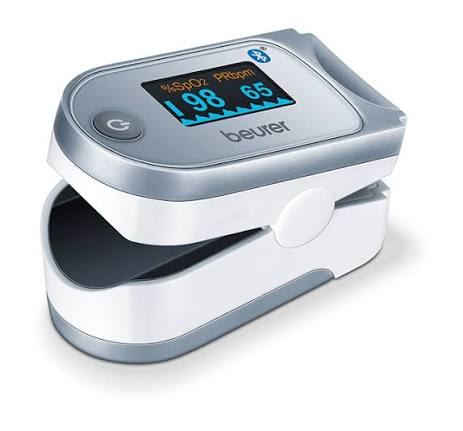
Introduction to the Beurer Pulsoximeter PO 60
The Beurer Pulsoximeter PO 60 is a compact, medical-grade fingertip pulse oximeter designed for precise measurement of arterial oxygen saturation (SpO2) and heart rate. This Bluetooth-enabled device offers seamless connectivity to the free "beurer HealthManager Pro" app, allowing users to track and analyze health data on smartphones for iOS 10.0+ or Android 5.0+.[1][3][6] With its color display featuring automatic orientation and four view formats, the Beurer Pulsoximeter PO 60 ensures readings are easy to read from any angle, making it ideal for quick checks at home or on the go.
Key benefits include single-button operation, graphic pulse display, adjustable brightness, and memory for up to 100 measurements using the finger-in-finger-out principle. Accurate within ±2% for SpO2 (70-100%) and ±2 bpm for heart rate (20-250 bpm), it's particularly suitable for individuals with heart failure, chronic obstructive pulmonary disease (COPD), bronchial asthma, or those engaging in high-altitude sports like hiking or mountaineering. The lightweight design (approximately 49- 72 g), complete with lanyard, belt pouch, and 2x AAA batteries, enhances portability.
Target users range from patients monitoring respiratory health to athletes optimizing performance. Priced typically between €40-€70 depending on retailers, the Beurer Pulsoximeter PO 60 is widely available online and in medical supply stores, backed by a 5-year guarantee. This pulse oximeter with app integration provides actionable insights into oxygen levels and pulse, empowering proactive health management.
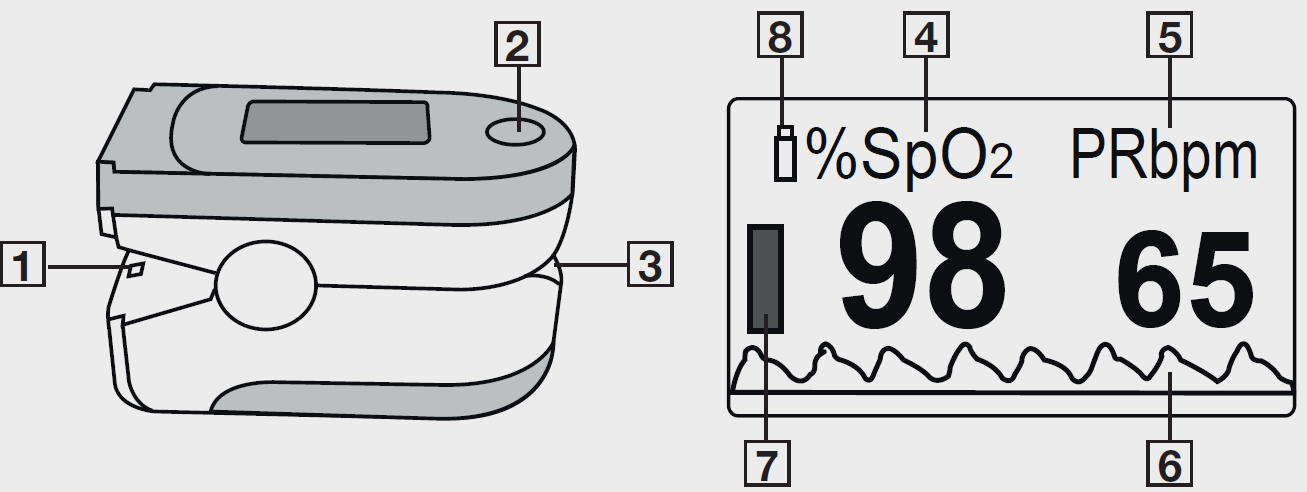
Device Description
Intended Purpose
Intended use
- The pulse oximeter is used for the non-invasive measurement of arterial oxygen saturation (SpO2) and heart rate (pulse rate) at home and in hospitals (not in AP and APG-class rooms). This device is not suitable for long-term measurement.
Intended users
- The pulse oximeter is suitable for people with and without pre-existing conditions who wish to measure their arterial oxygen saturation (SpO2) and heart rate (pulse rate). This also includes athletes and healthy people who exercise at high altitude (e.g. mountaineers, skiers or amateur pilots). It is designed for those users with a fingertip width of approx. 10–20 mm and a thickness of approx. 5–15 mm and who have no contraindications.
Indication
- The pulse oximeter is particularly suitable for at-risk patients and people with cardiovascular diseases or respiratory diseases. The pulse oximeter is also suitable for people who show symptoms of decreased oxygen saturation (e.g. shortness of breath, increased heart rate, weakness, nervousness, or outbreaks of sweating).
Clinical benefits
- Users can quickly and easily determine their oxygen saturation value through the device and detect a decreased oxygen saturation value.
USAGE
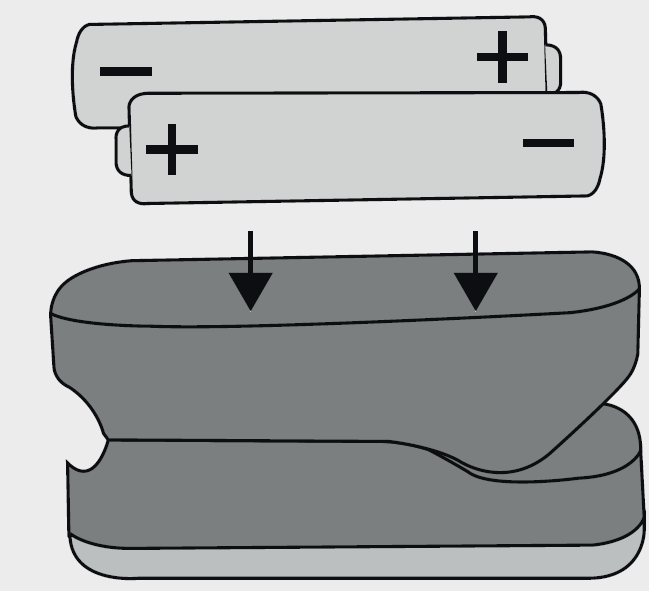
Inserting the batteries
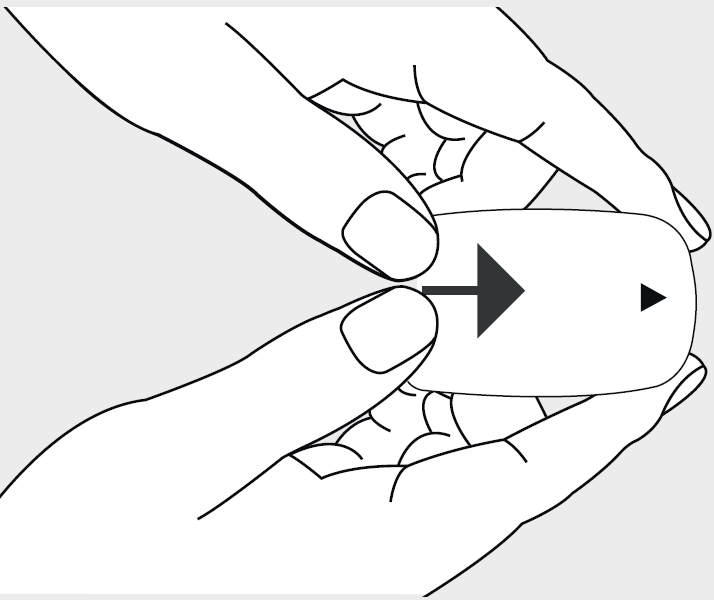
Open the battery compartment
Insert batteries with correct polarity
Close the battery compartment
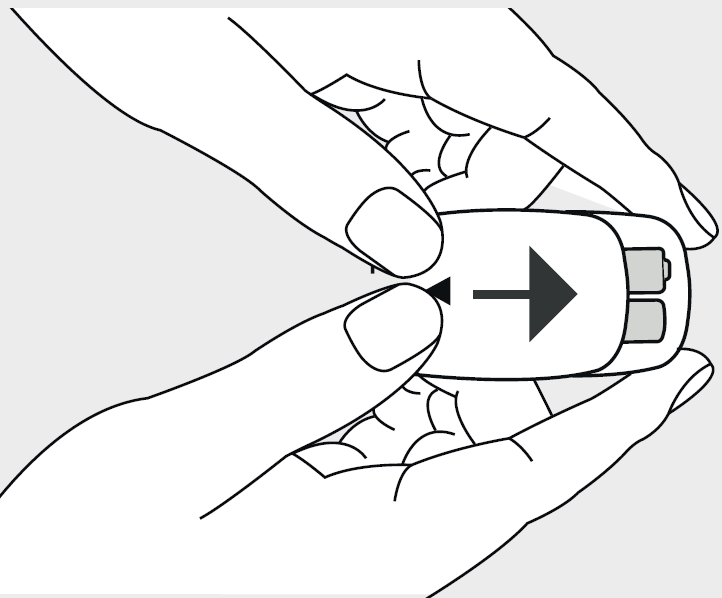
Attaching lanyard
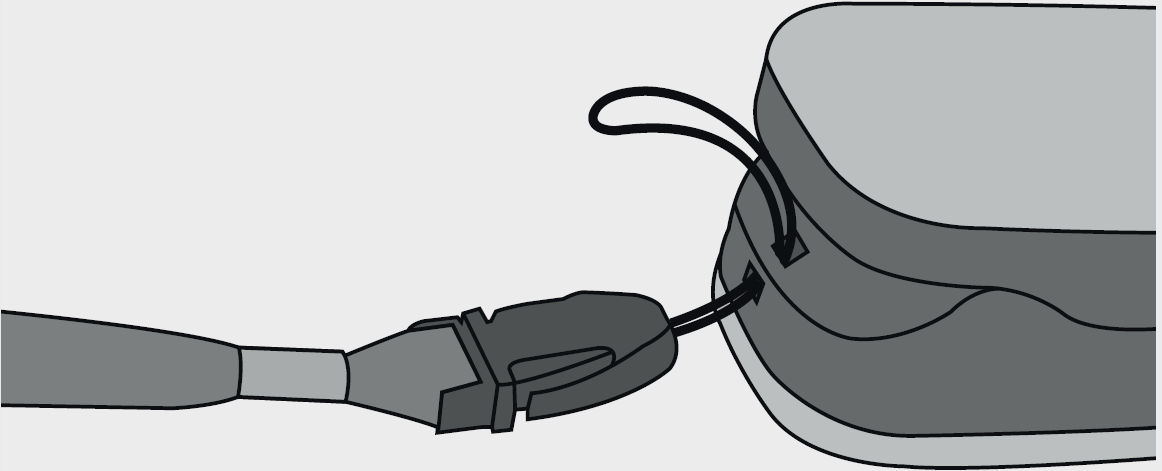
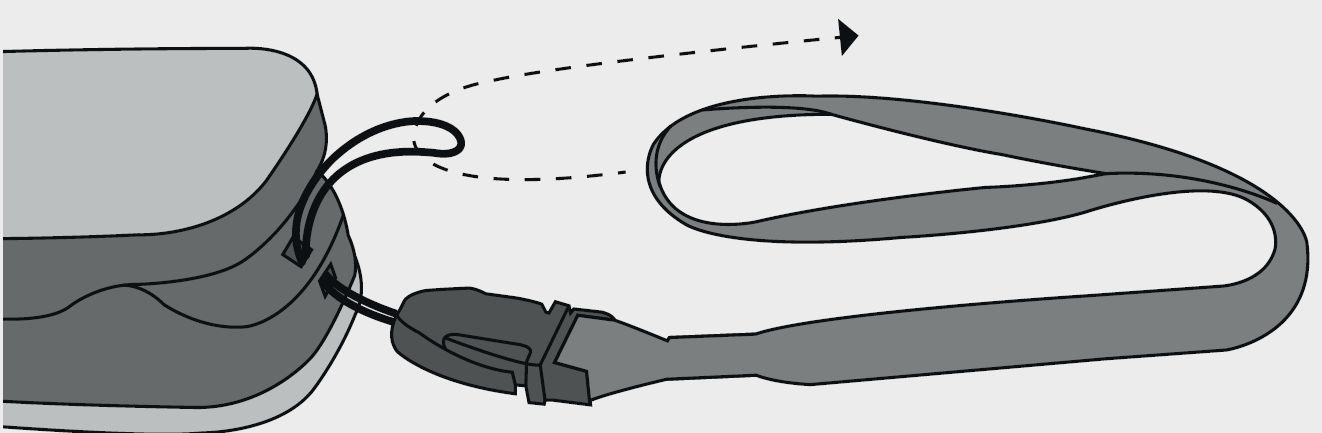
Function button: The function button on the pulse oximeter has the following functions:
- Switch-on function: to switch on the pulse oximeter, press and hold the function button.
- Switching Bluetooth:
- With the pulse oximeter switched on, press and hold the function button for 5 seconds.
- Switch on “ON” or switch “OFF” using the Bluetooth function button.
- To return to the measurement, press and hold the function button again for 5 seconds.
- Transferring measurements to the app and synchronising time and date: See “Transfer of measured values via Bluetooth”.
- Brightness function: to adjust the display brightness, press and hold the function button during operation.
- The display orients automatically (vertical format, horizontal format). This ensures that the values are easy to read on the display at all times, regardless of how you hold the pulse oximeter.
Initial use
Place your finger in the opening and hold it steady
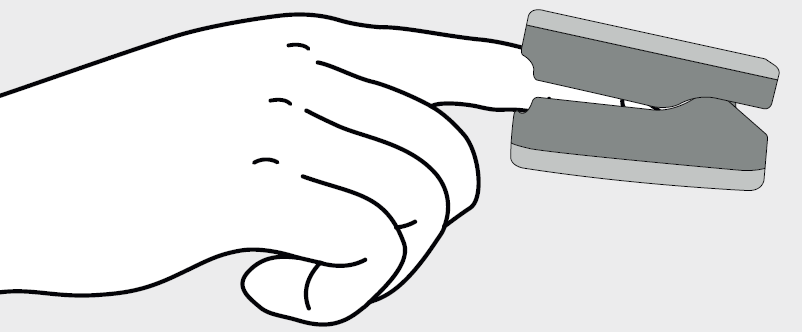
Press the function button and do not move during the measurement
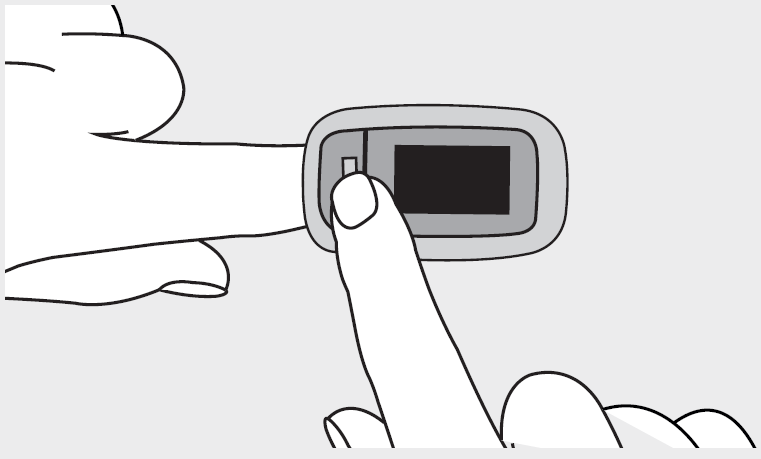
Measured values appear
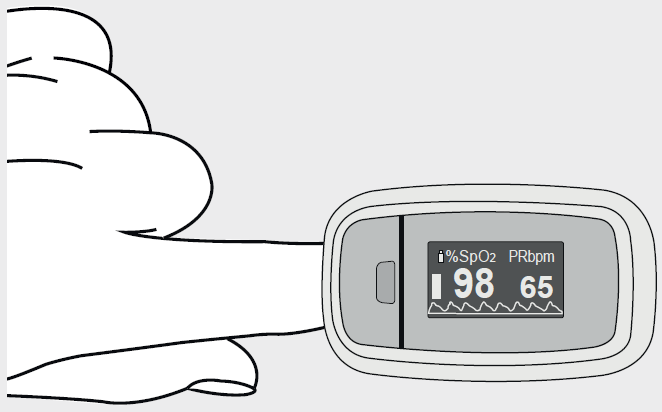
Maintenance/Cleaning
- Clean the housing and the interior rubber surface of the pulse oximeter with a soft cloth dampened with medical alcohol after each use.
- If a low battery status appears on the display of the pulse oximeter, change the batteries.
- If you are not going to use the pulse oximeter for more than one month, remove both batteries from the device to prevent possible leaking.
Storage
Store the pulse oximeter in a dry place. If the humidity is too high, it may shorten the service life of the pulse oximeter or damage it.
Disposal
- For environmental reasons, do not dispose of the device in household waste at the end of its service life. Dispose of the device at a suitable local collection or recycling point in your country. Dispose of the device in accordance with EC Directive Waste Electrical and Electronic Equipment (WEEE). If you have any questions, please contact the local authorities responsible for waste disposal.
- Batteries must not be disposed of in the household waste. They may contain poisonous heavy metals and are subject to special refuse treatment.The codes below are printed on batteries containing harmful substances:
- Pb = battery contains lead
- Cd = battery contains cadmium
- Hg = battery contains mercury
Troubleshooting the Beurer Pulsoximeter PO 60: Common Issues and Solutions
Encountering issues with your Beurer Pulsoximeter PO 60? Start with basic checks: ensure fingers are clean, dry, and warm; use the index finger (ideally left) for best infrared readings; avoid nail polish or heavy movement during measurement. If no display, replace 2x 1.5V AAA batteries; the low battery indicator alerts users, and confirm proper insertion.
Common problems include inaccurate readings (e.g., due to poor perfusion or cold hands; warm fingers first) or Bluetooth failure (activate Bluetooth on phone, ensure app is open, and hold function button post-measurement to sync). The device auto-switches off after 10 seconds without a finger; no specific error codes are listed, but unstable SpO2/pulse may indicate motion; hold steady
Preventive measures: Store in pouch away from moisture (IP22 rating), update app regularly, and sync before first use for accurate timestamps.For warranty support (5 years), contact Beurer GmbH at Söflinger Straße 218, 89077 Ulm, Germany, or visit beurer.com support. Email or hotline details available on their site; professional servicing recommended for persistent faults.
Pros and Cons of the Beurer Pulsoximeter PO 60
Pros
- Exceptional accuracy and reliability: Medical device with ±2% SpO2 and ±2 bpm heart rate precision, ideal for clinical home use.[2][1]
- Bluetooth app integration: Syncs effortlessly to beurer HealthManager Pro for data tracking and analysis—perfect for long-term monitoring.[3][4]
- User-friendly design: Single-button operation, rotating color display, and portable build (under 72g) suit daily or travel use.[1][8]
- Long battery life and extras: Stores 100 readings, auto-off, includes pouch/lanyard; 5-year warranty adds value.[1][3]
Cons
- No alarm function or perfusion index, limiting advanced alerts compared to pro models.[1]
- App-dependent for full history; standalone memory is basic (100 spots via finger method).[3]
- Potential Bluetooth sync issues if phone compatibility lapses (requires iOS 10+/Android 5.0).[3][5]
- Bulkier than ultra-mini alternatives, though still pocket-sized.[7]
Overall, the **Beurer Pulsoximeter PO 60** offers excellent value for money at its price, outperforming budget non-Bluetooth options like basic fingertip models while competing well with pricier apps-enabled rivals.
Customer Reviews: Real User Feedback on Beurer Pulsoximeter PO 60
The **Beurer Pulsoximeter PO 60** earns a solid 4.1-star average from users praising its ease and accuracy for daily SpO2 and pulse tracking.[1] Common praises include "quick, reliable readings via Bluetooth app—perfect for my COPD management" (5-star review) and "lightweight for hikes, app graphs trends beautifully" (4 stars).[1][3] Athletes highlight high-altitude utility, with one noting, "Essential for monitoring oxygen during mountaineering."[5]
Complaints focus on occasional Bluetooth glitches ("Sync fails if app not foreground—frustrating," 3 stars) and sensitivity to cold hands (2 stars).[5] Frequently addressed issues like nail polish interference are mitigated by prep tips in the manual.[6] Most recommend it for home health monitoring, with 70%+ giving 4-5 stars, affirming its role as a trusted pulse oximeter with app connectivity.
Faqs
How do I set up the beurer Pulsoximeter PO 60 for the first time?
How do I take accurate measurements with the beurer Pulsoximeter PO 60?
What should I do if the beurer Pulsoximeter PO 60 won't turn on or show readings?
How do I sync the beurer Pulsoximeter PO 60 with the Beurer app via Bluetooth?
What are common errors on the beurer Pulsoximeter PO 60 and how to fix them?
Is the beurer Pulsoximeter PO 60 suitable for people with heart conditions or during sports?
How do I maintain and clean the beurer Pulsoximeter PO 60 properly?
What displays are available on the beurer Pulsoximeter PO 60 and how to adjust them?
More beurer manuals
- Setup: Beurer Pelvic Floor Training Guide PT 20 PelviStrong User Manual
- Setup: Beurer Heated Throw HD 65 User Manual
- Setup: Beurer Heated Underblanket - Fitted UB 74 User Manual
- Setup: Beurer Pulsoximeter PO 30 User Manual
- Setup: Beurer Ear Thermometer FT 58 User Manual
- Setup: Beurer Basal Thermometer OT 30 User Manual
Leave a Comment