
Pairing & Setup: Bose Soundlink Plus Portable Speaker User Manual
Content
bose Soundlink Plus Portable Speaker
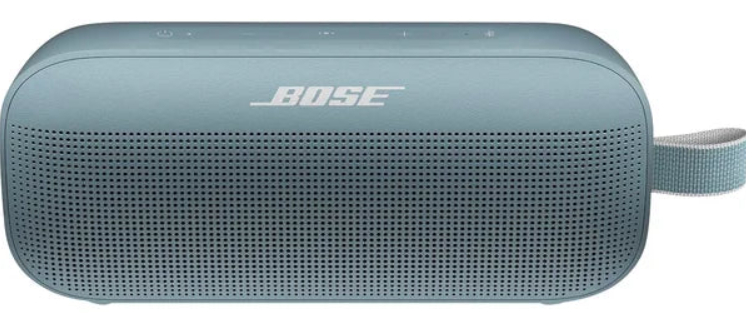
Introduction
The Bose Soundlink Plus Portable Speaker is a premium, versatile Bluetooth speaker designed to deliver bold, resonant audio with exceptional bass performance in a portable form factor. Ideal for music lovers, outdoor enthusiasts, and anyone seeking high-quality sound on the go, this speaker balances powerful audio output with durable, weather-resistant construction. Whether you are hosting a backyard gathering, enjoying a camping trip, or simply enhancing your everyday music experience, the Soundlink Plus is engineered to elevate the moment.
Key benefits include up to 20 hours of continuous playtime, IP67-rated dust and waterproof protection, and shock and rust resistance, making it suitable for rugged outdoor use. Its innovative acoustic architecture combines a subwoofer, tweeter, and four passive radiators to produce deep bass and clear highs, all within a compact, lightweight enclosure weighing less than four pounds. The speaker also doubles as an external battery to charge your devices via its USB-C port.
Compatibility with Bluetooth 5.4, multipoint connectivity, and support for Google Fast Pair enhance ease of use with modern smartphones and tablets. Available in multiple colors, the Bose Soundlink Plus typically ranges in price from $235 to $270, making it a competitively priced option in the high-end portable speaker market. You can purchase it through major retailers and authorized Bose dealers worldwide.
Specifications of the Bose Soundlink Plus Portable Speaker
- Audio Drivers: One subwoofer, one tweeter, four passive radiators
- Dimensions: 9.1" W x 3.9" H x 3.4" D (231 x 99 x 87 mm)
- Weight: Approximately 3.4 lbs (1,530 grams)
- Battery Life: Up to 20 hours of wireless playback
- Charging: USB-C port supports charging the speaker and charging external devices.
- Connectivity: Bluetooth 5.4 with multipoint pairing, Google Fast Pair, SBC, AAC, aptX Adaptive codecs
- Durability: IP67-rated dustproof, waterproof, shock, and rust-resistant
- Sound Modes: Stereo Mode and Party Mode when paired with compatible Bose speakers
- App Support: Bose Music app for Adjustable EQ, sound customization, and battery monitoring
Compared to similar models like the SoundLink Flex and JBL Charge 6, the Soundlink Plus offers superior bass, longer battery life, and more robust weatherproofing, making it an excellent choice for both indoor and outdoor listening experiences.
CONTENTS
Confirm that the following parts are included:
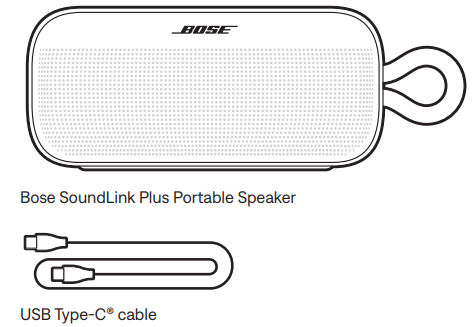
INITIAL SETUP
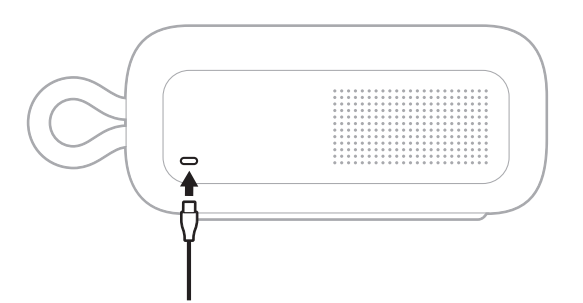
Connect one end of the USB-C® cable to the USB-C port on the back of the speaker.
Connect the other end of the USB-C cable to a USB-C power supply.
The Power light slowly pulses white.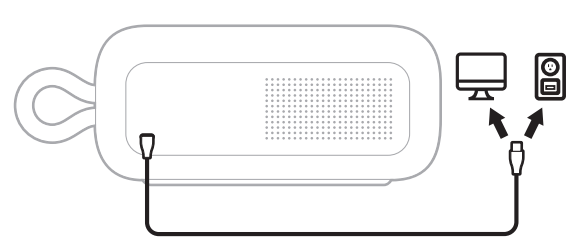
Press the Power button.
The Power light slowly pulses white. You hear the battery level followed by “Ready to connect.” The Bluetooth light slowly blinks blue.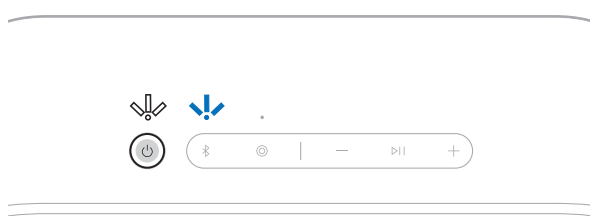
- Connect to your device (see page 12).
SPEAKER CONTROLS
Controls are located on the top of the speaker.
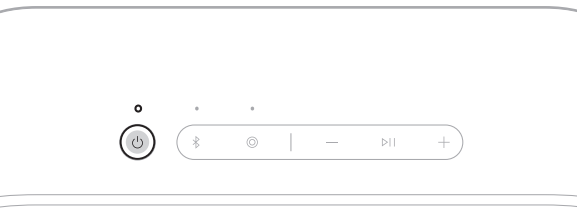
POWER ON/OFF
- Press the Power button.
- When powered on, a voice prompt announces the battery level. The Power light glows according to the current battery level (see page 25).
Auto-off timer
- The auto-off timer conserves the battery when the speaker is operating on battery power. The speaker switches off when the audio has stopped and the buttons have not been pressed for 20 minutes.
- To wake the speaker, press the Power button I or press and hold the
Bluetooth button
NOTE: To change the timer setting, use the Bose app. You can access this option from the Settings menu.
Disable the auto-off timer
- Press and hold the Play/Pause button F and the Volume up button H simultaneously. You hear “Auto-off disabled.”
- Repeat to re-enable the auto-off timer.
- TIP: You can also disable the auto-off timer using the Bose app. You can access this option from the Settings menu.
MEDIA PLAYBACK AND VOLUME
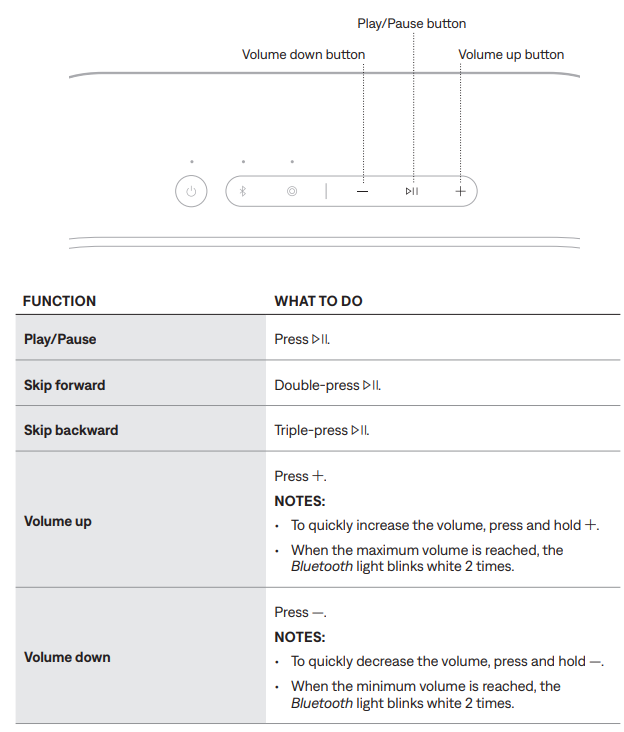
TIP: You can also increase or decrease the volume using the volume controls on your device or in the Bose app. You can access this option on the product control screen.
CHARGE THE SPEAKER
CAUTION: Do not attempt to charge the speaker while the speaker is wet. Doing so will cause damage to the speaker. The speaker is waterproof, but the USB-C port must be fully dried out before charging.
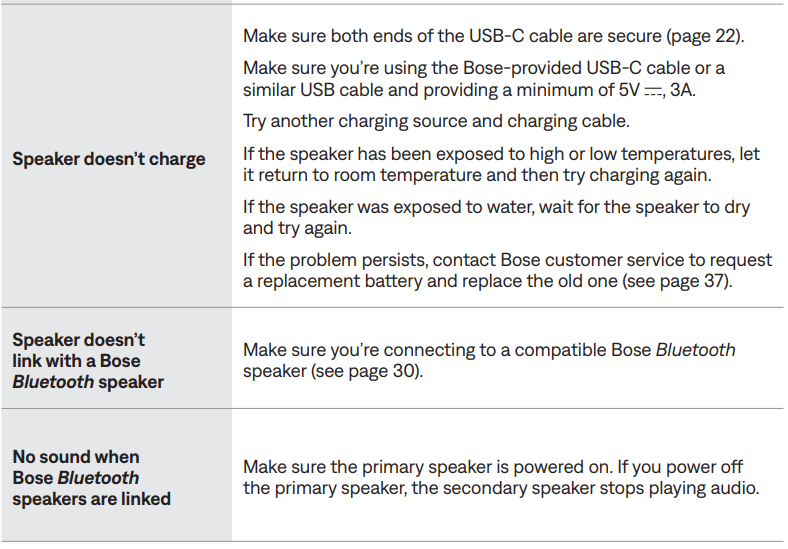
NOTE: Make sure you’re using the Bose-provided USB cable or a similar USB cable.
Bose recommends using a 5V p, 3A capable power source.
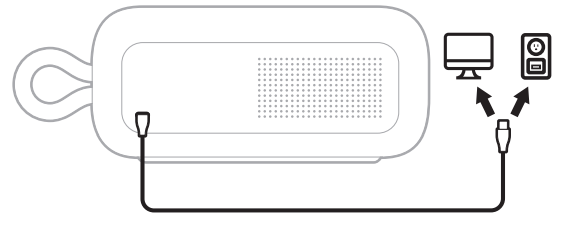
Connect one end of the USB-C cable to the USB port on the back of the speaker.
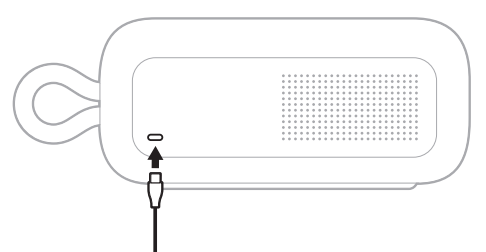
- Connect the other end of the USB-C cable to a power source such as a computer or a wall charger.
While charging, the battery light pulses white. When the battery is fully charged, the battery light glows solid white.
Charging time
- Allow up to 5 hours to fully charge the battery.1
- A full charge powers the speaker up to 20 hours.2 At maximum volume, the battery lasts up to 4 hours 3
- Charging time and battery performance vary with the USB power supply capability, music content, and speaker volume.
Hear the battery level.
- Each time you power on the speaker, a voice prompt announces the battery level. When the speaker is in use, a voice prompt announces if the battery needs to be charged.
- Press and hold the Power button I until you hear a voice prompt.
Battery protection mode
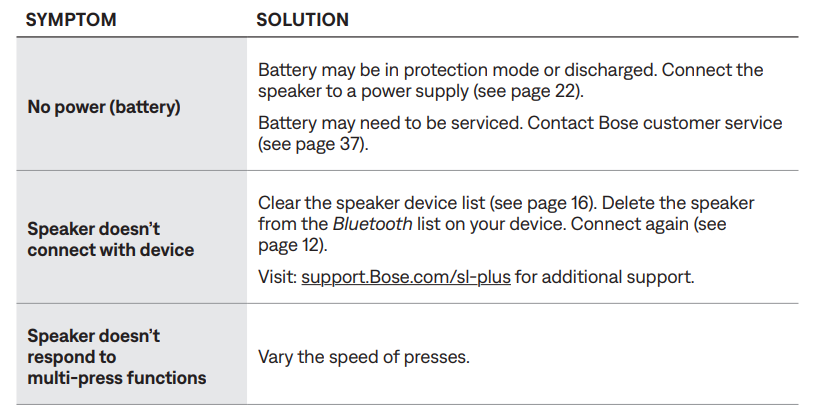
- When the speaker battery is depleted (0%), it enters battery protection mode. To reactivate the speaker, connect it to a power supply and press the Power button I.
- When not in use, store the speaker in a cool place.
CAUTION: Do NOT store the speaker for extended periods when fully charged or with a remaining charge of less than 10%. All tests were conducted by Bose with a production-representative Bose SoundLink Plus Portable Speaker.
- With a 5V/3A (15W) USB-C capable power supply, from 0% to 100% while the unit is in standby mode. Charging times will vary when not using the recommended 15W supply.
- Using Bluetooth A2DP audio at 65% volume and between 68° F – 77° F (20° C – 25° C), with default EQ using a mix of Top 50
Global tracks as of November 2024 , and no charging of external devices. Battery performance varies with individual user conditions such as audio content, loudness, and environmental temperature. - Using Bluetooth A2DP audio at 100% volume and between 68° F – 77° F (20° C – 25° C), with default EQ using a mix of Top 50 Global tracks as of November 2024, and no charging of external devices. Battery performance varies with individual use conditions such as audio content, loudness, and environmental temperature.
CHARGE YOUR DEVICE
CAUTION: Do not attempt to charge your device while the speaker is wet. Doing so may cause damage to the speaker. The speaker is waterproof, but the USB-C port must be fully dried out before charging. If moisture is detected, the Power light slowly blinks white and amber (see page 25).
- Connect one end of the USB-C cable to the USB-C port on the back of he speaker.
- Connect the other end of the cable to the USB-C port on your device.
Charging status displays on your device.
CARE AND MAINTENANCE
SERVICE THE SPEAKER BATTERY
This product must only be operated with compatible Bose-certified batteries. For battery service options, contact Bose customer service
UPDATE THE SPEAKER
The speaker begins updating automatically when connected to the Bose app and an update is available. Follow the app instructions. When the update begins, the Power light blinks white 3 times (repeated) until the update is complete.
You can also update the speaker using the Bose updater website. On your computer, visit: bbtu.Btu.Bose.ose.comcom and follow the on-screen instructions. When the update begins, the Power light blinks white 3 times (repeated) until the update is complete.
CLEAN THE SPEAKER
The speaker may require periodic cleaning.
- Clean the surface of the speaker with a soft, damp cloth (water only). Make sure the USB-C port is fully dried out before charging.
- Do not use any solvents, chemicals, or cleaning solutions containing alcohol, ammonia, or abrasives.
- If the speaker is exposed to salt or chlorinated water, gently rinse with fresh water following the exposure to remove residue. Make sure the USB-C port is fully dried out before charging.
STORE THE SPEAKER
When not in use, store the speaker in a cool place.
CAUTION: Do NOT store the speaker for extended periods when the battery is fully charged or has a low charge (see page 23).
Troubleshooting Guide forBosee Soundlink Plus Portable Speaker
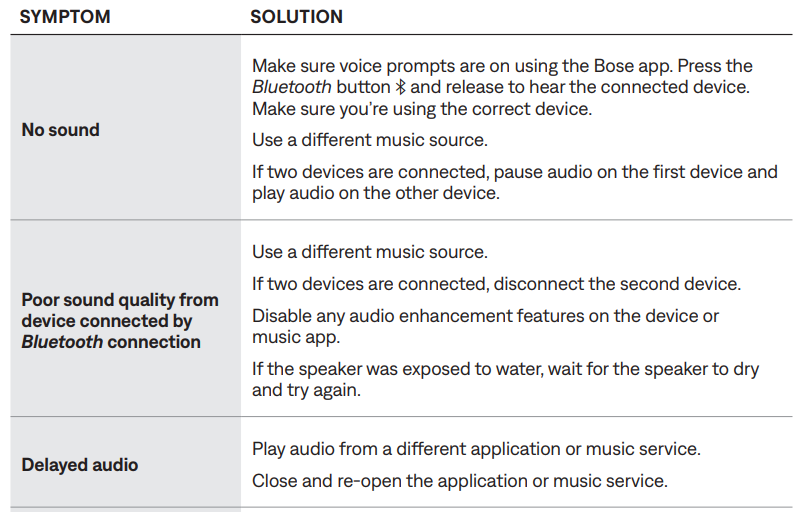
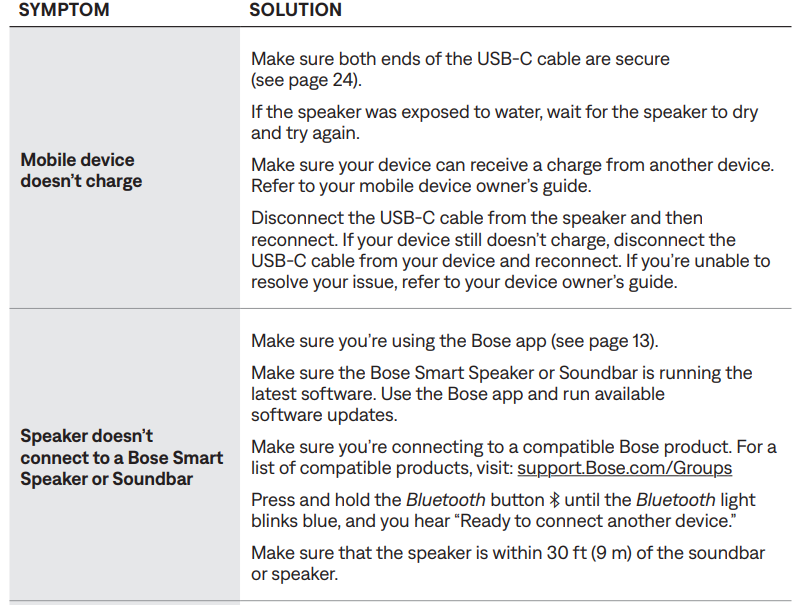
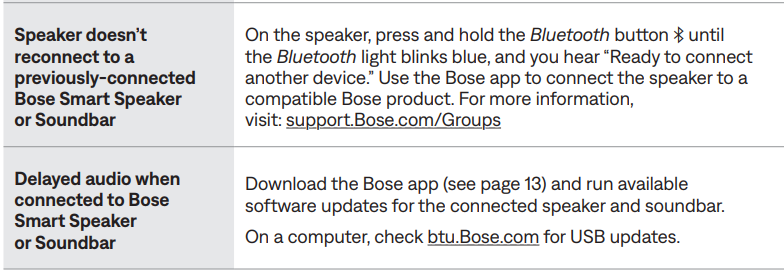
TRY THESE SOLUTIONS FIRST
If you experience problems with the speaker:
- Power the speaker off and then on again (see page 19).
- Check the status ghts (see page 25).
- Make sure your device supports Bluetooth connections (see page 12).
- Charge the speaker (see page 22).
- Increase the volume on the speaker, your device, and the music app.
- Move your device closer to the speaker (30 ft or 9 m) and away from any interference or obstruction.
- Try connecting another device (see page 12).
- Press and hold the Power button I for 15 seconds to reset the speaker (see page 41)
OTHER SOLUTIONS
Pros & Cons of the Bose Soundlink Plus Portable Speaker
- Pros:
- Exceptional sound quality with deep, booming bass and clear treble for its size.
- Long battery life up to 20 hours supports extended use without frequent charging.
- Rugged IP67-rated design ensures durability against dust, water, shocks, and rust.
- Multipoint Bluetooth 5.4 connectivity allows seamless switching between two devices.
- Supports Party and Stereo modes with other Bose speakers for scalable sound setups.
- USB-C charging port doubles as a power bank for mobile devices.
- Cons:
- Priced higher than some competitors, which might be a consideration for budget buyers.
- Heavier and larger than ultra-compact models, potentially less pocket-friendly.
- Limited physical controls; reliance on the Bose Music app for advanced sound customization.
Customer Reviews & Feedback on bosBoseundlink Plus Portable Speaker
Users consistently praise the Bose Soundlink Plus Portable Speaker for its rich, powerful sound that outperforms many similarly sized Bluetooth speakers. The long-lasting battery and robust build quality are frequently highlighted as major advantages. Several reviewers mention how the IP67 rating gives them confidence to use the speaker poolside or on outdoor adventures without worry.
Common complaints include the relatively high price point and occasional Bluetooth connection dropouts, though these are often resolved through firmware updates. The Bose Music app receives positive notes for enabling easy sound tuning, but some find it less intuitive initially.
Rated an average of 4.8 out of 5 stars on major retail sites, many customers recommend the Soundlink Plus for those seeking premium audio performance and rugged portability in one package.
More bose manuals
- Pairing & Setup: Bose Quiet Comfort Earbuds User Manual
- Pairing: Bose Smart Speaker 500 User Manual
- Setup & Pairing: Bose Soundlink Color II User Manual
- Pairing: Bose Soundlink Home Bluetooth Speaker User Manual
- Pairing & Setup: Bose SoundLink® Bluetooth Speaker III User Manual
- Setup & Pairing: Bose Soundlink Micro Portable Speaker (2ND Gen) User Manual
Leave a Comment