
Pairing: Bose Smart Speaker 500 User Manual
Content
bose Smart Speaker 500
Introduction
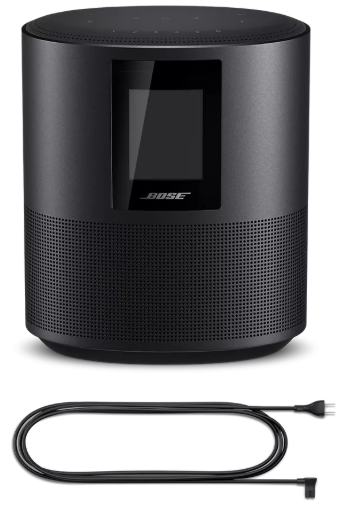
The Bose Smart Speaker 500 is a premium wireless smart speaker designed to deliver an immersive, room-filling audio experience through its advanced stereo sound technology. Featuring two custom full-range drivers that face opposite directions, it offers one of the widest soundstages available in smart speakers, making it ideal for music lovers who want crystal-clear sound and powerful bass in any room.
This smart speaker integrates both Amazon Alexa and Google Assistant voice assistants, allowing hands-free control of music, information queries, smart home devices, and more. The eight-microphone array enhances voice pickup even in noisy environments, ensuring your commands are heard clearly.
With connectivity options including Wi-Fi, Bluetooth 4.2, Apple AirPlay 2, Chromecast, and a 3.5mm auxiliary input, the Bose Smart Speaker 500 supports a wide variety of streaming services like Spotify, Amazon Music, and Pandora, catering to diverse listening preferences. The built-in LCD screen displays album art, track info, and can optionally show the time.
Targeted at tech-savvy consumers and audiophiles who want smart functionality combined with superior sound quality, it fits perfectly in living rooms, kitchens, or offices. Its sleek anodized aluminum design comes in “Triple Black” or “Luxe Silver.”
The Bose Smart Speaker 500 is typically priced between $350 and $400, available through Bose’s official website, major electronics retailers, and online marketplaces.
Technical Specifications
- Drivers: Two custom 2.5-inch full-range drivers mounted in opposite directions for wide stereo sound
- Connectivity: Wi-Fi, Bluetooth 4.2, Apple AirPlay 2, Chromecast built-in, 3.5mm aux input
- Voice Assistants: Built-in Amazon Alexa and Google Assistant with an eight-microphone array for superior voice pickup
- Controls: Capacitive touch controls, six customizable presets, Bose Music app support for setup and sound customization
- Display: Full-color LCD screen showing album art, track info, radio stations, and optional clock
- Power: Wired-only operation (no battery)
- Dimensions & Weight: 203 mm x 170 mm x 109 mm; 2.15 kg
- Audio Performance: Loud volume with clear treble, strong bass, natural midrange, and consistent sound across front/back and left/right
- Comparison: Superior to Bose Home Speaker 300 due to stereo sound and louder output; offers a wider soundstage than Sony SRS-RA5000, though it lacks immersive surround audio features
CONTENTS
Confirm that the following parts are included:
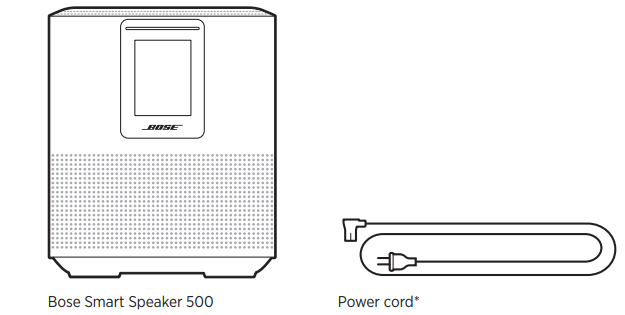
May ship with multiple power cords. Use the power cord for your region.
SPEAKER CONTROLS
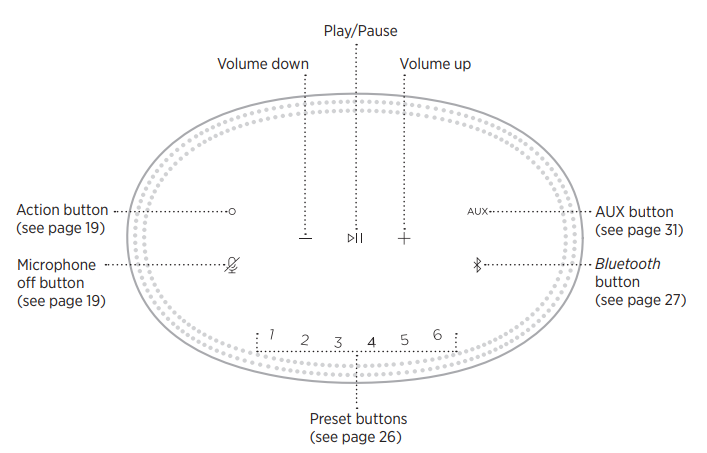
SPEAKER FUNCTIONS
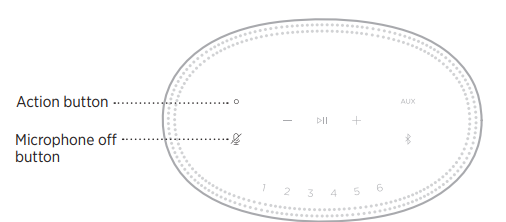
Speaker controls are located on the top of the speaker.
NOTE: You can also control your speaker using the Bose Music app.
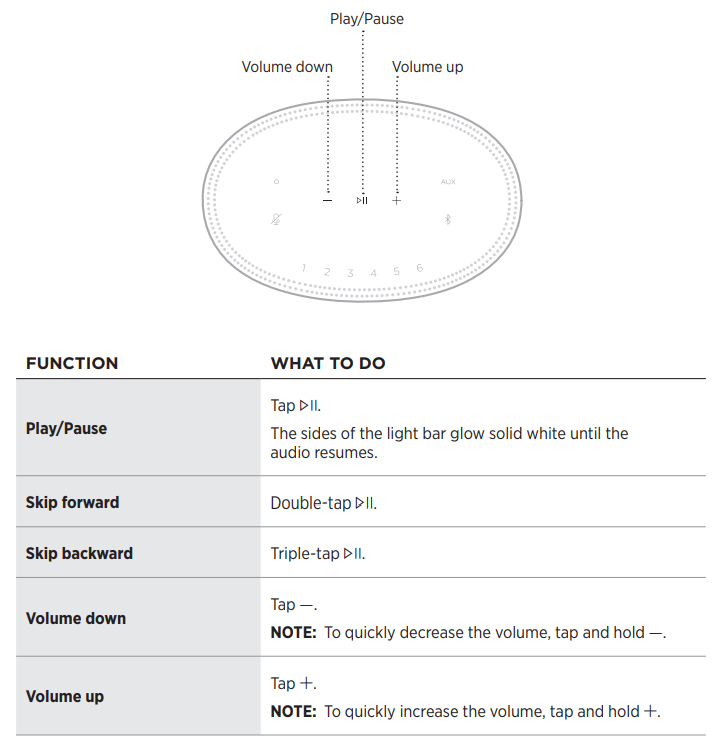
Media playback and volume
VOICE ASSISTANT CONTROLS
You can use the Action button b and Microphone off button n to control Amazon Alexa (see page 22) or Google Assistant (see page 24).
PRESETS
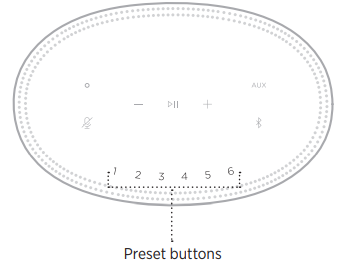
The speaker includes six presets that you can set to play audio from your favorite music services. Once set, you can access your music at any time, with a simple touch of a button or by using the Bose Music app.
CARE AND MAINTENANCE
CLEAN THE SPEAKER
Clean the surface of the speaker with a soft, dry cloth.
CAUTIONS:
- Do NOT use any sprays near the speaker. Do NOT use any solvents, chemicals, or cleaning solutions containing alcohol, ammonia,, or abrasives.
- Do NOT allow liquids to spill into any openings.
TROUBLESHOOTING
TRY THESE SOLUTIONS FIRST
If you experience problems with the speaker, try these solutions first:
- Make sure the speaker is connected to a live AC (mains) outlet (see page 14).
- Secure all cables.
- Verify the state of the light bar (see page 32).
- Download the Bose Music app and run available software updates.
- Move the speaker and mobile device away from possible interference (wireless routers, cordless phones, televisions, microwaves, etc.).
- Move the speaker within the recommended range of your wireless router or mobile device for proper operation.
OTHER SOLUTIONS
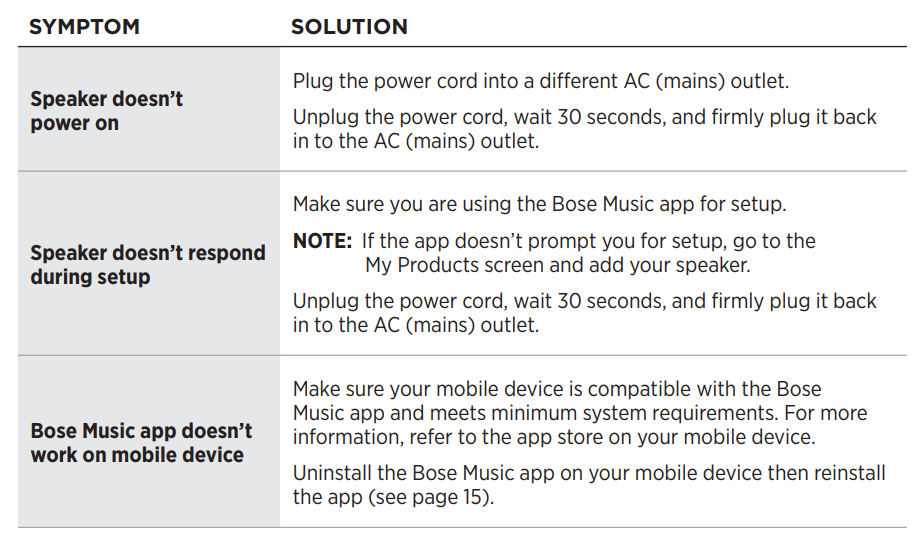
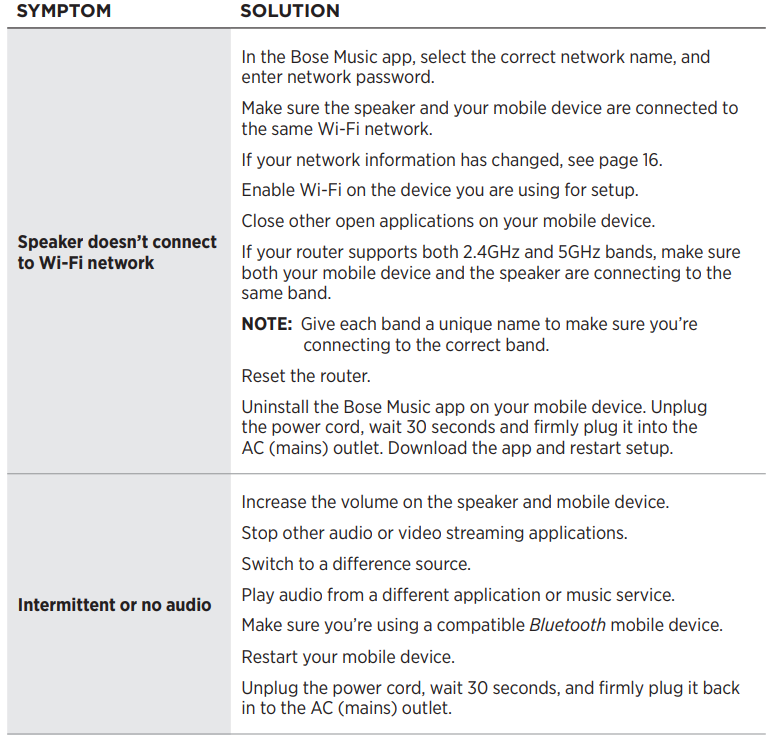
If you could not resolve your issue, see the table below to identify symptoms and solutions to common problems. If you are unable to resolve your issue, contact Bose customer service.
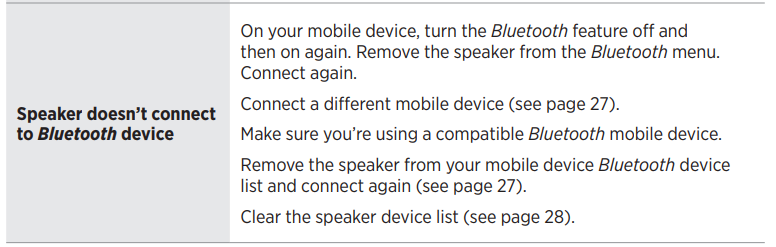
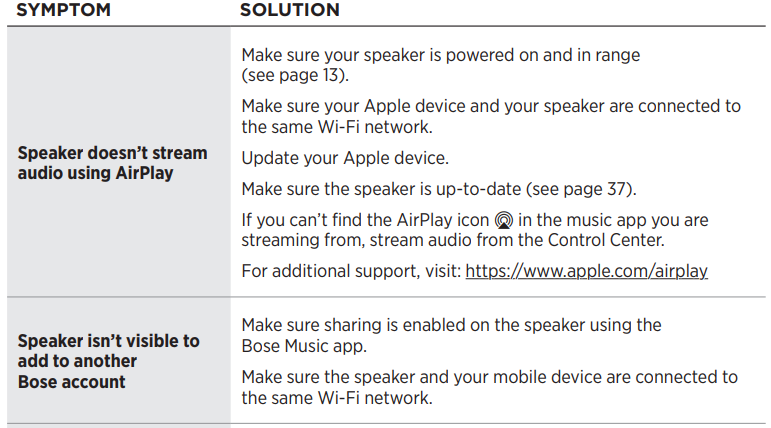
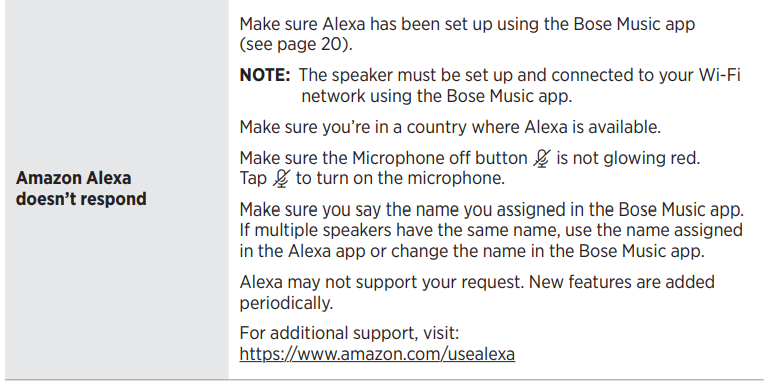
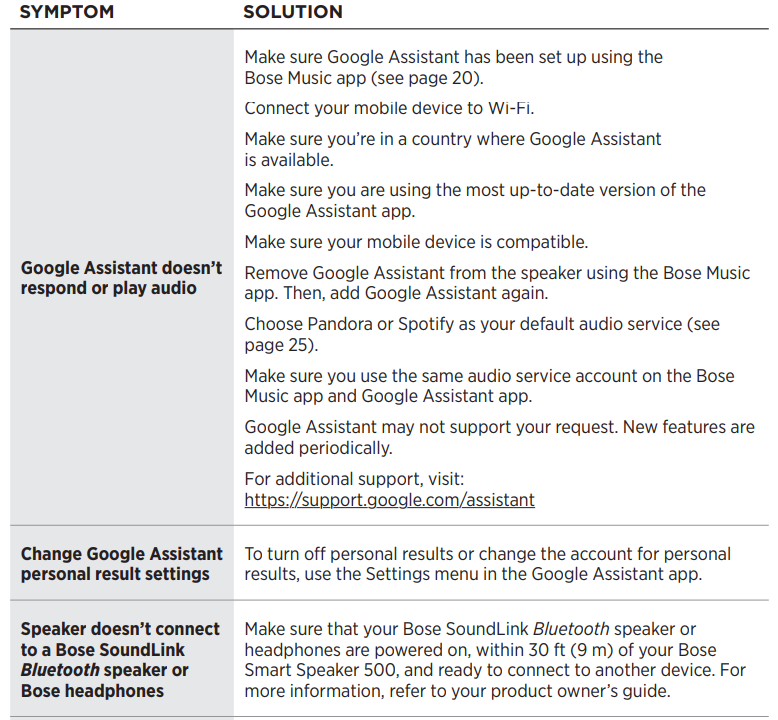
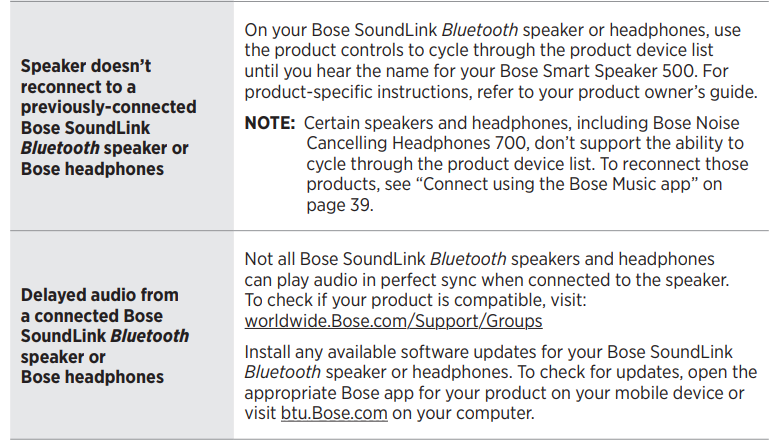
Troubleshooting Common Issues with the Bose Smart Speaker 500
- No Power: Ensure the speaker is plugged into a working outlet; check the power cable connection.
- Wi-Fi Connectivity Problems: Restart the router and speaker; use the Bose Music app to reconnect; disable and re-enable Wi-Fi on the speaker.
- Voice Assistant Not Responding: Verify that the microphone is not muted (mic-disable button toggled off); reduce background noise; reboot the speaker.
- Audio Playback Issues: Check Bluetooth or Wi-Fi connections; update firmware via the Bose Music app; reset the speaker if necessary.
- Error Codes: Refer to the Bose Music app for diagnostic messages; factory reset may resolve persistent errors.
- Preventive Measures: Keep firmware updated; avoid placing the speaker near strong wireless interference; mute the microphone when privacy is desired.
Bose offers a limited warranty covering manufacturing defects. For further support, contact Bose Customer Service via their official website or call their support hotline available in your region.
Pros and Cons of the bosBoseart Speaker 500
- Pros:
- Exceptional stereo sound with wide soundstage and clear, balanced audio performance.
- Robust voice assistant integration with excellent far-field voice recognition due to eight microphones.
- Multiple connectivity options, including Wi-Fi, Bluetooth, AirPlay 2, and Chromecast, for versatile streaming.
- Elegant design with intuitive touch controls and an informative LCD.
- Customizable presets and app-based sound adjustments enhance user experience.
- Cons:
- Wired-only power supply limits portability.
- Relatively high price point compared to some competitors.
- No IP rating, so not suitable for outdoor exposure to elements.
- Lacks immersive surround sound enhancements found in some rival models.
- Value for Money: Offers premium sound and features,s justifying the price for users seeking quality stereo smart speakers.
Customer Reviews and Feedback on Bose Smart Speaker 500
Users consistently praise the Bose Smart Speaker 500 for its high-quality, loud, and clear stereo sound, often highlighting the deep bass and natural midrange tones. The voice recognition is frequently mentioned as superior, especially in noisy environments, thanks to the advanced microphone array. The LCD with album art adds a modern touch that many appreciate.
Common complaints include the speaker’s dependency on wired power, limiting portability, and the relatively high price. Some users note that while loud, maximum volume playback can introduce slight compression.
Overall, the speaker holds a strong average star rating of around 4.5 out of 5, with many recommending it for home use, especially for those prioritizing sound quality coupled with smart assistant features.
More bose manuals
- Pairing & Setup: Bose Soundlink Plus Portable Speaker User Manual
- Pairing: Bose Soundlink Home Bluetooth Speaker User Manual
- Pairing & Setup: Bose Quiet Comfort Earbuds User Manual
- Setup & Pairing: Bose Soundlink Micro Portable Speaker (2ND Gen) User Manual
- Setup & Pairing: Bose Soundlink Color II User Manual
- Pairing & Setup: Bose QuietComfort Ultra Earbuds 2ND GEN User Manual
Leave a Comment