
Setup & Pairing: Capoxo H06 Earbuds User Manual
Content
Capoxo H06 Earbuds
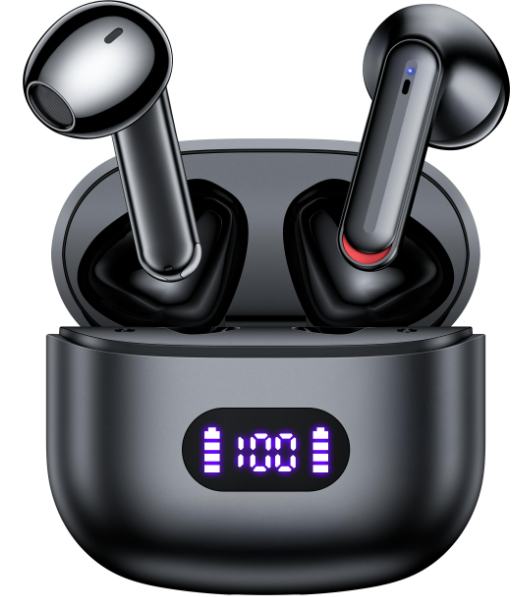
Introduction
The capoxo H06 Earbuds deliver an exceptional blend of advanced technology, superior sound quality, and user-friendly design at an affordable price point. Designed for music lovers, fitness enthusiasts, and everyday users seeking reliable wireless audio, these earbuds offer crystal-clear stereo sound, a robust Bluetooth 5.3 connection, and a comfortable fit suitable for extended wear. Whether you're working out, commuting, or enjoying leisure time, the capoxo H06 ensures an immersive audio experience.
Key benefits include up to 40 hours of total playback with a compact wireless charging case, an IPX7 waterproof rating for sweat and water resistance, and a real-time LED battery display to keep you informed about power levels. Unique features such as quick auto-pairing and wireless charging add convenience, setting the H06 apart in the budget wireless earbuds market. With a price range typically around $20 to $40, the Capoxo H06 Earbuds are widely available through online retailers, making premium sound accessible to a broad audience.
Packing List
- Charging Case 1
- Wireless Earbuds 2
- Type-C Cable
- User Manual 1
Technical Specifications and Features of Capoxo H06 Earbuds
- Model Name: H06
- Bluetooth Version: V5.3
- Earbud Battery Capacity: 35mAh
- Case Battery Capacity: 500mAh
- Charging Time: about 2H
- Case Size/Weight: 53.5 50 28.5mm/45.5g
- Earbud Size/Weight: 17.7mm/3.6g
- Transmission Rang: 39 feet(without obstacle)
Compared to similar products in the budget wireless earbuds category, the Capoxo H06 stands out with its longer playback time (40+ hours vs. typical 20-30 hours) and the dual charging modes, which are often missing in competitors at this price point.
Overview
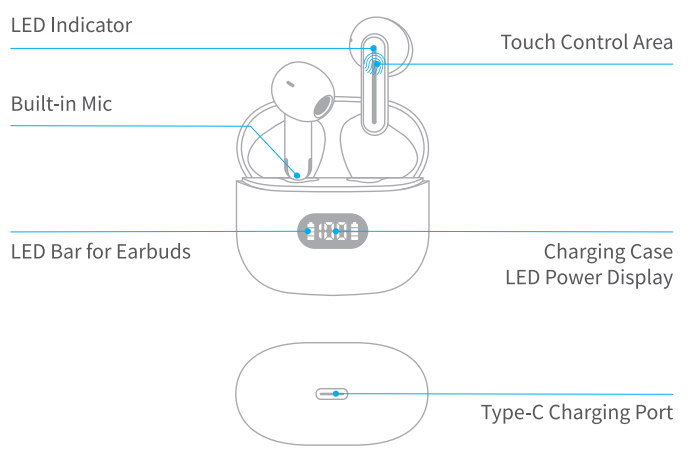
Power On/Off
- Auto Power On
The earbuds will turn on automatically when you open the charging case. - Auto Power Off
Put the earbuds back into the charging case and close the case. The earbuds will turn off automatically and enter charging mode. - Manually Power On
If the earbuds are not in the case and powered off, press & hold them for about 2 seconds, and they will turn on. (At this time, the light on the earbuds will flash blue for 1 second.) - Manually Power Off
Press & hold the earbuds for about 5 seconds, the light on the earbuds will flash red,, and then they will power off.
Bluetooth Connection
Prior to first use (or not in use for a long time), please fully charge both earbuds and the charging case.
First Time Pairing
Step 1- The twin earbuds will automatically power on and enter pairing mode when you open the charging case.
At this time, the LED indicator of the master earbud will flash Blue & Red lights alternately, and the vice earbud's LED indicator flashes Blue light 2 times every 2 seconds.
Step 2 -Activate the Bluetooth setting on your phone, search for and connect to "H06".
Once connected, the LED light of both earbuds goes off.
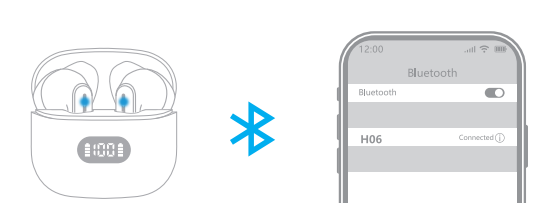
Note: If the earbuds are not connected to your device for over 5 minutes, the earbuds will power off automatically.
For Second Time Use
If the earbuds have already connected with your device, and the Bluetooth setting of this device is on, in the second time you use them, when you take out the earbuds from the charging case, they will connect with your device automatically.
Pair with Other Device
- HOG Earbuds have a memory function; they usually auto-connect with the last paired device.
- Thus, if you want to pair them with another device, you should disconnect "HOG" from the last paired device, AND forget the pairing record on the last device.
- Then, try to connect it to a new device, and it should work properly.
Mono Mode (Only Left/Right Earbud is being Used)
You can use one earbud alone, and leave the other earbud in the charging case.
- When in Dual mode, put one earbud into the charging case and close the case.
- Turn on the Bluetooth setting on your phone, then search for & connect to "HOG" on your device.
Factory Restore Settings
When should I reset?
- Only one earbud plays music.
- Both earbuds can not work with together.
- Occur connection issues.
How to reset?
- Step 1: Delete the pairing name "H06" on your phone and deactivate the Bluetooth setting of all devices near the earbuds.
- Step 2: Take out the two earbuds from the charging case and keep them powered on.
- Step 3: Tap both earbuds 5 times , then put the earbuds back into the charging case and close the lid. (Both earbuds will flash Blue & Red light alternately for 3s, then the Red lights keep ls and go off.)
- Step 4: Now, open the charging case to turn them on, activate the Bluetooth setting on your phone, search for and select "H06" to connect, and they should work properly.
If it doesn't work, please repeat the steps above to try again.
Earbuds Charging
To Charge Earbuds
Insert the Earbuds into the charging case properly and close the case, they will power off & get charged.
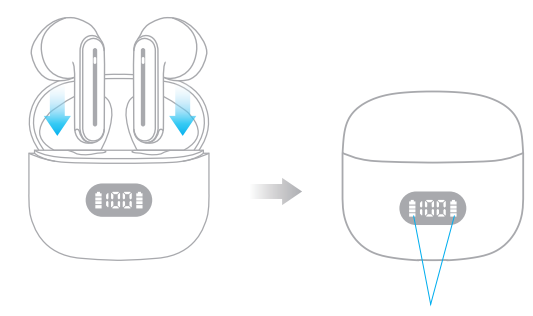
Flash for 10 secs after charging starts and then turns off.
Low Battery Alarm
When the battery is less than 10% (and the voltage is lower than 3.4V), a prompt voice "Please charge" will be announced, announced once every 5 minutes and 5 times in total, the earbud LED indicator flashes red light once time every 5 seconds. And then the earbuds will power off as normal.
Charging Case Charging
Type-C Charging
(There is a Type-C charging cable in the small black paper box inside the packing box.)
Please use the provided Type-C cable with an SV/lA adapter(not included) to charge the charging case.
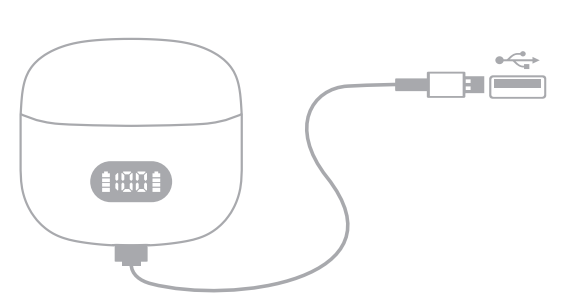
100 when the case is being charged, the digital display will show current power, the end digital number flashes for 10 seconds, and then goes off.
Once fully charged, when you open the charging case to view it, the number will be displayed as 100 and then go off.
Wireless Charging
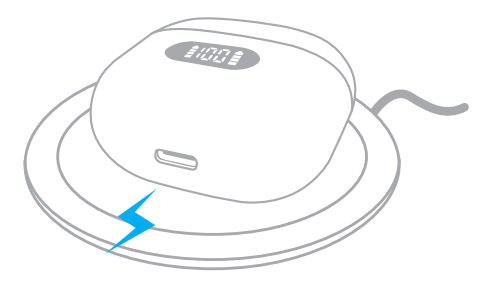
Easy to charge your charging case without cables, just put the charging case on a wireless charging pad. Please keep the LED power display facing up when charging.
If the charging case doesn't start to charge, please try to reposition it until the LED power display flashes. (Wireless Charging Pad Not Included)
Tips:
If the earbuds don't charge or even can't even turn on, that may be because there is an oxidized layer or something else on the charging pin.
You can solve this problem by cleaning the magnet connector on the earbuds with alcohol wipes.
Troubleshooting Common Issues with capoxo H06 Earbuds
- Problem: Earbuds are not pairing automatically. Solution: Ensure earbuds are fully charged, remove any protective film on the earbuds, and open the charging case near your device to trigger auto connection.
- Problem: No sound or one earbud is silent. Solution: Reset earbuds by placing them in the case and closing it for 10 seconds; re-pair with the device.
- Problem: The Charging case is not charging the earbuds. Solution: Remove any protective films from the earbuds; clean the charging contacts; ensure the case battery has a charge.
- Error Codes: No specific error codes; LED indicators show charging status and battery levels—refer to the LED battery display for diagnostics.
- Preventive Measures: Keep earbuds dry, clean charging contacts regularly, avoid extreme temperatures, and use the original charging case.
Capoxo offers a standard warranty period (usually 12 months) covering manufacturing defects. For support, users can contact customer service through the official Capoxo store or their authorized sellers.
Pros & Cons of capoxo H06 Earbuds
Pros
- Excellent Battery Life: Up to 40 hours total playback with fast charging and wireless charge support.
- Strong Bluetooth 5.3 Connectivity: Offers quick pairing and stable connection with low latency.
- IPX7 Waterproof Rating: Well-suited for workouts and outdoor activities.
- Clear Stereo Sound: Balanced highs, mids, and bass for music and calls.
- Convenient LED Battery Display: Real-time power monitoring helps manage charging cycles.
Cons
- Wireless Charging Pad Not Included: Users need to buy separately for wireless charging convenience.
- Plastic Build Quality: While lightweight, some users may prefer a more premium finish.
- Fit May Vary: Ear tips may require replacement for optimal comfort and sound isolation.
- Limited Advanced Features: Lacks active noise cancellation found in higher-end models.
Overall, the Capoxo H06 represents excellent value for money, especially for budget-conscious consumers seeking quality sound and long battery life without premium pricing.
Customer Reviews and Feedback on Capoxo H06 Earbuds
Users commonly praise the Capoxo H06 Earbuds for their impressive battery longevity and reliable Bluetooth 5.3 connection, often rating the product 4.5 to 5 stars. Many highlight the earbuds’ clear call quality and comfortable fit during exercise. Occasional complaints mention the absence of included wireless charging pads and the basic plastic build, but these are generally seen as minor issues relative to the price.
Customers recommend the H06 earbuds for daily use, workouts, and casual listening, appreciating the balance of features and affordability. Frequent reviewers also note the helpful LED battery display as a practical addition, making it easy to track remaining power and avoid unexpected shutdowns.
Faqs
How do I set up my capoxo H06 Earbuds for the first time?
What should I do if my capoxo H06 Earbuds are not charging properly?
Can I use the capoxo H06 Earbuds with both Android and iOS devices?
How can I maximize the battery life of my capoxo H06 Earbuds during use?
What are the key features of the capoxo H06 Earbuds related to sound quality?
How do I troubleshoot connectivity issues with my capoxo H06 Earbuds?
Are the capoxo H06 Earbuds suitable for workouts and outdoor use?
What maintenance is recommended to keep my capoxo H06 Earbuds performing well?
Tags
More capoxo manuals
Leave a Comment