
Setup & Pairing: Capoxo X19 Wireless Earbuds User Manual
Content
Capoxo X19 Wireless Earbuds
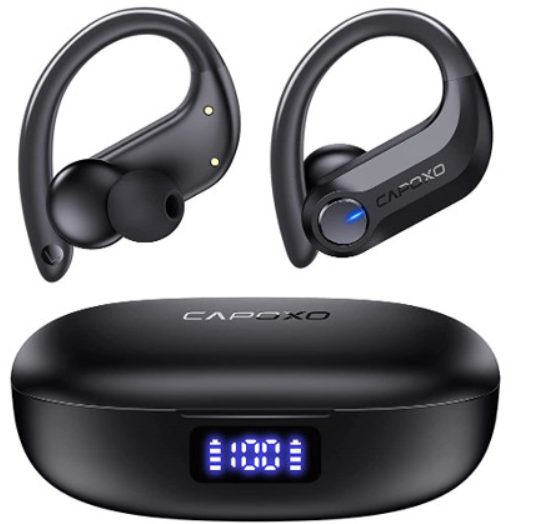
Introduction
Welcome to the capoxo X19 Wireless Earbuds—your gateway to seamless audio, crystal-clear calls, and true wireless freedom. Designed for music lovers, commuters, and fitness enthusiasts, the Capoxo X19 Wireless Earbuds deliver immersive sound, intuitive controls, and reliable connectivity in a compact, stylish package. Whether you’re working out, commuting, or just relaxing at home, these earbuds are engineered to keep you connected and entertained wherever life takes you.
Key benefits of the Capoxo X19 include advanced Bluetooth 5.0 technology for fast pairing and a stable signal, ergonomic design for all-day comfort, and a portable charging case that extends your listening time. The earbuds feature easy touch controls for music, calls, and voice assistants, as well as a built-in microphone for hands-free calls. The capoxo X19 Wireless Earbuds are ideal for anyone seeking a balance of performance, convenience, and affordability.
Target users include students, professionals, travelers, and fitness buffs who value portability, battery life, and hassle-free wireless audio. With an estimated price range of $40–$60, the Capoxo X19 Wireless Earbuds offer excellent value for money and are widely available through major online retailers and electronics stores. Experience the freedom of wireless listening with Capoxo X19—your perfect companion for music, calls, and more.
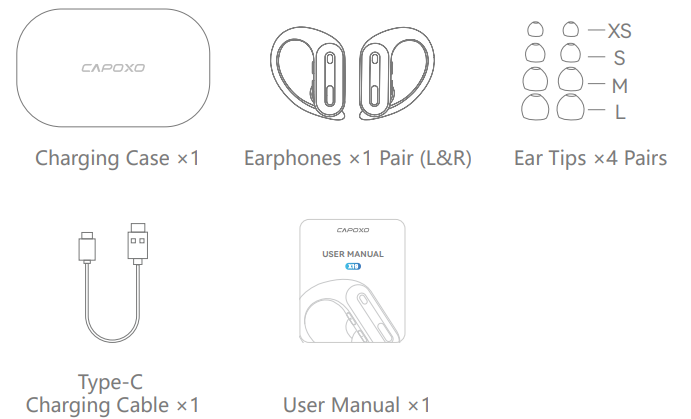
Packing List
Product Specification
- Model Name: X19
- Bluetooth Version: V5.3
- Support: AAC/A2DP/HFP/HSP/AVRCP
- Transmission Range: 33 feet(without obstacle)
- Charging Port: Type-C
- Wireless Charging Supported: Yes(charging pad not included)
- Charging Time: about 2H
- Battery of each Earbud: 50mAh
- Battery of Charging Case: 600mAh
Compared to similar products, the Capoxo X19 Wireless Earbuds stand out for their long battery life with the charging case, ergonomic fit, and intuitive controls. They offer a competitive feature set at a mid-range price point, making them a strong alternative to more expensive brands.
Product Overview
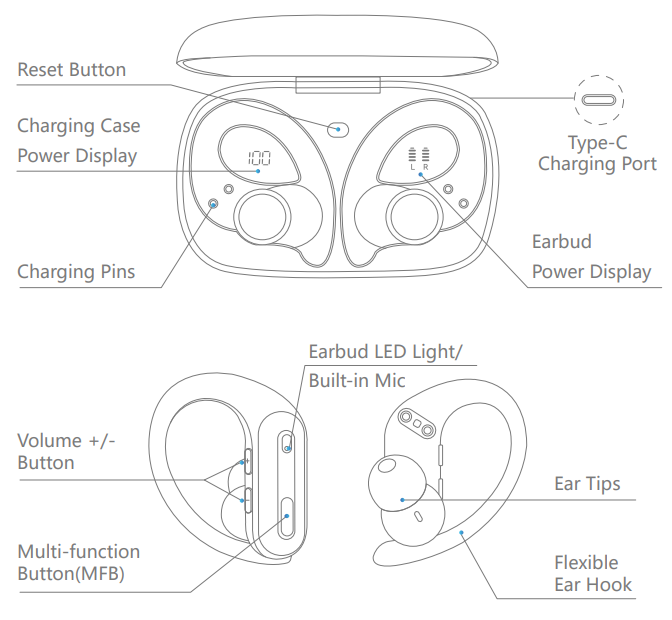
Note: Please remove protective films from the earphones’ charging point before using them.
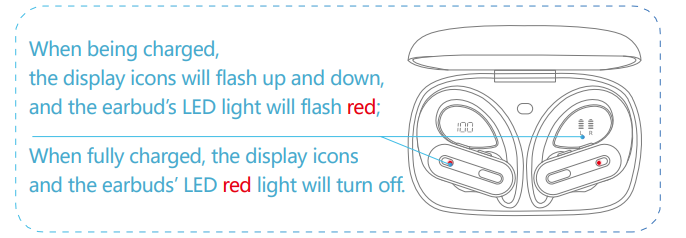
Earbuds Charging
To Charge Earbuds
Insert the Earbuds into the charging case properly, and they will power off and get charged automatically.
Low Battery Alarm
When the battery is less than 10%(and the voltage is lower than 3.4V), a prompt voice “Please charge” will be announced once every 5 minutes and 5 times in total, and then the earbuds will power off as normal.
Charging Case Charging
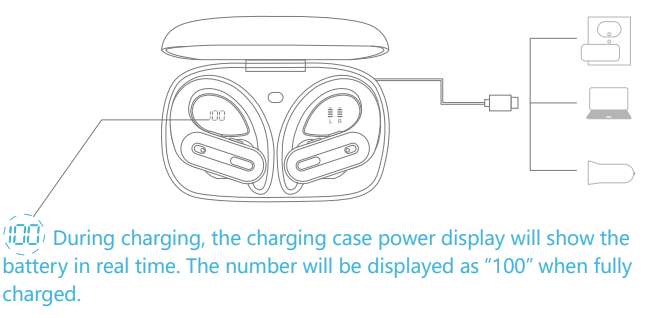
(There is a Type-C charging cable included in the packing box.)
Type-C Charging
Use the provided Type-C cable with a 5V/1A adapter(NOT included) to charge the charging case.
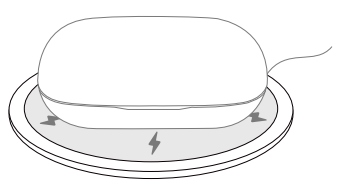
Wireless Charging
Just put the charging case on a wireless charging pad (NOT included) to charge your charging case easily.
If the charging case doesn’t start to charge, please try to reposition it. ( We recommend you to use a wireless charging pad with a Ql certificate.)
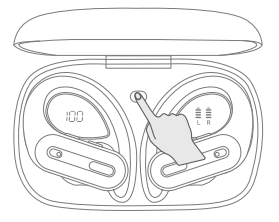
Factory Restore Setting
When should I reset?
- When only one side plays music
- When you can’t find “X19” on your device,
- Occur connection issues.
How to reset?
- Delete all "X19" on your phone and deactivate the Bluetooth setting.
- Put the two earbuds in the charging case, and keep them in the charging state.
- Long-press the Reset Button on the charging case for about 10s, the LED display flasflashesimes and, and the earbuds flash red and green alternately, which means both earbuds have reset completely.
- Now, pick up the earbuds to turn them on, activate the Bluetooth on your device a, nd select "X19" to connect, i; it should work properly.
If not, please put the earbuds back in the charging case and repeat the steps above.
Enable Developer Options
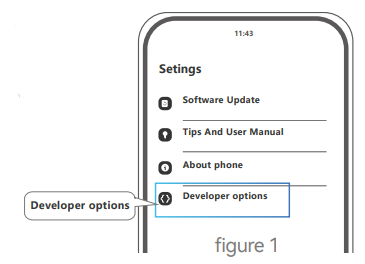
Locate the Build number and tap it about 7 times in succession to enable Developer options. You may also have to tap in your PIN for verification. Once developer options are activated, you will see a message that reads "You are now a developer".
Go back to the Settings pane, search for Developer options as an entry. At the top of the Developer options screen, you can toggle the options as Figure 1.
Enable Absolute Volume
Scroll down until you reach the Networking section. Once there, enable (toggle ON) the absolute volume option as Figure 2.
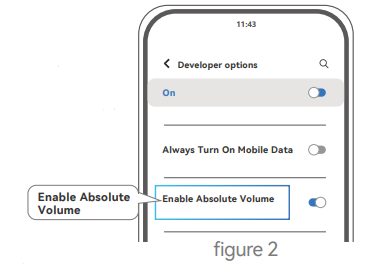
Note: These options in the figures may be different from the device you're using. Typically, the choices depend on the type and model of the device you are working with.
Troubleshooting
Common Problems & Solutions
- Pairing Failed: Ensure earbuds are fully charged, reset by placing them back in the case, then remove to enter pairing mode. Check your device’s Bluetooth settings for “capoxo X19.” If issues persist, restart both earbuds and your device.
- No Sound or Intermittent Audio: Check volume levels on both earbuds and your device. Ensure earbuds are securely placed in your ears. Clean charging contacts if audio cuts out.
- Charging Issues: Use the provided cable and a reliable power source—clean charging contacts on the earbuds and case. If the LED indicator does not light up, try a different cable or outlet.
- Short Battery Life: Reduce volume, disable unnecessary features, and ensure the charging case is fully charged. Store earbuds in the case when not in use.
- Unresponsive Controls: Reset earbuds by placing them in the case for 10 seconds. Ensure firmware is up to date if available.
Preventive Measures: Keep earbuds and case clean and dry. Avoid extreme temperatures. Charge regularly to maintain battery health. Store in the case when not in use.
Warranty & Support: capoxo X19 Wireless Earbuds come with a 12-month limited warranty. For support, contact Capoxo customer service via the official website or your retailer. Keep your proof of purchase for warranty claims.
Pros & Cons
Advantages
- Affordable Price: Delivers premium features without the premium price tag.
- Long Battery Life: Up to 15 hours with the charging case—ideal for travel and daily use.
- Comfortable Fit: Ergonomic design and multiple ear tip sizes ensure a secure, comfortable fit for most users.
- Easy Controls: Intuitive touch controls for music, calls, and voice assistants.
- Reliable Connectivity: Bluetooth 5.0 ensures stable pairing and minimal dropouts.
Disadvantages
- No Active Noise Cancellation: Lacks advanced noise reduction compared to some competitors.
- Micro USB Charging: Uses older Micro USB instead of USB-C.
- Basic Water Resistance: An IPX5 rating is sufficient for sweat and light splashes but not for swimming.
- No App Support: Limited customization compared to brands with dedicated apps.
Customer Reviews
Users consistently praise the Capoxo X19 Wireless Earbuds for their comfortable fit, reliable battery life, and clear sound quality. Many highlight the value for money, noting that the earbuds perform well above their price point. Common compliments include easy pairing, intuitive controls, and the convenience of the charging case.
Some users mention minor issues such as occasional connectivity glitches and the lack of USB-C charging. A few note that the earbuds may feel slightly bulky for tiny ears, but most find the included ear tips provide a secure fit. Overall, the Capoxo X19 Wireless Earbuds receive an average rating of 4.2 out of 5 stars, with most buyers recommending them for everyday use and travel.
If you’re seeking affordable, reliable wireless earbuds with solid performance and essential features, the Capoxo X19 Wireless Earbuds are a smart choice—especially for those new to true wireless audio or on a budget.
Faqs
How do I set up the capoxo X19 Wireless Earbuds for the first time?
What should I do if my capoxo X19 Wireless Earbuds are not connecting via Bluetooth?
Can I use the capoxo X19 Wireless Earbuds with Apple devices and smartwatches?
How can I check the battery level of my capoxo X19 Wireless Earbuds and charging case?
What are the key features of the capoxo X19 Wireless Earbuds for workout and sports use?
How do I optimize the sound performance on my capoxo X19 Wireless Earbuds?
What is the recommended way to maintain and clean my capoxo X19 Wireless Earbuds?
How does wireless charging work with the capoxo X19 Wireless Earbuds charging case?
More capoxo manuals
Leave a Comment