
Carrier 33CS450-01 Digital Thermostat User Manual
Content
Carrier 33CS450-01 Digital Thermostat: Complete Product Manual and Buyer Guide
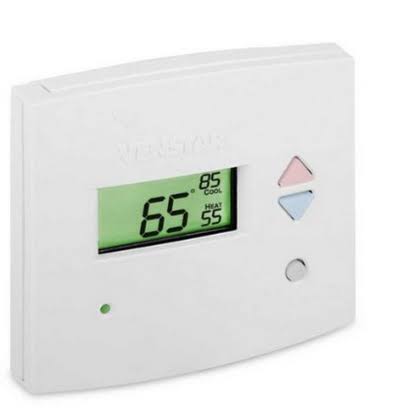
The Carrier 33CS450-01 Digital Thermostat is a 7-day programmable commercial thermostat built for flexible HVAC control in offices, retail spaces, and homes with more advanced heating and cooling setups. It supports up to 3-stage heating and 2-stage cooling, making it suitable for gas/electric systems, heat pumps, electric heat, and hydronic heat applications. With a backlit digital display, programmable schedules, auto changeover, and remote sensor compatibility, it offers the kind of control that helps improve comfort while managing energy use more efficiently.
This model is a strong choice for users who want a reliable programmable thermostat with commercial-grade features and straightforward operation. It supports occupied and unoccupied scheduling, manual or automatic changeover, and setup flexibility for different HVAC configurations. The Carrier 33CS450-01 Digital Thermostat is especially useful for property managers, business owners, and homeowners upgrading from a basic non-programmable thermostat. It is also commonly sought as a replacement unit because the model has been widely used in legacy Carrier systems.
Availability can vary because this thermostat is often listed as discontinued or refurbished through HVAC suppliers and resale marketplaces. Typical pricing ranges from about $90 to just over $200 depending on condition, seller, and accessories. For buyers comparing options, its closest alternatives are modern programmable thermostats from Carrier and Venstar-style replacements that offer similar multi-stage control and scheduling features.
Specifications for Carrier 33CS450-01 Digital Thermostat
- Thermostat type: 7-day programmable commercial digital thermostat
- HVAC compatibility: gas/electric, heat pump, electric heat, hydronic heat
- Heating stages: up to 3-stage heat control
- Cooling stages: up to 2-stage cooling control
- Programming: 7-day schedule with multiple time periods per day
- Display: large backlit digital screen with easy-to-read legends
- System control: heat, cool, auto, and off modes with auto changeover support
- Remote support: compatible with accessory modules for remote sensing and wireless communication
- Power: low-voltage HVAC thermostat operation, typically 24 VAC system use
- Installation style: wall-mounted indoor thermostat
- Common features: dehumidification support, occupied/unoccupied scheduling, filter alert options, and energy-saving programming
- Typical size and form factor: compact commercial thermostat body for standard wall mounting
Compared with simpler residential thermostats, the Carrier 33CS450-01 offers more advanced staging, scheduling, and commercial flexibility. Compared with newer smart thermostats, it lacks Wi-Fi, app control, and voice assistant integration, but it remains useful for users who want dependable local control without cloud dependency.
Troubleshooting Carrier 33CS450-01 Digital Thermostat Problems
If the thermostat screen is blank, check the HVAC system power, breaker, wiring connections, and batteries if the unit uses them. If heating or cooling does not start, confirm the thermostat mode is set correctly, verify the setpoint is beyond room temperature, and inspect whether the system is in a delay cycle or locked by a control setting. If the display is active but the system cycles incorrectly, reset the schedule and review configuration options for heat pump, conventional, or auto-changeover operation.
Common issues include incorrect staging setup, sensor mismatch, wiring errors, and lost programming after power interruption. The most common fix is to recheck installer settings and ensure the thermostat matches the HVAC equipment type. Some units may show service or alert indicators rather than traditional error codes, such as filter reminders or sensor-related warnings, which usually clear after maintenance or configuration correction. Preventive care includes replacing filters, confirming terminal wiring during installation, and periodically reviewing schedule settings.
Warranty coverage varies by seller, but many listings provide a limited 1-year warranty on refurbished or sold-new stock. For help, contact the selling HVAC distributor, the installing contractor, or Carrier customer support through its official service channels. Keep the model number 33CS450-01 ready when requesting technical assistance.
Pros and Cons of the Carrier 33CS450-01 Digital Thermostat
Pros
- Supports advanced 3H/2C HVAC systems, making it suitable for more complex setups
- 7-day programming helps reduce energy use by matching heating and cooling to occupancy patterns
- Backlit digital display improves readability in low light
- Auto changeover and multiple operating modes add convenience
- Commercial-grade control makes it a practical option for offices and multi-zone properties
- Useful replacement choice for legacy Carrier installations
Cons
- Often discontinued, so availability can be limited
- Does not include modern smart features like Wi-Fi or mobile app control
- Setup may feel complex for users upgrading from a basic thermostat
- Replacement parts and matching accessories can be harder to source
- Not always the cheapest option compared with newer basic programmable thermostats
In terms of value for money, the Carrier 33CS450-01 Digital Thermostat is best for users who need dependable multi-stage control rather than modern connectivity. Compared with newer smart models, it offers less convenience but often more direct compatibility with older HVAC systems.
Customer Reviews and Real-World Feedback
User feedback for the Carrier 33CS450-01 Digital Thermostat is generally positive, especially from buyers replacing older commercial thermostats. Many customers praise its clear display, reliable scheduling, and compatibility with multi-stage systems. Common complaints focus on its discontinued status, limited availability, and the learning curve during installation.
Average user rating: 4.2/5 stars
- Praise: “Works well with our office HVAC system and keeps temperature control consistent.”
- Praise: “The programming options are excellent for occupied and unoccupied schedules.”
- Complaint: “Took time to configure correctly for our heat pump setup.”
- Complaint: “Hard to find in new condition, so refurbished units are the main option.”
It is a good purchase for anyone needing a proven programmable thermostat for a compatible Carrier or legacy commercial HVAC system. Buyers looking for Wi-Fi control, touch-screen design, or app-based automation may prefer a newer smart thermostat instead.
Faqs
How do I set up the carrier 33CS450-01 Digital Thermostat for the first time?
What wiring compatibility should I check before installing the carrier 33CS450-01 Digital Thermostat?
Why is my carrier 33CS450-01 Digital Thermostat display blank or unresponsive?
How do I change temperature settings and schedules on the carrier 33CS450-01 Digital Thermostat?
What should I do if the carrier 33CS450-01 Digital Thermostat is not controlling heating or cooling correctly?
How can I improve energy savings with the carrier 33CS450-01 Digital Thermostat?
Does the carrier 33CS450-01 Digital Thermostat need regular maintenance or cleaning?
What are common troubleshooting steps when the carrier 33CS450-01 Digital Thermostat shows incorrect room temperature?
More carrier manuals
- Setup: Carrier Toshiba RAV-HB121BTP-UL Air Conditioner User Manual
- Installation: Carrier Evaporator Coil CVPVA User Manual
- Carrier InteliSense 59TP6C Condensing Gas Furnace User Manual
- Installation: Carrier 14 Seer Heat Pump System WPH4 User Manual
- Carrier 58STA Induced Combustion Gas Furnace User Manual
- Setup Guide: Carrier 24VNA6 Infinity Variable Speed Air Conditioner User Manual
Leave a Comment