
Setup: Cobra Connected Radar & Laser Detector RAD-480i User Manual
Content
Cobra Connected Radar & Laser Detector RAD-480i
Introduction
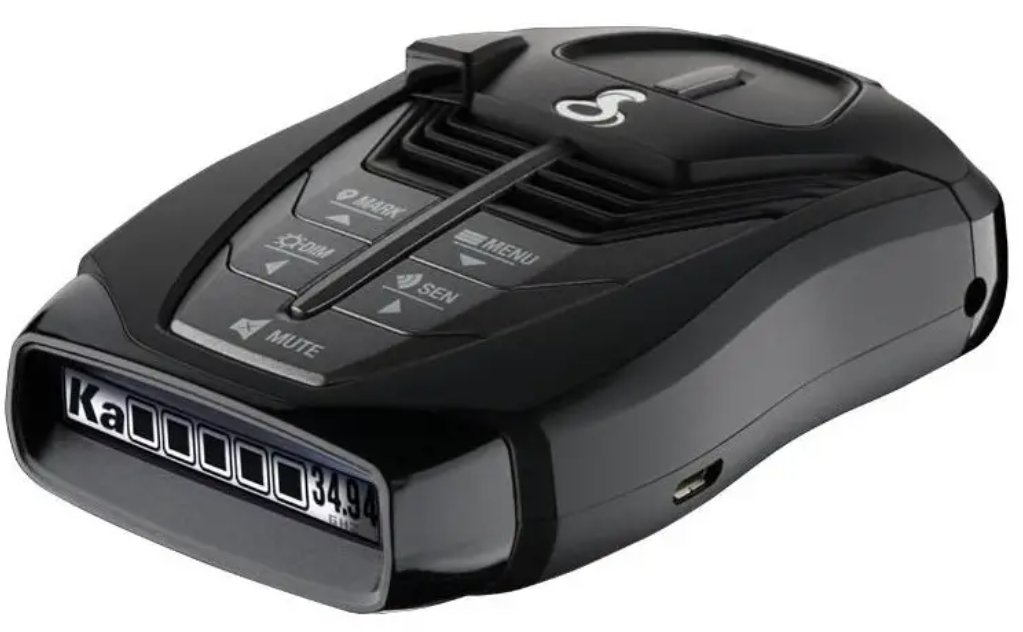
The Cobra Connected Radar & Laser Detector RAD-480i is a versatile and advanced radar and laser detection system designed to enhance driver safety by providing early warnings of speed enforcement measures. Equipped with cutting-edge digital signal processing (DSP) technology, this detector offers rapid detection and reduced false alerts, allowing drivers to focus on the road with confidence. Its standout feature is Bluetooth connectivity, enabling real-time updates and shared alerts from the Cobra iRadar community via a smartphone app.
Ideal for daily commuters, road trip enthusiasts, and fleet operators, the RAD-480i targets drivers seeking reliable protection against radar guns and laser speed detectors. It supports the detection of multiple radar bands, including X, K, Ka, and Ka-POP, as well as laser signals from both front and rear, providing comprehensive coverage.
The device is known for its bright, easy-to-read monochromatic OLED display, compact design, and user-friendly interface. Typically priced in the $170-$200 range, the RAD-480i is widely available through major electronics retailers and online platforms, offering excellent value for its feature set. Its combination of long-range detection, user connectivity, and regular software updates makes it a competitive choice in the mid-tier radar detector market.
Specifications
- Radar Bands Detected: X Band (10.525 ± 0.050 GHz), K Band (24.150 ± 0.125 GHz), Ka Band (34.700 ± 1.300 GHz), Ka-POP, VG-2 (11.500 ± 0.250 GHz)
- Laser Detection: Detects laser signals at 910 nm ± 50 nm wavelength from front and rear with LaserEye® technology
- Display: Monochromatic white OLED screen for clear visibility day and night
- Technology: High-speed Digital Signal Processing (DSP) for faster and more accurate alerts
- Bluetooth Connectivity: Syncs with the Cobra iRadar app for real-time shared alerts, red light, and speed camera notifications
- False Alert Reduction: Next-generation IVT filtering reduces alerts from blind spot and collision avoidance systems
- Mounting and Power: Suction mount windshield installation and a straight power cord included
- Performance: Offers up to 2x the detection range compared to police radar guns
- Updateability: Firmware updates via Bluetooth ensure improved performance over time
Compared to similar models like the Cobra RAD 450 and RAD 700i, the RAD-480i provides a balanced mix of features and price, though it lacks advanced manual location lockout options found in higher-end models.
WHAT’S IN THE BOX
- RAD 480i radar/laser detector
- 12V Power Cord
- Windshield Mount with Suction Cups
- Hook & Loop fastener for dash mounting
- Quick Start Guide
OPTIONAL ACCESSORIES
- Coiled 12V Power Cord: Item # 420-026-N-001– Includes plug and fuse
- Straight Combination Radar USB Cord: Item # PWR USB-01 – Includes plug and USB Output
- Dual Port Power Adapter: Item # CLP-2B – Includes adjustable plug (up to 90˚) and fuse
- Hardwire Cord for Radar: Item # RA-PSCB – Wires your detector directly into the fuse box for a quick and clean installation without any dangling wires
- Install Mount: Item # 545-002 – Includes 3M Dual Lock
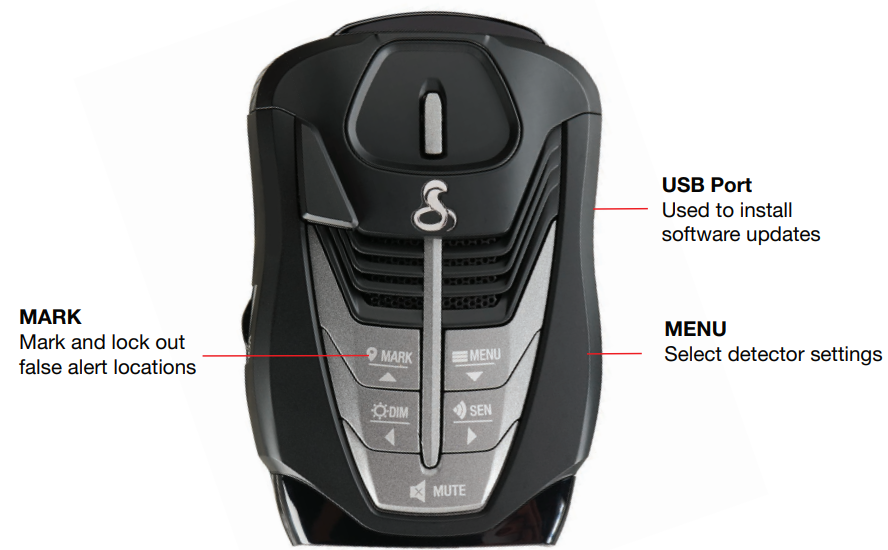
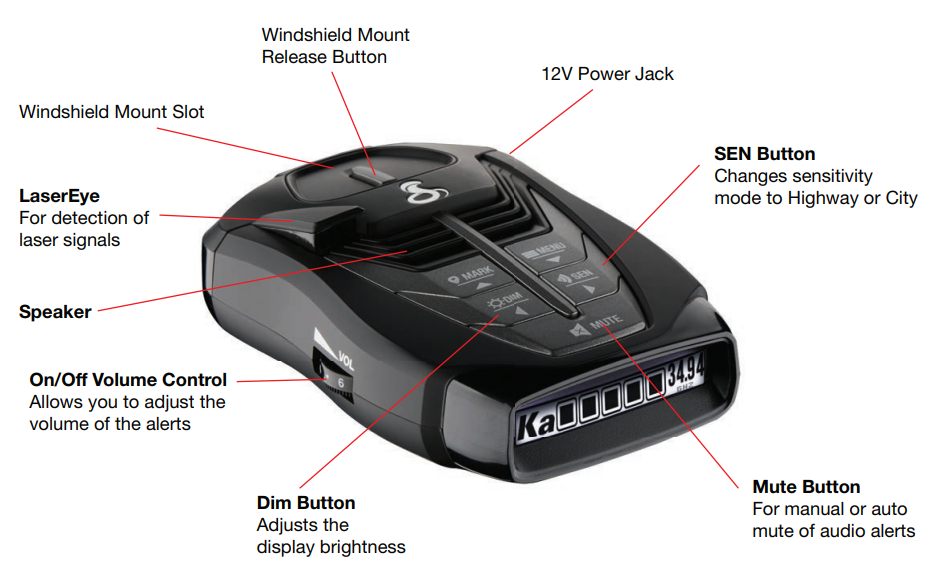
CONTROLS AND CONNECTIONS
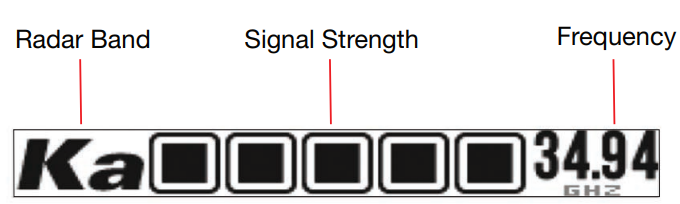
Easy to Read Display
INSTALLATION
WHERE TO MOUNT YOUR DETECTOR
You will get optimum performance from your detector if you mount it at a point approximately in the center of the vehicle, as low as possible on the front windshield without obstructing the unit’s view of the road either to the front or rear. You can also mount it directly on the dashboard using the included hook-and-loop fastener.
The detector’s lens must not be blocked a, nd the LaserEye should have a clear view out the back window to allow maximum detection.
Radar and laser signals pass through glass but not through other materials and objects. Objects that can block or weaken incoming signals include:
- Windshield wiper blades
- Mirrored sunscreens
- Dark tinting at the top of the windshield
- Heated windshields are currently available on some vehicles (Instaclear for Ford, Electriclear for GM). Consult your dealer to see if you have this option.
WINDSHIELD MOUNTING
- Make sure the rubber cups and your windshield are clean
- Push the bracket firmly onto the windshield.
- Attach the detector to the bracket. Importantly, check that the unit is parallel to the road’s surface.
To adjust the angle if necessary, gently push or pull on the bracket to bend it. DO NOT use the detector to bend the bracket.
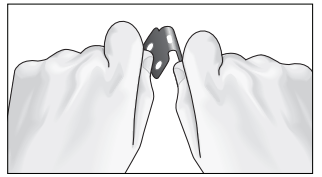
- Plug the power cord into the detector.
- Plug the cigarette lighter adapter into the power cord into your vehicle’s cigarette lighter.
DASHBOARD MOUNTING
- Place the detector on the dashboard to find a location where the unit has a clear, level view of the road and is parallel to the road’s surface. The angle CANNOT be adjusted after mounting.
- Remove the paper backing from one side of the hook-and-loop fastener.
- Attach the pad to the dashboard at your chosen location and remove the other paper backing.
- Attach the detector to the hook-and-loop fastener. You can remove and reattach the unit as often as you like.
- Plug the power cord into the detector.
- Plug the cigarette lighter adapter into the power cord into your vehicle’s cigarette lighter.
MAINTENANCE
Your detector is designed and built to give you years of trouble-free performance without the need for service. No routine Maintenance is required.
If your unit does not appear to be operating properly, please follow these troubleshooting steps:
- Make sure the power cord is properly connected.
- Make sure the socket of your vehicle’s cigarette lighter is clean and free of corrosion.
- Make sure the power cord’s cigarette lighter adapter is firmly seated in your cigarette lighter.
WARRANTY
LIMITED 1-YEAR WARRANTY
Cobra Electronics Corporation warrants that this product and the component parts thereof, will be free of defects in workmanship and materials for a period of one year from the date of first consumer purchase. This warranty may be enforced by the first consumer purchaser. If the product is under warranty, it will be repaired or exchanged, depending on the mode,l as determined at Cobra’s sole discretion. Such remedy shall be your sole and exclusive remedy for any breach of warranty.
Provided that the product is utilized within the U.S.,.- Cobra will, without charge, repair or replace, at its option, defective products, components, or component parts upon delivery to the Cobra Factory Service department, accompanied by proof of the date of first consumer purchase, such as a duplicated copy of a sales receipt. You must pay any initial shipping charges required to ship the product for warranty service, but the return charges, to an address in the U.S.A., will be at Cobra’s expense, if the product is repaired or replaced under warranty.
This warranty gives you specific legal rights, and you may also have other rights which may vary from state to state and country to country.
Exclusions: This limited warranty does not apply:
- To any product damaged by accident;
- In the event of misuse, ordinary wear, failure to follow directions, or improper maintenance of the product, or as a result of unauthorized alterations or repairs;
- If the serial number has been altered, defaced, or removed;
- If the product was purchased or is utilized in a jurisdiction not covered by the limited warranty.
All implied warranties, including warranties of merchantability and fitness for a particular purpose,, are limited in duration to the length of this warranty. Cobra shall not be liable for any incidental, consequential, al or other damage, es; including, without limitation, damages resulting from loss of use or cost of installation.
Some states and countries do not allow limitations on how long an implied warranty lasts and/or do not allow the exclusion or limitation of incidental or consequential damages, so the above limitations may not apply to you. This warranty gives you specific legal rights, and you may also have other rights which vary from state to state and country to country.
Troubleshooting Common Issues with Cobra Connected Radar & Laser Detector RAD-480i
- False K-Band Alerts: Often caused by vehicle safety sensors (blind spot or collision avoidance). Solution: Enable K-band filtering in settings, but note this may reduce detection of legitimate K-band radar signals.
- No Alerts or Weak Detection: Ensure the unit is properly mounted with a clear view of the windshield and rear window for laser detection. Check the power connection and Bluetooth pairing.
- Bluetooth Connectivity Issues: Restart the smartphone and the detector. Ensure the latest version of the Cobra iRadar app is installed.
- Display or Firmware Errors: Perform a factory reset and update firmware via the app. If persistent, contact Cobra support.
To prevent issues, regularly update the device firmware, keep the windshield clean near the mount, and avoid mounting behind tinted or metallic windshields. The Cobra RAD-480i comes with a limited manufacturer's warranty, and customer support is available via Cobra Electronics' official website and customer service hotline.
Pros & Cons of the Cobra Connected Radar & Laser Detector RAD-480i
- Pros:
- Excellent long-range detection with advanced DSP technology
- Bluetooth integration with the iRadar app for real-time shared alerts and GPS-based notifications
- Clear, bright OLED display enhances readability in all lighting conditions
- Effective false alert reduction from vehicle safety systems with IVT filtering
- Regular firmware updates improve reliability and performance
- Affordable price point providing strong value for mid-range radar detectors
- Cons:
- Prone to some false alerts, especially in dense urban environments
- Lacks advanced customization features, such as manual location lockouts
- Laser detection requires unobstructed front and rear windows for optimal performance
- Limited filtering sophistication compared to higher-end models like RAD 700i
Customer Reviews and Feedback on Cobra Connected Radar & Laser Detector RAD-480i
Users generally praise the Cobra Connected Radar & Laser Detector RAD-480i for its reliable long-range detection and Bluetooth connectivity, which offers real-time community alerts through the iRadar app. Many highlight the bright OLED display and clear voice alerts as beneficial features enhancing usability during night and day driving. Typical ratings average around 4 out of 5 stars.
Common complaints include occasional false alerts triggered by modern vehicle safety sensors and a lack of advanced filtering options. Some users note that the device may not perform as well in highly congested or urban areas with many radar sources. However, many also acknowledge that the detector has saved them from speeding tickets, citing value for money and ease of use as major positives.
Overall, customers recommend the RAD-480i for drivers who want a solid, mid-tier radar detector with connected capabilities, especially those who value community-shared alerts and regular updates.
Faqs
How do I set up the cobra Connected Radar & Laser Detector RAD-480i for the first time?
What should I do if the cobra Connected Radar & Laser Detector RAD-480i is giving frequent false alerts?
Can I hardwire the cobra Connected Radar & Laser Detector RAD-480i for a permanent installation?
How do I connect the cobra Connected Radar & Laser Detector RAD-480i to the iRadar app?
Is the cobra Connected Radar & Laser Detector RAD-480i compatible with all vehicles?
How can I optimize the detection range of the cobra Connected Radar & Laser Detector RAD-480i?
What maintenance does the cobra Connected Radar & Laser Detector RAD-480i require?
How does the OLED display on the cobra Connected Radar & Laser Detector RAD-480i improve user experience?
Tags
More cobra manuals
Leave a Comment