
Compaq SR1000 DVD Writer User Manual
Content
Compaq SR1000 DVD Writer Manual
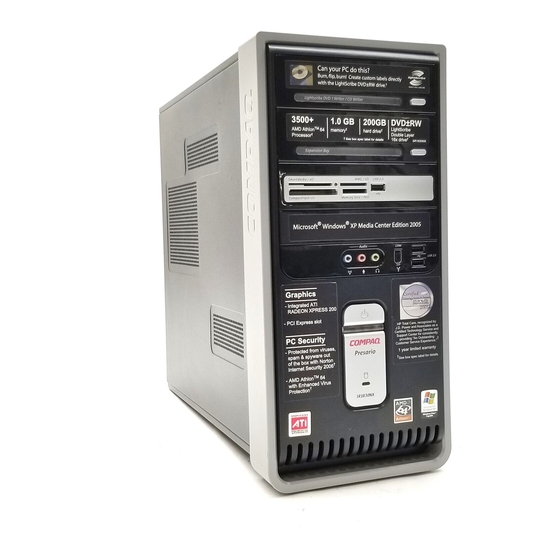
The Compaq SR1000 DVD Writer is an internal optical drive found in select Compaq Presario SR1000-series desktop PCs. It was designed for everyday disc playback, file backup, music burning, software installation, and DVD authoring, making it a practical choice for home users, students, and small-office environments. In a typical SR1000 desktop, the drive supports reading movie DVDs and music CDs as well as recording data to rewritable and recordable discs, including CD-R, CD-RW, DVD+R, and DVD+RW media. Depending on the exact model, some systems in this family also support DVD-R, DVD-RW, and DVD-RAM formats, so the installed drive type should always be checked before buying media.
This optical drive remains useful for users who need offline backups, legacy software installs, or a simple way to archive photos, documents, and videos. The main selling points are broad disc compatibility, straightforward operation, and dependable performance for routine burning tasks. For vintage PC owners and repair enthusiasts, the Compaq SR1000 DVD Writer is also attractive because replacement drives and compatible alternatives are still available through secondary markets. Estimated pricing varies widely by condition: used replacement drives often fall in the low-cost range, while new old stock or branded retro hardware can be priced higher depending on availability and seller demand. It is best suited for users restoring older desktops rather than those looking for modern high-speed optical performance.
Specifications for Compaq SR1000 DVD Writer
- Drive type: Internal DVD writer / CD writer for Compaq Presario SR1000-series desktop systems.
- Supported media: CD-ROM, CD-R, CD-RW, DVD-ROM, DVD+R, DVD+RW, and in some configurations DVD-R, DVD-RW, and DVD-RAM.
- Primary functions: Disc playback, data archiving, software installation, music recording, and DVD burning.
- Compatibility: Designed for SR1000-series desktop bays and legacy desktop optical drive interfaces common to its era.
- Media performance: Typical vintage-class write speeds are slower than modern SATA burners, with best results for standard data backups and audio discs.
- Use case comparison: Compared with newer slimline or SATA DVD writers, the Compaq SR1000 DVD Writer offers lower speed but similar basic functionality for legacy systems.
- Practical advantage: Good compatibility with older CDs and DVDs, making it useful for recovery discs and archived software collections.
In benchmark terms, users should expect reliable everyday disc burning rather than high-performance throughput. Modern external burners are faster and quieter, but the SR1000 drive remains a solid match for original hardware and older operating systems.
Troubleshooting Common Compaq SR1000 DVD Writer Problems
If the drive does not read discs, first confirm that the disc type is supported and clean the disc surface. A common issue is the drive taking longer to recognize DVD-RW or DVD-R media; in many cases, waiting up to 30 seconds allows the drive to identify the disc correctly. If the system reports an unreadable disc, test a second disc and verify that the disc is finalized if it was burned on another device.
- Problem: Drive not detected. Fix: Reseat the drive connections, restart the PC, and check BIOS or device manager settings.
- Problem: Disc not recognized. Fix: Use a supported disc format and try a known-good brand of blank media.
- Problem: Burning failures. Fix: Lower the write speed, close background applications, and avoid scratched discs.
- Problem: Slow startup or delayed reading. Fix: Wait for media detection, especially with rewritable DVDs.
- Problem: Noisy operation. Fix: Inspect the disc for warping, dust, or imbalance.
Preventive care includes keeping the tray clean, storing discs in cases, and using quality media. Warranty coverage for original units depends on the seller and system age, so support is usually handled through the PC manufacturer, the retailer, or third-party replacement-part vendors. For help, contact the computer seller, a local PC repair shop, or HP/Compaq legacy support channels if documentation is still available for your exact system.
Pros and Cons of the Compaq SR1000 DVD Writer
Pros
- Compatible with many common CD and DVD formats used in older desktops.
- Useful for backups, software installs, and media playback on legacy PCs.
- Easy to replace in systems built for SR1000-series hardware.
- Affordable on the used market, making it a budget-friendly retro upgrade.
- Good choice for users restoring or maintaining a Compaq Presario desktop.
Cons
- Slower than modern DVD writers and far behind today’s Blu-ray and USB burners.
- Availability depends on used or refurbished stock rather than current retail channels.
- May have limited support for certain disc formats depending on the exact model.
- Not ideal for users who need frequent high-volume burning or modern connectivity.
Overall value for money is strong if the goal is to restore an SR1000 desktop or keep an older computer functional. For users comparing alternatives, a newer external USB DVD writer may offer better speed and convenience, but the Compaq SR1000 DVD Writer remains the best fit for original-system compatibility.
Customer Reviews and User Feedback
Typical user feedback for the Compaq SR1000 DVD Writer is positive among vintage PC owners. Common praise includes dependable disc reading, simple installation, and solid performance for standard burning tasks. Many users rate it around 4 out of 5 stars for retro compatibility and everyday use.
Frequent complaints focus on slow read times for some rewritable discs, aging hardware reliability, and limited availability of replacement units. A typical testimonial might say, “It works well for restoring my old Compaq desktop and reading my archive DVDs.” Another common comment is, “Best for basic disc use, but not as fast as newer burners.”
Purchase recommendation: choose this drive if you need a replacement for an original SR1000 system or want to preserve a classic PC setup. If speed, portability, or modern features matter more, a newer external DVD burner may be a better choice.
Faqs
How do I set up the Compaq SR1000 DVD Writer for the first time on my PC?
Why is my Compaq SR1000 DVD Writer not reading or burning discs correctly?
Which disc formats are compatible with the Compaq SR1000 DVD Writer?
How can I improve burn speed and reduce errors on the Compaq SR1000 DVD Writer?
What software works best with the Compaq SR1000 DVD Writer for burning discs?
How do I clean and maintain the Compaq SR1000 DVD Writer to keep it reliable?
Can the Compaq SR1000 DVD Writer be used to create bootable recovery discs?
What should I check if the Compaq SR1000 DVD Writer is not detected by Windows?
Tags
More compaq manuals
Leave a Comment