
Conair Glidelite Professional Iron GI500 User Manual
Content
Conair GlideLite Professional Iron GI500: Full Product Manual and Buyer’s Guide
Introduction
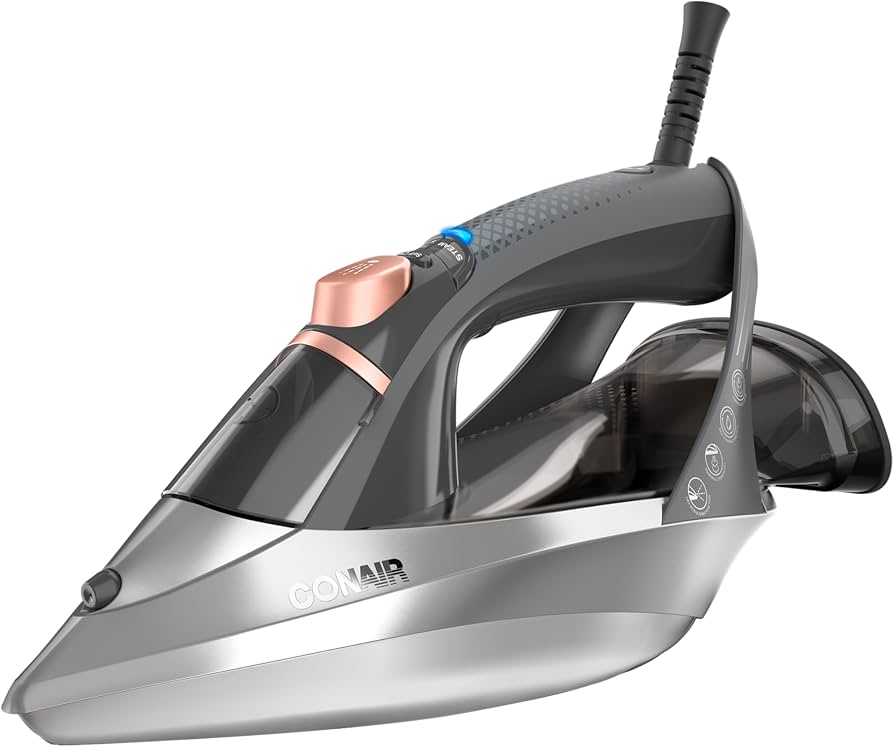
The Conair GlideLite Professional Iron GI500 is a powerful steam iron designed for users who want fast wrinkle removal without complicated settings. Built with ONE-TEMP technology, it uses a single heat setting that is safe and effective across common fabric types, including cotton, linen, polyester, and wool. This makes the Conair GlideLite Professional Iron GI500 especially appealing for busy households, dorm rooms, and anyone who wants a simpler alternative to multi-setting irons.
One of its standout features is the rapid heat-up time, which gets the iron ready in under 30 seconds. It also includes regular steam and turbo steam options, along with a spray function and self-cleaning capability for easier maintenance. The nonstick stainless steel soleplate is designed to glide smoothly over fabric, helping reduce snagging and improving maneuverability around seams, collars, pockets, and buttons.
This professional steam iron is a strong choice for everyday garment care, especially for users who iron frequently and want reliable performance with minimal setup. The estimated price range typically falls between $70 and $80, depending on the retailer and seasonal promotions. Availability is generally good through major appliance, department, and home goods stores, though stock may vary by region.
For shoppers comparing the Conair GlideLite Professional Iron GI500 with more complex models, its biggest advantage is convenience. It offers a practical balance of speed, steam power, and ease of use in a compact corded iron.
Specifications for Conair GlideLite Professional Iron GI500
- Model: GI500
- Power: 1700 watts for strong heating performance
- Heat-up time: Less than 30 seconds
- Temperature control: ONE-TEMP single-setting technology
- Soleplate: Premium nonstick stainless steel
- Steam options: Regular steam and turbo steam
- Extra functions: Spray button and self-cleaning feature
- Fabric compatibility: Cotton, linen, polyester, and wool
- Voltage: Single voltage
- Warranty: 1-year limited warranty
In performance terms, the GI500 is positioned as a fast-heating, easy-to-use steam iron with a professional feel. Compared with basic entry-level irons, it offers stronger steam output and a more durable soleplate. Compared with premium irons that include digital controls or multiple fabric presets, it is simpler and quicker to operate. That simplicity is a major selling point for users who want dependable wrinkle removal without constant adjustment.
Setup Guide: How to Use the Conair GlideLite Professional Iron GI500
- Place the iron on a stable, heat-resistant surface before plugging it in.
- Fill the water reservoir to the recommended level using clean tap water.
- Plug the iron into a suitable outlet and make sure no other high-wattage appliances share the same circuit.
- Press the power button and wait for the blue indicator light to blink while heating.
- Use the iron once the light turns solid, which indicates it is ready.
- Press the One-Touch Steam button for regular steaming or the Turbo Steam button for stubborn wrinkles.
- Keep the iron in a horizontal position when using steam, as steam is released only in that orientation.
The GI500 does not require temperature selection or fabric mode pairing, which makes setup extremely straightforward. There are no connectivity features or app-based controls, so users simply fill, plug in, and begin ironing. For safety, avoid overfilling the tank, keep hands away from the steam vents, and never leave the iron unattended while plugged in.
If the iron does not heat properly, check the outlet, confirm the power button is on, and ensure the cord is seated correctly. If steam output seems weak, refill the reservoir and confirm the iron is being held level. After use, turn the unit off, unplug it, and allow at least 10 minutes of cooling time before storage.
Troubleshooting Conair GlideLite Professional Iron GI500
- Problem: Iron does not heat. Check power connection, outlet function, and whether the power button has been activated.
- Problem: Little or no steam. Make sure the water tank is filled and the iron is held horizontally.
- Problem: Water spots on clothing. Reduce overfilling and allow the iron to reach full operating temperature before steaming.
- Problem: Iron leaves residue. Run the self-clean cycle to remove mineral buildup.
- Problem: Wrinkles remain after ironing. Use the turbo steam setting for tougher creases or press more slowly over the fabric.
Although the GI500 does not use error codes, most issues are easy to resolve through basic checks. Preventive care includes emptying excess water after use, performing periodic self-cleaning, and storing the iron upright once fully cooled. If problems continue, the product is covered by a 1-year limited warranty, and support is typically available through the manufacturer or the retailer where it was purchased. Keep your receipt, model number, and purchase date ready when requesting service.
Pros & Cons of the Conair GlideLite Professional Iron GI500
Pros
- Fast heat-up in less than 30 seconds, ideal for quick ironing sessions.
- ONE-TEMP design removes the complexity of manual fabric sorting.
- Regular and turbo steam help handle both light wrinkles and deeper creases.
- Nonstick stainless steel soleplate improves glide and handling.
- Works well on cotton, linen, polyester, and wool, making it versatile for everyday laundry care.
- Good value for money for users who want performance without premium pricing.
Cons
- Single temperature setting may not satisfy users who want fine control for delicate garments.
- No cordless operation, digital display, or smart features.
- Single-voltage design is less travel-friendly than dual-voltage models.
- Water tank capacity is suitable for home use but not ideal for long commercial ironing sessions.
Compared with basic irons, the Conair GlideLite Professional Iron GI500 offers better steam performance and easier handling. Compared with advanced steam stations, it is more affordable and less bulky, though it lacks the extended runtime and specialized controls of higher-end alternatives.
Customer Reviews and Real-World Feedback
User feedback for the Conair GlideLite Professional Iron GI500 is generally positive, with many customers giving it around 4.5 to 4.8 out of 5 stars. Reviewers frequently praise its ease of use, quick heat-up, and strong steam output. A common comment is that the single setting makes ironing much simpler, especially for people who do not want to adjust dials for different fabrics.
Typical praise includes phrases like “easy to use,” “heats up fast,” and “does not need starch for everyday clothes.” Common complaints are limited fabric customization and the lack of advanced features found in more expensive irons. For most buyers, however, the simple design is part of the appeal.
Recommended for shoppers who want a reliable steam iron for regular household use, the GI500 is a smart purchase for people who value speed and convenience over high-end controls. If you need a straightforward iron with strong wrinkle removal and low learning curve, this model is a solid choice.
Faqs
How do I set up the conair Glidelite Professional Iron GI500 for the first time?
What should I do if the conair Glidelite Professional Iron GI500 is not producing steam?
Why does the conair Glidelite Professional Iron GI500 stop steaming when I lift it upright?
Is the conair Glidelite Professional Iron GI500 safe for cotton, polyester, wool, and linen?
How do I use the regular steam and turbo steam features on the conair Glidelite Professional Iron GI500?
Why is the soleplate on the conair Glidelite Professional Iron GI500 not gliding smoothly?
How do I clean and maintain the conair Glidelite Professional Iron GI500?
Can the conair Glidelite Professional Iron GI500 be used when traveling internationally?
More conair manuals
Leave a Comment