
Conair RTGX01 Power Plaque Remover User Manual
Content
Conair RTGX01 Power Plaque Remover: Complete Product Manual and Review
Introduction
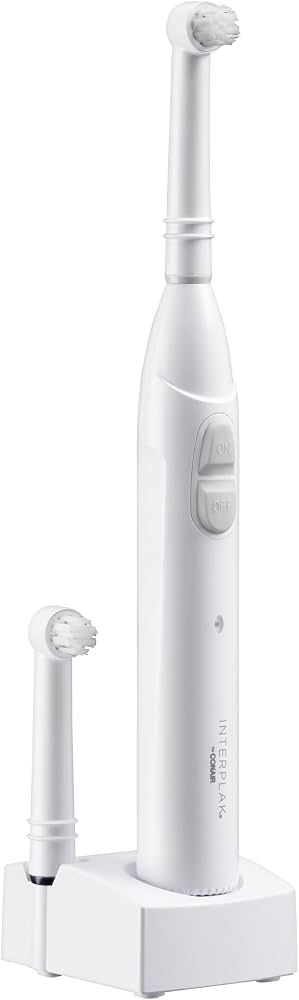
The conair RTGX01 Power Plaque Remover is a rechargeable cordless electric toothbrush designed to help improve daily oral hygiene with more effective plaque removal than a standard manual brush. Built for convenience and consistent performance, it combines a compact form factor with a rotating brush head that helps clean teeth, polish surfaces, and support gum care. This makes it a practical choice for users who want a simple, travel-friendly dental care device without the complexity of premium smart toothbrush features.
The RTGX01 is especially appealing to budget-conscious shoppers, families needing a dependable everyday toothbrush, and users who prefer an easy-to-use charging base instead of disposable batteries. Its lightweight design and straightforward operation make it suitable for beginners, teens, and adults who want a low-maintenance oral care solution. The included rechargeable NiMH battery also reduces the need for frequent replacements, adding long-term convenience.
In terms of value, the estimated price range is typically in the budget-to-midrange category, often found around $15 to $30 depending on seller availability and condition. Availability may vary because this is a long-running model that can appear through online marketplaces, legacy inventory, and replacement-part sellers rather than mainstream retail shelves. For shoppers looking for a classic powered plaque remover with simple controls and reliable daily use, the RTGX01 remains a practical option.
Specifications
- Model: Conair RTGX01 Power Plaque Remover
- Type: Cordless rechargeable electric toothbrush / plaque remover
- Power: 3W
- Voltage: 120 VAC
- Frequency: 60 Hz
- Battery: Nickel metal hydride rechargeable AAA battery, 1.2V, 450 mAh
- Weight: 230 grams
- Brush Head Style: Oscillating rotating head for plaque removal
- Charging Method: Compact base charger
- Portability: Lightweight and travel-friendly design
- Maintenance: Replaceable brush heads
The RTGX01 focuses on essential cleaning performance rather than premium extras such as Bluetooth tracking or multiple cleaning modes. Compared with newer sonic toothbrushes, it offers a simpler user experience and a lower purchase cost, though with fewer advanced features. Relative to basic manual toothbrushes, it provides powered brushing action and more consistent plaque cleaning support, making it a strong entry-level choice for everyday oral care.
Setup Guide
Setting up the conair RTGX01 Power Plaque Remover is straightforward. Start by placing the charging base on a dry, stable surface near a wall outlet. Insert the toothbrush handle into the base and allow it to charge fully before first use. A full initial charge helps support battery performance and ensures the brush is ready for daily brushing.
Next, attach the brush head securely to the handle. If your unit includes multiple heads, choose the one that feels most comfortable for regular use. Turn the brush on using the main control and test it briefly to confirm the head is seated correctly. Use light pressure when brushing, letting the rotating motion do most of the work.
For best results, keep the charging contacts dry and avoid overexposing the unit to water. Do not submerge the handle or charger base. If the brush does not power on, verify that it is properly seated in the charger and that the outlet is working. If performance feels weak, recharge the battery fully before troubleshooting further. Always read the safety instructions carefully and keep the device away from children during charging.
Troubleshooting
Common issues with the RTGX01 are usually easy to resolve. If the brush will not turn on, check whether the battery needs charging or whether the handle is making proper contact with the base. If the brush head feels loose or uneven, remove it and reinstall it firmly. If vibration or rotation seems weak, clean the brush head connection and allow the unit to recharge completely.
This model does not typically use digital error codes, so most problems are indicated by performance changes rather than display alerts. If the charger becomes warm during use, unplug it and let it cool before reconnecting. If you notice unusual noise, inspect the brush head for wear and replace it if necessary.
Preventive care helps extend product life. Rinse and dry the brush head after each use, keep the charging base clean, and avoid dropping the handle. For warranty support, check the retailer or manufacturer documentation included with the device. If replacement parts or service are needed, contact Conair customer support through its official support channels or the seller from whom the brush was purchased.
Pros and Cons
Pros
- Simple, easy-to-use design that works well for daily brushing
- Rechargeable battery reduces the need for disposable replacements
- Compact and lightweight, making it easy to store or travel with
- Effective plaque-removal performance for an entry-level powered toothbrush
- Good value for money compared with many premium electric toothbrushes
Cons
- Lacks modern features such as multiple modes, timers, or smart connectivity
- Older model, so availability of replacement heads may vary
- Not as advanced as sonic toothbrush alternatives with higher brushing speeds
- Battery and charging system are basic compared with newer premium devices
For buyers comparing the RTGX01 to newer oscillating or sonic brushes, the biggest advantage is simplicity and affordability. It is a solid option for users who want dependable cleaning without paying for advanced digital features. For those seeking premium pressure sensors, app support, or multiple cleaning programs, a newer alternative may offer better long-term flexibility.
Customer Reviews
Customer feedback for the conair RTGX01 Power Plaque Remover is generally positive, with many users rating it around 4 out of 5 stars for reliability and ease of use. Buyers often praise its compact design, comfortable handling, and the noticeable clean-feeling result after brushing. One common comment is that it works well as a straightforward daily toothbrush for people who prefer simple controls.
Frequent complaints usually focus on the lack of advanced features and the age of the model, which can make replacement parts harder to find. Some users also mention that battery life and charging performance depend heavily on how well the brush is maintained. For shoppers looking for an affordable, no-fuss electric toothbrush, it is often recommended as a practical value buy.
Frequently Asked Questions
How do you use the Conair RTGX01 Power Plaque Remover?
Attach the brush head, charge the unit fully, apply toothpaste, and guide the brush gently along each tooth surface without pressing too hard.
Is the RTGX01 good for travel?
Yes. Its lightweight body and compact charging design make it suitable for travel, especially for users who want a rechargeable toothbrush with minimal bulk.
Does it have multiple cleaning modes?
No advanced mode selection is typically associated with this model. It is designed for simple powered brushing and plaque removal.
Is the Conair RTGX01 worth buying?
It is worth considering if you want an affordable rechargeable plaque remover with dependable everyday cleaning and do not need premium smart features.
Faqs
How do I set up the Conair RTGX01 Power Plaque Remover for first-time use?
What should I do if my Conair RTGX01 Power Plaque Remover is not turning on?
How do I know if the brush head is installed correctly on the Conair RTGX01 Power Plaque Remover?
Is the Conair RTGX01 Power Plaque Remover compatible with replacement brush heads?
How should I use the Conair RTGX01 Power Plaque Remover for better plaque removal?
Why does my Conair RTGX01 Power Plaque Remover feel weak or lose power quickly?
How do I clean and maintain the Conair RTGX01 Power Plaque Remover after use?
How often should I replace the brush head on the Conair RTGX01 Power Plaque Remover?
More conair manuals
Leave a Comment