
Setup & Pairing: Csasan V90 True Wireless Stereo Earphones User Manual
Content
Csasan V90 True Wireless Stereo Earphones
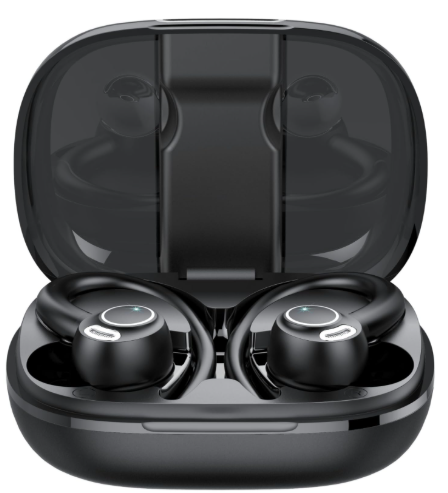
Introduction
The Csasan V90 True Wireless Stereo Earphones are designed for music lovers, sports enthusiasts, and anyone seeking premium audio performance in a compact, durable package. Featuring Bluetooth 5.3 technology, these earphones deliver seamless connectivity, crystal-clear sound, and a secure fit for active lifestyles. With an ergonomic over-ear design and IPX7 waterproof rating, the Csasan V90 earbuds are built to withstand sweat, rain, and splashes, making them ideal for workouts, outdoor activities, and daily commutes.
Equipped with a 14.2mm diaphragm speaker driver and CVC 8.0 noise cancellation, the Csasan V90 True Wireless Stereo Earphones provide immersive 3D stereo sound and clear voice calls. The smart touch controls allow for easy music and call management, while the long battery life ensures uninterrupted listening. These earbuds are compatible with a wide range of devices and offer a comfortable fit with multiple ear tip sizes included.
Available for purchase online and in select electronics stores, the Csasan V90 True Wireless Stereo Earphones typically retail between $40 and $60, offering excellent value for their advanced features and robust build quality.
Specifications of the Csasan V90 True Wireless Stereo Earphones
- Bluetooth Version: 5.3 for stable, fast, and low-latency wireless connectivity
- Audio Codecs: SBC, AAC for high-quality sound reproduction
- Driver Size: 14.2mm diaphragm speaker for powerful bass and crisp highs
- Noise Cancellation: CVC 8.0 for clear calls and reduced ambient noise
- Water Resistance: IPX7 rating, sweatproof,, and splashproof
- Battery Life: Up to 8 hours per charge (earbuds), up to 48 hours total with charging case
- Charging Time: Approximately 1.5 hours for both earbuds and the case
- Charging Port: USB-C for fast and convenient charging
- Transmission Range: Up to 10 meters (33 feet) without obstacles
- Smart Controls: Touch-sensitive controls for play/pause, track navigation, volume, and call management
- Compatibility: Works with iOS, Android, and other Bluetooth-enabled devices
- Ear Tip Sizes: Three sizes included for a secure and comfortable fit
The Csasan V90 True Wireless Stereo Earphones stand out with their advanced Bluetooth 5.3 chip, superior noise cancellation, and long battery life, making them a strong competitor to other mid-range wireless earbuds in the market.
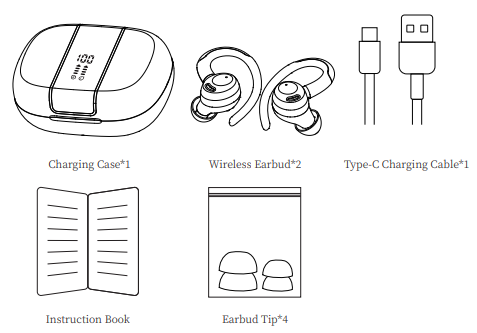
Introduction
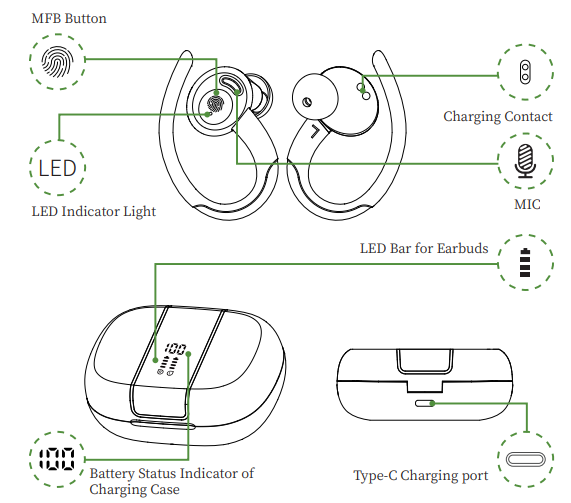
Pair two headphones with my phone.
- Please make sure both the earbuds and the charging case are fully charged before first use.
Step
Take both earbuds out of the charging case,e and both earbuds will power on and start pairing automatically.[If the earbuds are not connected to your device for more than 5 minutes, the earbuds will automatically turn off. Press the MFB button for about 3 seconds to manually turn on the earbuds when prompted "Power on".
- One earbud will flash a white light, while the other earbud will flash a white light every three seconds, indicating that the wireless earphones have completed pairing.
Step
Enable the Bluetooth pairing mode on your phone device, searcfor h and select "V90" to connect. (You should hear a voice prompt "Connected" when wearing earbuds).
- If the indicator light of the earbud is off, it means the phone is connected.
Automatic connection
- By default, the earbuds will connect to the last paired phone automatically when powered on.
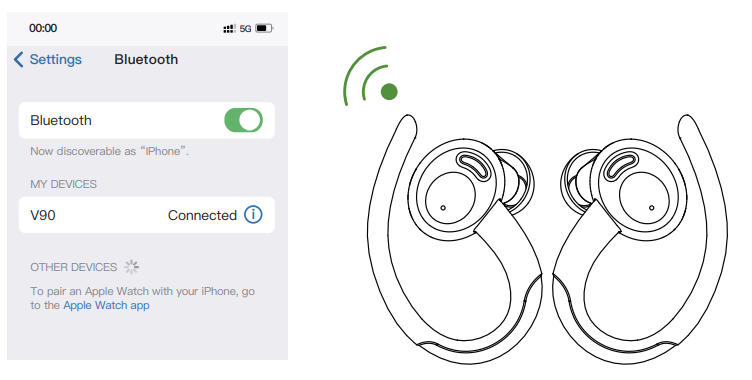
Prompt
- If you have any problem pairing the two earbuds with your phone, put the earbuds back in the charging case and repeat the above steps.
- These earbuds can be used not only together, but also individually. If you want to use a single earbud, just take one earbud out of the case and connect it to your phone. Or when using two earbuds, manually turn off one earbud or put one back in the charging case , and you'll be able to use the other one earbud alone.
Charging
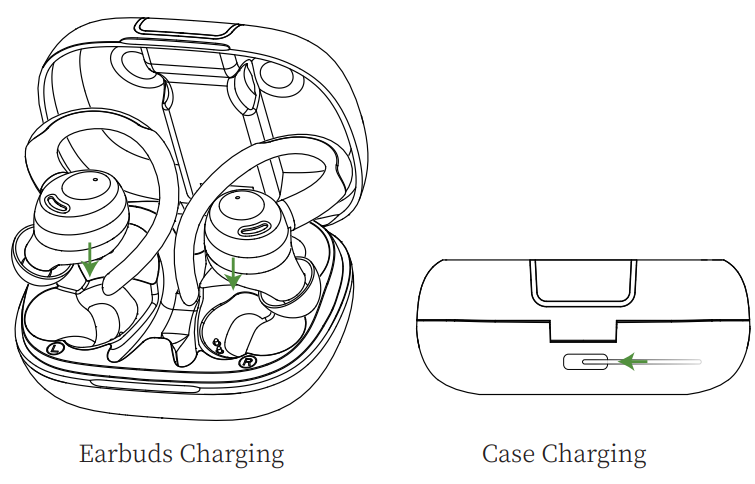
Earbuds Charging
- The earbuds will only be charged when you place them in the charging slots correctly. (You can charge the charging case and the earbuds at the same time, or you can charge the charging case first and then the earbuds.
- The indicator light will show white when charging.
- The charging case will stop charging automatically,y and the indicator light on the earbuds will go out when fully charged.
- When the earbuds are charging in the charging case, the digital display bar of the case will keep blinking and turn off when the earphones are fully charged.
Case Charging
There is a Type-C USB charging cable in the package. Please use it to charge the case directly. During charging, the digital display will flash and display the battery level in real time. When fully charged, the number shows 100.
Charging Alerts
- After using it for a long period of time, due to the oxidation of the magnet connector, the earbuds might not be charged or even turned on.
- You can fix this pr oblem by cleaning the magnet connectors on the e-ARBUDS and charging case with an alcohol wipe.
- Put the earbuds in the charging case, and the earbuds will turn on immediately,y and the charging case will start to charge automatically.
- The earbuds will connect to the last paired phone automatically.
Storage and Maintenance
- If the earbuds have not been used for more than 3 months, we recommend that you charge them.
- Please use a charger approved by the FCC (Federal Communications Commission).
- Do not disassemble the earbuds.
- Children aged 12 and under require adult supervision.
- Do not expose the earbuds to high or low temperatures, and do not use the earbuds during a thunderstorm.
- Avoid free fall or violent shock to the device. Keep the device away from sources of fire and do not place the device in water.
Activation & Warranty
Permanent replacement of damaged, defective items or missing components. Please activate via email below within 15Troubleshootingg Common Issues with the Csasan V90 True Wireless Stereo Earphone.s
- Earbuds won’t connect: Place both earbuds back in the charging case, remove them, and ensure Bluetooth is enabled on your device. Search for “V” and select to pair.
- No sound or low volume: Check device volume settings, ensure earbuds are fully charged, and clean ear tips if necessary.
- One earbud not working: Place both earbuds in the case, remove them, and try pairing again. If the issue persists, reset the earbuds by holding the MFB button for 5 seconds.
- Connection drops or audio crackles: Move closer to your device, avoid obstacles, and ensure no other Bluetooth devices are interfering.
- Charging issues: Use the provided USB-C cable and ensure the charging port is clean and free of debris.
For persistent issues, consult the user manual or contact Csasan customer support. The Csasan V90 True Wireless Stereo Earphones come with a standard 1-year warranty. For assistance, visit the official Csasan website or contact support via email or phone.
Pros and Cons of the Csasan V90 True Wireless Stereo Earphones
Pros
- Excellent sound quality with deep bass and clear highs
- Secure, comfortable fit with multiple ear tip sizes
- IPX7 waterproof rating for sweat and splash resistance
- Long battery life with fast USB-C charging
- Smart touch controls for easy operation
- Bluetooth 5.3 for stable, low-latency connectivity
- Good value for money compared to similar models
Cons
- Larger earbuds and case size may not suit all users
- No advanced features like app support or EQ customization
- Some users report occasional connection drops in crowded areas
- Volume control is limited to touch taps, not continuous adjustment
The Csasan V90 True Wireless Stereo Earphones offer a balanced mix of performance, durability, and affordability, making them a solid choice for everyday use and active lifestyles.
Customer Reviews of the Csasan V90 True Wireless Stereo Earphones
Customers consistently praise the Csasan V90 True Wireless Stereo Earphones for their comfort, sound quality, and secure fit during workouts. Many users highlight the long battery life and reliable Bluetooth connection, with several noting the earbuds stay in place even during intense exercise. The waterproof design is a popular feature, especially for runners and gym-goers.
Some common complaints include occasional connectivity issues and the lack of advanced features like app support. The average customer rating is 4.5 out of 5 stars, with most reviewers recommending the Csasan V90 True Wireless Stereo Earphones for their value and performance. Frequent mentions include the ease of use, clear calls, and immersive sound experience.
Faqs
How do I set up csasan V90 True Wireless Stereo Earphones for the first time?
Why won’t my csasan V90 True Wireless Stereo Earphones connect to my phone?
Can I use csasan V90 True Wireless Stereo Earphones with only one earbud?
How do I control music and calls on csasan V90 True Wireless Stereo Earphones?
Are csasan V90 True Wireless Stereo Earphones waterproof and suitable for workouts?
How long does the battery last on csasan V90 True Wireless Stereo Earphones?
What should I do if the sound quality on csasan V90 True Wireless Stereo Earphones is poor?
How do I maintain and care for csasan V90 True Wireless Stereo Earphones?
More csasan manuals
Leave a Comment