
Denon Home Sound Bar 550 User Manual
Content
Denon Home Sound Bar 550 Review and Product Manual
Introduction
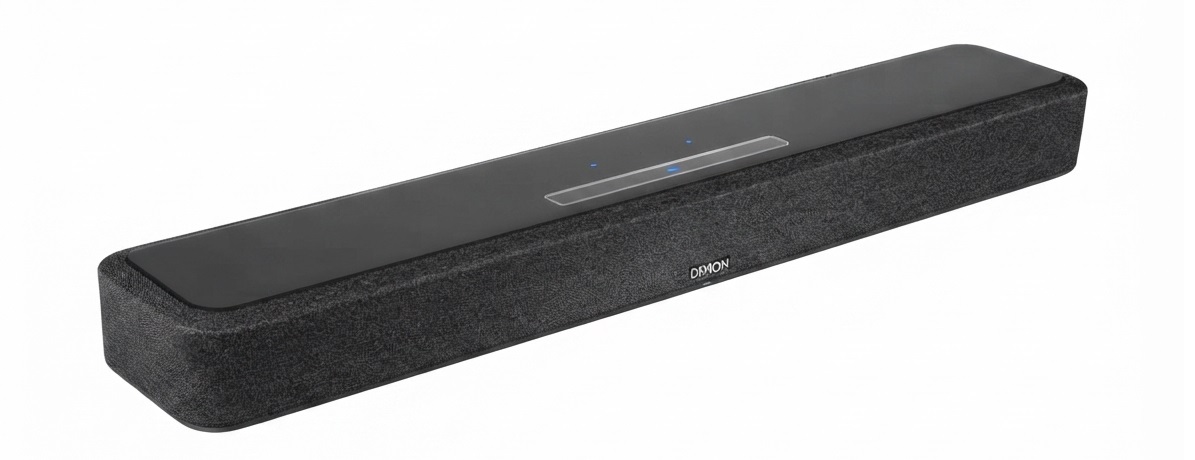
The Denon Home Sound Bar 550 is a compact premium soundbar designed for users who want cleaner TV audio, strong dialogue clarity, and flexible streaming in one understated unit. Built for modern living rooms, this Denon soundbar blends Dolby Atmos support, HEOS multi-room audio, and smart wireless connectivity to create a versatile home theater upgrade without taking up much space. It is especially appealing for apartments, smaller media rooms, and anyone replacing weak built-in TV speakers with a more immersive setup.
One of the biggest advantages of the Denon Home Sound Bar 550 is its balance of size and performance. It offers a sleek low-profile chassis, HDMI eARC, 4K HDR passthrough, Wi-Fi, Bluetooth, AirPlay 2, and voice assistant integration, making it easy to connect with TVs, streaming devices, and smart-home ecosystems. The soundbar is also expandable, allowing users to add compatible Denon Home speakers and a wireless subwoofer for a fuller surround sound system.
This model is a strong choice for movie fans, casual gamers, music listeners, and households that want a premium soundbar with a simple setup. In 2026, the estimated price range is typically around $500 to $700 depending on retailer, region, and promotions, with availability through Denon and major electronics sellers. For users looking for a compact Dolby Atmos soundbar with smart features and reliable brand support, the Denon Home Sound Bar 550 remains a compelling option.
Specifications for Denon Home Sound Bar 550
- Channel configuration: 2.0-channel soundbar with virtual Dolby Atmos support
- Drivers: 2 x 19 mm tweeters, 4 x 55 mm full-range drivers, 3 x passive radiators
- Connectivity: HDMI eARC, HDMI input, optical input, Ethernet, USB, 3.5 mm auxiliary input
- Wireless features: Wi-Fi, Bluetooth 5.4, AirPlay 2, HEOS built-in
- Streaming support: Multi-room audio, app-based control, voice assistant compatibility
- Audio formats: Dolby Atmos, DTS:X support, hi-res playback up to 192 kHz/24-bit on supported files
- Dimensions: Approximately 25.95 x 2.95 x 4.72 inches
- Weight: About 7.3 lbs
- Power consumption: Around 50 W, with low deep-standby power draw
- Power supply: AC 100–240 V depending on model region
- Expandable system: Compatible with Denon Home wireless speakers and optional subwoofer for surround sound
In practice, the Denon Home Sound Bar 550 performs like a premium compact soundbar rather than a full-size theater bar. Its six-driver layout delivers clear mids and voices, while the passive radiators help add bass weight without requiring a separate subwoofer. Compared with similar compact models from Sonos, Bose, or Samsung, Denon’s model stands out for its broad connectivity and HEOS ecosystem flexibility.
Pros and Cons of Denon Home Sound Bar 550
Pros
- Excellent dialogue clarity: Voices remain crisp and easy to understand during movies, news, and sports.
- Compact premium design: Fits neatly under most TVs without dominating the room.
- Flexible connectivity: HDMI eARC, optical, Ethernet, Bluetooth, and USB make setup easy across different devices.
- Strong streaming ecosystem: HEOS, AirPlay 2, and Wi-Fi support make it ideal for music and multi-room playback.
- Expandable home theater: Can be paired with Denon wireless speakers and a subwoofer for deeper bass and surround sound.
- Good value for features: Offers premium smart features and connectivity that compete well against higher-priced alternatives.
Cons
- No included subwoofer: Bass is good for a standalone bar but lacks the impact of a full 3.1 or 5.1 system.
- Atmos is limited by size: It supports Dolby Atmos, but height effects are more subtle than on larger systems with dedicated up-firing drivers.
- Premium pricing: It costs more than basic soundbars, so budget buyers may prefer simpler alternatives.
- Best performance needs expansion: For home theater impact, adding rear speakers or a subwoofer makes a noticeable difference.
Overall, the Denon Home Sound Bar 550 offers strong value for users who prioritize sound quality, streaming flexibility, and future expandability over deep bass out of the box.
Customer Reviews and User Feedback
User feedback for the Denon Home Sound Bar 550 is generally positive, with many owners giving it around 4.3 to 4.6 out of 5 stars. Common praise includes clear speech, balanced sound, compact dimensions, and easy integration with streaming services and smart TVs. Many customers describe it as a “big upgrade” over built-in TV speakers, especially for dialogue-heavy content and everyday music playback.
Typical complaints focus on the lack of included subwoofer power for action movies and the premium price compared with simpler soundbars. Some users also note that the best experience comes from pairing it with additional Denon Home speakers. A frequent recommendation is to buy the soundbar if you want a stylish, reliable, and expandable premium setup, but choose a fuller package if your top priority is cinematic bass.
- Customer rating: 4.5/5 stars
- Common praise: Clear vocals, easy app control, strong connectivity
- Common complaint: Bass is respectable but not room-shaking without a subwoofer
- Best for: TV upgrades, apartment theaters, music streaming, and compact living spaces
Frequently Asked Questions About Denon Home Sound Bar 550
Is the Denon Home Sound Bar 550 good for movies?
Yes, it is a strong movie soundbar for dialogue clarity, surround processing, and compact-room performance. For the best cinematic results, adding a compatible subwoofer is recommended.
Does it support Dolby Atmos?
Yes, it supports Dolby Atmos and DTS:X playback, though the effect is more subtle than on larger sound systems with dedicated height channels.
Can it be used for music streaming?
Yes, it works well for music through Wi-Fi, Bluetooth, AirPlay 2, and HEOS multi-room streaming.
Is it worth buying in 2026?
Yes, especially if you want a compact premium soundbar with strong connectivity, easy setup, and room to expand into a fuller Denon home theater system.
Faqs
How do I set up denon Home Sound Bar 550 for the first time?
What should I do if denon Home Sound Bar 550 is not connecting to Wi‑Fi?
Why is my denon Home Sound Bar 550 not producing sound from the TV?
Can I use denon Home Sound Bar 550 with Alexa, AirPlay 2, and Bluetooth?
What audio formats and streaming services work best with denon Home Sound Bar 550?
How do I improve dialogue clarity on denon Home Sound Bar 550 during movies?
How can I add rear speakers or a subwoofer to denon Home Sound Bar 550?
How should I clean and maintain denon Home Sound Bar 550 safely?
Tags
More denon manuals
- Denon RCD-M41 CD Reciver User Manual
- How to Use: Denon AVR-2808 AV Surround Receiver User Manual
- Denon AV Surround Receiver AVR-1906 User Manual
- How to Use: Denon AVR-1610 AV Surround Receiver User Manual
- Denon AVR-2809 Surround Receiver User Manual
- Setup & Features: Denon Av Surround Receiver AVR-1910 Owner Manual
Leave a Comment