
Dig 710A-XXX Battery Operated Controller User Manual
Content
dig 710A-XXX Battery Operated Controller Overview
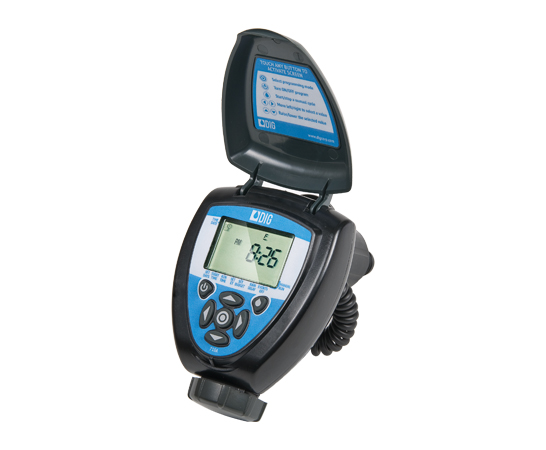
The dig 710A-XXX Battery Operated Controller is a compact, single-station irrigation controller designed for reliable automatic watering without AC power. Built for above-ground or below-grade installations, it is a strong fit for landscape irrigation, remote valve control, greenhouse setups, and sites where hardwired electrical power is unavailable. Its waterproof housing and rugged construction make it suitable for harsh outdoor environments, while its battery-powered design adds flexibility for retrofit projects and new installations alike.
One of the biggest advantages of the dig 710A-XXX Battery Operated Controller is its ease of use. It features an easy-to-read LCD screen, icon-based programming, and simple button controls that help users set schedules quickly. The controller supports weekly or cyclical watering, up to five start times per day, monthly budget adjustment, rain delay, and preset smart programs based on historical ET data. These features make it appealing to homeowners, landscapers, nursery operators, and irrigation professionals who want a dependable battery irrigation timer with advanced control options.
Estimated pricing typically ranges from about $155 to $404 depending on the valve configuration and retailer, with controller-only versions generally costing less than assembled valve models. Availability is generally good through irrigation suppliers and online retailers, especially for common NPT and BSP configurations. For users searching for a battery operated sprinkler controller that balances durability, programming flexibility, and water-saving features, this model remains a practical and competitive option.
Specifications and Key Features of the dig 710A-XXX Battery Operated Controller
- Type: single-station battery operated irrigation controller
- Power source: two AA alkaline batteries, not included
- Battery life: up to three years under typical irrigation use
- Housing: waterproof, rugged, and designed for harsh environments
- Display: large LCD screen with icon-based programming
- Programming: weekly or cyclical scheduling
- Start times: up to five per day
- Water management tools: monthly budget, rain delay up to 99 days, and automatic restart
- Smart watering: 20 preset smart programs using historical ET
- Compliance features: monthly and daily programming restrictions for municipal code support
- Operating pressure range: 10 to 150 PSI
- Temperature range: 38°F to 130°F
- Valve output: constant 11-volt power per valve
- Solenoid: two-way magnetic latching, bi-directional pulse
Available configurations include controller-only and assembled models with 3/4-inch, 1-inch, 1 1/2-inch, or 2-inch inline valves in NPT or BSP formats. Compared with basic battery irrigation timers, the dig 710A-XXX Battery Operated Controller offers more advanced scheduling, better environmental protection, and stronger compatibility with professional-grade valve setups. Compared with solar alternatives, it offers more predictable performance in shaded or low-light locations.
Troubleshooting the dig 710A-XXX Battery Operated Controller
If the controller does not turn on, replace both AA batteries with fresh alkaline batteries and check that they are installed correctly. If the display is dim or intermittent, battery voltage is usually the first issue to test. If watering does not start, confirm that the valve is connected properly, the schedule is active, and any rain delay or seasonal budget settings are not preventing irrigation.
Common issues include no response from the solenoid, failed manual start, or a missed watering cycle after a power-related battery change. There are no widely documented public error codes for the unit, so troubleshooting is typically performed through the display, wiring check, and battery replacement process. If the valve clicks but does not open, inspect the valve diaphragm, solenoid connection, and water pressure. If the controller repeatedly resets, replace the batteries and verify that moisture has not entered the battery compartment.
Preventive care includes replacing batteries before the irrigation season, keeping the enclosure sealed, and checking wiring connections during routine maintenance. Warranty coverage and technical support are usually provided through the manufacturer and authorized sellers. For help, contact DIG technical service at 760-727-0914 during standard weekday business hours or use the support resources listed by the retailer where the controller was purchased.
Pros and Cons of the dig 710A-XXX Battery Operated Controller
Pros
- Battery powered design works where AC power is unavailable
- Waterproof housing supports outdoor and buried installations
- Flexible scheduling with up to five daily start times
- Useful smart watering features, including ET-based preset programs
- Long battery life makes maintenance easier
- Available with multiple valve sizes and connection types
Cons
- Single-station design is less suitable for larger multi-zone systems
- Higher price than some basic battery timers
- Two AA batteries must be monitored and replaced on schedule
- Setup may feel advanced for users who only need simple on/off timing
In value-for-money terms, the dig 710A-XXX Battery Operated Controller is best for users who need professional irrigation control in a remote location. It compares well against cheaper battery timers because it adds weather-based logic, code-friendly restrictions, and stronger valve compatibility. Compared with some smart Wi-Fi irrigation controllers, it is less connected but more practical in places without internet access or line power.
Customer Reviews and User Feedback
Average user sentiment is generally positive, with many buyers rating the controller around 4 to 5 stars for reliability, waterproof construction, and simple programming. Customers often praise the long battery life, easy-to-read display, and dependable performance in outdoor installations. A common testimonial style comment is that it “works exactly as expected for remote irrigation” and “solved the problem of running water to a valve with no power nearby.”
Frequent complaints usually involve the premium price, the need to understand valve compatibility, or confusion during first-time setup. Some users also mention that the single-station design limits expansion. For best results, the dig 710A-XXX Battery Operated Controller is recommended for buyers who need a durable battery irrigation controller for one zone, especially in landscape, nursery, and retrofit applications.
Faqs
How do I set up the dig 710A-XXX Battery Operated Controller for the first time?
Why is my dig 710A-XXX Battery Operated Controller not turning on?
How do I program schedules on the dig 710A-XXX Battery Operated Controller?
What should I check if the dig 710A-XXX Battery Operated Controller is not responding to commands?
Is the dig 710A-XXX Battery Operated Controller compatible with all systems?
How can I improve battery life on the dig 710A-XXX Battery Operated Controller?
What are the most useful features of the dig 710A-XXX Battery Operated Controller?
How do I clean and maintain the dig 710A-XXX Battery Operated Controller safely?
More dig manuals
Leave a Comment