
Dig GQ-AC4 Indoor Mounting AC Irrigation Controller User Manual
Content
dig GQ-AC4 Indoor Mounting AC Irrigation Controller Review and Manual
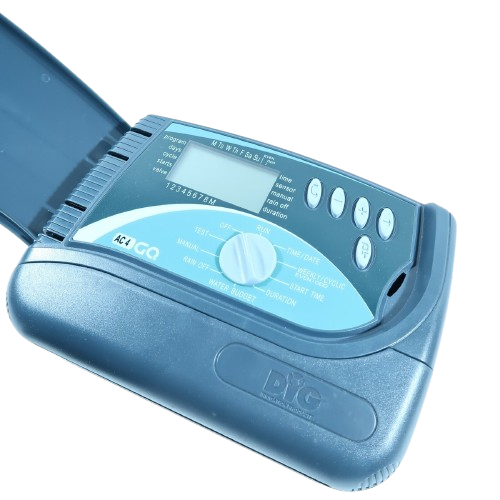
The dig GQ-AC4 Indoor Mounting AC Irrigation Controller is a compact, hardwired sprinkler controller designed for indoor installation in residential and light commercial irrigation systems. It is built for users who want reliable multi-station watering control, easy seasonal programming, and dependable operation with standard 24 VAC irrigation valves. The unit is a strong fit for homeowners, landscapers, and property managers who need a straightforward indoor irrigation timer with flexible scheduling and sensor support.
One of its biggest advantages is its practical feature set. The controller supports multiple watering programs, multiple start times, and minute-based run times, making it easier to fine-tune watering schedules for lawns, shrubs, and mixed landscape zones. It also includes support for rain, freeze, or moisture sensors, which helps reduce water waste and improves irrigation efficiency. A built-in battery backup alert adds peace of mind during power interruptions, while the reset function allows a full controller reset when needed.
The dig GQ-AC4 Indoor Mounting AC Irrigation Controller is commonly used in homes, small gardens, HOA properties, and commercial spaces that require indoor wall mounting near a 120 VAC outlet. Typical pricing generally falls in the budget-to-midrange category, often around $80 to $150 depending on the seller, station count, and availability. It is widely available through irrigation suppliers, online marketplaces, and specialty hardware retailers, though stock may vary by region.
Troubleshooting the dig GQ-AC4 Indoor Mounting AC Irrigation Controller
If the controller does not power on, first confirm that the transformer is plugged into a working 120 VAC outlet and that all valve wiring is secure. If a station fails to water, check for loose wire connections, a damaged solenoid, or a blown valve fuse in the irrigation circuit. When watering times appear incorrect, verify the active program, start times, and run-time settings before assuming the unit is defective.
Common display problems are often resolved with a simple reset. If the controller loses programming after a power issue, replace the 9-volt backup battery and re-enter the schedule. If a sensor prevents watering, inspect the rain, freeze, or moisture sensor wiring and confirm the sensor is not activated. Error codes are not always prominently displayed on every setup, so most issues are handled through manual diagnosis, reset procedures, and wiring checks rather than code-based alerts.
To prevent repeat problems, mount the unit in a dry indoor location, keep wiring organized, and protect all field splices with waterproof connectors. The controller includes a full 3-year warranty, and technical support is available by phone at 800-322-9146 or 760-727-0914 during weekday business hours. Email support is also available at questions@digcorp.com.
Pros and Cons of the dig GQ-AC4 Indoor Mounting AC Irrigation Controller
Pros
- Easy indoor wall mounting with a clean, compact design that fits utility rooms and garages.
- Flexible scheduling with multiple programs and multiple start times for different landscape needs.
- Sensor compatibility improves water conservation and helps prevent unnecessary irrigation.
- Minute-based run times offer precise control for small beds, turf zones, and drip areas.
- Backup battery support helps preserve settings during outages.
- Good value for money for users who need a dependable AC sprinkler controller without advanced smart-home extras.
Cons
- No built-in Wi-Fi or app-based remote control, unlike modern smart irrigation controllers.
- Indoor mounting only, so it is not ideal for outdoor cabinet-free installations.
- Programming is functional but less intuitive than premium touchscreen alternatives.
- Best suited for users comfortable with basic wiring and manual schedule setup.
- Compared with smarter alternatives, it offers fewer automation and weather-based features.
For buyers comparing it with smart controllers, the dig GQ-AC4 Indoor Mounting AC Irrigation Controller is a strong traditional option when reliability and simplicity matter more than connectivity. It is especially appealing for users who want straightforward irrigation control at a reasonable price.
Customer Reviews for the dig GQ-AC4 Indoor Mounting AC Irrigation Controller
Customer feedback is generally positive, with many users rating it around 4 out of 5 stars for reliability and ease of installation. Buyers often praise the controller’s solid build, consistent watering performance, and practical programming options. One common testimonial style response is, “It does exactly what I need and has been dependable for years.”
Frequent complaints usually focus on the lack of smart features and the learning curve for first-time users. Some customers also mention that indoor-only mounting limits placement flexibility. Despite those concerns, many reviewers still recommend it for anyone who wants a dependable irrigation controller for basic to moderate landscape needs.
Overall, the dig GQ-AC4 Indoor Mounting AC Irrigation Controller is a smart purchase for users who prioritize function, durability, and value over app control and automation. It is best for homeowners and property managers who need a straightforward indoor sprinkler timer that performs reliably season after season.
Faqs
How do I set up the dig GQ-AC4 Indoor Mounting AC Irrigation Controller for the first time?
What wiring and power requirements does the dig GQ-AC4 Indoor Mounting AC Irrigation Controller need?
How do I program multiple watering schedules on the dig GQ-AC4 Indoor Mounting AC Irrigation Controller?
Why is my dig GQ-AC4 Indoor Mounting AC Irrigation Controller not turning on a zone?
Can the dig GQ-AC4 Indoor Mounting AC Irrigation Controller work with rain, freeze, or moisture sensors?
What is the best way to test zones on the dig GQ-AC4 Indoor Mounting AC Irrigation Controller?
How do I optimize watering performance on the dig GQ-AC4 Indoor Mounting AC Irrigation Controller?
How should I maintain and care for the dig GQ-AC4 Indoor Mounting AC Irrigation Controller?
Tags
More dig manuals
Leave a Comment