
Setup: Dreo Inverter Portable Air Conditioner DR-HAC001 User Manual
Content
Dreo Inverter Portable Air Conditioner DR-HAC001: Comprehensive Product Manual and Review
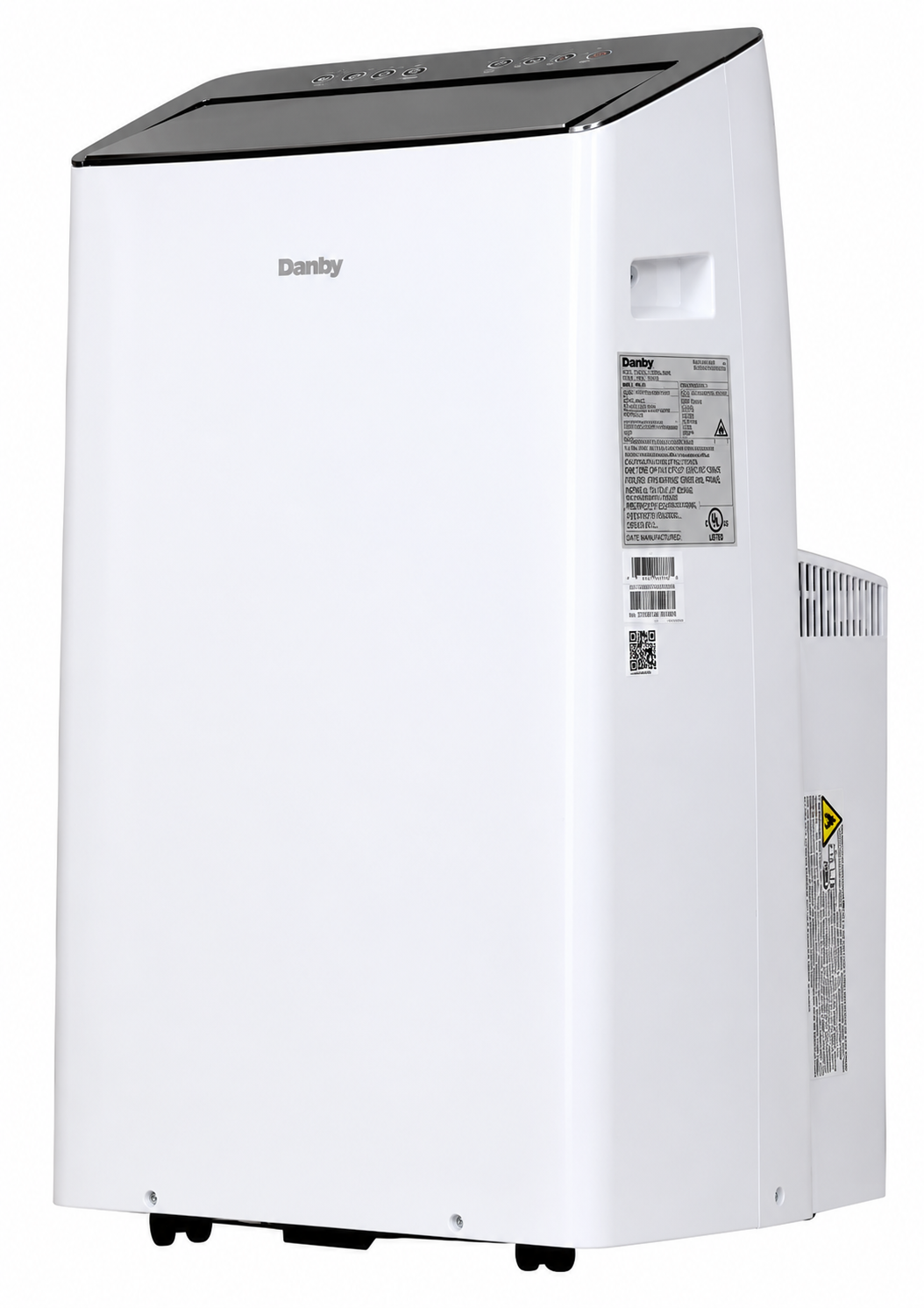
Introduction to Dreo Inverter Portable Air Conditioner DR-HAC001
The Dreo Inverter Portable Air Conditioner DR-HAC001, also known as the Dreo TwinCool 12000 BTU Smart Inverter Portable Air Conditioner, delivers powerful cooling for rooms up to 450 square feet with its dual-hose design and advanced inverter technology. This portable AC stands out for its whisper-quiet operation at just 42dB, making it ideal for bedrooms, home offices, or living spaces where noise matters. Key benefits include rapid cooling, efficient dehumidification, and smart controls via remote, app, or voice assistants like Alexa and Google Assistant.
Unique selling points of the dreo Inverter Portable Air Conditioner DR-HAC001 are its dual-hose system for faster cooling compared to single-hose models, 24-hour timer, sleep mode, and included window mount kit for easy setup. It's perfect for renters, apartment dwellers, or anyone needing flexible climate control without permanent installation. Target audiences include homeowners in hot climates, remote workers seeking quiet comfort, and families wanting energy-efficient cooling solutions.
Versatile use cases range from cooling small apartments during summer heatwaves to dehumidifying basements or serving as a fan in milder weather. With 12000 BTU ASHRAE rating (effective for 350-450 sq ft), it tackles high humidity and temperatures efficiently. Estimated price range is $400-$600, often available on Amazon, Walmart, and Dreo's site, with deals dropping as low as $414 recently. This Dreo Inverter Portable Air Conditioner DR-HAC001 combines convenience, performance, and smart features for all-day comfort.
Detailed Specifications of Dreo Inverter Portable Air Conditioner DR-HAC001
The Dreo Inverter Portable Air Conditioner DR-HAC001 boasts top-tier specs for reliable portable cooling. Here's a breakdown:
- Cooling Capacity: 12000 BTU ASHRAE (up to 450 sq ft coverage; effective 350 sq ft in real-world tests)
- Noise Level: Ultra-quiet 42- 46 dB, quieter than a library whisper
- Hose Design: Dual-hose for superior airflow and faster cooling vs. single-hose competitors like basic Midea or Black+Decker units
- Modes: 3-in-1 (Cool, Fan, Dry/Dehumidify) with Auto, Sleep, and Eco modes
- Smart Controls: Remote control, Dreo app, voice-compatible (Alexa, Google, Siri); 24H timer
- Additional Features: Swing function for air direction, filter reminders, drainage-free in cool/fan modes, window kit included
- Power & Efficiency: Inverter tech for energy savings; dimensions approx. 17x28x15 inches, weight around 65 lbs
- Performance Benchmarks: Cools 450 sq ft rooms quickly, 42dB on low—outperforms similar 12000 BTU units in quietness and speed.
Compared to rivals, it excels in noise and dual-hose efficiency, covering larger areas than 8000 BTU DOE models.
Package Contents
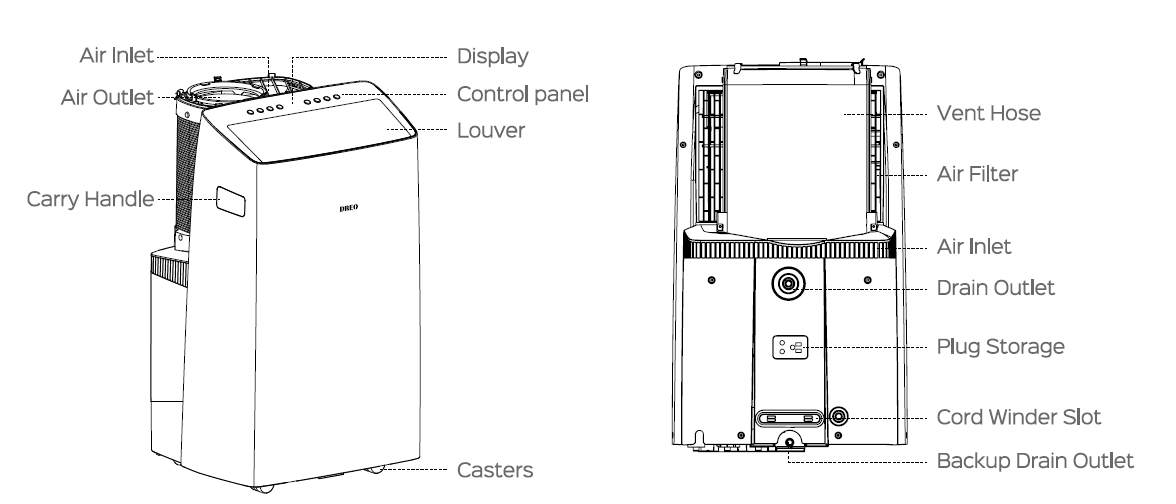
Accessories
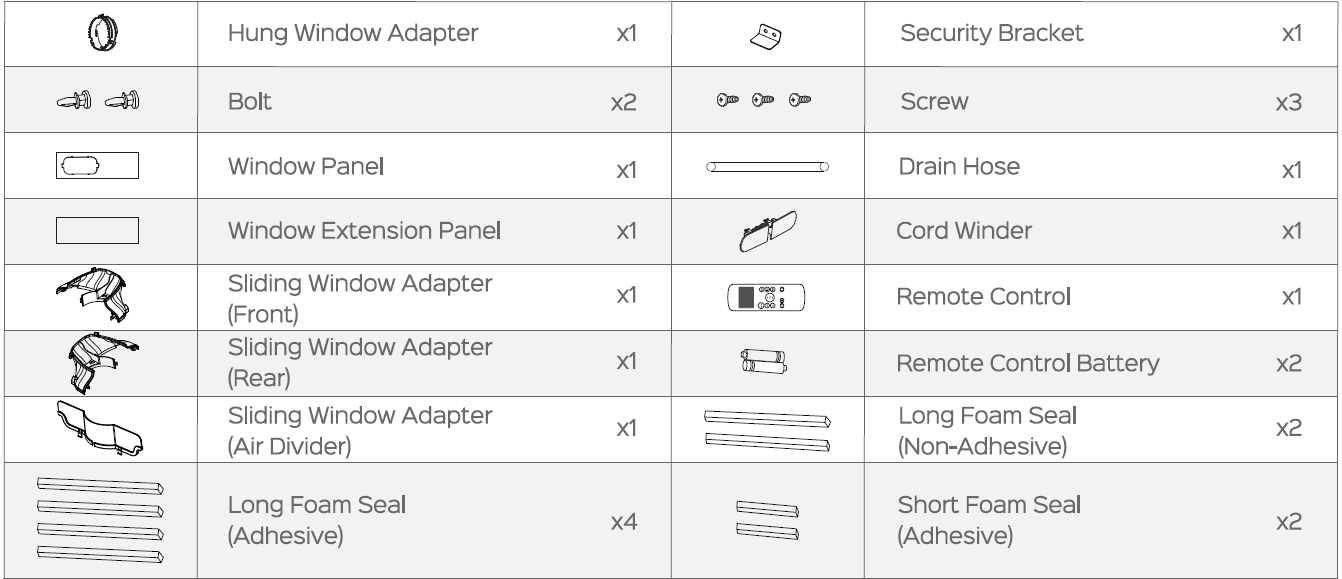
Getting Started
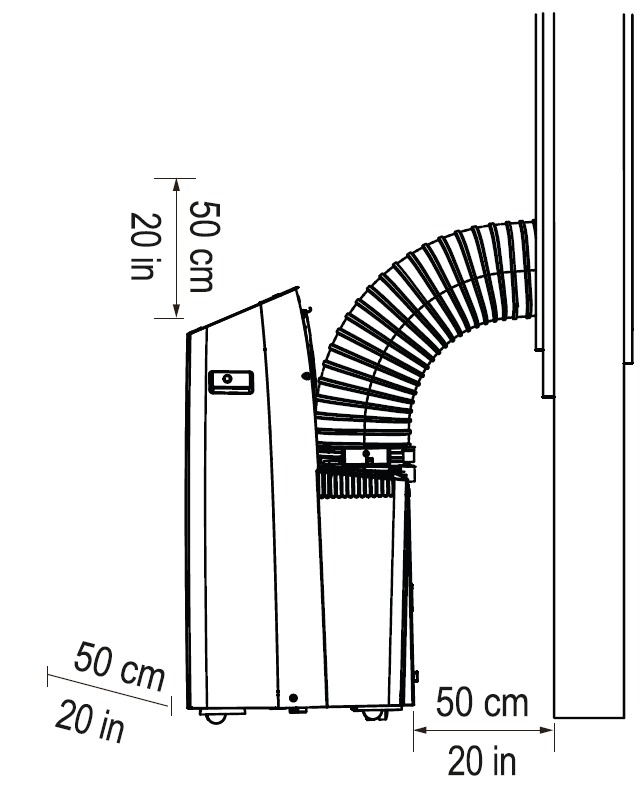
Placing the Air Conditioner
Place on a firm, flat floor close to a window, leaving at least 20 in / 50 cm of space on all sides for proper ventilation.
Preparing the Window Panel
Measure the length of your window. Use the window extension panel if needed.

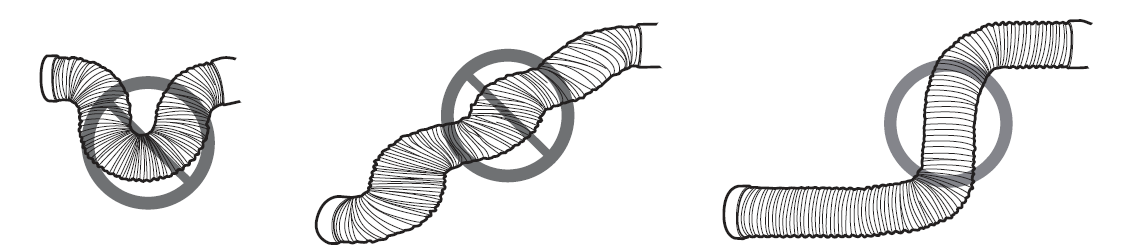
Pulling Out the Vent Hose
Release the vent hose from the lock tab.
Installation
For Hung Window:
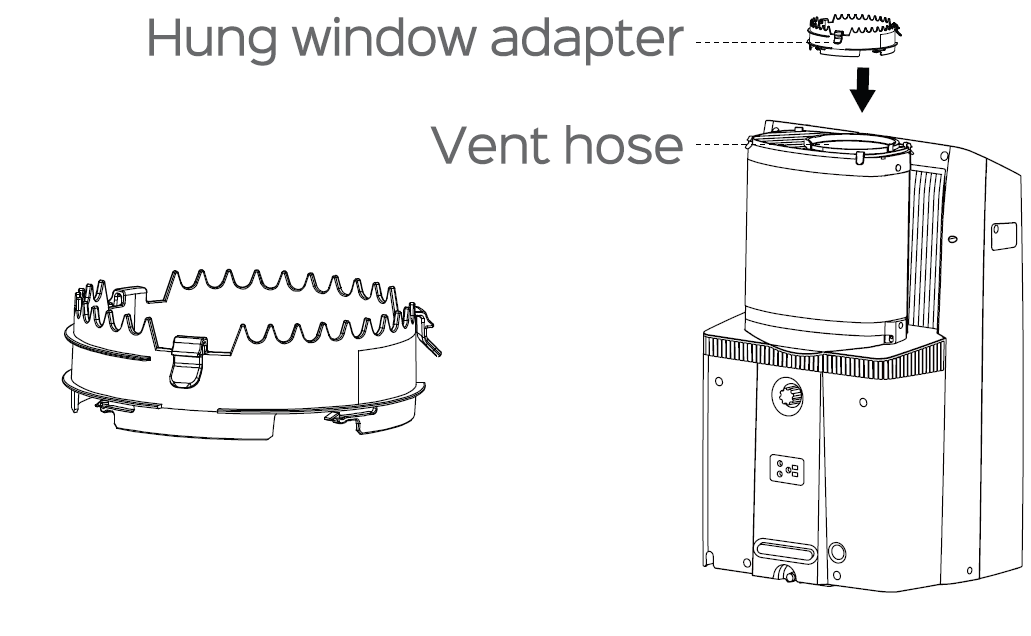
Installing the Hung Window Adapter
Screw the hung window adapter onto the vent hose.
For Sliding Window:
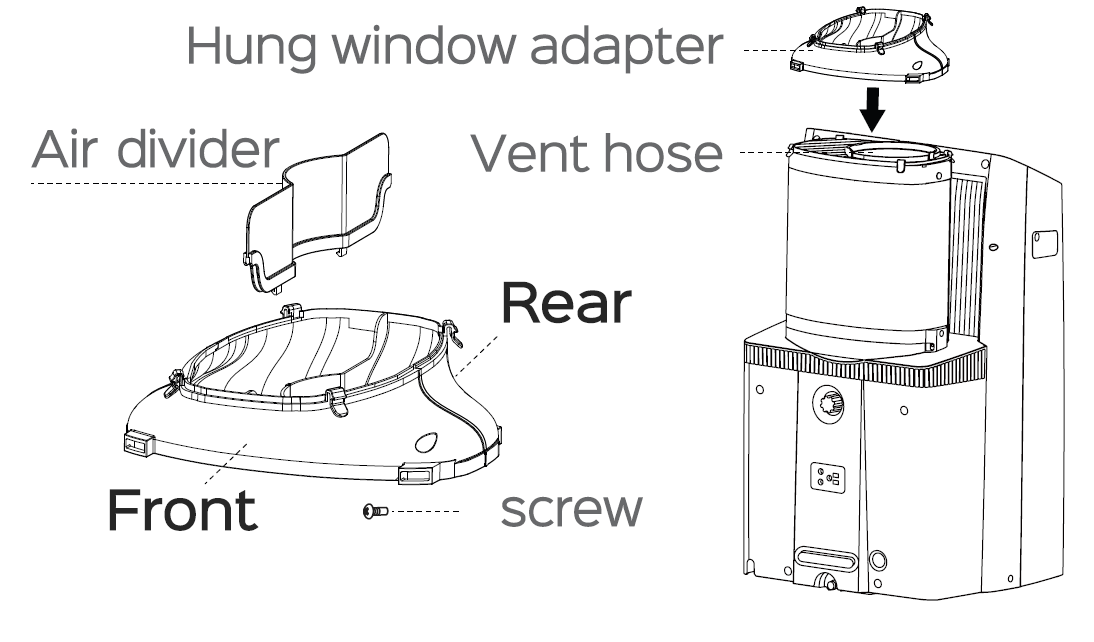
Installing the Sliding Window Adapter
Assemble the sliding window adapter and fasten with a screw, then snap it onto the vent hose.
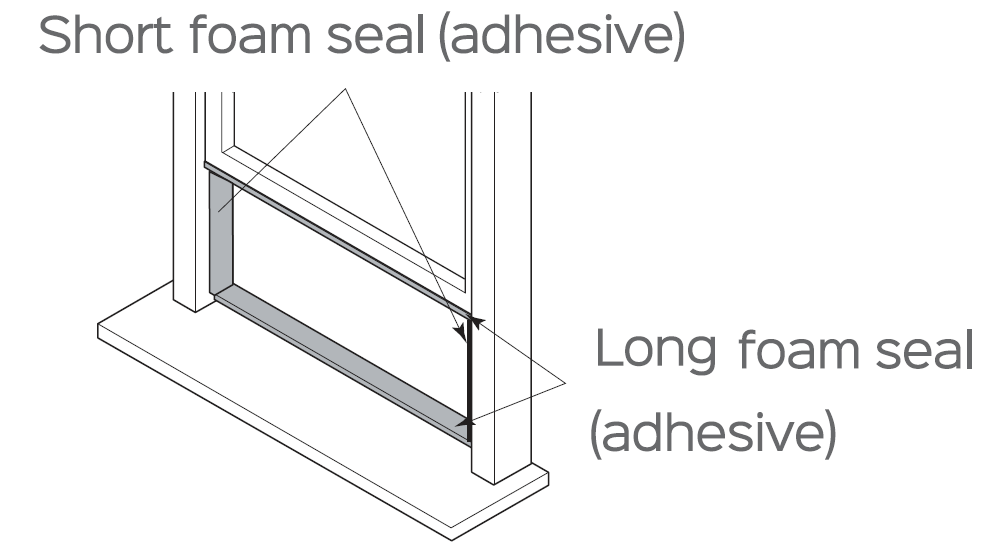
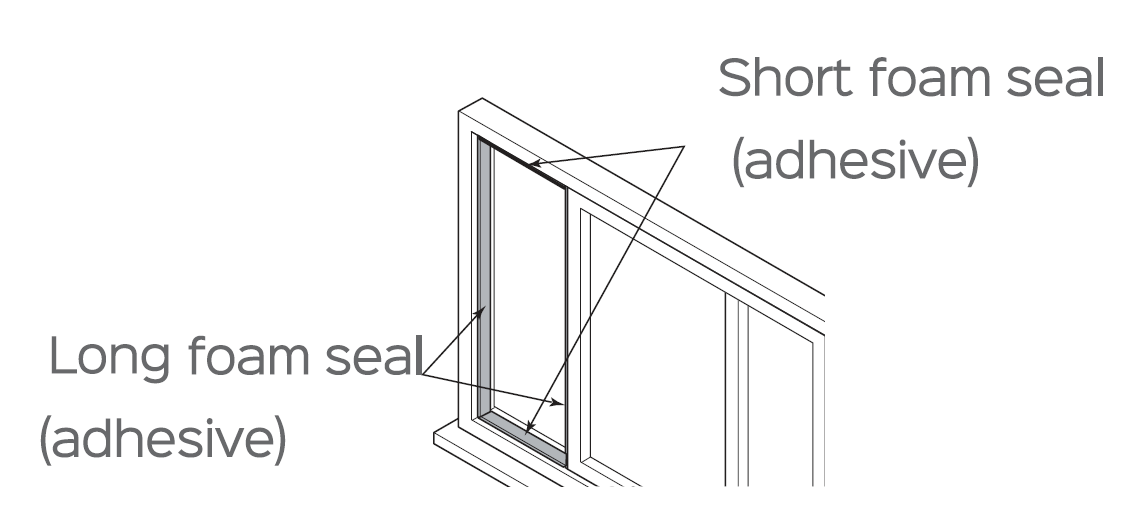
Installing Adhesive Foam Seals
Cut the adhesive foam seals to the proper lengths, peel the back side, and attach them to the window frame and sash as shown.
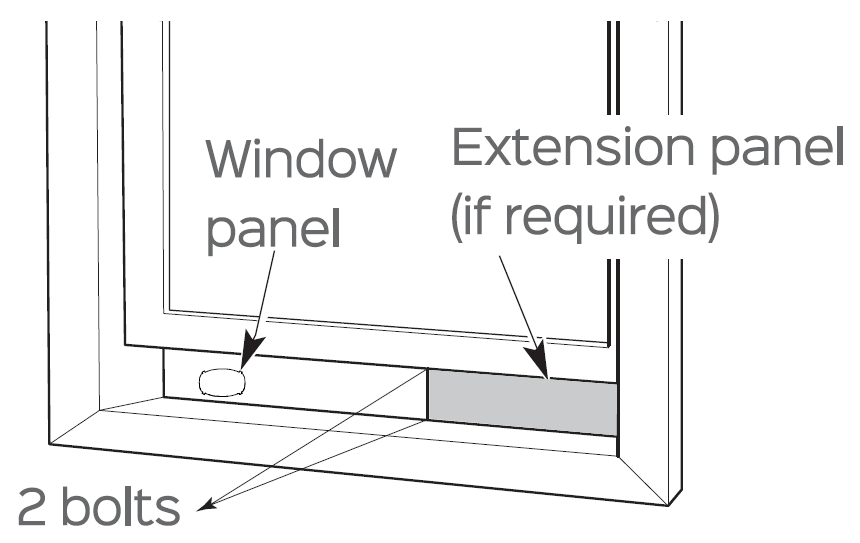
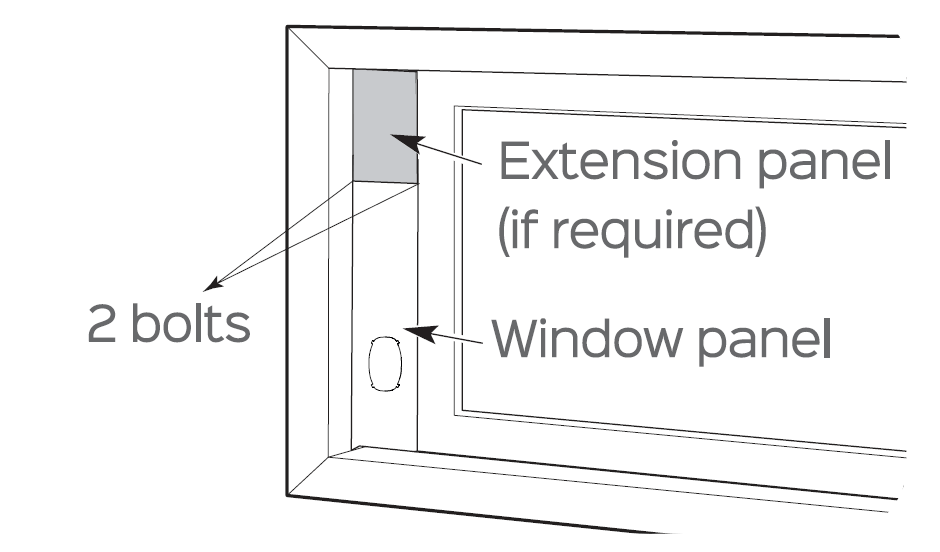
Installing the Panel Assembly
Insert the window panel assembly into the window opening and fasten with two bolts into both sides.
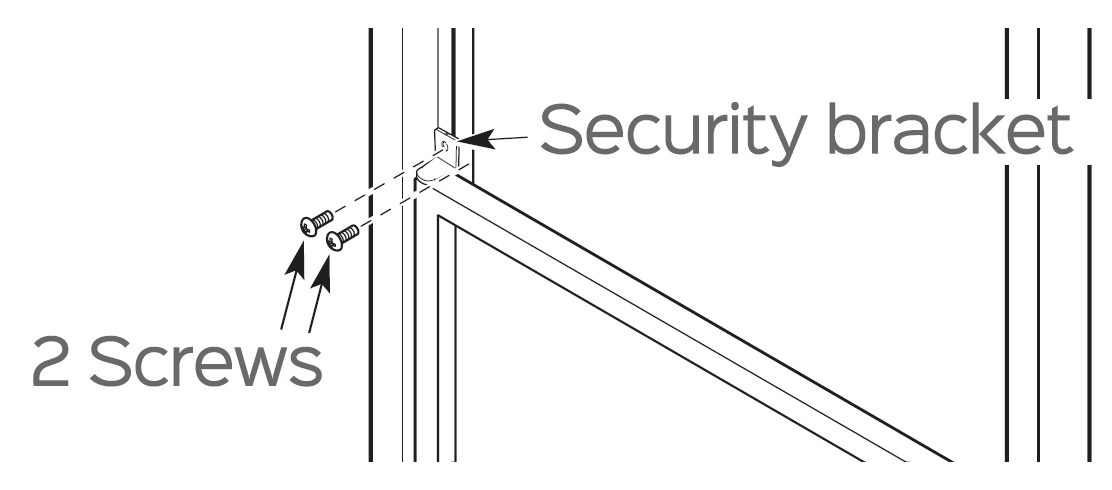
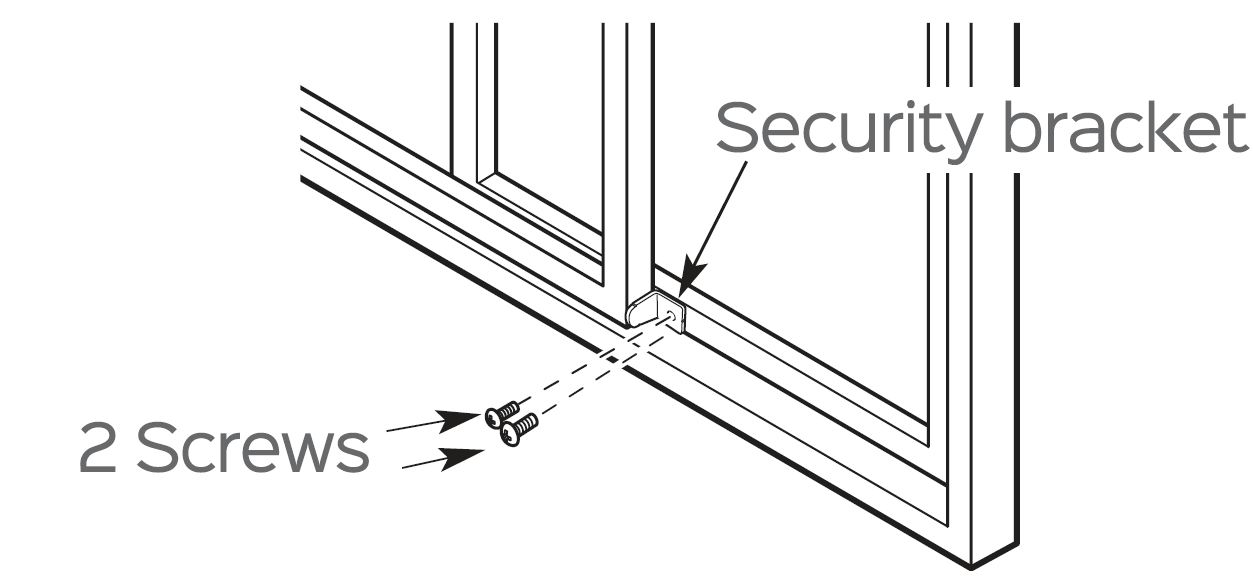
Installing the Security Bracket
Close the window onto the panel assembly and install the security bracket as shown to secure it if desired.
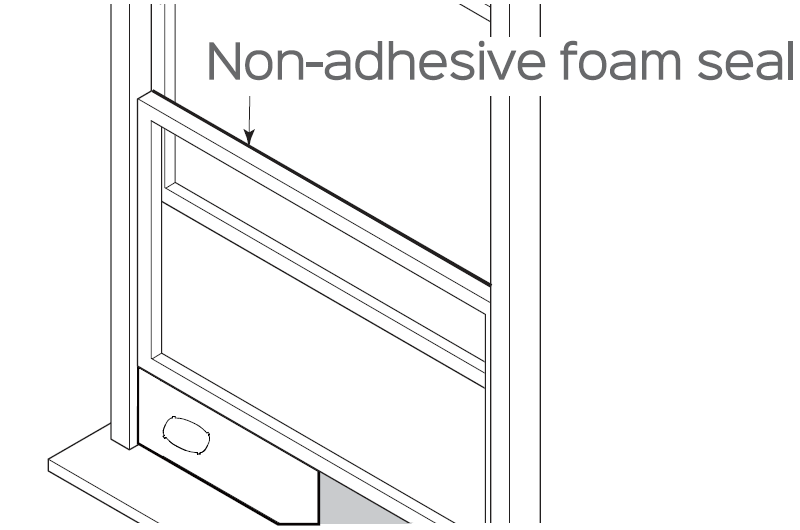
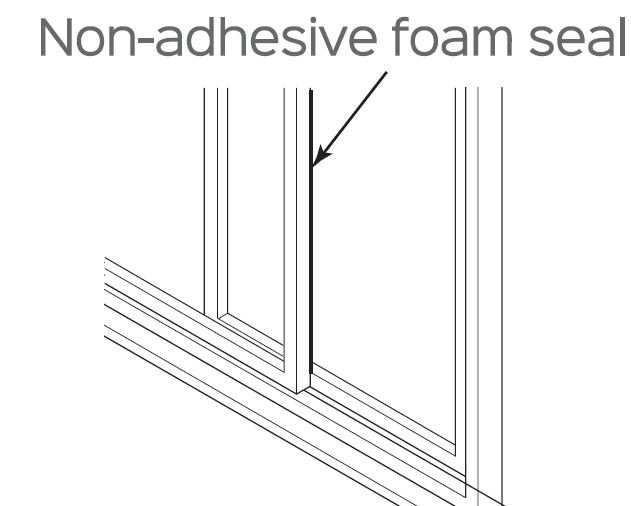
Installing Non-Adhesive Foam Seals
Cut a non-adhesive foam seal to the proper size and seal gaps to prevent air and insects from getting into the room.
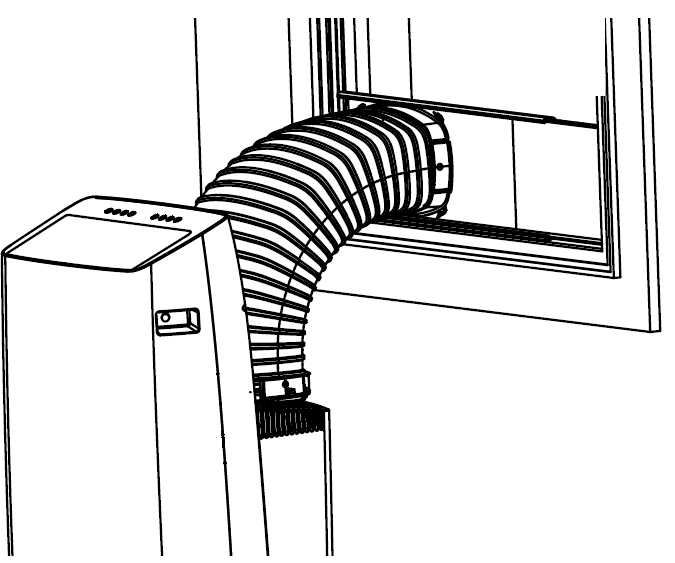
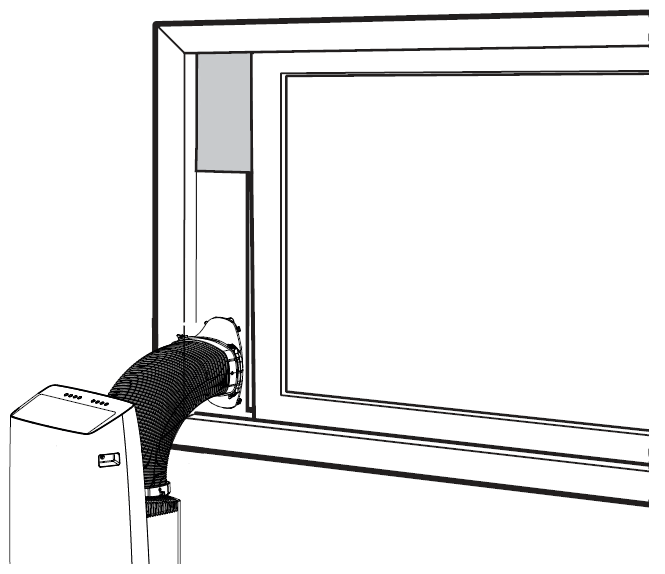
Attaching the Hose to the Window
Attach the vent hose to the cutout on the window panel.
USING YOUR AIR CONDITIONER
Control Panel

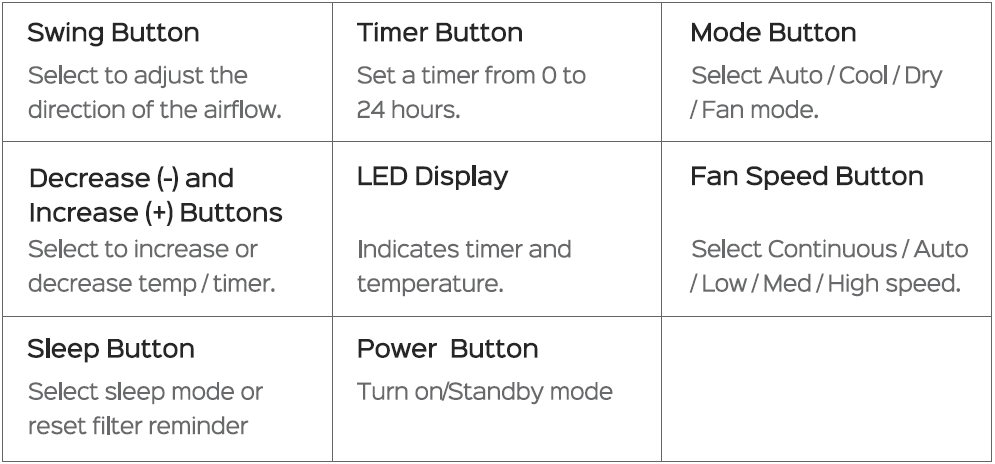
Additional Features
Memory
If the air conditioner is turned off or disconnected from power, it will operate under the previous settings (except the timer setting) when it is turned on again.
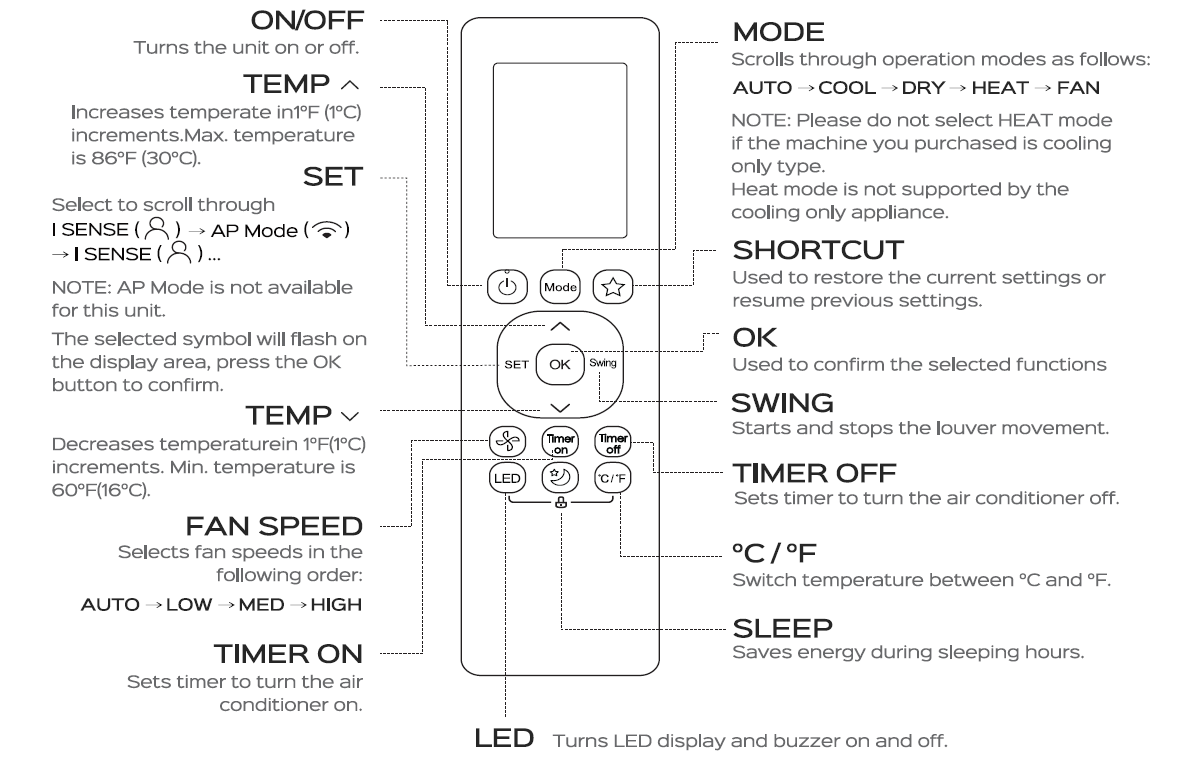
Short Cut
Push this button when the remote controller is on. The system will automatically revert to the previous settings, including operating mode, setting temperature, fan speed level, and sleep feature (if activated). If pressed for more than 2 seconds, the system will automatically restore the current operation settings, including operating mode, set temperature, fan speed level, and sleep feature (if activated).
I Sense
To activate the I Sense feature, point the remote control towards the air conditioner and press the Set button. When the icon R lights up, press Ok to confirm. When I Sense is enabled, the remote control serves as a remote thermostat, allowing for precise temperature control at its location.
Remote Control
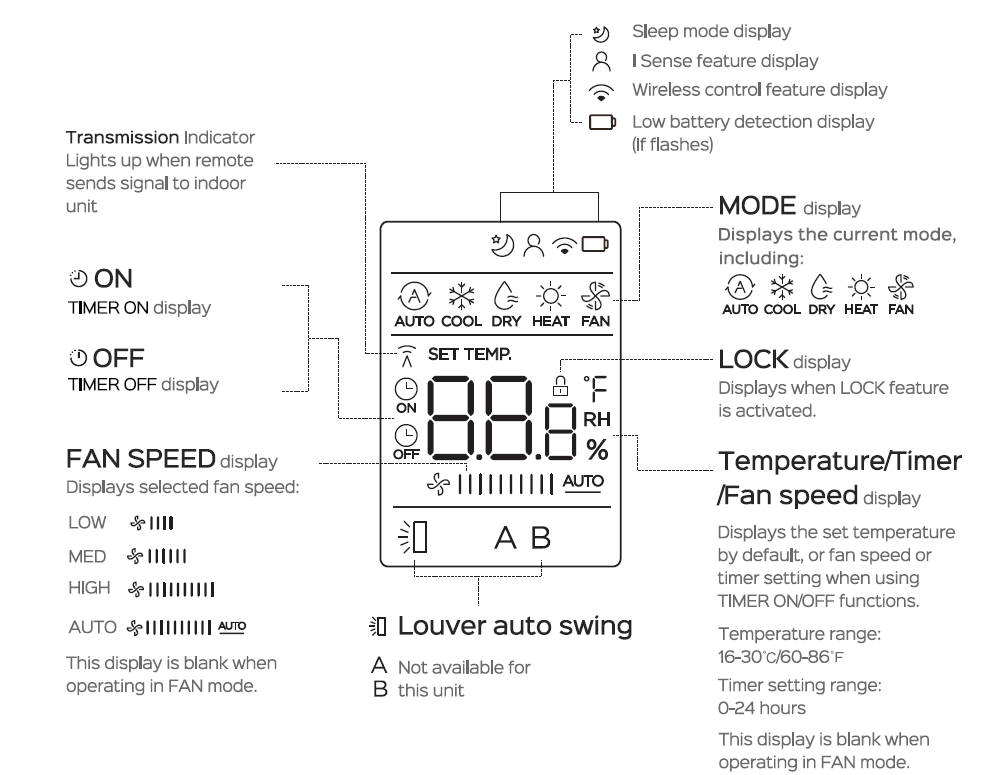
Remote Screen Indicators
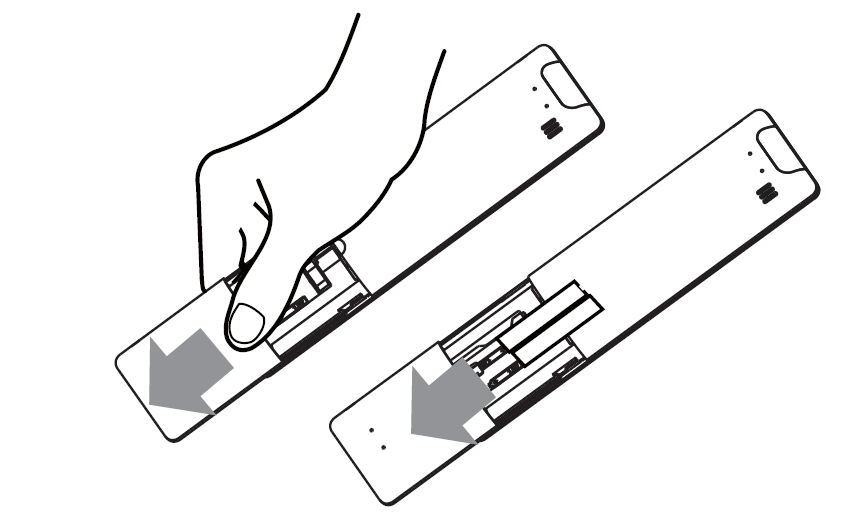
Battery Replacement
Your air conditioner may come with two batteries. Put the batteries in the remote control before use.
- Slide the back cover from the remote control downward, exposing the battery compartment.
- Insert the batteries, paying attention to match up the (+) and (-) ends of the batteries with the symbols inside the battery compartment.
- Slide the battery cover back into place.
Cleaning and Maintenance
- Always unplug the appliance before cleaning or servicing.
- Do not use flammable liquids or chemicals to clean the appliance.
- Do not wash the appliance under running water. Doing so causes electrical danger.
- Do not operate the appliance if the power supply was damaged during cleaning.
- A damaged power cord must be replaced with a new cord from the manufacturer.
Outer Surface Cleaning
Clean the outer surface using a damp, lint-free cloth and mild detergent. Dry the appliance with a dry, lint-free cloth.
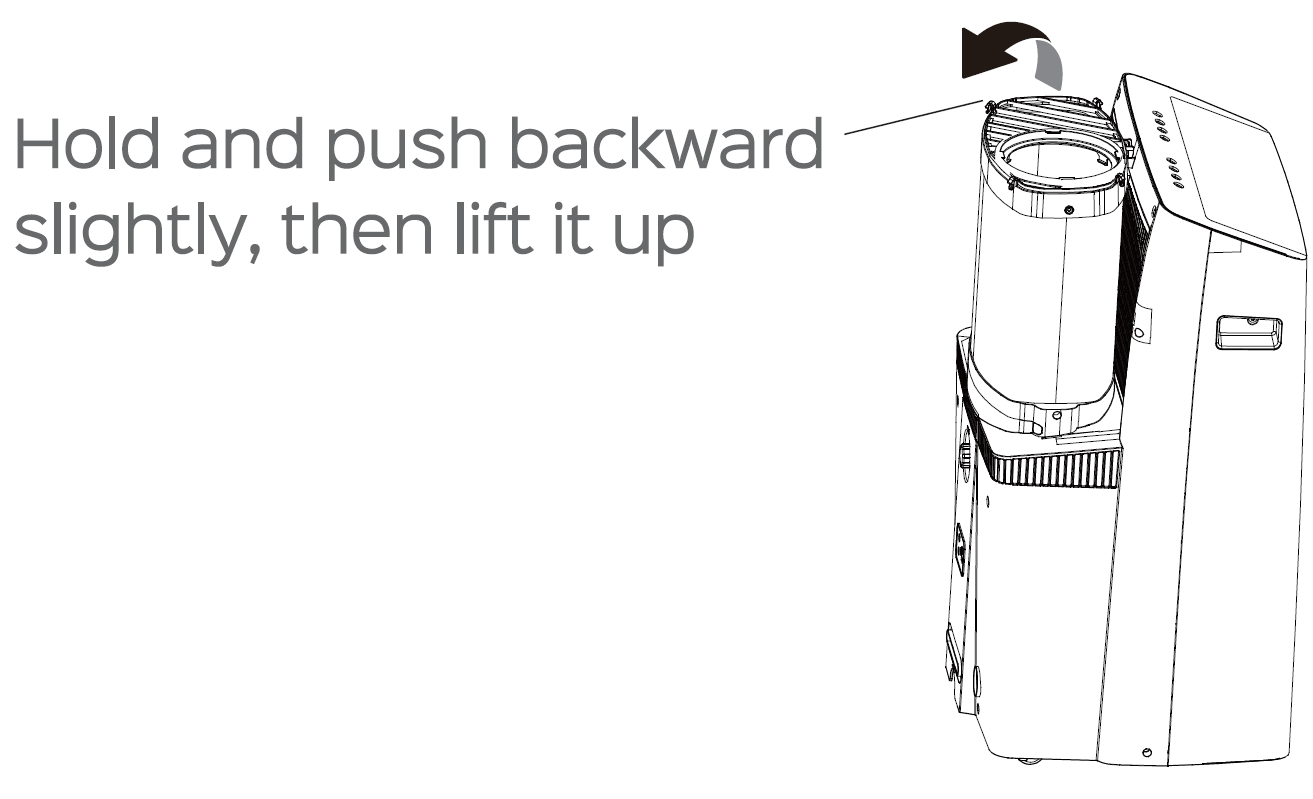
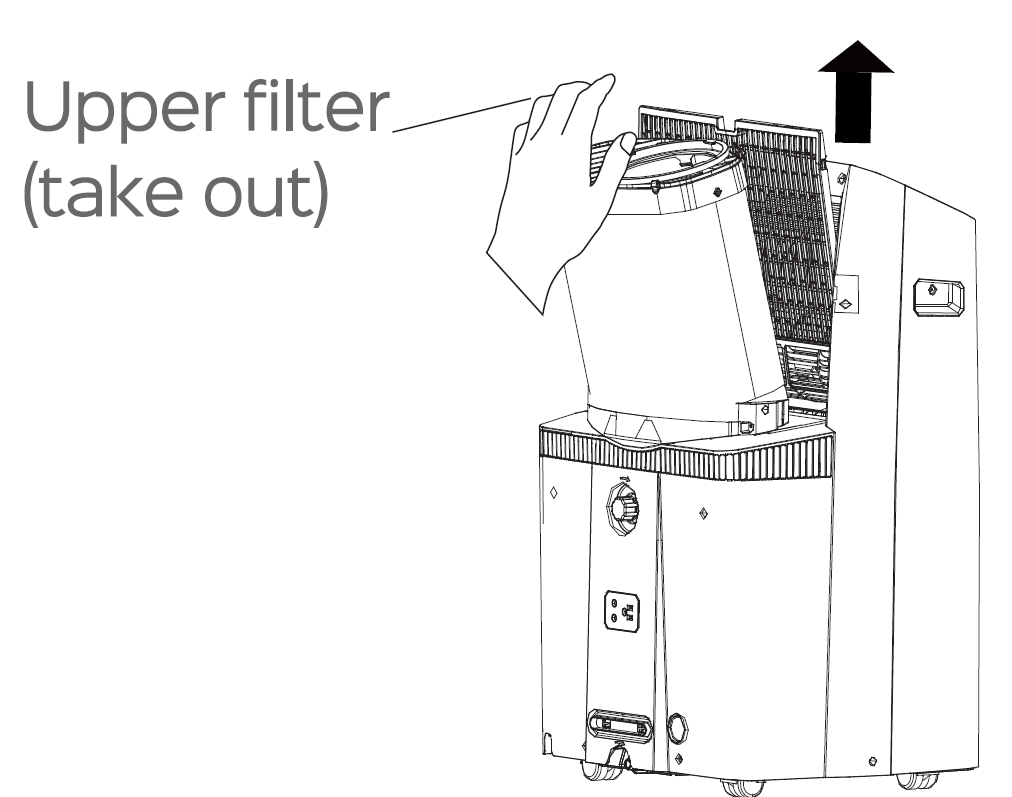
Air Filter Cleaning
- Be sure to clean the air filter every 2 weeks for optimal performance.
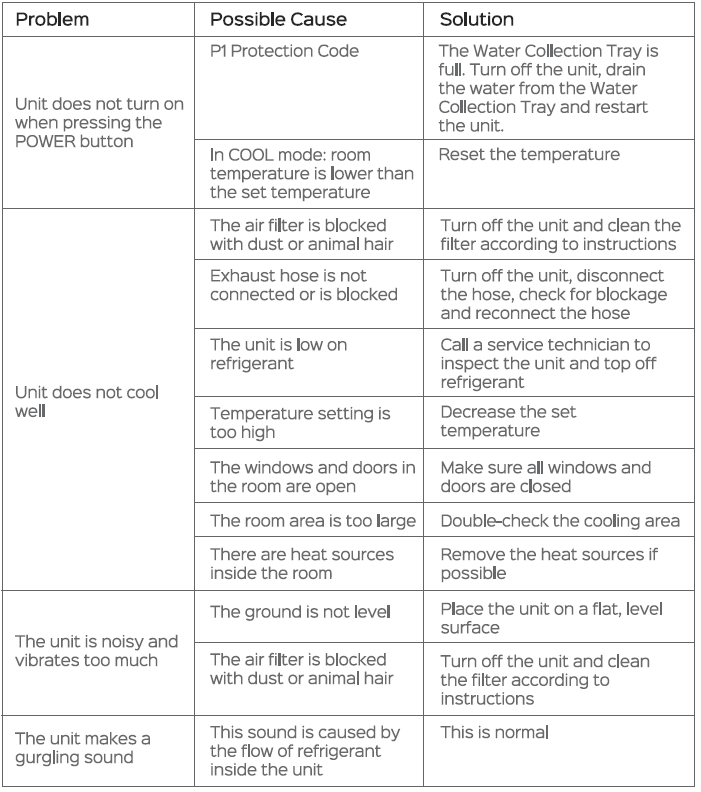
- The water collection tray should be drained immediately after P1 error occurs and before storage to prevent mold.
- In households with animals, you will have to periodically wipe down the grill to prevent blocked airflow due to animal hair.
Troubleshooting
Pros and Cons of Dreo Inverter Portable Air Conditioner DR-HAC001
Pros
- Exceptional quiet operation at 42dB—perfect for nighttime use without disruption.
- Powerful dual-hose cooling covers up to 450 sq ft rapidly, ideal for medium rooms.
- Smart features like app/voice control and 24H timer enhance convenience over basic portables.
- Energy-efficient inverter tech reduces bills; great value at $400-$600 range.
- Easy setup with window kit; multi-mode versatility (cool, fan, dry) adds year-round utility.
Cons
- Heavier at ~65 lbs, requiring two people for window installation.
- Higher upfront cost than single-hose 10000 BTU alternatives, though long-term savings offset this.
- App connectivity may need strong Wi-Fi; occasional filter cleaning required for peak performance.
- Larger footprint suits medium rooms best—not ideal for tiny spaces under 200 sq ft.
Overall, the Dreo Inverter Portable Air Conditioner DR-HAC001 offers superior value for money, outperforming budget options in cooling power and quietness while matching premium smart ACs.
Customer Reviews for Dreo Inverter Portable Air Conditioner DR-HAC001
Users rave about the dreo Inverter Portable Air Conditioner DR-HAC001, with Walmart ratings at 4.7/5 from 102+ reviews and Amazon praise for its performance. Common praises include "super quiet at 42dB" and "cools my 400 sq ft living room fast," with one reviewer noting, “Puts out a lot of cool air—highly recommend for quiet AC needs.”
Testimonials highlight dual-hose efficiency: "Covers 450 sq ft effortlessly" (5 stars), and smart controls: “Love the app and remote—easy to use.” Frequent issues mentioned are initial setup weight and occasional drainage in high-humidity dry mode, but most resolve with proper window sealing. At 4.7 stars average, 90% recommend for hot summers, addressing complaints like noise in competitors effectively. Ideal purchase for reliable portable cooling.
More dreo manuals
- Setup: Dreo Macro Pro True HEPA Air Purifier User Manual
- Setup: Dreo Cool & Warm Mist Humidifier HM717S User Manual
- Setup: Dreo Cordless Stick Vacuum Cleaner DR-HFV001 User Manual
- Setup: Dreo Inverter Window Air Conditioner DR-HAC002 User Manual
- Setup: Dreo Cool & Warm Mist Humidifier DR-HHM003 User Manual
- Setup: Dreo Portable Air Conditioner AC318S User Manual
Leave a Comment