
How to Use: Dyson Omni-glide Vacuum Cleaner User Guide
Content
Dyson Omni-glide Vacuum Cleaner
Introduction
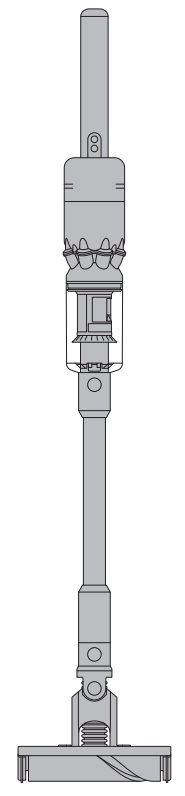
The Dyson Omni-glide Vacuum Cleaner is a revolutionary cordless cleaning device designed specifically for hard floor surfaces. Known as Dyson’s slimmest and most maneuverable vacuum, it features an omnidirectional soft roller cleaner head that effortlessly glides in all directions, including sideways, making it ideal for cleaning tight spaces as small as 8.15 inches wide. This ultra-lightweight vacuum weighs under 5 pounds, making it ergonomically easy to use and perfect for quick pickups between deep cleans.
Key benefits include its compact lie-flat design, advanced Dyson Hyperdymium™ motor spinning at up to 105,000 rpm for powerful suction, and an articulating neck with 360-degree castors that let you easily maneuver around furniture and obstacles. It is particularly suited for homes with hardwood, vinyl, tile, laminate, or other hard surface floors.
The Dyson Omni-glide is targeted at urban dwellers, small apartment owners, and anyone seeking a lightweight, easy-to-store vacuum for daily maintenance and quick cleanups. It retails in the price range of approximately $350 to $450 and is widely available through Dyson’s official website and major retailers.
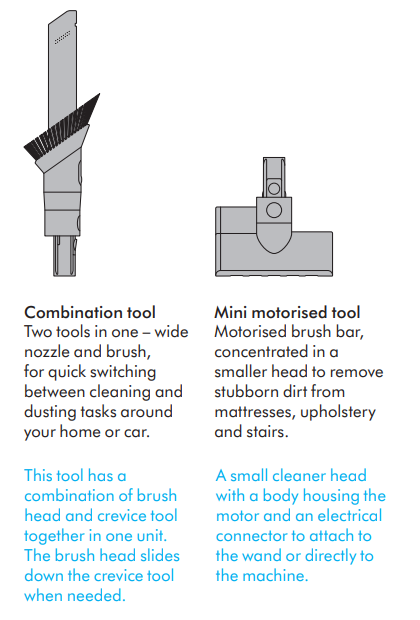
In the box
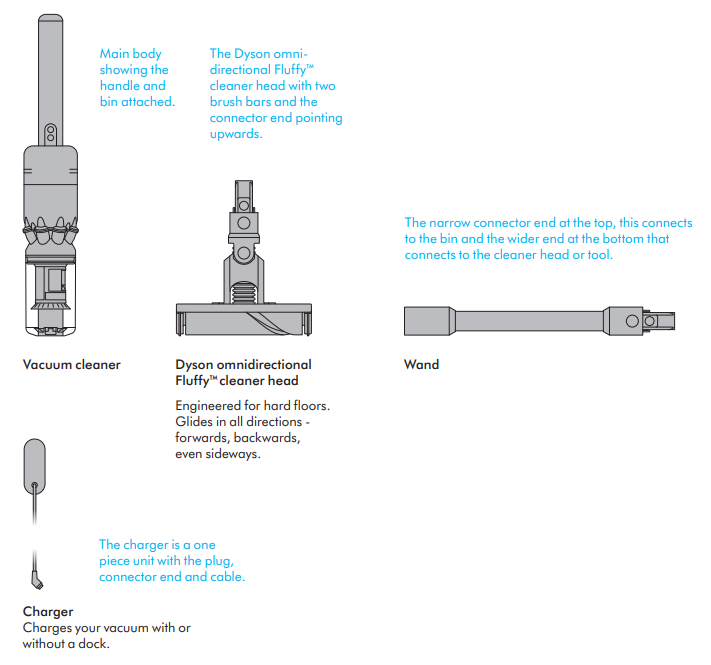
Some tools may not be included.
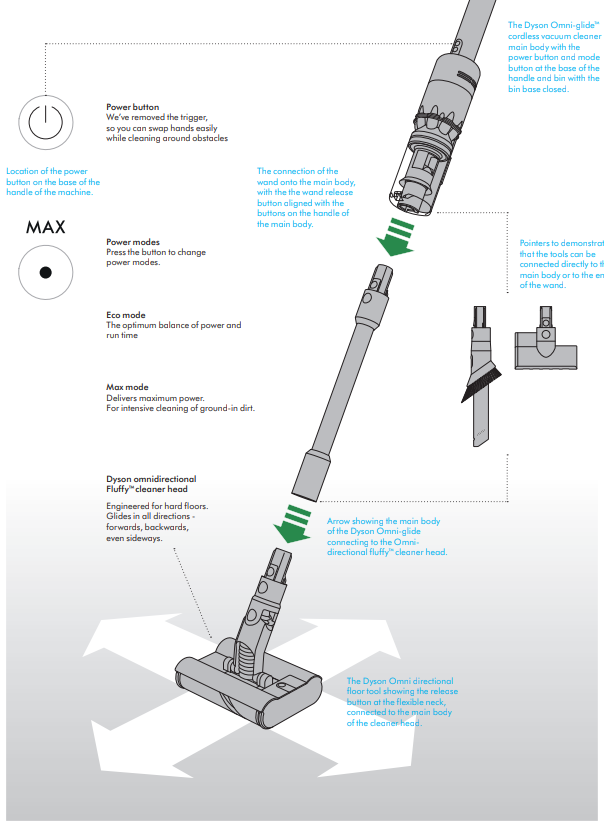
Getting started
Looking after your machine
- To always get the best performance from your machine, it’s important to clean it regularly and check for blockages.
- Look after your machine
- If your machine is dusty, wipe with a damp , lint-free cloth.
- Check for blockages in the cleaner head, tools, and main body of your machine.
- Wash your filter regularly and leave it to dry completely.
- Don’t use detergents or polishes to clean your machine. Look after your battery.
- To get the best performance and life from your battery, use Eco or Med mode.
- Your machine won’t operate or charge if the ambient temperature is below 5°C(41°F). This is designed to protect both the motor and battery.
- Your serial numbers
- You can register your machine using the serial number found on the bottom of your machine.
- You can find your serial numbers on your machine, battery , and charger.
- Use your serial number to register.
Specifications of Dyson Omni-glide Vacuum Cleaner
- Motor: Dyson Hyperdymium™ motor, spins up to 105,000 rpm for strong suction
- Weight: 4.18 lbs (lightweight for easy handling)
- Dimensions: Height 42.4", Width 8.1", Depth 3.6"
- Cleaner Head: Omnidirectional soft roller with dual counter-rotating brush bars for symmetrical pick-up
- Mobility: 360-degree caster wheels and an articulating neck for maneuvering in tight spaces and around obstacles
- Battery: 14.4V rechargeable lithium-ion, approx. Runtime varies by mode, powered by two battery packs for extended use.e
- Filtration: Advanced whole-machine filtration captures microscopic dust particles
- Cleaning Modes: Two modes – regular and max suction for adaptable cleaning power
- Capacity: Dust bin capacity is about 0.05 gallons
- Special Features: Sideways cleaning with 90° head rotation, push-button operation for easy mode switching, compatible with handheld conversion
- Comparison: Less powerful than Dyson V11 or V15 models (max 50 AW suction vs. up to 230 AW), but optimized for hard floors and superior maneuverability in tight spaces where larger vacuums struggle
Troubleshooting Dyson Omni-glide Vacuum Cleaner
- Vacuum won't start: Check if the battery is charged and firmly installed. Try pressing the power button firmly. If still unresponsive, recharge or replace the battery pack.
- Loss of suction: Clean the filter monthly by rinsing under cold water and allowing 24 hours to dry. Empty the dust bin regularly to prevent blockage.
- Brush roll not spinning: Remove the brush bars using the red release button, clean debris, rinse if needed, dry fully before reinstalling.
- Vacuum overheats or shuts off: Clean filters and check for blockages in the cleaner head or airflow path. Allow the vacuum to cool down before restarting.
- Error codes: The Dyson Omni-glide does not display specific error codes , but follow basic maintenance to prevent common issues.
- Preventive Measures: Regularly clean filters and brush bars, avoid vacuuming large debris or liquids, and store in a cool, dry place.
- Warranty and Support: Comes with a 2-year manufacturer warranty and lifetime Dyson support. Contact Dyson customer service via their official website or phone for repair or replacement inquiries.
Pros & Cons of Dyson Omni-glide Vacuum Cleaner
- Pros:
- Exceptionally lightweight and compact for easy handling and storage
- Omnidirectional soft roller head provides 360° maneuverability and sideways cleaning
- Great for hard floors with efficient dust and debris pick-up
- An advanced filtration system improves air quality by trapping microscopic dust
- Push-button and cordless design simplify operation and mobility
- Ergonomically designed to require less effort during use
- Cons:
- Not suitable for carpet or rug cleaning
- Lower suction power compared to higher-end Dyson models (V11, V15)
- No telescoping wand; height may be too short for taller users
- Limited onboard accessory storage and no cord management on the charging dock
- Relatively small dust bin requiring frequent emptying for larger clean-ups
Customer Reviews and Feedback on Dyson Omni-glide Vacuum Cleaner
Users praise the Dyson Omni-glide Vacuum Cleaner for its lightweight design, exceptional maneuverability, and ease of use on hard floors. Many highlight how it fits into tight spaces and under low furniture, making daily cleaning more convenient. The smooth glide and quiet operation are frequently mentioned as positive points.
Common complaints center on its unsuitability for carpets, limited dust capacity, and absence of additional attachments. Some users find the vacuum's height less comfortable for taller individuals. Overall, it maintains high ratings averaging 4 to 4.5 stars, with frequent recommendations for households primarily with hard flooring who want a quick, efficient cleaning tool.
Faqs
How do I set up my dyson Omni-glide Vacuum Cleaner for first use?
What should I do if my dyson Omni-glide Vacuum Cleaner is not picking up dirt properly?
Can the dyson Omni-glide Vacuum Cleaner be used on carpets or rugs?
How do I clean and maintain my dyson Omni-glide Vacuum Cleaner effectively?
What features make the dyson Omni-glide Vacuum Cleaner ideal for hard floor cleaning?
How long does the battery last on the dyson Omni-glide Vacuum Cleaner, and can I extend cleaning time?
Why does my dyson Omni-glide Vacuum Cleaner stop working suddenly, and how can I fix it?
Is the dyson Omni-glide Vacuum Cleaner compatible with additional tools or accessories?
Tags
More dyson manuals
Leave a Comment