
Usage: Dyson Purifier Cool PC1 User Guide
Content
Dyson Purifier Cool PC1
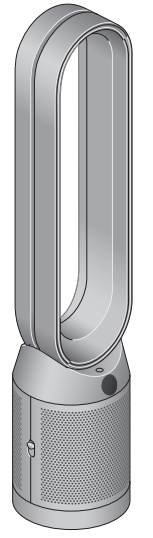
Introduction
The Dyson Purifier Cool PC1 is a state-of-the-art air purifier designed to deliver whole-room purification combined with powerful cooling. Engineered for health-conscious users who prioritize clean indoor air, it automatically captures gases and 99.97% of pollutants as small as 0.3 microns, including allergens, dust, and microscopic particles. Its Air Multiplier™ technology projects over 76 gallons per second of smooth, yet powerful airflow, ensuring effective circulation of purified air throughout spaces up to approximately 101 square feet.
Beyond purifying, the Dyson Purifier Cool PC1 offers a cooling breeze ideal for bedrooms, living rooms, or home offices, all while operating quietly to avoid disturbance. The unit connects seamlessly to the MyDyson™ app, allowing users to monitor air quality and control settings remotely. Compatible with voice assistants such as Amazon Alexa, Google Assistant, and Siri, it fits perfectly into smart home ecosystems.
Targeted at urban dwellers, allergy sufferers, and tech-savvy users seeking a blend of air purification and cooling, this purifier balances style with function in its sleek white/silver design. The estimated price range is around $490 to $550, reflecting its premium features and build quality. Available through major retailers and directly from Dyson, it represents a valuable investment in healthier indoor air and comfort.
Getting started
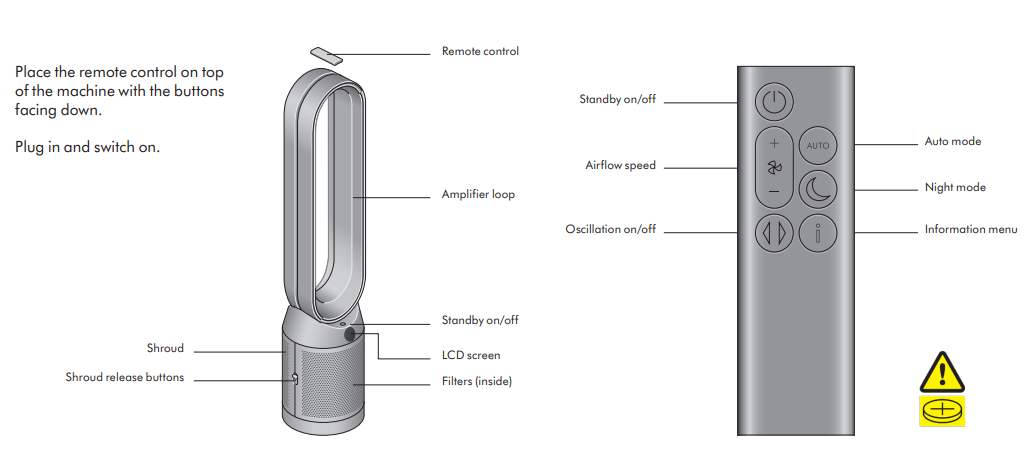
Specifications of Dyson Purifier Cool PC1
- Weight: 10.4 lbs (4.72 kg)
- Dimensions: Height 41.3 in (105 cm), Base diameter 8.7 in (22 cm), Depth 4.7 in
- Power Consumption: 50 watts
- Oscillation: Up to 350° for wide, whole-room coverage
- Speed Settings: 10 adjustable fan speeds, including Auto, Diffused, and Sleep modes
- Airflow: Projects 76+ gallons per second (approx. 290 liters/second)
- Filtration System: Fully sealed 360° Glass HEPA H13 combined withan activated carbon filter, capturing 99.97% of pollutants down to 0.3 microns
- Controls: Remote control, MyDyson™ app, voice assistant compatibility (Alexa, Google Assistant, Siri)
- Noisiness: Quiet operation, max 61.4 dB
- Additional Features: Real-time air quality monitoring, scheduling/timer, air quality reports via app
Compared to other Dyson air purifiers, the PC1 focuses on combining powerful cooling with purification in a compact tower design, making it ideal for medium-sized rooms. While it lacksthe detection of VOCs and indoor temperature found in higher-end models, its HEPA H13 filter and Air Multiplier™ technology provide strong performance for everyday use.
Troubleshooting Dyson Purifier Cool PC1
- Common Issue: Device not powering on
Solution: Ensure the power cable is securely connected and the outlet is functional. Try resetting the device by unplugging it for 60 seconds. - Issue: Fan not oscillating
Solution: Check if oscillation mode is enabled via remote or app. Restart the device if necessary. - Error Code: Filter replacement alert
Fix: Replace the 360° Glass HEPA and Carbon filter as recommended every 12 months or when prompted by the machine. - Issue: App not connecting
Fix: Confirm Wi-Fi credentials and proximity to router. Restart both the purifier and the smartphone. Update MyDyson™ app to the latest version.
Preventive measures include regular filter replacement, cleaning air intake vents, and avoiding placing the device near obstructions. The Dyson Purifier Cool PC1 comes with a limited warranty (typically 2 years), and Dyson customer support is reachable via phone or through their website for technical assistance and parts replacement.
For direct help, contact Dyson Support at 1-800-Dyson or visit the official Dyson website support section.
Pros & Cons of Dyson Purifier Cool PC1
- Pros:
- Efficient HEPA H13 filtration captures 99.97% of microscopic particles
- Powerful Air Multiplier™ technology ensures smooth, whole-room airflow
- Quiet operation suitable for bedrooms and offices
- Intuitive MyDyson™ app with real-time air quality monitoring and remote control
- Voice assistant compatibility adds convenience
- Sleek modern design complements home decor
- Cons:
- Premium price may be higher than some competing models with similar filtration.
- Lacks VOC and indoor temperature sensors present in higher-end Dyson air purifiers
- Replacement filters can be costly and require annual upkeep
- The cooling function is fan-based and may not suffice for very large or outdoor spaces
- Value for Money: While positioned at the higher end of the market, the Dyson Purifier Cool PC1 offers an excellent blend of purification, cooling, smart features, and design integrity, justifying its cost for those seeking premium air quality and comfort.
Customer Reviews of Dyson Purifier Cool PC1
Users generally praise the Dyson Purifier Cool PC1 for its effective air cleaning and quiet, smooth airflow. Many highlight the convenience of app control and real-time air quality data as standout features. The cooling function receives positive feedback for providing relief without noise disruption, making it ideal for nighttime use.
Common complaints include the higher price point and the cost of replacement filters. A few users noted difficulty in initial app setup or occasional connectivity issues, which are typically resolved with updates or customer support.
With average ratings around 4.5 out of 5 stars, many customers recommend the Dyson Purifier Cool PC1 for those who want a reliable, stylish purifier with smart features. It is frequently recommended to allergy sufferers and smart home enthusiasts looking for an all-in-one air treatment solution.
Faqs
How do I set up my dyson Purifier Cool PC1 for the first time?
What should I do if my dyson Purifier Cool PC1 shows an error code?
How often should I replace the filter in the dyson Purifier Cool PC1?
Can I control the dyson Purifier Cool PC1 using a smartphone or smart home devices?
What features make the dyson Purifier Cool PC1 effective for indoor air quality?
How do I clean and maintain my dyson Purifier Cool PC1 to ensure best performance?
Why is my dyson Purifier Cool PC1 not cooling the room effectively?
Is the dyson Purifier Cool PC1 suitable for large rooms or open spaces?
More dyson manuals
- Usage: Dyson V15s Detect Submarine Vacuum Cleaner User Guide
- Setup & Usage: Dyson Big Ball Absolute Cylinder Vacuum Cleaner User Guide
- Setup & Instructions: Dyson V16 Piston Animal Vacuum Cleaner User Manual
- Setup: Dyson Solarcycle Morph light User Manual
- Setup: Dyson Purifier Hot+Cool HP2 De-NOx User Manual
- How to Use: Dyson Airwrap Multi-Styler User Guide
Leave a Comment