
Setup: Dyson Purifier Hot+Cool HP2 De-NOx User Manual
Content
Dyson Purifier Hot+Cool HP2 De-NOx
Introduction
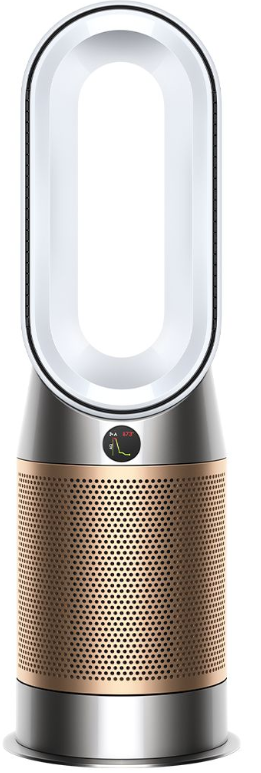
The Dyson Purifier Hot+Cool HP2 De-NOx is an innovative air purifier designed to deliver advanced air quality management alongside whole-room heating and powerful cooling. This multifunctional device combines a cutting-edge filtration system with Dyson’s signature Air Multiplier™ technology, creating a seamless experience of purified, heated, or cooled air tailored to your environment. It targets common indoor pollutants such as nitrogen dioxide (NO₂), formaldehyde, odors, gases, allergens, and microscopic particles as small as 0.3 microns with 99.97% efficiency.
Its unique De-NOx filtration specifically captures 50% more nitrogen dioxide, a harmful pollutant often emitted by traffic and combustion sources, making it an excellent choice for urban households or anyone sensitive to air pollution. The purifier is ideal for allergy sufferers, families with children, pet owners, or anyone seeking improved indoor air quality throughout the year.
The Dyson Purifier Hot+Cool HP2 De-NOx retails approximately between $850 to $950, available widely through authorized retailers and online platforms. With smart connectivity features such as app control and voice assistant compatibility, it caters to tech-savvy users who want real-time air quality monitoring and remote operation. Combining performance, convenience, and sleek design, this purifier is a premium solution for healthier living spaces.
Specifications and Key Features of Dyson Purifier Hot+Cool HP2 De-NOx
- Filtration System: Fully sealed, 3-stage HEPA H13 grade filter combined with K-Carbon filter capturing 99.97% of particles as small as 0.3 microns, including allergens, gases, odors, and formaldehyde
- De-NOx Technology: Captures 50% more nitrogen dioxide (NO₂) pollutants than previous models
- Airflow Technology: Dyson Air Multiplier™ projects over 76 gallons per second of smooth airflow for efficient room heating and cooling
- Oscillation Range: Smooth oscillation up to 350° for wide air distribution
- Modes of Operation: Purification, heating, cooling, and diffused mode for quiet, draft-free air cleaning
- Control Options: Curved, magnetized remote control; MyDyson app for real-time air quality monitoring, scheduling, and personalized reports; compatible with voice assistants (Alexa, Google Assistant, Siri)
- Physical Dimensions: Height 30.1 inches, base diameter 9.8 inches, weight approximately 12.2 lbs
- Filter Life: Approximately 1 year for HEPA+K-Carbon filter, with app notifications for replacement
- Connectivity: Requires Wi-Fi, Bluetooth 4.0, iOS 10+ or Android 5+ for app functionality
- Energy Efficiency: Auto mode optimizes energy use by adjusting airflow based on detected pollutants
- Comparison: Compared to earlier Dyson models, the HP2 De-NOx offers enhanced nitrogen dioxide capture and more efficient formaldehyde destruction, making it superior for urban and high-pollution environments
Assembling your machine
Use both hands to lift your machine out of the box, by its base. Do not lift out by the loop amplifier.
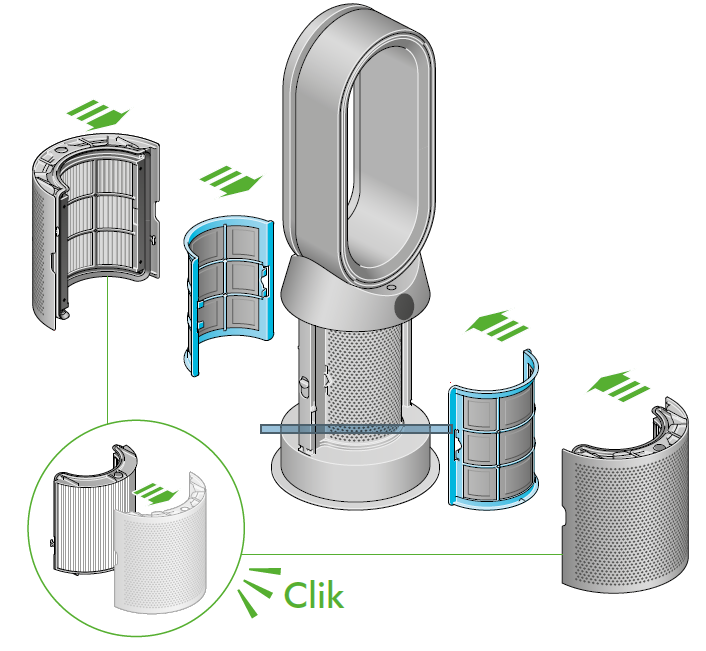
Assemble your machine with the filters that are supplied.
Dyson Purifier Hot+Cool HP2 De-NOx
Your machine comes with a permanent catalytic filter and a HEPA+K-Carbon filter.
- Push the catalytic filter into position on the machine.
- Push the HEPA+K-Carbon filter into the outer cover and position on the base.
- Push firmly until both outer covers click into place.
Getting started
Power and continuous monitoring
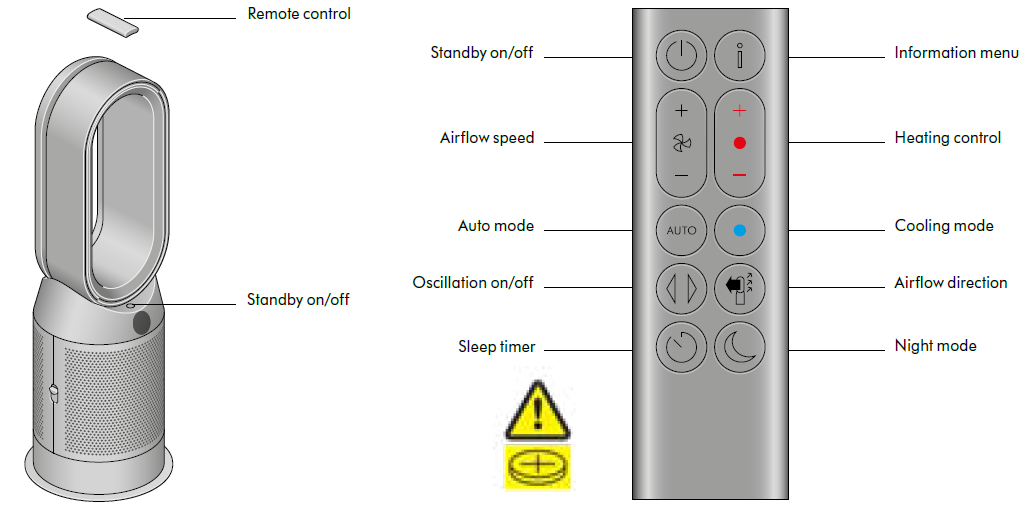
Standby on/off
Press the Standby on/off button on your Dyson purifier heater or remote control to stop your machine. It will continue to monitor the air quality.
Continuous monitoring
- Continuous monitoring is turned off by default. Once turned on, it will always be active until you turn it off again.
- With continuous monitoring turned on, your Dyson purifier heater will gather air quality, temperature and humidity information, which is displayed on the LCD screen and in the MyDyson™ app.
- Press and hold the Auto mode button on the remote control for five seconds to turn it on. The LCD screen will indicate when continuous monitoring is on or off.
Wi-Fi Connectivity
Wi-Fi is on by default. To turn the Wi-Fi on or off, press and hold the Standby on/off button on your machine for five seconds.
Information menu
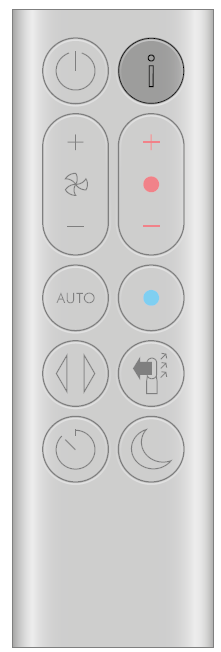
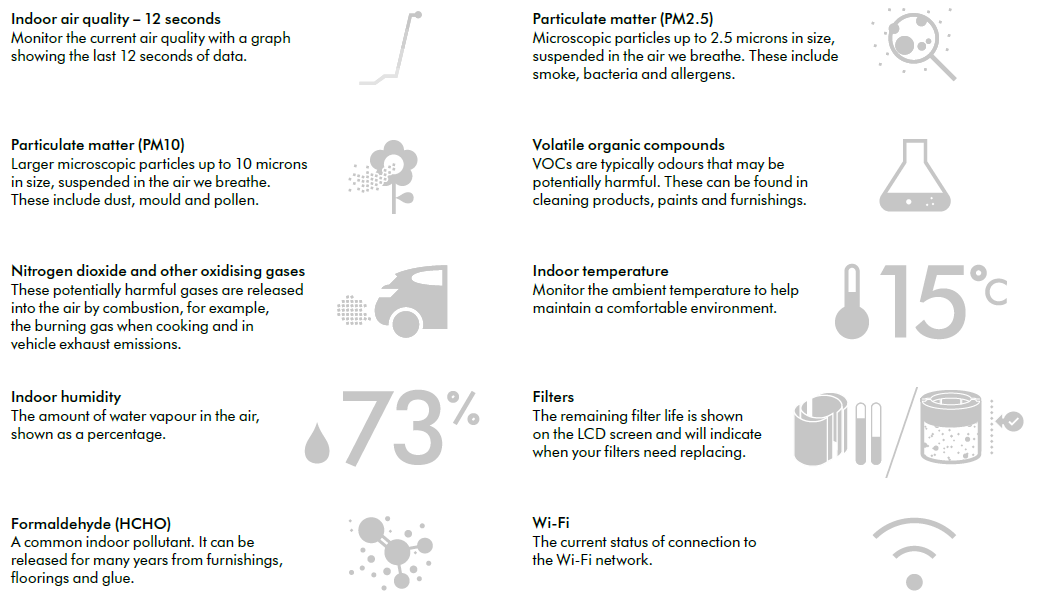
- Press this button to scroll through the information being monitored by your Dyson purifier heater.
- Information about air quality, temperature, humidity and filter levels is shown on the LCD screen.
- When a particular type of pollutant causes air quality to decrease, a symbol for the pollutant will show on the LCD screen.
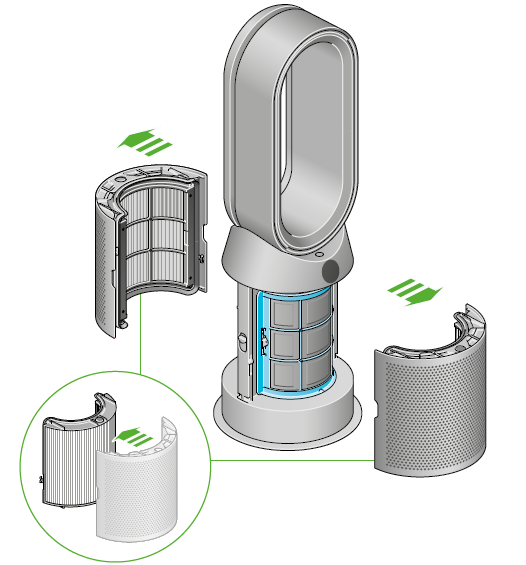
Changing your HEPA+K-Carbon filters with a catalytic filter
Before changing your filter, switch off and unplug your Dyson purifier heater.
The remaining filter life is displayed on the screen and will indicate when your non-washable filters need replacing. Press the Information button on your remote or check on the MyDyson™ app.
You’ll need to reset the filter life on your machine.
Dyson Purifier Hot+Cool HP2 De-NOx
- Your machine comes with a permanent catalytic filter and a HEPA+K-Carbon filter.
- You won’t need to change your catalytic filter.
- To change your HEPA+K-Carbon filter, push down on the buttons either side of your machine to release the outer cover. Push down on the tabs to remove the filter.
- Push the replacement filter into the outer cover and make sure the tabs click into place.
- Put the outer covers into position on your machine and push firmly until they both click securely into position.
- Plug in and switch your machine, and reset your filter life.
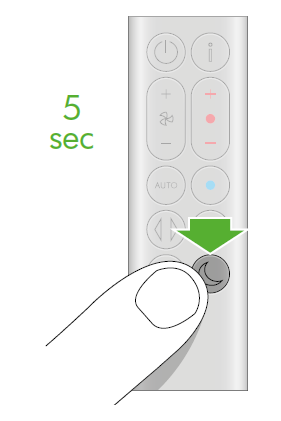
Resetting your HEPA+K-Carbon filter life
- It’s important to reset your filter life after you have replaced your filter.
- Resetting your HEPA+K-Carbon filter life
- Press and hold the Night mode button on your remote control.
The display on your machine will countdown from five, the filter life will be reset and your machine is ready to use.
Looking after your machine
To always get the best performance from your Dyson purifier, it’s important to regularly clean it and check for blockages.
Cleaning your machine
- If your machine is dusty, wipe with a damp lint-free cloth.
- Look for blockages in the air inlet holes on the filter and the small aperture inside the loop amplifier.
- Use a soft brush to remove dust and debris.
- Don’t use detergents or polishes to clean your machine.
Error codes
- If your machine shows an error code, try turning it off and then on again.
- If this doesn’t clear the e-rror code contact Dyson Customer Care.
- For more information and support for your machine go to the MyDyson™ app app or online: www.dyson.com/support
Troubleshooting Common Issues with Dyson Purifier Hot+Cool HP2 De-NOx
- Device Not Turning On: Ensure the unit is properly plugged in and the power outlet is functional. Check if the remote battery needs replacement.
- Airflow Weak or No Airflow: Verify that the filter is installed correctly and not clogged. Replace the filter if the app or LCD screen indicates filter expiry.
- Error Codes: The purifier’s LCD displays error codes such as F1 or F2 indicating fan or motor issues—refer to the user manual or contact Dyson support immediately.
- Connectivity Problems: Ensure Wi-Fi and Bluetooth are enabled and device firmware is up to date. Restart the MyDyson app and purifier if connection drops.
- Heating or Cooling Not Working: Confirm the correct mode is selected. For heating, the device needs a minimum room temperature to operate efficiently.
- Preventive Measures: Regularly clean the device exterior, replace filters annually, and avoid blocking air intake or outlet vents.
Dyson offers a limited warranty covering parts and labor typically for 2 years. For support, customers can contact Dyson’s official service center through their website or customer hotline.
Pros and Cons of Dyson Purifier Hot+Cool HP2 De-NOx
- Pros:
- Highly effective air purification with De-NOx technology capturing 50% more nitrogen dioxide
- Multi-functionality combining heating, cooling, and purification in one sleek device
- Smart controls via MyDyson app and voice assistant compatibility enhance user convenience
- Quiet operation, especially in diffused mode for uninterrupted sleep or work
- Long filter life with easy replacement notifications
- Cons:
- Premium price may be a barrier for budget-conscious buyers
- Requires Wi-Fi and a compatible smartphone for full feature access
- Not a true air conditioner; cooling mode functions as a fan with purified airflow
- Relatively bulky footprint compared to some competitors
- Value for Money: Considering its advanced filtration, heating/cooling versatility, and smart features, the Dyson Purifier Hot+Cool HP2 De-NOx offers strong value for users prioritizing air quality and year-round comfort.
Customer Reviews and Feedback on Dyson Purifier Hot+Cool HP2 De-NOx
Users consistently praise the Dyson Purifier Hot+Cool HP2 De-NOx for its powerful and smooth airflow, effective air purification, and elegant design that fits well into modern homes. Many highlight the benefit of capturing nitrogen dioxide and formaldehyde, especially in urban or high-traffic settings.
Common compliments include the quiet operation at low speeds, intuitive MyDyson app controls, and the convenience of combined heating, cooling, and purification. Some users report minor issues with Wi-Fi connectivity or app responsiveness but acknowledge responsive Dyson customer support.
Typical ratings average around 4.5 out of 5 stars, with recommendations focusing on buyers needing comprehensive air treatment solutions rather than basic fans or heaters. Frequent users advise timely filter changes to maintain optimal performance.
Faqs
How do I set up my dyson Purifier Hot+Cool HP2 De-NOx for the first time?
What should I do if my dyson Purifier Hot+Cool HP2 De-NOx is not working properly?
Can I use the dyson Purifier Hot+Cool HP2 De-NOx with voice assistants?
How often should I clean or replace the filters in my dyson Purifier Hot+Cool HP2 De-NOx?
What are the key features that make the dyson Purifier Hot+Cool HP2 De-NOx different?
How do I optimize the performance of my dyson Purifier Hot+Cool HP2 De-NOx?
Is the dyson Purifier Hot+Cool HP2 De-NOx compatible with my smartphone or tablet?
Can I use the dyson Purifier Hot+Cool HP2 De-NOx in a large room?
More dyson manuals
- How to Use: Dyson Airstrait Straightener Owner Manual
- Setup & Instructions: Dyson V16 Piston Animal Vacuum Cleaner User Manual
- How to Use: Dyson Airwrap Coanda2x Multi-Styler and Dryer User Manual
- Usage: Dyson V15s Detect Submarine Vacuum Cleaner User Guide
- Setup: Dyson Purifier Hot+Cool HP07 User Manual
- Usage: Dyson Purifier Cool PC1 User Guide
Leave a Comment