
Setup: Dyson Purifier Hot+Cool HP07 User Manual
Content
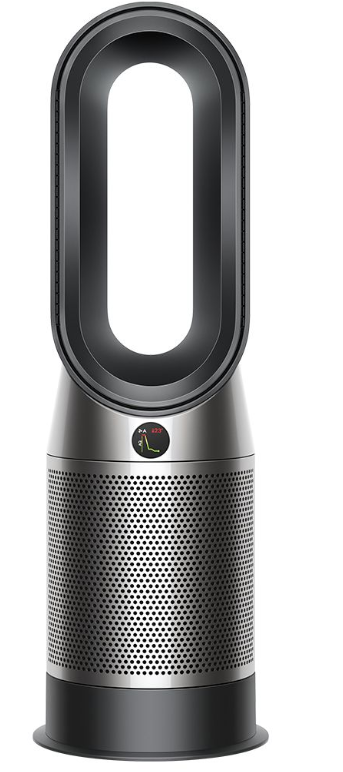
Dyson Purifier Hot+Cool HP07
Introduction
The Dyson Purifier Hot+Cool HP07 is a cutting-edge air purifier that combines powerful heating, cooling, and air purification in one sleek, bladeless design. Engineered to deliver cleaner air throughout your living or working space, it features advanced HEPA H13 filtration that captures 99.95% of ultrafine particles as small as 0.1 microns, including allergens, pollutants, and odors. This purifier is uniquely designed for year-round use, offering efficient room heating during colder months and refreshing cooling airflow in warmer seasons.
Ideal for allergy sufferers, pet owners, and individuals seeking improved indoor air quality, the HP07 adapts intelligently to your environment with real-time air quality sensing and automatic mode adjustment. Its 350° oscillation ensures purified air circulates evenly across large rooms up to approximately 870 square feet. Equipped with smart connectivity, users can monitor and control the purifier remotely via the MyDyson™ app or voice assistants like Alexa, Siri, and Google Home.
With an estimated price range of around $650-$700 USD and availability through major retailers and Dyson’s official website, the Dyson Purifier Hot+Cool HP07 offers premium performance and innovative technology. Its combination of three functions—purification, heating, and cooling—makes it a versatile appliance for home, office, or studio environments.
Specifications of Dyson Purifier Hot+Cool HP07
- Filtration System: Fully sealed HEPA H13 filter capturing 99.95% of particles down to 0.1 microns, including an activated carbon layer for gases and odors
- Room Coverage: Purifies spaces up to 871 sq ft; heats rooms up to 376 sq ft efficiently
- Airflow & Oscillation: 350° oscillation with Air Multiplier™ technology for long-range purified airflow distribution
- Functional Modes: Heating, cooling fan, and backward airflow purification without heating or cooling
- Smart Features: Real-time air quality sensing, LCD with pollution reporting, MyDyson™ app control, voice assistant compatibility (Alexa, Siri, Google Home)
- Power Consumption: Heater wattage approx. 2250 watts (~18 amps)
- Settings & Controls: 10 airflow settings, programmable timers (30 minutes to 8 hours), Night mode with quiet operation and dimmed display
- Dimensions & Weight: Medium height tower design, weighs about 12 pounds
- Colors Available: White/Silver and Black/Nickel
- Filter Life & Maintenance: Automatic filter-life notifications; easy, tool-free filter changes.
Compared with similar products like the Dyson HP04, the HP07 improves air cleaning efficiency by approximately 50%, adding heating capabilities and more advanced sensing technology to enhance user experience and comfort.
Features
Connecting to your smart home
Using Amazon Alexa
Ask Alexa to enable the Dyson skill, to control your Dyson purifier or purifier humidifier. And set a routine that automates how your machine works with other devices in your home.
Using Google Assistant
Control all of your connected purifiers with Google or set a routine to automate how your machine works with other devices in your home. Just say “Hey Google” to get started.
Using Siri
Connect your Dyson machines to Siri Shortcuts and you’ll be able to control them with your voice, on your Apple device.

Power and continuous monitoring
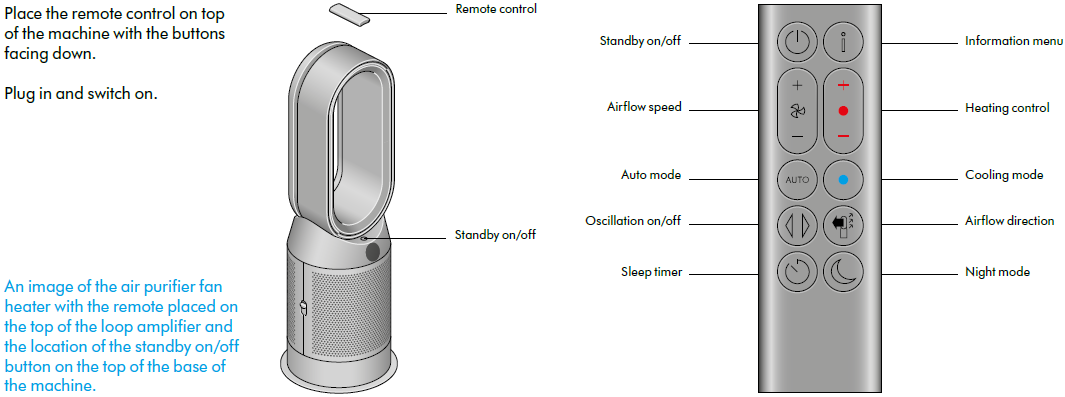
Standby on/off
Press the Standby on/off button on your Dyson purifying fan heater or remote control to stop your machine. It will continue to monitor the air quality.
Continuous monitoring
Continuous monitoring is turned off by default. Once turned on, it will always be active until you turn it off again.
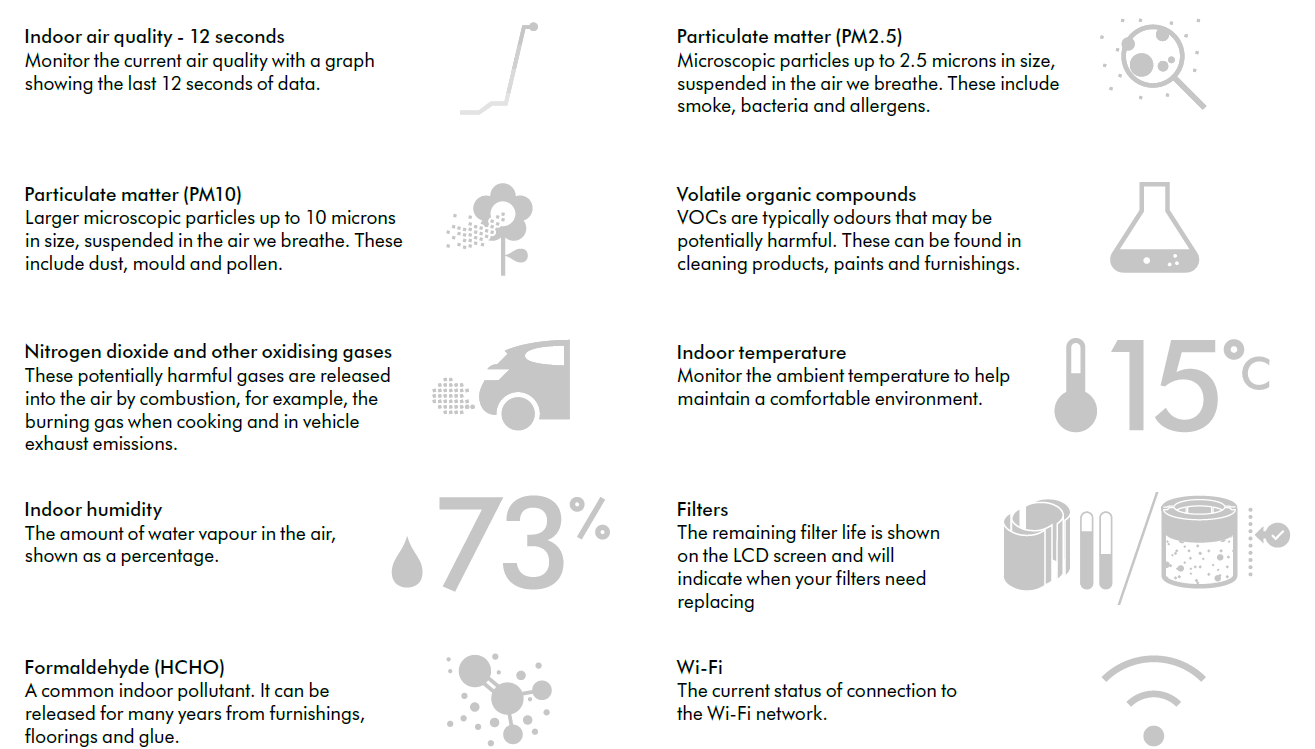
With continuous monitoring turned on, your Dyson purifying fan heater will gather air quality, temperature, and humidity information, which is displayed on the LCD screen and in the Dyson Link app.
Continuous monitoring
Press and hold the Auto mode button on the remote control for 5 seconds o turn it on. The LCD screen will indicate when continuous monitoring is on or off.
Wi-Fi Connectivity
Wi-Fi is on by default. To turn the Wi-Fi on or off, press and hold the Standby on/off button on your machine for 5 seconds.
Information menu
- Press this button to scroll through the information being monitored by your Dyson purifying fan heater.
- Information about air quality, temperature, humidity, and filter levels is shown on the LCD screen.
- When a particular type of pollutant causes air quality to decrease, a symbol for the pollutant will show on the LCD screen.
Changing your HEPA+Carbon filter
Before changing your filter, switch off and unplug your Dyson purifier fan heater.
The remaining filter life is displayed on the screen and will indicate when your non-washable filters need replacing. Press the Information button on your remote or check on the Dyson Link app.
You'll need to reset the filter life on your machine.
Dyson Purifier Hot+Cool
Supplied with a HEPA+Carbon filter.
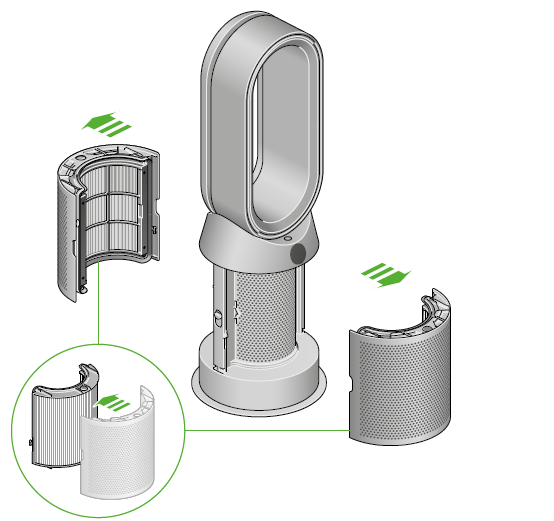
- To change your HEPA+Carbon filter, push down on the buttons on either side of your machine to release the outer cover. Push down on the tabs to remove the filter.
- Push the replacement filter into the outer cover and make sure the tabs click into place.
- Put the outer covers into position on your machine and push firmly
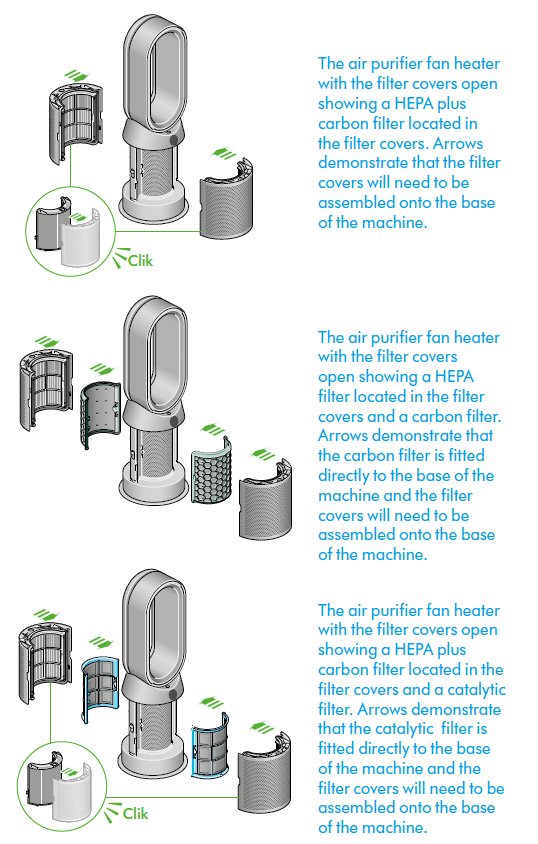
Assembling your machine
- Use both hands to lift your machine out of the box, by its base. Do not lift out by the loop amplifier.
- Assemble your machine with the filters that are supplied.
Dyson Purifier Hot+Cool
- Supplied with a HEPA+Carbon filter.
- Push your HEPA+Carbon filter into the outer cover and position it onto the base. Push firmly until both outer covers click securely into place.
- Dyson Purifier Hot+Cool
- Supplied with separate HEPA and carbon filters.
- Push the carbon filters into place on the machine.
- Push the HEPA filter into the outer cover. Put the outer covers into position on the base and push firmly until they both click securely into place.
Dyson Purifier Hot+Cool Formaldehyde
Your machine comes with a permanent catalytic filter and a HEPA+Carbon filter.
- Push the catalytic filter into position on the machine.
- Push the HEPA+Carbon filter into the outer cover and position it on the base.
- Push firmly until both outer covers click into place.
Resetting your HEPA+Carbon filter life
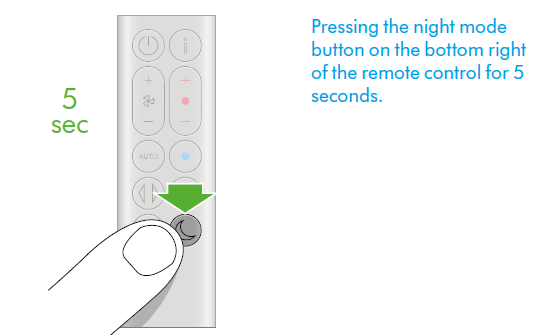
It's important to reset your filter life after you have replaced your filter.
Resetting your HEPA+Carbon filter life
Press and hold the Night mode button on your remote control.
The display on your machine will count down from five, the filter life will be reset, and your machine is ready to use.
Changing your HEPA and carbon filters
- Before changing your filter, switch off and unplug your Dyson purifier fan heater.
- The remaining filter life is displayed on the screen and will indicate when your non-washable filters need replacing. Press the Information button on your remote or check on the Dyson Link app.
- You'll need to reset the filter life on your machine.
Dyson Purifier Hot+Cool
- Supplied with separate HEPA and carbon filters.
- To change your HEPA filter, push down on the buttons on both sides of your machine to release the filter covers. Push down on the tabs to remove the HEPA filter.
- Push the replacement filter into the outer cover and make sure the tabs click into place.
- To change the carbon filter in your machine, remove the filter from the base of your machine and insert the replacement filter.
- Put the outer covers into position on your machine and push firmly until they both click securely into position.
- Plug in and switch your machine, and reset your filter life.
Looking after your machine
- To always get the best performance from your Dyson purifying fan heater, it’s important to regularly clean it and check for blockages.
Cleaning your machine
- If your machine is dusty, wipe with a damp,, lint-free cloth.
- Look for blockages in the air inlet holes on the filter and the small aperture inside the loop amplifier.
- Use a soft brush to remove dust and debris.
- Don’t use detergents or polishes to clean your machine.
Error codes
- If your machine shows an error code, try turning it off and then on again. If this doesn’t clear the error codecode,e, contact Dyson Customer Care.
- For more information and support for your machine, e go to the Dyson Link app or online: www.dyson.com/support
Trouble shooting
Display errors
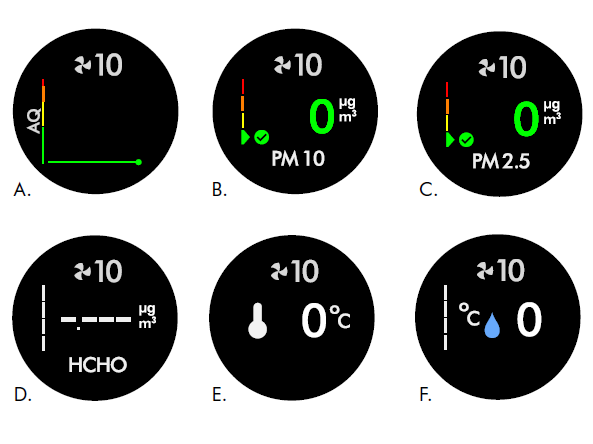
Sensor display is not updating or constantly displays a reading of ‘zero’ reading.
- A. Air Quality (AQ) sensor error - Display shows a flat line and does not change over time.
- B. PM 10 sensor error - Display shows no readings (‘-.---’) or zero.
- C. PM 2.5 sensor error - Display shows no readings (‘-.---’) or zero.
- D. Formaldehyde sensor error - Display shows no readings (‘-.---’) or zero.
- E. Temp sensor error - Display shows no readings (‘-.---’) or zero.
- F. Humidity sensor error - Display shows no readings (‘-.---’) or zero.
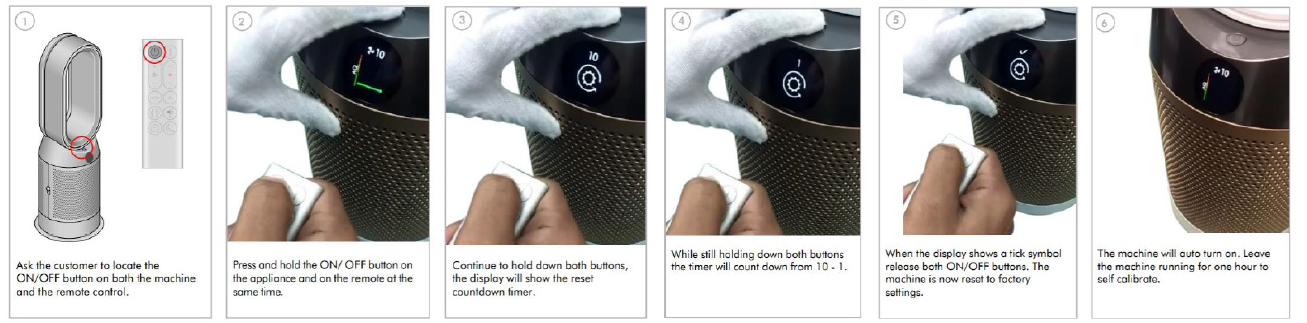
To resolve this issue,, please follow the steps below.
Pro & Cons of Dyson Purifier Hot+Cool HP07
Pros
- Multifunctional Design: Combines air purification, heating, and cooling in one elegant, space-saving unit.
- Superior Filtration: Medical-grade HEPA H13 filter captures ultrafine particles, allergens, and gases effectively.
- Smart Air Quality Monitoring: Continuously senses and adjusts settings automatically, ensuring optimal air purity and comfort.
- Wide Oscillation Range: 350° rotation projects purified air throughout large rooms evenly.
- Convenient Controls: Operable via remote, smartphone app, or voice assistants for ease of use.
- Quiet Operation: Especially in Night mode, suitable for bedrooms and offices.
Cons
- High Power Usage: The Heater function consumes about 2250 watts, which may trip circuits in older homes without adequate amperage.
- Price Point: Considered premium-priced compared to some competitors, potentially limiting for budget shoppers.
- App Limitations: Some users report limited control over heating settings via the app compared to fan and purification modes.
- Size and Weight: Not the most compact purifier available, so it requires some floor space.
Overall, the Dyson Purifier Hot+Cool HP07 offers excellent value for those seeking an all-in-one air quality solution with year-round functionality and smart home integration.
Customer Reviews and Feedback on Dyson Purifier Hot+Cool HP07
The Dyson Purifier Hot+Cool HP07 generally receives high ratings for its effectiveness and design, with users awarding it an average of 4.5 out of 5 stars. Customers frequently praise its ability to noticeably improve indoor air quality, the smooth and quiet fan operation, and the convenience of controlling the unit through voice commands or the app.
Common praises include the rapid heating of rooms, thorough purification with visible reduction in allergens and odors, and the sleek, modern aesthetic that fits well in various room decors. Users also value the informative LCD display providing real-time air quality data.
However, some reviews mention concerns about the heater’s power draw causing circuit breaker trips in older electrical systems. Others note that the price is on the higher end and wish for more granular app controls for heating modes. Filter replacement cost is also a consideration for long-term ownership.
Despite these points, most customers recommend the Dyson Purifier Hot+Cool HP07 for its multifunctionality, build quality, and overall performance as a reliable air purifier, heater, and fan combo.
Faqs
How do I set up my dyson Purifier Hot+Cool HP07 for the first time?
What should I do if my dyson Purifier Hot+Cool HP07 is not turning on?
How often should I replace the filter in the dyson Purifier Hot+Cool HP07?
Why is my dyson Purifier Hot+Cool HP07 showing sensor errors or zero readings?
Can I control the dyson Purifier Hot+Cool HP07 remotely via an app?
How do I clean and maintain my dyson Purifier Hot+Cool HP07 to optimize performance?
What should I do if the dyson Purifier Hot+Cool HP07 heater function is not blowing warm air?
Is the dyson Purifier Hot+Cool HP07 compatible with smart home systems?
More dyson manuals
- Setup: Dyson CSYS Desk Lamp User Manual
- How to Use: Dyson Airwrap Coanda2x Multi-Styler and Dryer User Manual
- How to Use: Dyson Cool CF1 fan User Manual
- How to Use: Dyson Airstrait Straightener Owner Manual
- Setup & Usage: Dyson V8 Cyclone Vacuum Cleaner User Manual
- Setup: Dyson Purifier Hot+Cool HP2 De-NOx User Manual
Leave a Comment