
How to Use: Dyson Cool CF1 fan User Manual
Content
Dyson Cool CF1 Fan
Introduction
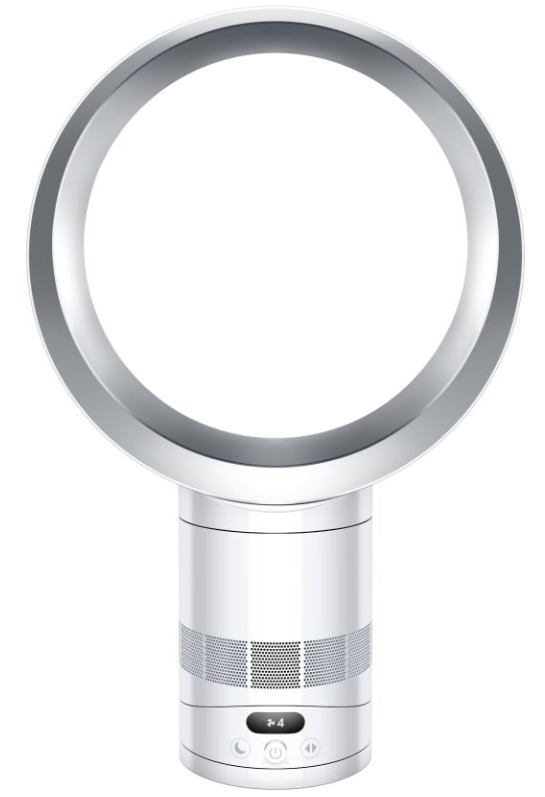
The Dyson Cool CF1 fan is an innovative bladeless desk fan that blends cutting-edge technology with sleek design to deliver powerful, whisper-quiet cooling. Leveraging Dyson’s patented Air Multiplier™ technology, it amplifies surrounding air up to 13 times, producing a smooth, consistent airflow of over 370 litres per second without the discomfort of choppy air or spinning blades. This makes it both safer and more hygienic compared to traditional fans.
With 10 adjustable speed settings, customizable oscillation angles (15°, 40°, 70°), and a user-friendly LCD, the Cool CF1 offers precise control over airflow intensity and direction. Its Sleep mode reduces noise to just 29dB and dims the display for undisturbed rest, making it ideal for bedrooms, offices, and any noise-sensitive environment. The fan also features timers ranging from 30 minutes to 8 hours, enhancing convenience and energy efficiency at a modest 30 watts of power consumption.
Priced around $349, the Dyson Cool CF1 targets discerning users seeking a premium cooling solution with sophisticated aesthetics and smart functionality. It's perfect for those who prioritize quiet operation, safety (bladeless design), and efficient cooling in medium-sized rooms or personal spaces.
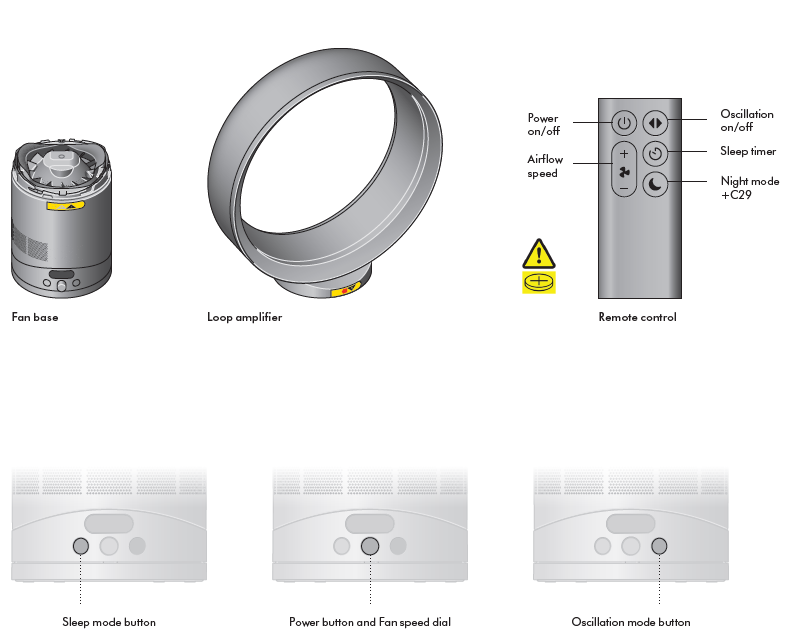
In the box
Assembling your machine
Step 1
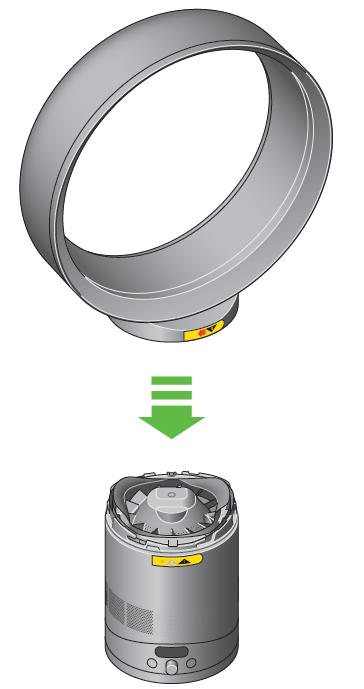
Lower the loop amplifier onto the base, aligning the arrows.
Step 2
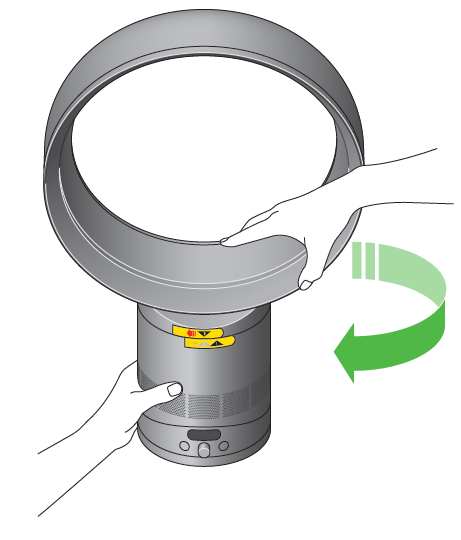
Once aligned, turn the loop amplifier clockwise to lock.
Cleaning your machine
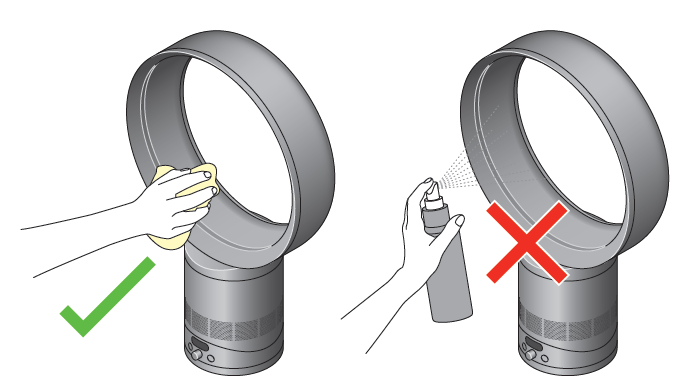
Unplug your machine before cleaning. To clean, wipe with a dry or damp cloth. Do not use detergents or polishes to clean the appliance.
Clearing blockages
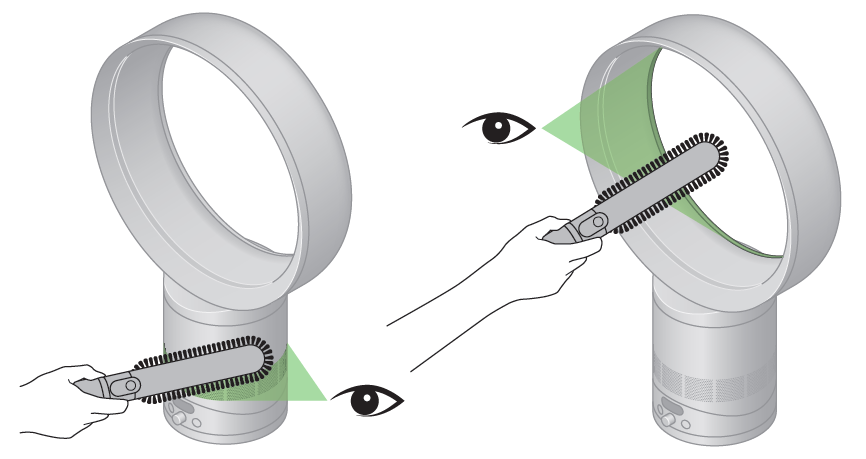
Look for blockages in the air inlet holes. Use a soft brush to remove debris. Look for blockages in the small aperture inside the loop amplifier. Use a soft brush to remove debris.
Remote control
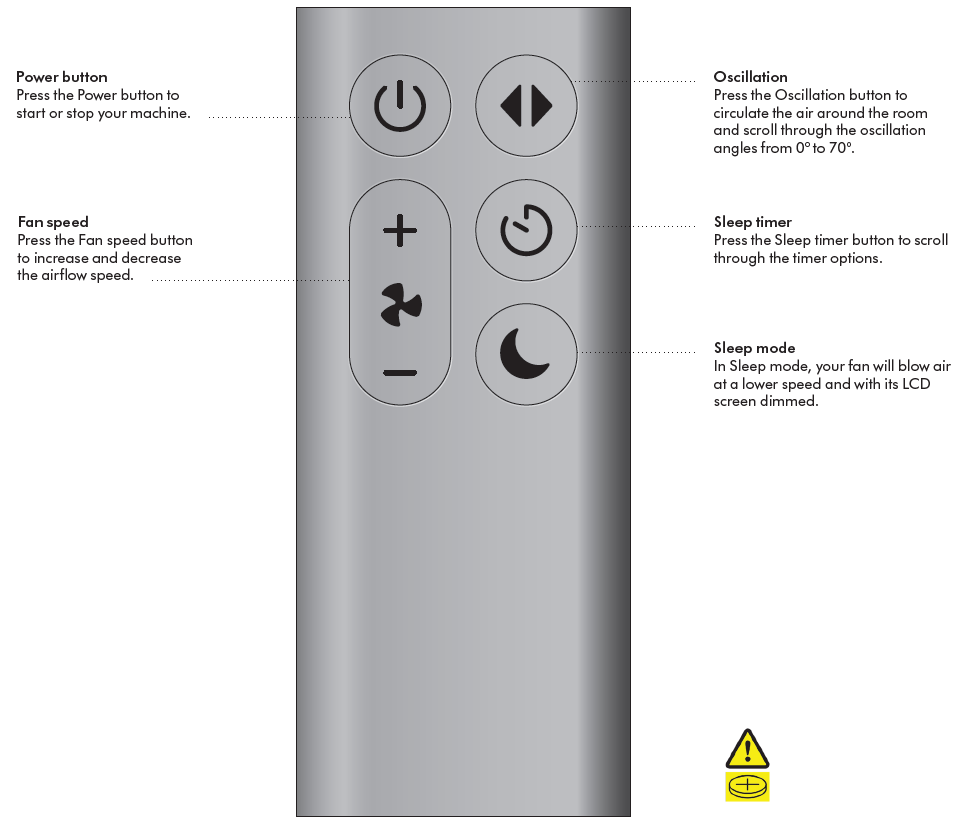
Use your remote control to operate your machine from a distance. The remote is curved and magnetised to store neatly on your machine.
Troubleshooting Common Issues with the Dyson Cool CF1 Fan
Although the Dyson Cool CF1 is engineered for reliability, users may encounter minor issues. Here are common problems and their solutions:
- Fan not turning on: Ensure the power cord is securely plugged in and the outlet is functioning. Check if the remote control battery needs replacement.
- Remote control unresponsive: Replace the remote batteries and ensure a direct line of sight between the remote and the fan’s sensor.
- Display screen not lighting up: This may indicate a power issue; try resetting the fan by unplugging it for 30 seconds and plugging it back in.
- Oscillation not working: Confirm oscillation settings via remote or manual controls; ensure no obstruction blocks movement.
There are no specific error codes for this model, but maintaining cleanliness by wiping the bladeless ring and base regularly prevents dust buildup that could affect performance. Avoid placing the fan near water or heat sources to extend its lifespan.
The Dyson Cool CF1 comes with a standard manufacturer's warranty, typically one year, covering defects and malfunctions. For support, customers can contact Dyson’s official customer service via their website or phone, ensuring expert assistance and authorized repairs.
Pros and Cons of the Dyson Cool CF1 Fan
Pros
- Quiet Operation: The fan produces noise as low as 29dB in Sleep mode, making it suitable for bedrooms and offices.
- Powerful Airflow: With 370 litres per second, it cools spaces efficiently and quickly.
- Safe and Hygienic Design: Bladeless construction removes safety hazards and eases cleaning.
- Customizable Settings: Offers 10 fan speeds, multiple oscillation angles, timer functions, and sleep mode.
- Intuitive Controls: Both remote control and manual buttons on the base with an LCD for easy setting adjustments.
Cons
- Price: At around $349, it is a premium option compared to traditional fans.
- Remote Control Reliability: Some users report occasional unresponsiveness with the remote.
- Size: Slightly large for very small desks or compact spaces.
- No App Connectivity: Lacks smart home integration common in some modern fans.
Overall, the Dyson Cool CF1 fan offers excellent value for money for users prioritizing quiet, safe, and efficient cooling, standing out against conventional fans due to its unique bladeless technology and refined user experience.
Customer Reviews and Feedback on the Dyson Cool CF1 Fan
Users praise the Dyson Cool CF1 fan chiefly for its quiet operation and powerful airflow, noting it cools rooms quickly without disruptive noise. The bladeless design is frequently highlighted for its safety, especially in households with children or pets. Many appreciate the intuitive LCD and variety of speed and oscillation settings that allow personalized comfort.
Common criticisms include occasional issues with the remote control’s responsiveness and the fan’s size, which some find bulky for desk placement. Despite the relatively high price, most reviews rate the fan highly, often 4 to 5 stars, recommending it as a worthwhile investment for those seeking premium cooling solutions.
Frequent buyers suggest pairing the fan with well-ventilated rooms or air conditioning to enhance efficiency and save energy, reflecting the fan’s role in complementing rather than replacing traditional cooling systems.
Faqs
How do I set up the Dyson Cool CF1 fan for optimal performance?
What should I do if my Dyson Cool CF1 fan is not working properly?
Can I use the Dyson Cool CF1 fan in a small, enclosed space?
How do I maintain and clean the Dyson Cool CF1 fan?
What are the key features that make the Dyson Cool CF1 fan different?
Is the Dyson Cool CF1 fan compatible with smart home systems?
How does the Dyson Cool CF1 fan's sleep mode work?
Does the Dyson Cool CF1 fan require any special power requirements?
Tags
More dyson manuals
- Setup & Usage: Dyson V8 Cyclone Vacuum Cleaner User Manual
- Setup: Dyson CSYS Desk Lamp User Manual
- How to Use: Dyson Airwrap User Manual
- Setup: Dyson Purifier Hot+Cool HP07 User Manual
- Pairing & Usage: Dyson Ontrac Headphones User Manual
- How to Use: Dyson Airwrap Coanda2x Multi-Styler and Dryer User Manual
Leave a Comment