
How to Use: Dyson Airwrap User Manual
Content
Dyson Airwrap Multi-Styler

Introduction
The Dyson Airwrap is a revolutionary hair styling tool designed to help you achieve salon-quality results at home. Combining advanced airflow technology with intelligent heat control, the Dyson Airwrap multi-styler allows you to dry, curl, wave, smooth, volumize, and tame flyaways—all with minimal heat damage. Its unique Coanda effect gently wraps hair around the barrel or brush attachments, creating long-lasting styles without the need for extreme temperatures or harsh chemicals.
Key benefits include 6-in-1 versatility, Bluetooth connectivity for personalized styling via the MyDyson app, and a suite of attachments for every hair type and desired look[2][4]. Whether you want bouncy curls, sleek straight styles, defined waves, or added volume, the Dyson Airwrap adapts to your needs. The latest models, such as the Dyson Airwrap i.d., feature intelligent adaptation of heat, airflow, and timing based on your hair profile, making styling faster and more consistent.
This premium hair tool is ideal for busy professionals, styling enthusiasts, and anyone seeking healthier alternatives to traditional heat tools. It is especially suited for those with fine, medium, or thick hair lengths, offering attachments for both short and long hair. The Dyson Airwrap is available globally through authorized retailers and the official Dyson website, with an estimated price range of $550–$600 USD, reflecting its advanced technology and premium build quality.
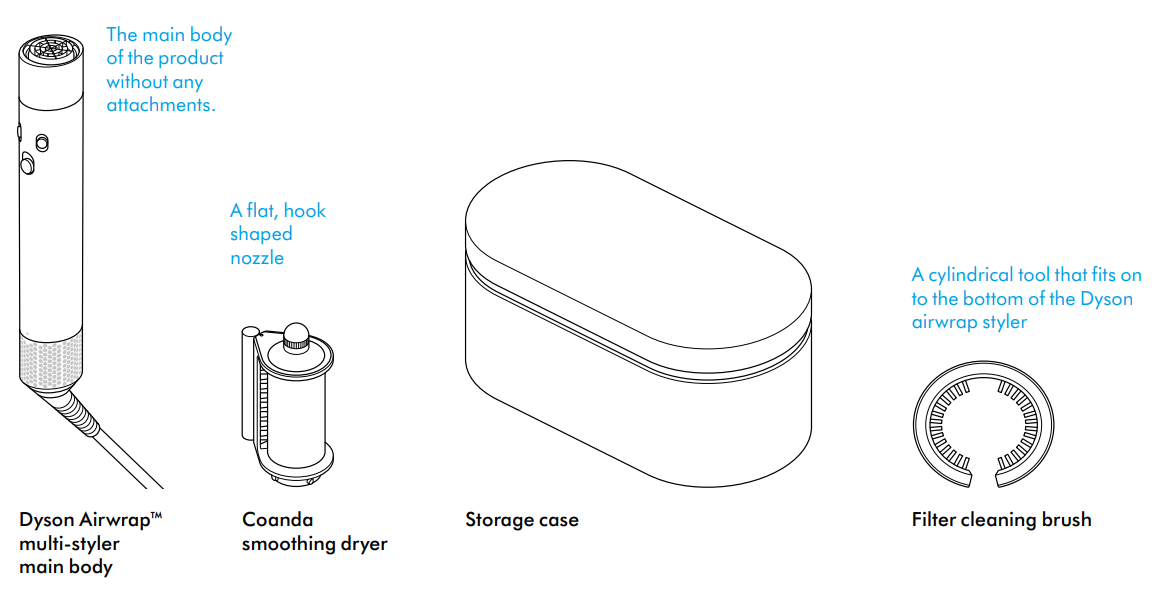
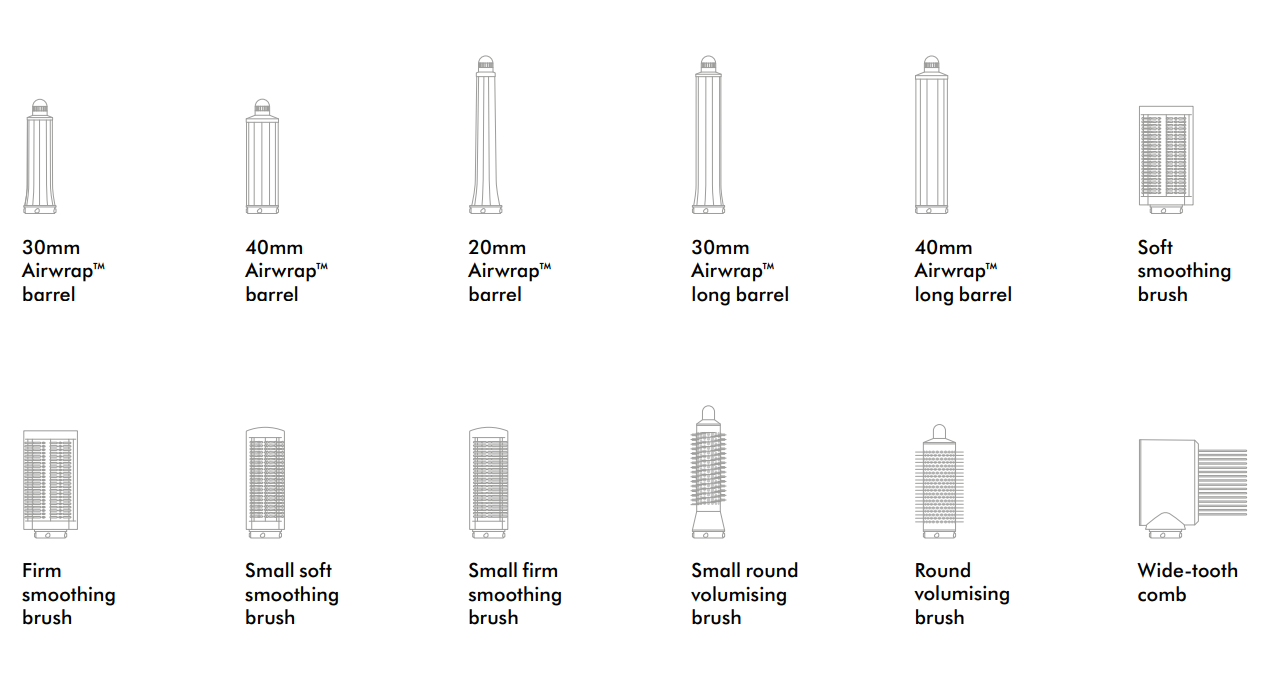
In the box
Getting started
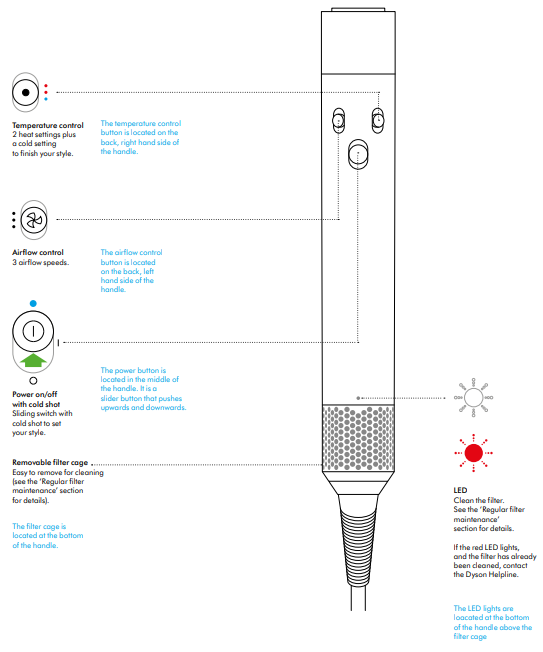
- Temperature control: 2 heat settings plus a cold setting finish your style.
- The temperature control button is located on the back, right-hand side of the handle.
- Airflow control: 3 airflow speeds.
- The airflow control button is located on the back, left-hand side of the handle.
- Power on/off with a cold shot. Sliding switch with an old shot to set your style.
- The power button is located in the middle of the handle. It is a slider button that pushes upwards and downwards.
- Removable filter cage. Easy to remove for cleaning (see the ‘Regular filter maintenance’ section or details).
- The filter cage is located at the bottom of the handle.
LED
- Clean the filter.
- See the ‘Regular filter maintenance’ section for details.
- If the red LED lights, and the filter has already been cleaned, contact the Dyson Helpline.
- The LED lights are located at the bottom of the handle above the filter cage .
Regular filter maintenance
- The filter must be cleaned when the white LED starts flashing.
- Ensure that you unplug your appliance from the mains electricity supply and allow it to cool down before cleaning your filter.
- The Dyson Airwrap™ multi-styler has highly tuned technology to give outstanding performance.
- This technology needs to be kept free from dust and hair product residue. Maintenance is required to maintain performance.
Step 1
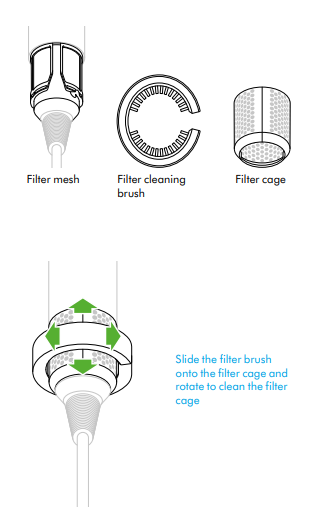
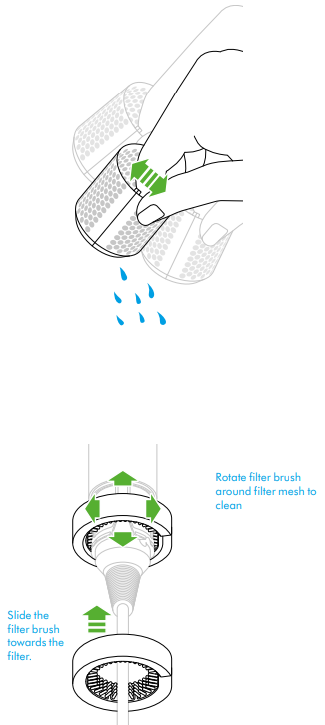
- Slide the filter cleaning brush over the cable and onto the filter cage.
- Using a rotating action, clean the filter cage thoroughly.
- Remove the filter cleaning brush.
Step 2
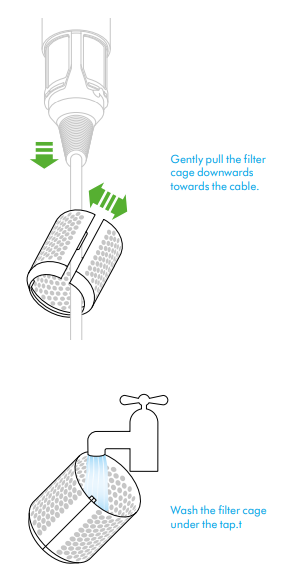
- Hold the handle of your appliance and pull the filter cage downwards, onto the cable.
- Gently pull open the filter cage and slide it off the cable.
Step 3
- Wash the filter cage under a warm, running tap.
Step 4
- Shake the filter cage to remove the majority of the excess water, then leave it to dry naturally.
Step 5
- Using a rotating and up-and-down action, clean the filter mesh with the filter cleaning brush until all the debris has been removed.
- Do not use water or chemicals to clean the filter mesh.
Step 6
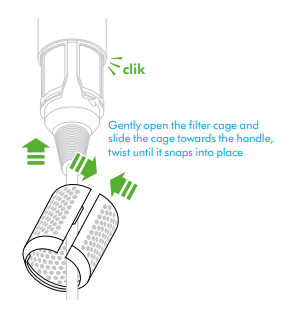
- Gently pull the filter cage open and slide it onto the cable.
- Slide the filter cage towards the handle and twist until it snaps into place.
Detailed Specifications and Key Features
- Power: 1300 watts for fast drying and styling
- Heat Settings: Three precise temperature options, including a constant cold shot to set styles without heat damage
- Airflow Settings: Three adjustable speeds for customized styling and drying
- Attachments: Includes fast dryer, Coanda smoothing dryer, 1.6" Airwrap barrel (for loose curls and waves), conical Airwrap barrel (for defined curls), large round volumizing brush, soft smoothing brush, and a presentation case
- Smart Features: Bluetooth connectivity pairs with the MyDyson app for personalized routines and i.d. curl sequences based on your hair profile
- Dimensions: 1.61 x 1.89 x 10.7 inches; weight approximately 1.3–1.5 lb1]
- Cable Length: 8.5 feet for flexible styling
- Materials: Aluminum, ceramic, and polycarbonate for durability and heat resistance
- Negative Ions: Helps reduce static and frizz for smoother finishes.
The Dyson Airwrap stands out from traditional curling irons and straighteners by using air instead of direct heat, significantly reducing the risk of heat damage. While competitors like ghd and T3 offer advanced styling tools, the Dyson Airwrap’s combination of airflow technology, intelligent heat control, and multi-functional attachments is unmatched in the current market.
Troubleshooting and Support
Common Issues and Solutions
- Device Not Powering On: Check the power switch, ensure the device is plugged in, and that the outlet is working. If the LED does not light up, contact Dyson Support.
- Overheating or Reduced Airflow: Clean the filter regularly. A flashing white LED indicates when cleaning is needed. Remove the filter cage at the base and rinse under water, allowing it to dry completely before reattaching
- Bluetooth Pairing Issues: Ensure your device is in pairing mode (flashing blue LED), download the MyDyson app, and follow the in-app instructions to connect.t
- Error Codes: A red LED after filter cleaning indicates a potential fault—contact Dyson support for assistance
Preventive Maintenance
- Clean the filter and attachments regularly to maintain optimal performance
- Store the Dyson Airwrap and its accessories in the included presentation case to prevent damage
- Use only genuine Dyson attachments to avoid compatibility issues
Warranty and Support
Dyson offers a manufacturer’s warranty—retain your proof of purchase for claims. For additional support, visit the official Dyson website or contact customer service directly. Replacement attachments and accessories are available for purchase online.
Pros & Cons
Advantages
- Versatile Styling: Dries, curls, waves, smooths, volumizes, and tames flyaways with one device
- Reduced Heat Damage: Uses airflow technology instead of extreme heat, protecting hair health
- Smart Personalization: MyDyson app integration allows for customized styling routines based on your hair type
- Premium Build: High-quality materials and thoughtful design ensure durability and ease of use
- Quick Styling: Dries and styles hair faster than many traditional tools
Limitations
- High Price Point: More expensive than most hair stylers on the market
- Learning Curve: Requires practice to master all attachments and techniques.
- Attachment Availability: Some attachments may be out of stock or require a separate purchase
- Not for All Hair Types: Extremely thick or coarse hair may require additional passes for desired results.
Compared to alternatives like the ghd Duet Style or T3 Whirl Trio, the Dyson Airwrap offers superior versatility and hair health benefits, but at a higher cost.
Customer Reviews and Recommendations
Customer feedback for the Dyson Airwrap is overwhelmingly positive, with many users praising its ability to create salon-quality curls, waves, and smooth styles at home. Common highlights include the reduced heat damage, time savings, and the variety of looks achievable with different attachments. The MyDyson app’s personalized routines are frequently mentioned as a standout feature, especially for those new to styling tools.
Some users note a learning curve when first using the device, particularly for achieving consistent curls. Others mention the high price as a potential drawback, though many feel the investment is justified by the results and hair health benefits. Star ratings consistently average 4.5 out of 5 across major retailers, with testimonials emphasizing the tool’s transformative effect on daily routines.
For best results, follow the included tutorials and practice with different attachments. The Dyson Airwrap is recommended for anyone seeking a versatile, high-performance hair styling tool that prioritizes hair health and styling flexibility.
Faqs
How do I properly set up my Dyson Airwrap for the first use?
Why does my Dyson Airwrap keep turning off during use, and how can I fix it?
What should I do if my Dyson Airwrap won't turn on at all?
Can I use the Dyson Airwrap on all hair types, including fine or thick hair?
How often should I clean and maintain my Dyson Airwrap to ensure optimal performance?
What are the key features of the Dyson Airwrap that differentiate it from other styling tools?
How can I optimize the performance of my Dyson Airwrap for longer-lasting hairstyles?
Is the Dyson Airwrap compatible with international voltage, and do I need an adapter when traveling?
Tags
More dyson manuals
- Pairing & Usage: Dyson Ontrac Headphones User Manual
- Setup & Usage: Dyson V8 Cyclone Vacuum Cleaner User Manual
- How to Use: Dyson Airwrap I.D Multi-Styler and Dryer User Manual
- How to Use: Dyson Cool CF1 fan User Manual
- How to Use: Dyson Supersonic r Hair Dryer User Manual
- Setup: Dyson CSYS Desk Lamp User Manual
Leave a Comment