
Pairing & Usage: Dyson Ontrac Headphones User Manual
Content
Dyson OnTrac Headphones
Introduction
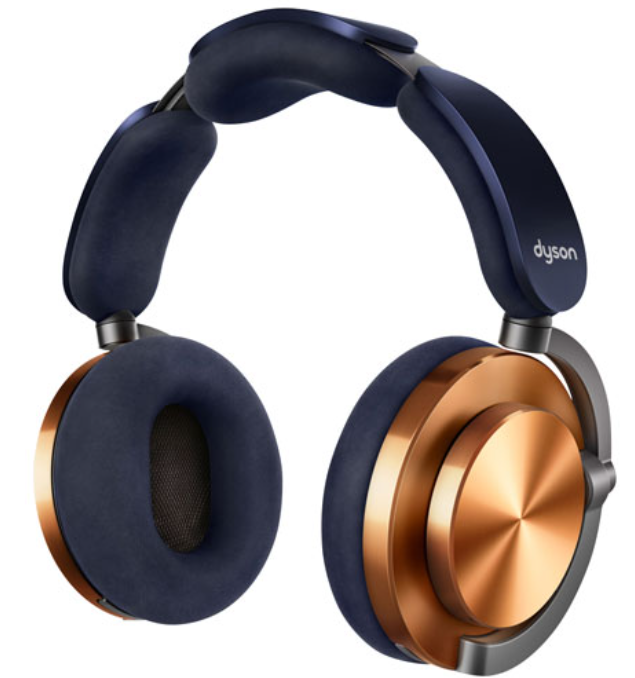
The Dyson OnTrac Headphones are a bold entry into the premium wireless audio market, combining Dyson’s engineering excellence with best-in-class noise cancellation and immersive sound quality. Designed for audiophiles, frequent travelers, and professionals seeking uninterrupted focus, the Dyson OnTrac Headphones deliver up to 55 hours of battery life with active noise cancellation (ANC) enabled—setting a new benchmark for endurance in the category. Their custom ANC algorithm leverages eight microphones sampling external sound 384,000 times per second, achieving up to 40dB of noise attenuation for a truly distraction-free experience.
Unique selling points include ergonomic comfort certified by US Ergonomics, thanks to high-grade foam cushions, micro-suede ear pads, and a headband with evenly distributed weight for all-day wear. The headphones reproduce a wide frequency range (6Hz–21kHz), ensuring deep, resonant bass and crisp highs. Users can customize their look with interchangeable ear cushions and caps, while the MyDyson™ app offers EQ presets and noise exposure monitoring for hearing health.
Targeting discerning listeners who value both performance and design, the Dyson OnTrac Headphones are ideal for commuting, remote work, gaming, and critical listening sessions. Available in multiple colorways, they are priced in the premium segment (approx. AUD$799), reflecting their advanced features and build quality. With global availability through Dyson’s official channels and select retailers, these headphones are positioned as a top-tier choice for those seeking luxury, longevity, and cutting-edge audio technology.
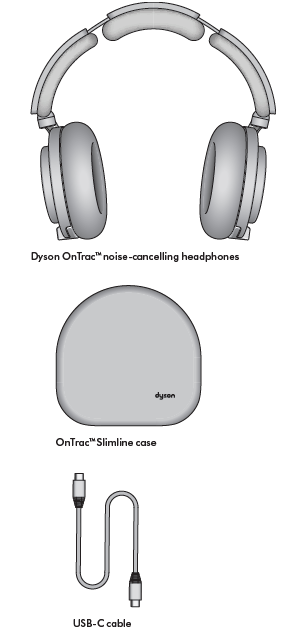
In the box
Specifications
- Drivers: 40mm neodymium dynamic drivers per ear cup
- Frequency Response: 6Hz – 21kHz
- Noise Cancellation: Up to 40dB attenuation with 8 ANC microphones
- Battery Life: Up to 55 hours (ANC on); 30-minute charge for 9 hours; 10-minute quick charge for 2.5 hours
- Charging: USB-C; includes travel adapter (sold separately)
- Bluetooth: Version 5.3, range up to 9m (30ft); supports SBC, AAC, LHDC codecs
- Weight: 451g
- Materials: CNC-milled aluminum body, ceramic or anodized aluminum caps, microfiber cushions
- Controls: Touch controls for ANC, intuitive joystick for volume/track/calls, dedicated listening mode buttons
- Smart Features: MyDyson™ app for EQ (Bass Boost, Enhanced, Neutral), noise exposure tracking, firmware updates
- Compatibility: Works with Apple Siri, Amazon Alexa, Google Assistant
- Dimensions: 201mm (H) x 261mm (L)
Comparison: The Dyson OnTrac Headphones outperform competitors like Apple AirPods Max (20 hours battery) and Sonos Ace (30 hours), though they lack some smart features such as auto device switching and adaptive audio modes[3]. Their robust build, exceptional battery life, and advanced ANC make them a strong contender in the luxury headphone segment.
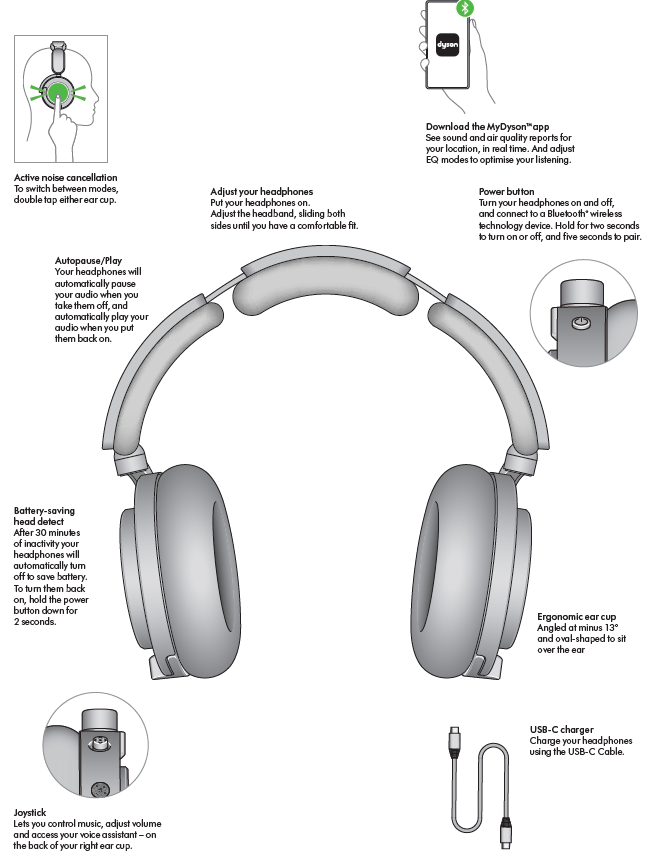
Get to know your headphones..
Battery and LED behaviour
Battery life
Up to 55 hours of listening, even with ANC switched on. And if you’re running low, a 10-minute charge delivers 2.5 hours of battery, and a 30-minute charge delivers 9 hours.
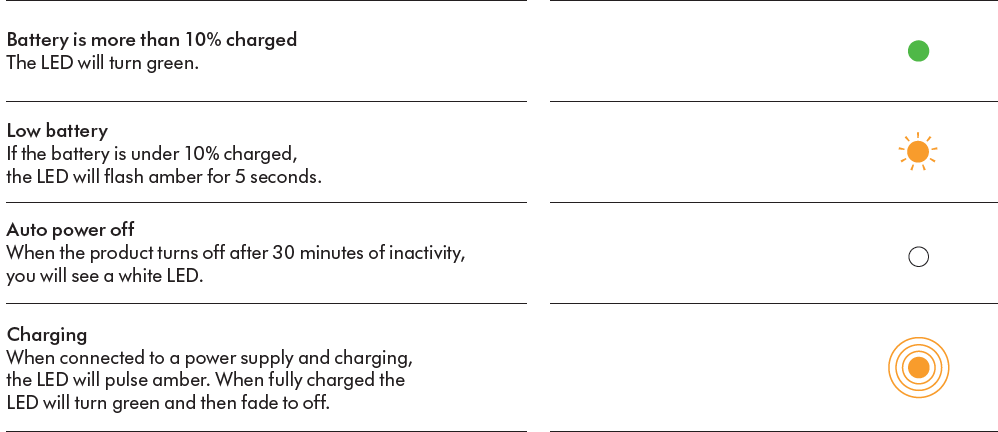
LED
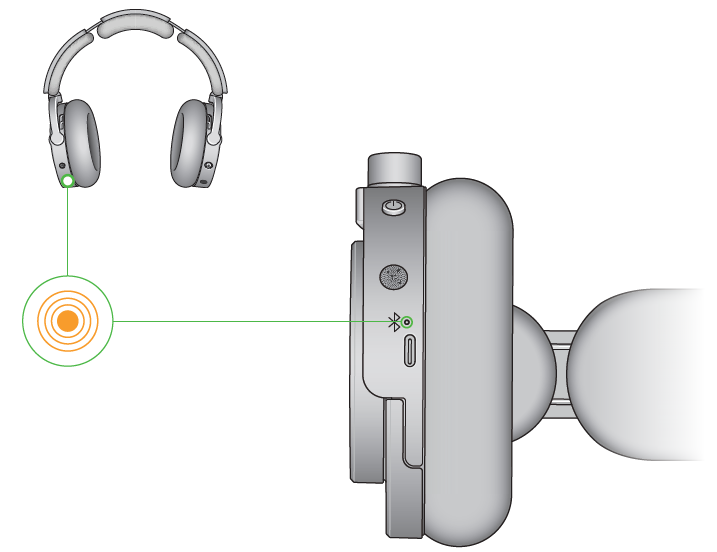
Locate the charge indicator at the front centre of the left ear cup.
Battery
Bluetooth® wireless technology1
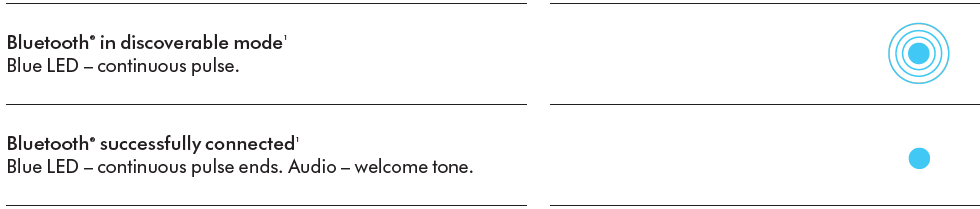
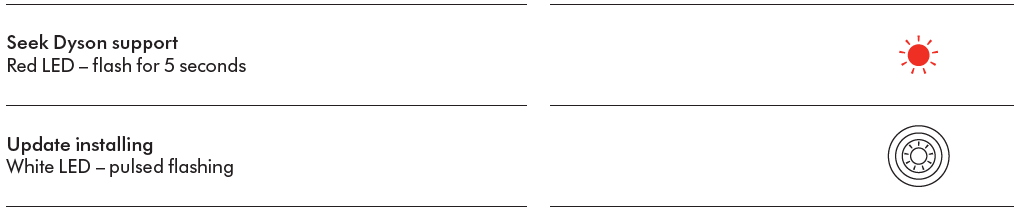
Alerts
Controlling audio
To play audio through your headphones, you’ll need to either connect them using Bluetooth® or the in-flight adaptor cable.
Use the intuitive joystick..
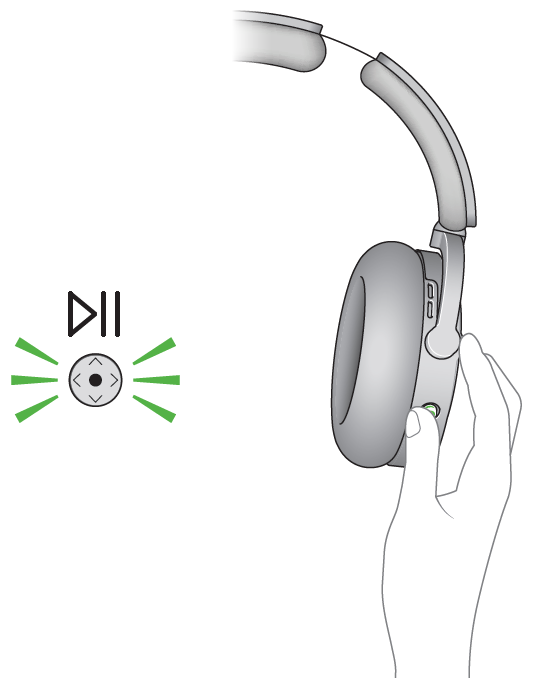
Control your audio using the MyDyson™ app or the joystick on the back of your right ear cup.
Play and pause
Press the middle of the joystick to play. Press it again to pause.
Active noise cancellation
Use Active noise cancellation (ANC) to reduce the background noise around you.
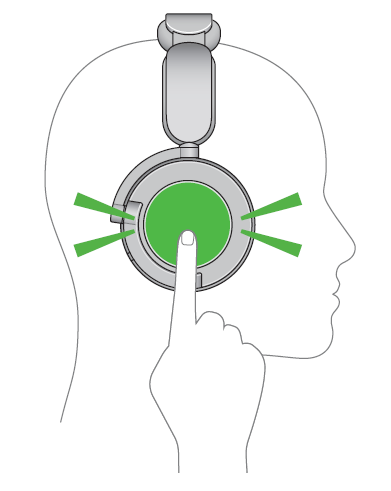
You can double-tap either outer cap to switch between noise-cancelling modes.
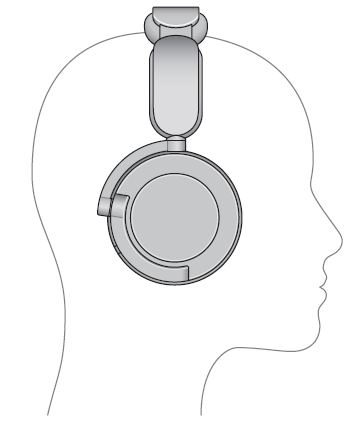
Isolation mode
The maximum level of ANC, the surrounding background noise. This is the default setting for your headphones.
Transparency mode
To hear the environment around you.
Cleaning your Dyson OnTrac™ headphones
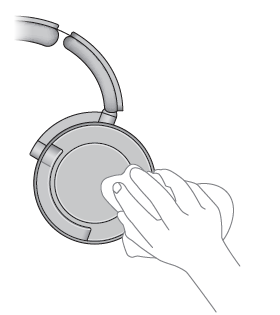
Outer caps
Wipe away dust or debris from the perforations in the ear cup covers with a soft, damp, lint-free cloth.
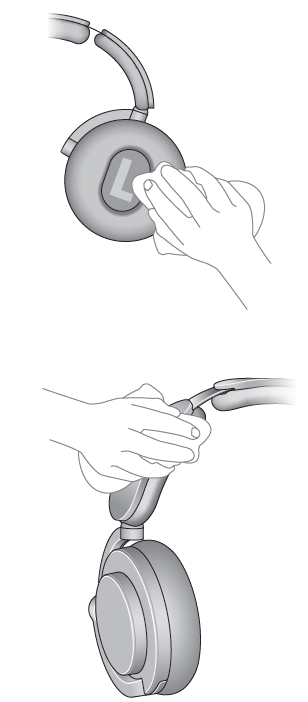
Ear cushions and headband
Wipe away dust or debris with a soft, damp, lint-free cloth.
Troubleshooting
Common Issues & Solutions
- Connectivity Problems: Ensure Bluetooth is enabled on your device and headphones are in pairing mode. Restart both devices if the connection fails.
- ANC Not Working: Double-check that ANC is enabled via the MyDyson™ app or by double-tapping the ear cup. Update firmware if issues persist.
- Battery Drain: If battery life is shorter than expected, disable unnecessary features and ensure the latest firmware is installed. Use original charging accessories.
- Audio Distortion: Check for debris in the ear cups and ensure a proper fit. Reset headphones via the app if problems continue.
- Comfort Issues: Adjust headband and ear cushion positioning. If discomfort persists, consider alternative cushion sizes (available separately).
Preventive Measures: Regularly clean ear cushions and caps, avoid exposure to extreme temperatures, and store them in the provided case when not in use.
Warranty & Support: Dyson OnTrac Headphones come with a standard manufacturer’s warranty. For service or replacements, contact Dyson customer support via their official website or local service centers. Keep your proof of purchase for warranty claims.
Contact Information: Visit Dyson’s support page for live chat, phone, or email assistance. Reference your serial number for faster service.
Pros & Cons
Strengths
- Unmatched Battery Life: 55 hours with ANC—far exceeding most rivals.
- Superior Noise Cancellation: 8-mic system delivers up to 40dB attenuation for immersive silence.
- Premium Build Quality: Durable aluminum and ceramic construction with customizable aesthetics.
- Comfortable Fit: Ergonomically certified, with even weight distribution and plush cushions for long sessions.
- Advanced App Features: EQ presets, noise exposure monitoring, and firmware updates via MyDyson™.
Limitations
- Heavier Than Competitors: At 451g, they are notably heavier than Apple AirPods Max (385g).
- Lack of Smart Features: No auto device switching, adaptive audio, or conversation awareness modes.
- Premium Price: Positioned at the high end of the market, which may not suit all budgets.
- Limited Ecosystem Integration: Less seamless with Apple or Sonos ecosystems compared to native options.
Value for Money: The Dyson OnTrac Headphones justify their price with exceptional battery life, build quality, and ANC performance, but buyers seeking smart features or lighter weight may prefer alternatives.
Customer Reviews
Early adopters praise the Dyson OnTrac Headphones for their marathon battery life, robust noise cancellation, and luxurious materials. Many highlight the comfort during extended use, though some note the weight can cause fatigue over very long sessions. The sound signature is described as balanced, with deep bass and clear highs, appealing to a wide range of music genres[3][4].
Common criticisms include the lack of auto-pause when removing the headphones (though some models may include this feature[7]), and the absence of advanced smart features found in competitors. The premium price is a recurring point, with some users questioning the value compared to established brands. Overall, star ratings average around 4.5/5, with strong recommendations for travelers and professionals who prioritize battery life and noise cancellation over smart ecosystem perks.
Purchase Recommendation: Ideal for users seeking best-in-class ANC and battery life in a stylish, customizable package. Consider alternatives if you prioritize lightweight design or deep integration with Apple/Sonos ecosystems.
Faqs
How do I properly set up my Dyson OnTrac Headphones for the first time?
What should I do if my Dyson OnTrac Headphones are not connecting via Bluetooth?
How do I optimize battery life on my Dyson OnTrac Headphones?
Can I use Dyson OnTrac Headphones with multiple devices simultaneously?
How often should I clean my Dyson OnTrac Headphones?
What are the different modes available on Dyson OnTrac Headphones?
Are Dyson OnTrac Headphones compatible with all smartphones?
How do I troubleshoot distorted audio on my Dyson OnTrac Headphones?
More dyson manuals
Leave a Comment