
How to Use: Dyson Pencilvac User Guide
Content
Dyson PencilVac
Introduction
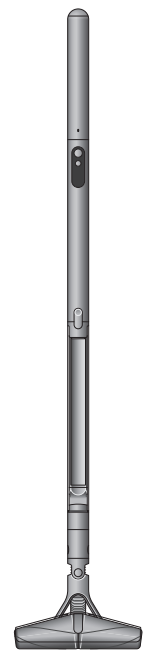
Revolutionizing home cleaning with its sleek design and powerful performance, the Dyson PencilVac is the world's slimmest cordless vacuum cleaner. Measuring just 38mm in diameter and weighing 1.8kg, it is designed for those living in small spaces or seeking a secondary vacuum for precise cleaning tasks. The PencilVac features Dyson's fastest motor yet, the Hyperdymium 140k, which spins at 140,000 RPM and delivers 55AW of suction. This makes it ideal for navigating tight spaces and cleaning under low furniture. The PencilVac is expected to launch in the US and UK in 2026, with a global rollout already underway. Pricing details are not yet fully disclosed, but are expected to be competitive with other high-end cordless vacuums.
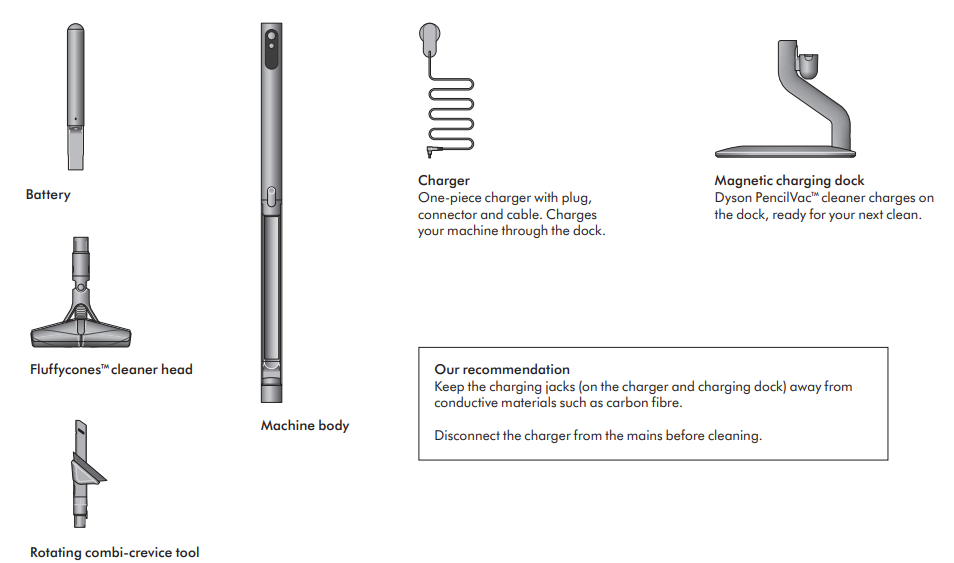
In the box
Your machine is boxed in 3 parts:
- Machine body
- Battery
- Cleaner head/tools
Simply attach the battery to the main body and then the cleaner head/tool to the other end of the main body.
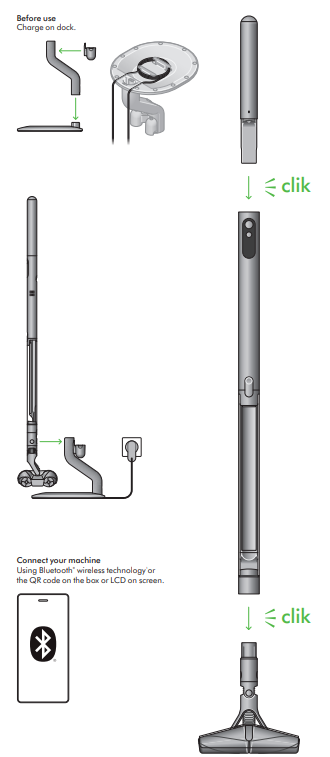
Getting started
Looking after your machine
- Day-to-day machine care
- To get the best performance from your machine, it’s important to clean it regularly.
- If your machine is dusty, wipe with a damp lint-free cloth.
Battery health
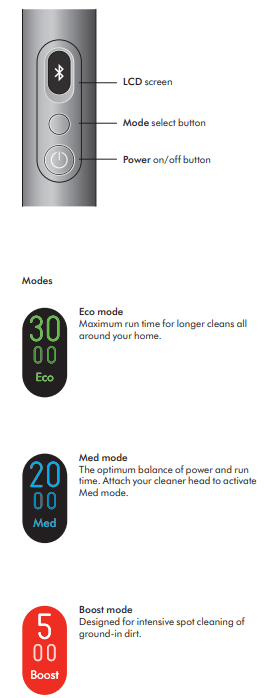
- For best performance and battery life, use Boost mode only for an intense burst of power.
- Your battery is designed to charge on the dock and stops charging when complete, so return the machine to the dock after use, which helps maintain battery life.
- Where to find your machine’s serial number
- The serial number is printed on the main body of the machine, behind the back of the clear bin.
- Use the serial number to register your machine.
Technical Specifications of the Dyson PencilVac
The Dyson PencilVac is engineered with cutting-edge technology to provide efficient cleaning:
- Motor: Hyperdymium 140k motor, 28mm wide, spinning at 140,000 RPM.
- Suction Power: 55AW of sealed suction.
- Filtration: Two-stage linear dust separation system capturing 99.99% of particles as small as 0.3 microns.
- Attachments: Includes a Motorbar cleaner head, rotating combi-crevice tool, and conical hair screw tool.
- Battery Life: Up to 40 minutes of fade-free suction (Eco mode), up to 5 minutes in Boost mode.
- Design: Slim 38mm diameter, 1.8kg weight, with a magnetic charging dock and wall mount.
- Special Features: Fluffycones™ cleaner head for detangling hair, air-compressing dustbin, and hygienic syringe bin ejection.
Compared to other slimline vacuums, the PencilVac offers superior suction power and advanced filtration technology, making it a leader in its class.
Troubleshooting and Maintenance
For common issues and solutions:
- Low Suction: Check for blockages in the dustbin or filter. Clean or replace as necessary.
- Battery Not Charging: Ensure the charging dock is properly connected and the battery is aligned correctly.
- Error Codes: Refer to the user manual for specific error codes and their solutions.
- Preventive Measures: Regularly clean the filter and dustbin to maintain performance.
- Warranty and Support: Contact Dyson customer support for warranty inquiries and troubleshooting assistance.
Pros and Cons of the Dyson PencilVac
Here’s a balanced assessment of the Dyson PencilVac:
Pros
- Compact Design: Ideal for small spaces and tight corners.
- Efficient Motor: Provides powerful suction despite its size.
- Advanced Filtration: Captures 99.99% of particles as small as 0.3 microns.
- Easy Maintenance: Hygienic syringe bin ejection and air-compressing dustbin.
Cons
- Short Battery Life in Boost Mode: Only up to 5 minutes of high suction.
- Cost: Expected to be priced higher than some competitors.
- Availability: Limited availability in some regions.
The Dyson PencilVac offers excellent performance and design, but may not be the best value for those needing extended battery life or a more affordable option.
Customer Reviews and Feedback
Users praise the PencilVac for its sleek design and powerful suction, though some note the short battery life in Boost mode. The Fluffycones™ cleaner head is particularly appreciated for its ability to detangle hair effectively.
Star Rating: 4.5/5
Common praises include its ease of use and ability to navigate tight spaces. However, some users mention the high expected price as a drawback.
Faqs
How do I set up my Dyson Pencilvac for the first time?
What should I do if my Dyson Pencilvac shows a blockage alert?
How often should I clean and maintain the filter on my Dyson Pencilvac?
Can I use the Dyson Pencilvac on different floor types and surfaces?
Why is my Dyson Pencilvac losing suction and how can I improve its performance?
How do I properly empty the dust bin on the Dyson Pencilvac?
What troubleshooting steps can I take if my Dyson Pencilvac won’t power on?
How do I clean the brush bar and ensure it doesn’t get obstructed on my Dyson Pencilvac?
Tags
More dyson manuals
- Setup & Usage: Dyson Corrale Setup Guide
- How to Use: Dyson Supersonic r Hair Dryer User Manual
- Setup: Dyson Purifier big+quiet Formaldehyde User Guide
- How to Use: Dyson Airwrap I.D Multi-Styler and Dryer User Manual
- How to Pair: Dyson Zone Headphone User Guide
- Pairing & Usage: Dyson Ontrac Headphones User Manual
Leave a Comment