
Pairing: Eargo 7 Self-Fitting Hearing Aids User Manual
Content
Eargo 7 Self-Fitting Hearing Aids
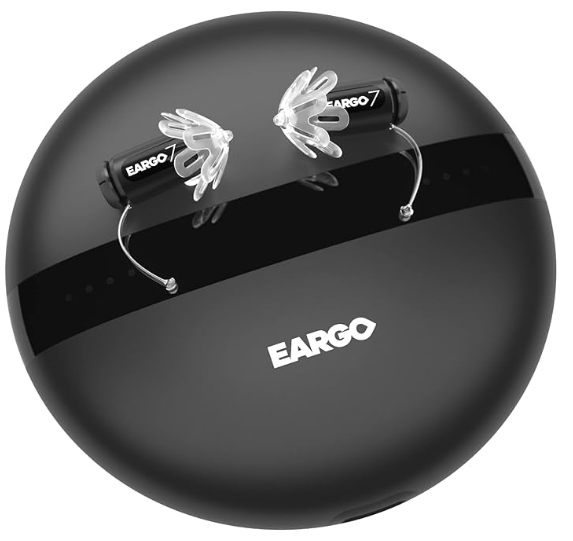
Introduction
The Eargo 7 Self-Fitting Hearing Aids are a revolutionary product designed to enhance hearing for individuals with mild to moderate hearing loss. Launched in 2022, these hearing aids are known for their sleek design, ease of use, and advanced technology. The estimated price for the Eargo 7 is around $2,950, making it a significant investment in hearing health.
These hearing aids are intended for individuals who want a discreet and user-friendly solution without the need for frequent visits to an audiologist. With their self-fitting capability, users can adjust the settings to their comfort and hearing needs directly through the Eargo app.
The Eargo 7 features cutting-edge sound processing algorithms and advanced noise reduction, ensuring clear and natural sound in various environments. The rechargeable batteries provide up to 16 hours of continuous use on a single charge, making them convenient for daily wear.
WHAT’S INCLUDED

Specifications
- Self-fitting capability through the Eargo app
- Advanced sound processing algorithms for clear sound
- Noise reduction technology to minimize background noise
- Rechargeable batteries with up to 16 hours of use per charge
- Water-resistant design with IPX7 rating
- Discreet and compact design for comfortable wear
- Bluetooth connectivity for seamless phone calls and streaming
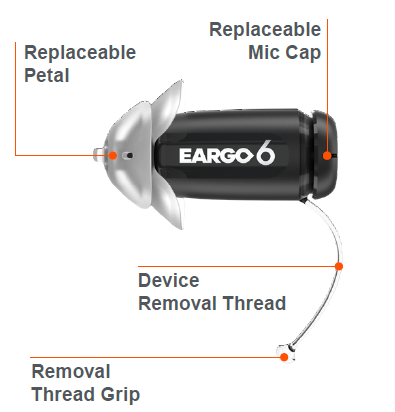
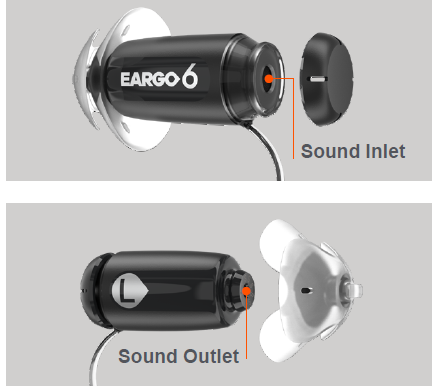
GET TO KNOW YOUR EARGO
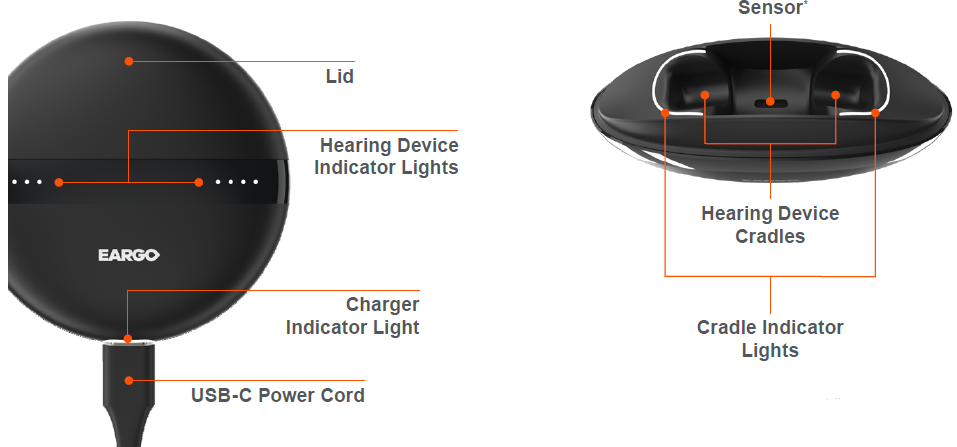
GET TO KNOW YOUR CHARGER
Setup Guide
To set up your Eargo 7 Self-Fitting Hearing Aids, follow these steps:
- Charge the hearing aids in the provided charging case until they are fully powered.
- Download and install the Eargo app on your smartphone or tablet.
- Pair the hearing aids with your device through the app by following the on-screen instructions.
- Complete the in-app hearing test to customize the sound settings to your hearing needs.
- Adjust additional settings such as noise reduction and volume through the app.
Troubleshooting
If you encounter issues with your Eargo 7 Self-Fitting Hearing Aids, here are some common problems and solutions:
- No Sound: Check that the batteries are fully charged and the hearing aids are properly paired with your device.
- Adjust the sound settings in the Eargo app or restart the hearing aids.
- Ensure Bluetooth is enabled on your device and try re-pairing the hearing aids.
Always refer to the user manual for detailed troubleshooting instructions and warnings.
APPENDIX
Indications for Use: The hearing device is intended to amplify and transmit sound to the ear and thereby compensate for mild to moderate high-frequency hearing loss in adults.
Additional Notices: A hearing aid will not restore normal hearing and will not prevent or improve a hearing impairment resulting from organic conditions.
In most cases,, infrequent use of a hearing aid does not permit a user to attain full benefit from it. The use of a hearing aid is only part of hearing rehabilitation and may need to be supplemented by auditory training and instruction in lip reading.
Possible Side Effects: Minor itchiness, redness, and irritation may occur as your ear becomes accustomed to having an object in it. If this or anything related may arise, please contact Eargo.
- If an actual allergic reaction occurs or you experience inflammation, discharge from the ear, excessive wax,, ax,, or other unusual conditions, contact a physician.
- If, for any reason, your hearing devices do not operate properly, do NOT attempt to fix them yourself. Not only are you likely to violate any applicable warrantibut you could also cause further damage.
Caution: Always wear an Eargo device with a Petal. Make sure that the Petal is correctly attached. In rare cases, the Petal could remain in your ear when removing the Eargo device. If this happens, do not attempt to remove the Petal yourself. Have the Petal removed by a healthcare professional.
Warning to Hearing Aid Dispensers: Please see eargo.com/guides for Warning to Hearing Aid Dispensers.
Important Notice for Prospective
Hearing Aid Users:
Please see eargo.com/guides for Prospective Hearing Aid Users.
Children with Hearing Loss: In addition to seeing a physician for a medical evaluation, a child with a hearing loss should be directed to an audiologist for evaluation and rehabilitation, since hearing loss may cause problems in language development and the educational and social growth of a child. An audiologist is qualified by training and experience to assist in the evaluation and rehabilitation of a child with a hearing loss. Eargo devices are for those who are at least 18 years of age.
Recycling and Disposal:
Eargo packaging is recyclable. Eargo devices, Charger, USB-C Power Cord, and Power Adaptor must be recycled at an e-waste facility or sent back to Eargo. Everything else goes in normal waste. For more information, visit eargo.com.
Pros & Cons
Pros:
- Discreet and compact design for comfortable wear
- Advanced sound processing and noise reduction technology
- Self-fitting capability through the Eargo app
- Rechargeable batteries with long battery life
- Bluetooth connectivity for seamless phone calls and streaming
Cons:
- Higher price point compared to some other hearing aid models
- May require some time to get used to the fit and sound adjustments
- Limited compatibility with certain phone models or devices
Customer Reviews
Customers have praised the Eargo 7 for its ease of use and clear sound quality. Many have appreciated the discreet design and the convenience of the self-fitting feature. However, some users have noted that the initial setup can be a bit complex and that the price is higher than some other options on the market.
Most Common Complaints:
- Higher cost compared to other hearing aid models
- Initial setup can be confusing for some users
Faqs
What is the battery life of the Eargo 7 Self-Fitting Hearing Aids?
Do I need to see an audiologist to set up the Eargo 7?
Are the Eargo 7 hearing aids waterproof?
Can I use the Eargo 7 with my smartphone?
What is the estimated price of the Eargo 7 Self-Fitting Hearing Aids?
How do I adjust the sound settings on my Eargo 7?
Can I try the Eargo 7 before purchasing?
Are there any additional costs for the Eargo 7 beyond the initial purchase?
How do I clean and maintain my Eargo 7 hearing aids?
What if I encounter issues with my Eargo 7?
More eargo manuals
Leave a Comment