
Pairing: Eargo OTC Hearing Aids User Manual
Content
eargo OTC Hearing Aids
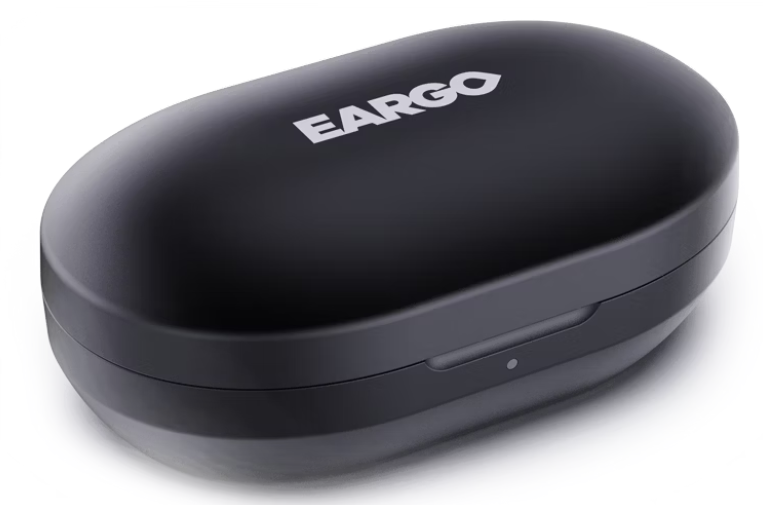
Introduction
The eargo OTC Hearing Aids represent a breakthrough in discreet, user-friendly hearing technology designed for individuals with mild to moderate hearing loss. These devices offer a virtually invisible, completely-in-canal (CIC) design that fits comfortably inside the ear, making them ideal for users seeking a natural look without bulky hearing aids. The eargo 8, the latest flagship model launched in 2025, integrates advanced sound technologies such as Smart Sound Adjust, which automatically adapts to diverse listening environments, and Sound Match, allowing personalized hearing adjustments via a mobile app without requiring in-clinic visits.
Users benefit from all-day comfort with medical-grade silicone eartips, exceptional battery longevity—up to 16 hours per charge with a portable charging case providing 14 full recharges—and robust durability featuring an IP68 water and dust resistance rating. These attributes make eargo hearing aids suitable for daily wear, including active lifestyles and outdoor activities. The product is well-suited for adults looking for an easy-to-use, rechargeable hearing solution that combines convenience, discretion, and clinical-quality sound enhancement.
Available directly over-the-counter and through licensed providers, eargo OTC hearing aids are priced around $2,699 with financing options as low as $88 per month. They come backed by a 45-day return policy and a 2-year warranty, underscoring the brand's confidence in user satisfaction and device reliability.
Technical Specifications of eargo OTC Hearing Aids
- Design: Completely-in-canal (CIC), lightweight, virtually invisible with soft, medical-grade silicone eartips for maximum comfort.
- Sound Technology: Smart Sound Adjust automatically adapts to different noise environments; the Sound Match feature enables self-fitting via the Eargo mobile app.
- Battery Life: Up to 16 hours per full charge; charging case provides 14 additional full charges for up to two weeks of use.
- Durability: IP68 rating - dust-tight and water-resistant to immersion beyond 1 meter for 30+ minutes (not waterproof).
- Connectivity: No Bluetooth audio streaming; app supported on iOS and Android for customization and hearing tests.
- Performance: 16 sound bands, 8 channels for clearer highs and richer lows; adaptive sound algorithms enhance speech clarity in quiet settings.
- Warranty & Support: 2-year warranty; remote audiologist support and no-office-visit fitting process.
- Price: Approximately $2,699 with financing available.
Compared to similar OTC hearing aids, eargo 8 stands out with its superior battery life, advanced adaptive sound technology, and high ingress protection rating, though it lacks Bluetooth streaming found in some competitors.
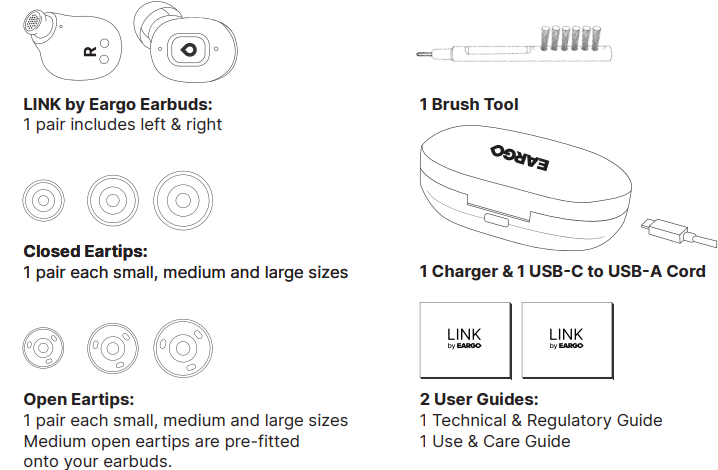
What’s Included
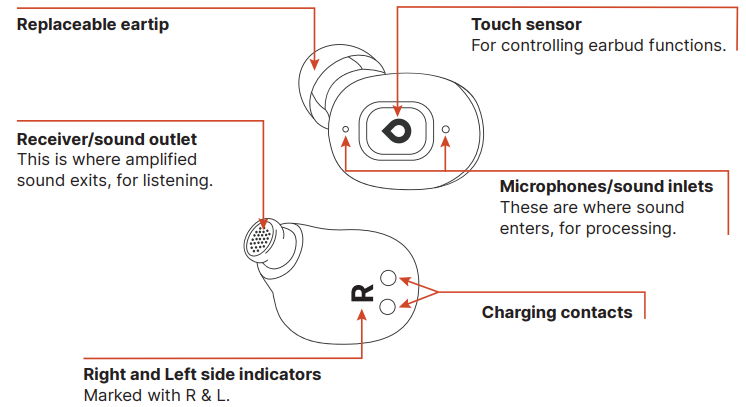
Get To Know Your Earbuds
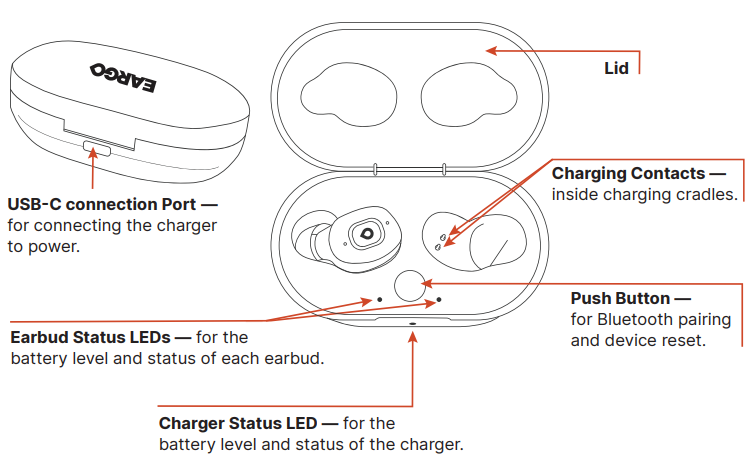
Get To Know Your Charger
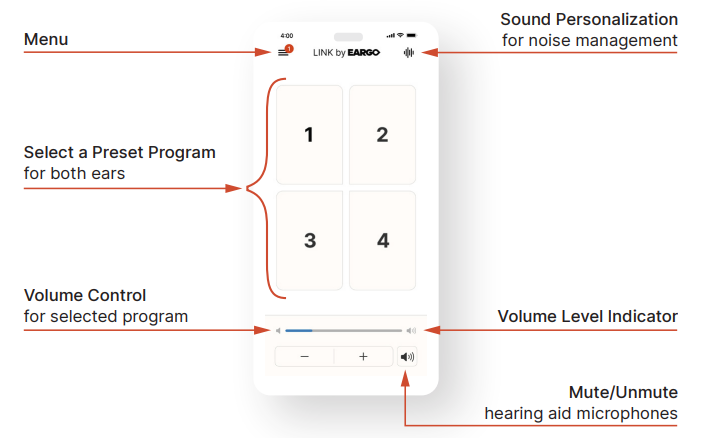
Dashboard Overview
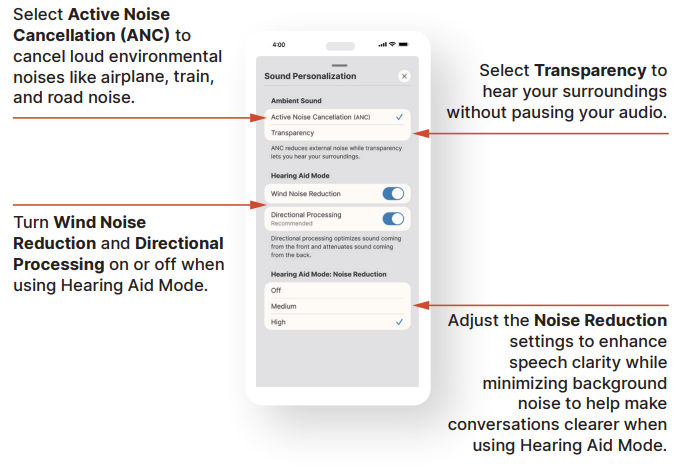
Sound Personalization
Pair Your Earbuds
- Pair your earbuds to a compatible device to experience audio streaming, and to control earbud volume and settings from the paired device’s controls.
- First, ensure that Bluetooth is switched on in your device settings. Then, follow one of two methods to set your earbuds in discovery mode for pairing.
- You can manage your pairing connection within the paired device’s Bluetooth list under Settings. Selecting “disconnect” will disconnect the earbuds. Selecting “forget” will delete the pairing altogether.
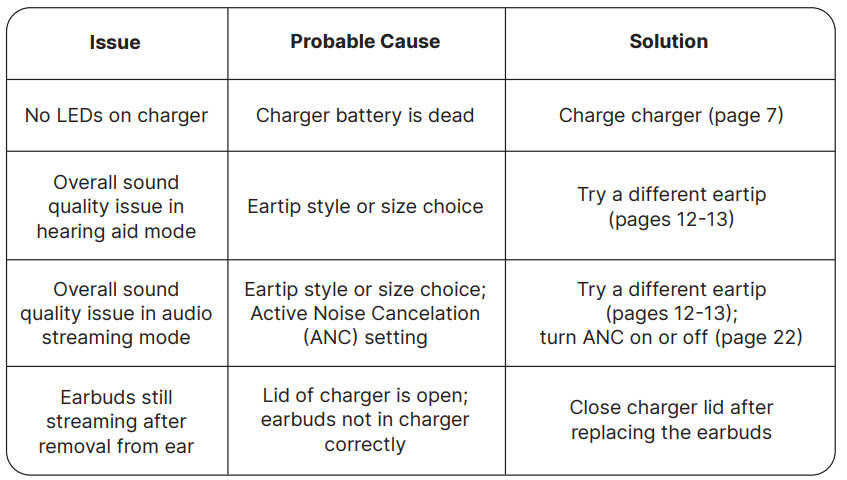
- When replacing earbuds into the charger after use, close the charger lid to stop Bluetooth streaming.
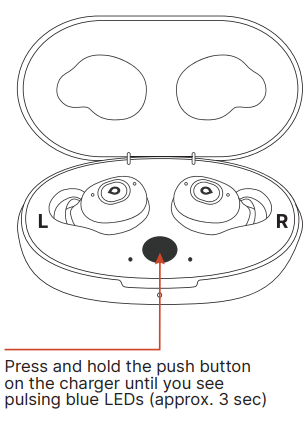
Method 1 - in-charger pairing:
- Place both earbuds inside the charger.
- Keep the lid open.
- Press and hold the push button on the charger until you see pulsing blue LEDs (approximately 3 seconds).
- Tap on ”Link by Eargo” in your device’s Bluetooth list. A solid blue LED will appear for 5 seconds once the device is paired.
- Remove earbuds from charger and place in ears. Use your paired device to stream and control phone calls and audio.
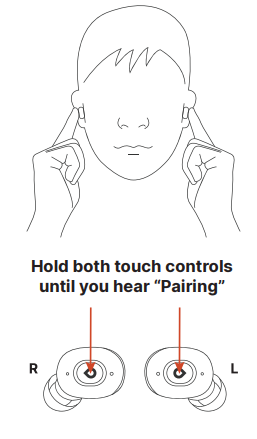
Method 2 - in-ear pairing:
- Place earbuds in your ears.
- Touch and hold both earbuds for 5 seconds until you hear “Pairing”.
- Tap on “Link by Eargo” in your device’s Bluetooth list.
- Earbuds will announce “Connected”. Use your paired device to stream and control phone calls and audio.
Daily Care
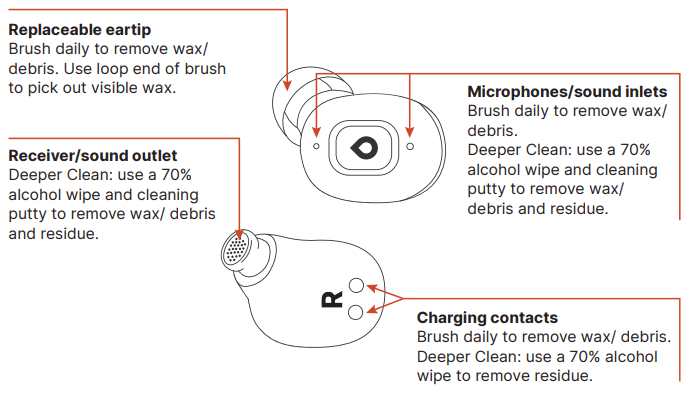
It is very important that you brush the earbuds clean after use. Wax, oil, or other debris can get into the sound inlets and outlets, which may cause the hearing aid to have poor sound quality or even no sound.
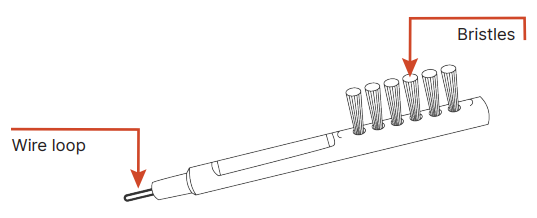
- Clean the eartips. With the eartips attached, use the bristles to brush the silicone and the sound outlet area. Use the wire loop to remove any visible wax.
- Clean the microphones. Use the bristles to brush the two sound inlets.
- Clean the charging contacts. Use the bristles to brush the gold contacts clean.
- Wipe. Use a lint-free cloth (not included) over the entire earbud to complete the daily cleaning process.
Deeper Cleaning
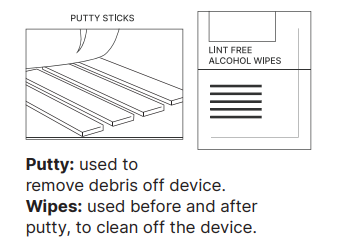
- Deep cleaning with putty and 70% isopropyl alcohol wipes will ensure your earbuds remain in good working condition. Perform deeper cleaning at least once every two weeks.
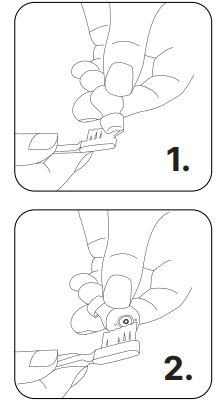
- Remove the eartip (p. 23). Brush around the sound outlet to remove wax and debris. Then, perform the following steps.
- Wipe first. Use the alcohol wipe all over the earbuds.
- Use the putty. After you wipe the earbuds, knead the putty and make it into a roll or a ball.
- Hold the putty in one hand and the earbud in the other.
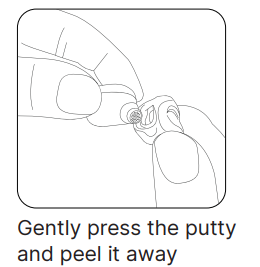
- Gently press the putty into the sound outlet. Peel it away. Repeat a few times.
- Gently press the putty into the microphone areas and peel it away. Do this a few times.
- Repeat on the other earbud.
Wipe again.
Reuse the alcohol wipe all over the earbuds one more time, to remove any residue.
Don’t forget! Your charger needs cleaning, too. Use a 70% isopropyl alcohol wipe to remove dust, debris,s and wax from the cradles and contacts.
Where, When & How to Clean Your Earbuds
Troubleshooting
Pros & Cons of eargo OTC Hearing Aids
Pros
- Discreet Design: Virtually invisible CIC form factor suits users who prioritize aesthetics and subtlety.
- Advanced Sound Adaptation: Smart Sound Adjust learns and adapts to environments for effortless listening without manual changes.
- Long Battery Life: Extended use with 16-hour charge duration plus 14 recharges in the compact magnetic charging case.
- Comfort: Soft medical-grade silicone eartips available in multiple sizes for all-day wear without irritation.
- Convenient App-Based Fitting: Personalized hearing profiles created via Sound Match on smartphone apps, eliminating the need for office visits.
- Durability: IP68 rating ensures dust and moisture resistance suitable for active lifestyles.
Cons
- Price Point: Higher initial cost than some OTC models, which may be a consideration for budget-conscious buyers.
- No Bluetooth Audio Streaming: Lacks direct connectivity for calls or music, unlike some competitors.
- Limited to Mild-Moderate Hearing Loss: Not suitable for severe hearing impairments requiring prescription devices.
- Non-Removable Battery: An internal lithium-ion battery means device replacement after battery lifespan ends.
Customer Reviews and Feedback on eargo OTC Hearing Aids
Users consistently praise the eargo OTC Hearing Aids for their discreet fit and comfort, with many highlighting the seamless adaptation to different sound environments as a significant benefit. The app-based self-fitting process receives positive remarks for ease of use and customized tuning without professional visits.
Common compliments include excellent battery life and a robust, portable charging case that supports everyday activities. However, some customers note the absence of Bluetooth streaming as a drawback, especially for those wanting direct audio connectivity for phones and media.
Star ratings generally range between 4 and 4.5 out of 5, reflecting overall satisfaction with sound quality and convenience. Occasional reports mention minor challenges in noisy environments, a known limitation given the device's OTC classification. The 45-day return policy and 2-year warranty bolster buyer confidence and satisfaction.
Most reviewers recommend the eargo 8 hearing aids for those seeking a discreet, rechargeable, and technologically advanced hearing solution tailored for mild to moderate hearing loss.
Faqs
How do I properly set up my eargo OTC Hearing Aids for first-time use?
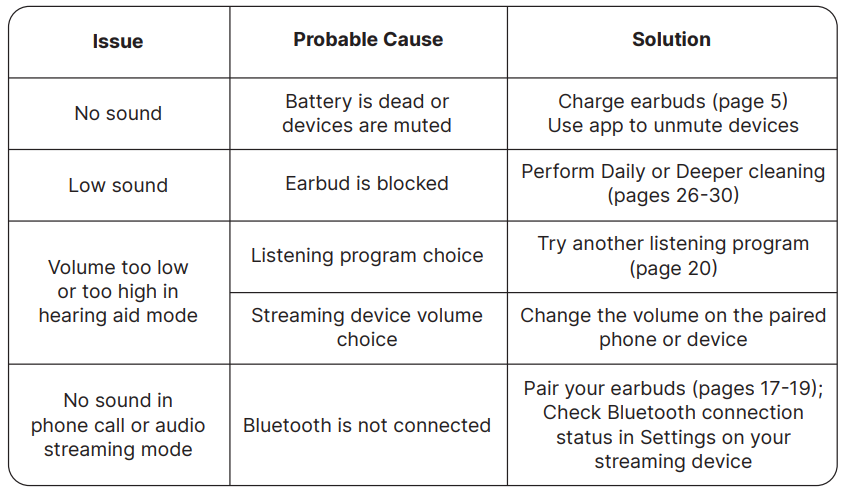
What should I do if my eargo OTC Hearing Aids produce weak or no sound?
How can I troubleshoot charging issues with my eargo OTC Hearing Aids?
What are the best practices for maintaining and cleaning my eargo OTC Hearing Aids?
How do I reduce feedback or whistling noises when using eargo OTC Hearing Aids?
Are eargo OTC Hearing Aids compatible with smartphones and how do I connect them?
What should I do if my eargo OTC Hearing Aids feel uncomfortable or cause ear irritation?
How can I optimize the performance of my eargo OTC Hearing Aids for different environments?
Tags
More eargo manuals
Leave a Comment