
Setup: Edgestar Portable Air Conditioner AP16000G User Guide
Content
Edgestar Portable Air Conditioner AP16000G
Introduction
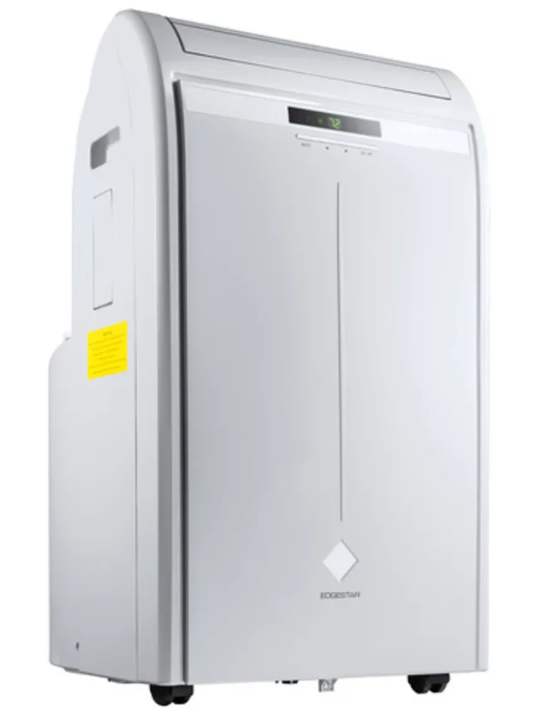
The Edgestar Portable Air Conditioner AP16000G is a versatile and powerful cooling solution designed for residential and commercial use. This portable air conditioner is ideal for rooms up to 450 square feet, making it a perfect choice for living rooms, bedrooms, offices, or any other space that needs efficient cooling. The AP16000G boasts a sleek and compact design, allowing it to fit seamlessly into any decor without taking up too much space.
Launched in recent years, this model has quickly gained popularity due to its high performance and energy efficiency. With an estimated price range of $400 to $600, it offers great value for its features and capabilities. The unit is equipped with advanced technologies such as automatic restart, dehumidifying mode, and a remote control for convenient operation.
The Edgestar Portable Air Conditioner AP16000G is not only a cooling device but also a dehumidifier and fan, making it a multi-functional appliance that can be used throughout the year. Its portability and ease of use make it an excellent choice for anyone looking to enhance their indoor climate comfort.
Specifications
- Description of product: Portable Air Conditioner
- Model: AP16000G
- Voltage / Frequency: AC 220 V ~ 60 Hz
- Input Power: 4835 W
- Current: 9.7 A
- Cooling Capacity: (SACC) 10000 BTU
- Cooling Capacity: (ASHRAE) 16000 BTU
- Color: Grey
- Coolant: R-410A
- Timer: 24 Hour
- Dimensions: H x W x D 33” x 19 3/4” x 18 1/8”
- Weight: 101.4 lbs.
Important Safety Information
Improper handling can cause serious damage to the appliance and/or to the user. Please read the following safety information.
Electrical Safety
- This unit is designed for indoor use only.
- Do not use the unit in extremely humid or wet environments.
- Do not wet the housing or control panel.
- Do not pull the unit by the cord.
- Always turn the unit off and unplug it from the outlet when cleaning.
- Unplug the unit if it is not going to be used for a long period of time.
- Do not operate the unit with a damaged plug or loose socket.
- Use only the correct power supply with appropriate amperage.
- If the power cord is damaged, it must be replaced by the manufacturer, a service agent, or a qualified technician.
- Do not remove any part of the casing unless you are instructed to do so by an authorized technician.
General Safety
- This portable air conditioner is n ot intended to be used by children.
- Children should be supervised to ensure that they do not play with this product.
- Do not allow children to play with he controls or drop any objects into the air outlets or vents.
- Do not place objects or let any person sit on top of the unit.
- Only use in the upright position on a flat, level surface and provide at least 12 inches of clearance from any walls or objects.
- Route the power cord carefully to avoid a tripping hazard.
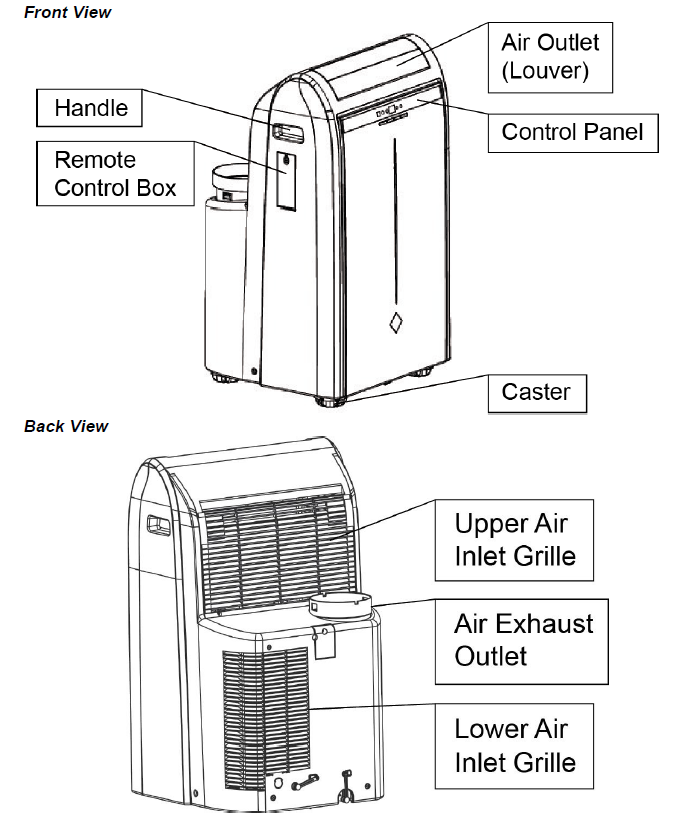
Parts Identification
Front View
Window Kit and Exhaust Hose Installation
Parts Included
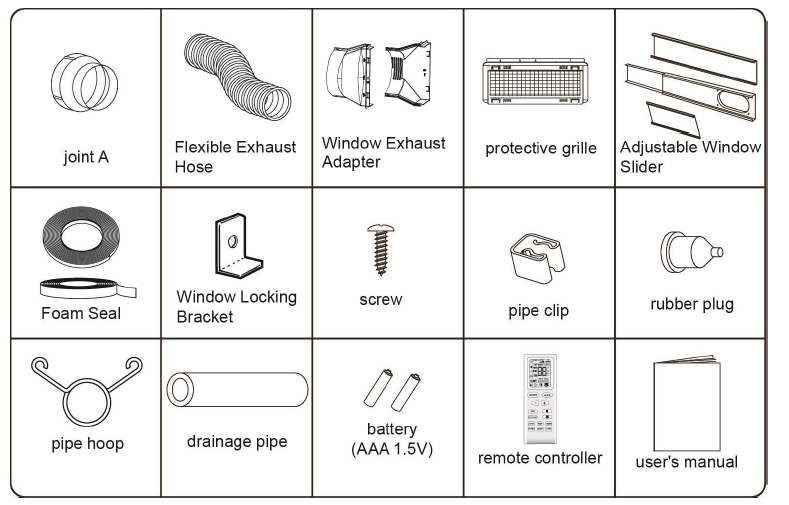
Suggested Tools
Philips Screw Driver (Medium Size), Tape Measure / Ruler, Scissors, Saw (if your window panel needs to be cut down in size for installation).
Operating Instructions
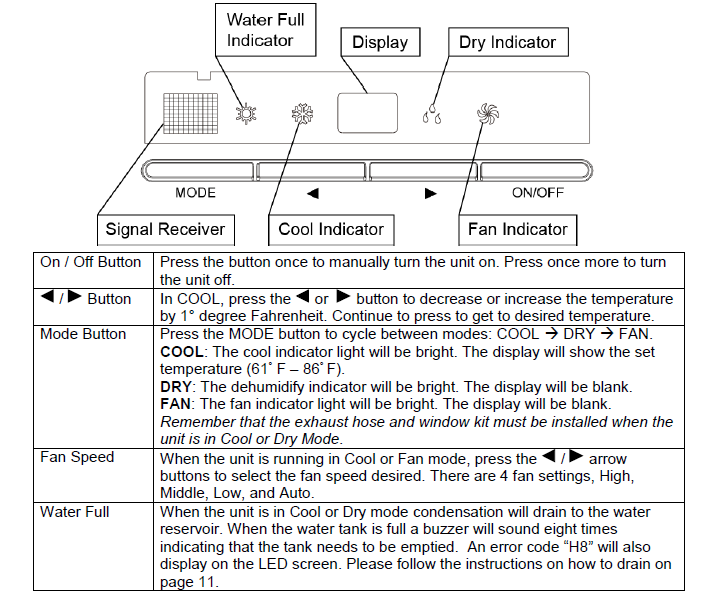
Control Panel Overview
Maintenance
Clean the air conditioner and filters regularly to maximize performance and efficiency, and to prolong the unit’s life. Be sure to always unplug the air conditioner from the power outlet before cleaning.
Cleaning the Exterior
- Use a soft, dry cloth to wipe the body of the air conditioner clean. If necessary, use lukewarm water to dampen a cloth to clean the unit.
- Use a soft-bristle brush to clean between the vents.
- Carefully use a vacuum cleaner to clean the condenser coils.
- Never use abrasive chemicals, volatile substances, gasoline, detergents, chemically treated cloths, or other cleaning solvents that may damage the cabinet exterior.
Warning: Never spray water directly on the unit.
Cleaning the Pre-Filter
To clean the pre-filter, follow the steps below:
- Power off the unit and remove the pre-filter.
- Remove the activated carbon filter.
- Use a vacuum cleaner or tap the pre-filter lightly to remove loose dust and dirt, then rinse thoroughly under lukewarm running water (below 104° F). You may use a mild soap and water solution if needed.
- Allow the pre-filter to air dry in a cool and shaded place. Dry the pre-filter thoroughly before reinstalling it.
Clean the pre-filter periodically. If the unit is used in a dusty environment , you may need to clean it every week.
Warning: Never operate the unit without the pre-filter.
Note: Filters should be replaced every veveryy2 – 3 months or as needed. Contact EdgeStar retailers for replacement filters.
Troubleshooting
If you encounter any issues with your Edgestar Portable Air Conditioner AP16000G, here are some common problems and solutions:
- No Power: Check if the unit is properly plugged in and if there are any issues with your electrical outlet.
- Poor Cooling Performance: Ensure proper installation of the window kit and exhaust hose. Check for any blockages or kinks in the hose.
- Noise Issues: Make sure all parts are securely assembled. If noise persists, contact customer support.
Always refer to the user manual for detailed troubleshooting guides and safety instructions.
Preparation for Storage
If you are not going to be using the unit for an extended period of time, follow the instructions below before storing your unit:
- Drain all the water from the unit’s reservoir. Operate the unit in fan mode for a few hours to thoroughly dry any moisture left on the coils inside the unit.
- Power off the unit. Then clean or change the filters.
- Unplug and carefully wind the power cord.
- Remove the exhaust hose and duct connectors and keep them in a safe place.
Energy Saving Guide
Read and follow the guide below to get the best performance and efficiency from your portable air conditioner:
- Do not cover the air outlet (exhaust) while the unit is in use.
- Do not place the unit in front of curtains or drapes to ensure they do not obstruct the air intake.
- Minimize the length of the exhaust hose.
- Make sure the exhaust hose is as straight as possible and avoid kinks or bends.
- Keep curtains, blinds, or drapes closed during the sunniest part of the day.
- Use the timer to operate the unit before it is needed. For example, set the timer to turn on the unit in cooling mode for 3 or more hours to cool the room before you arrive. You may want to operate the unit all day if you live in a warmer climate.
- Minimize the heat sources (direct sunlight, computers, servers, people, etc.) in the room.
- Close all windows and doors.
- Use the unit in a contained room. For example, operate the unit in a room with four walls and a ceiling, instead of a partitioned studio, or warehouse.
- Make sure the unit is on a level surface.
- Minimize the amount of humidity in the room. For example, run the unit as a dehumidifier.
- To prolong the compressor's life, please wait at least 3 minutes before turning the unit back on after shutting it off.
- Inspect and clean the pre-filters regularly.
- Inspect and replace the activated carbon filters regularly.
- Perform routine maintenance.
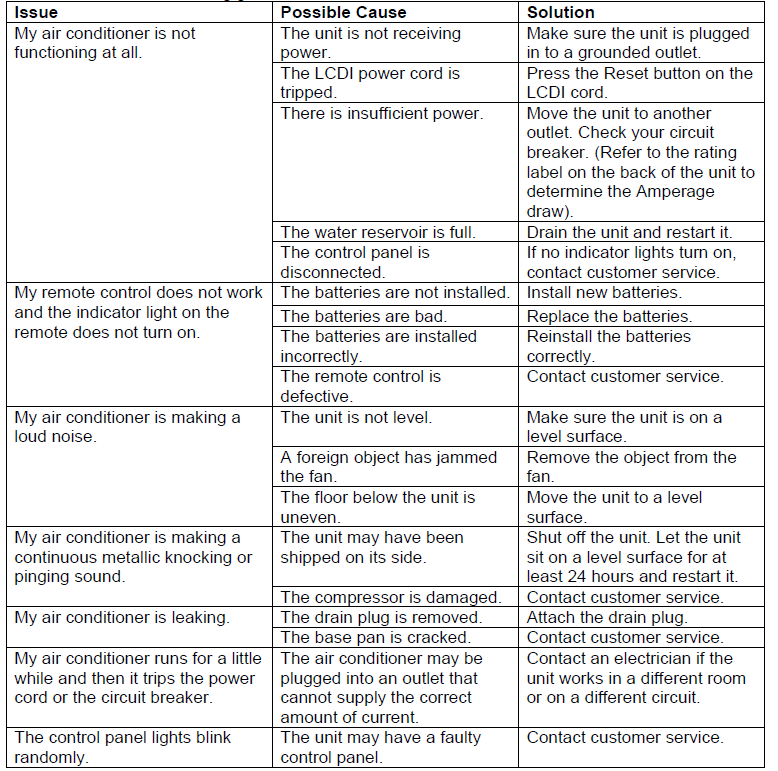
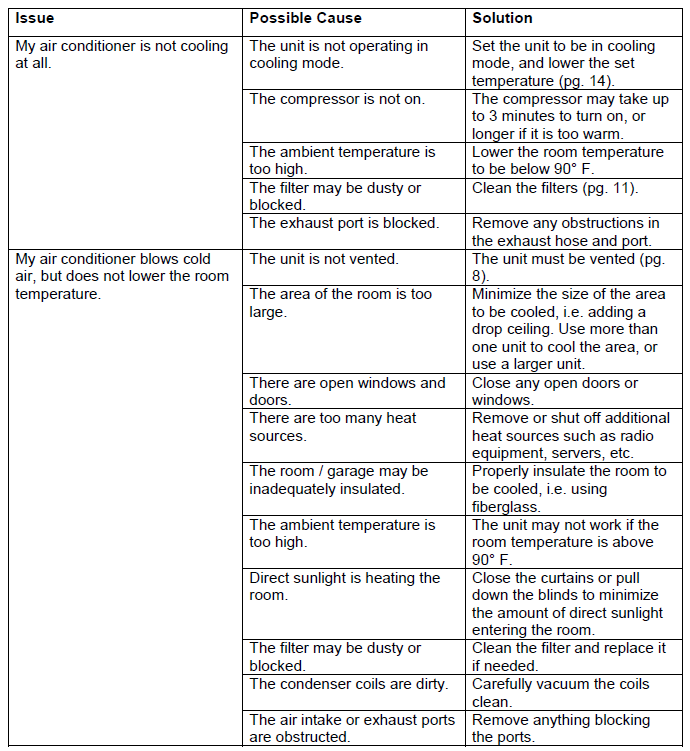
Troubleshooting
Follow the troubleshooting guide below to resolve common issues.
Error Codes
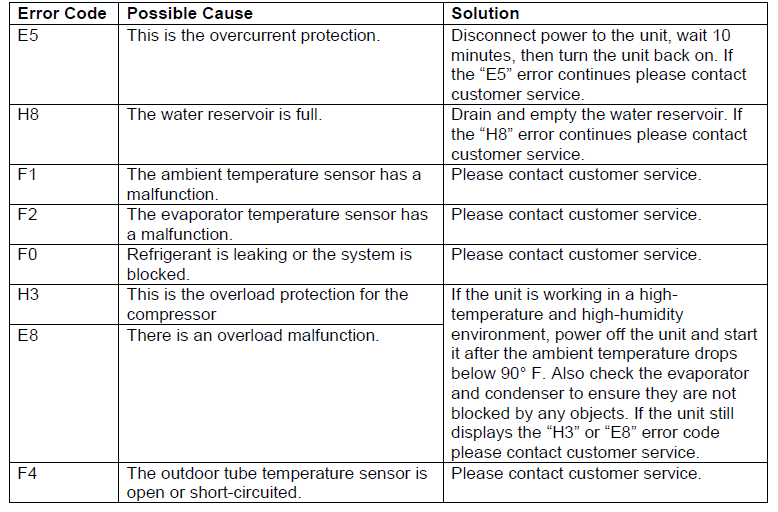
The air conditioner may display an error code if it is not operating correctly. Below is the list of error codes and their description.
Pros & Cons
Pros:
- High cooling capacity suitable for large rooms
- Multi-functional with dehumidifying and fan modes
- Easy installation with included window kit
- Remote control for convenient operation
- Auto-restart feature for uninterrupted cooling
Cons:
- Larger size compared to some other portable air conditioners
- Noise level can be higher than n in some models
- Higher energy consumption compared to smaller units
Customer Reviews
Customers have generally praised the Edgestar Portable Air Conditioner AP16000G for its powerful cooling performance and ease of installation. Many users appreciate the multi-functional capabilities and the convenience of the remote control. However, some users have noted that it can be noisy and consumes more energy than expected.
A common complaint is the larger size,, which may not fit as seamlessly into smaller rooms or spaces with limited floor area.
Faqs
How do I install the window kit for the Edgestar Portable Air Conditioner AP16000G?
What is the coverage area of the Edgestar Portable Air Conditioner AP16000G?
Does the Edgestar Portable Air Conditioner AP16000G come with a remote control?
How does the auto-restart feature work on this air conditioner?
Can I use the Edgestar Portable Air Conditioner AP16000G as a dehumidifier?
What are the dimensions of the Edgestar Portable Air Conditioner AP16000G?
Is the Edgestar Portable Air Conditioner AP16000G energy efficient?
How loud is the Edgestar Portable Air Conditioner AP16000G?
What maintenance is required for the Edgestar Portable Air Conditioner AP16000G?
Can I use the Edgestar Portable Air Conditioner AP16000G in different climates?
More edgestar manuals
Leave a Comment