
Setup: Egqinr P88 Smart Watch User Manual
Content
egqinr P88 Smart Watch
Introduction
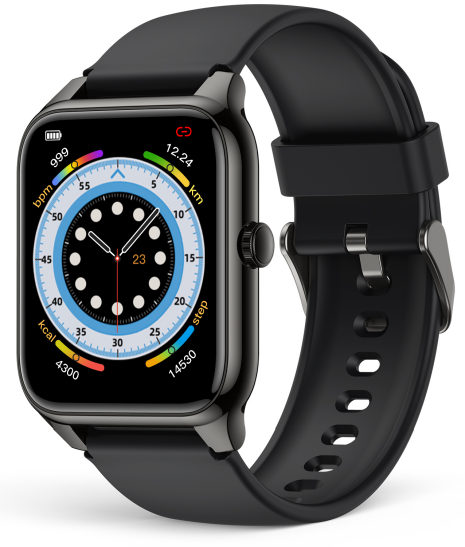
The egqinr P88 Smart Watch is a sophisticated wearable device designed to seamlessly integrate fitness tracking, health monitoring, and smart connectivity into daily life. Featuring a vibrant AMOLED touchscreen and a sleek design, this smartwatch targets fitness enthusiasts, tech-savvy users, and busy professionals seeking an all-in-one gadget to enhance their wellness and productivity. It supports comprehensive health metrics, including heart rate, blood oxygen (SpO2), blood pressure monitoring, and sleep tracking, making it ideal for users prioritizing holistic health management.
What sets the Equinox P88 apart is its extensive range of over 100 sports modes, allowing users to customize their workout experience across various activities from running to yoga. Its waterproof build ensures durability for active lifestyles, while smart features such as call answering, message notifications, and music control provide convenient, hands-free communication and entertainment. The device's compatibility with both iOS and Android platforms expands usability across a wide audience.
Available at an estimated price range of $60 to $90, the Equinor P88 Smart Watch is accessible through multiple e-commerce platforms and select retailers. Its attractive balance of affordability, functionality, and style makes it a compelling choice for anyone looking to upgrade their health and smart device arsenal.
Charge and Activate
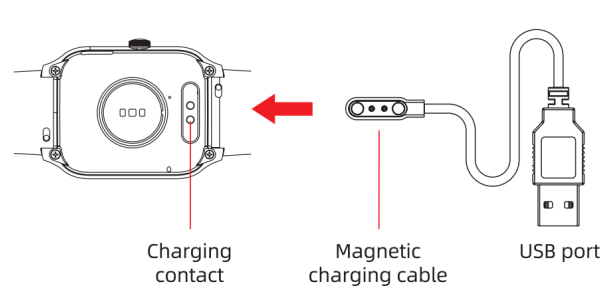
- Align the magnetic charger with the magnetic hole on the back of the watch until the charging reminder appears on the watch screen.
- Do not use a power adapter with a voltage exceeding 5V and an output current exceeding 1A for charging;, otherwise, it will cause charging failure and damage the magnetic charging cable and the device.
- When the watch is out of power and then charged, it needs to be activated first; the watch screen will light up after about 5 minutes of normal charging.
Appearance Description
Bluetooth Connection
Watch APP Installation and Connection
Instructions
As a Bluetooth product, most of the functions of this product need to be connected to a special APP for normal use, such as time display, call alert, and message alert. For Android phones, please do not use Bluetooth to connect and pair with the watch directly. Please scan the following QR code to select the version suitable for your mobile phone system or enter the main application markets to download and install Glory Fit.

Device Connection
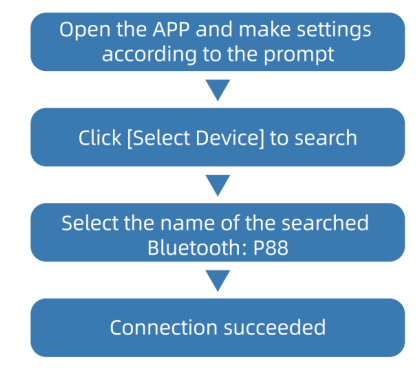
Before using the APP, please turn on the mobile phone Bluetooth and mobile phone GPS positioning to obtain the mobile phone positioning permission. After the connection is successful, it will prompt "To pair with: P88". Please select a pairing.
The watch connection operates as follows:
Note:
- For Android users, the APP should obtain permissions and run backstage, otherwise it will affect the user experience.
- For systems below iPhone iOS 13, after connecting the APP, you need to connect to the P88 for the second time in the Bluetooth settings of the mobile phone, and then you can make calls, play multimedia,, and other functions.
Phone Permission Settings:
For iOS
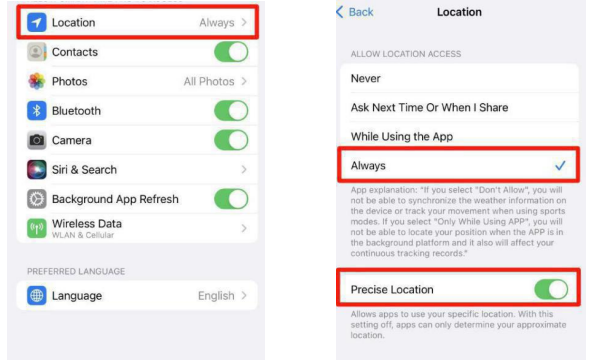
- Location: After it is turned on, the APP can obtain the local weather conditions and synchronize them to your watch.
- Contacts: After it is turned on, you can add frequently used contacts to the APP and it will be synced to your watch for quick calls.
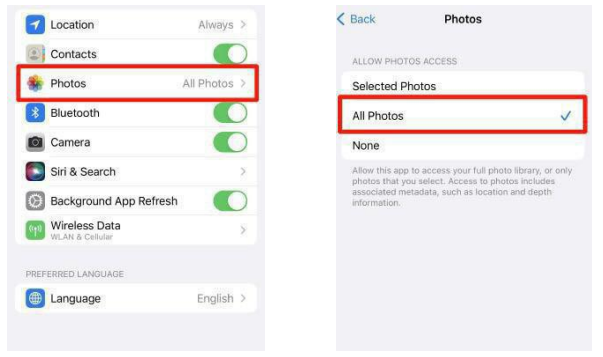
- Photos: After it is turned on, you can choose any photo in your phone to customize the watch face.
- Bluetooth: After it is turned on, the APP can be ready for pairing with the watch.
- Camera: After it is turned on, enter the remote camera function on the app, and shake the watch tactivatethe ze remote camera.
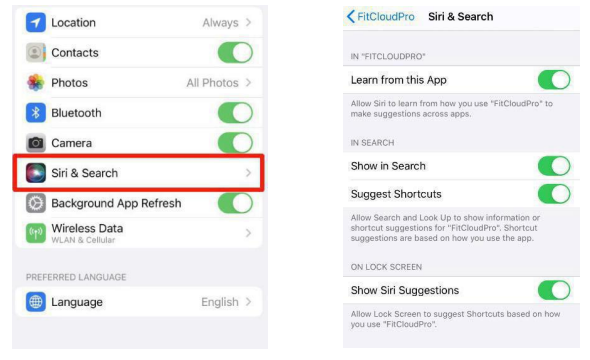
- Siri & Search: After it is turned on, you can use the watch to wake up Siri to perform quick operations.
- Background App Refresh: After it is turned on, the system will update the latest version of GloryFit synchronously.
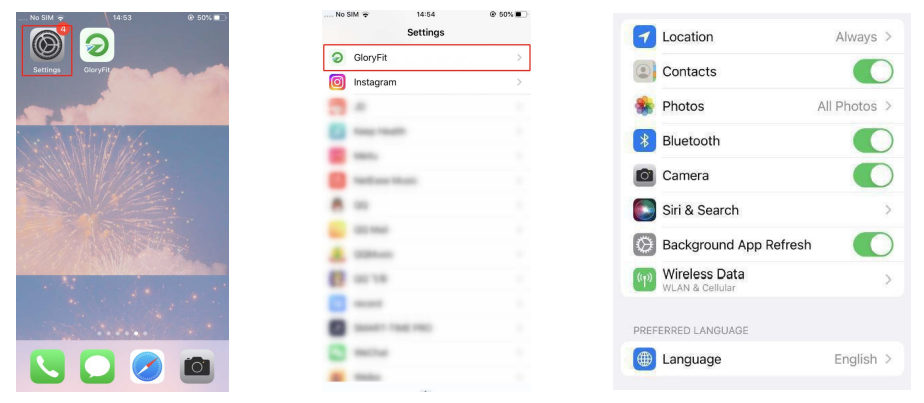
Q:How to open these permissions?
- Enter 【Settings】
- Scroll down to find 【GloryFit 】 APP and click to enter
- Open Contacts, Bluetooth, Camera, and Background App Refresh permissions.
- Enter 【Location】, choose 【Always】, open【Premise Location】
- Enter 【Photos】, choose 【All photos】
- Enter 【Siri & Search】, open all permissions.
- Enter 【Wireless Date】, choose 【WLAN &Cellulor Data】
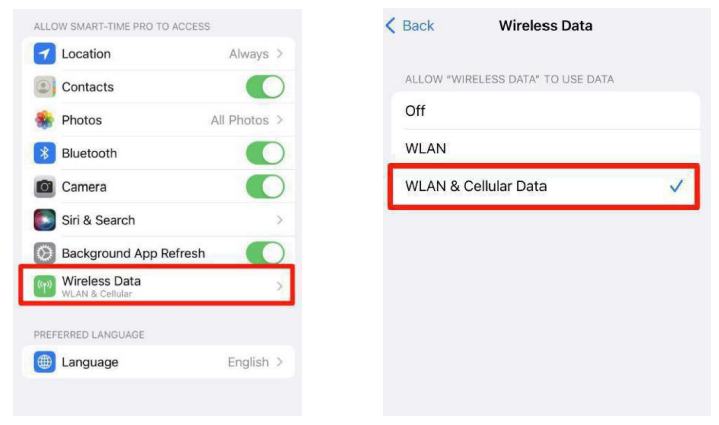
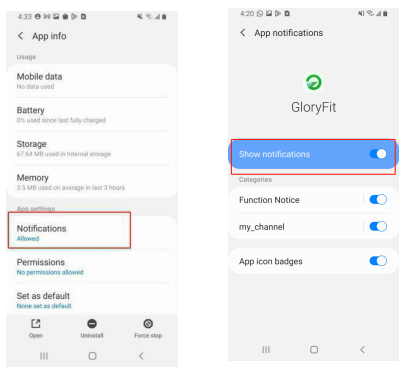
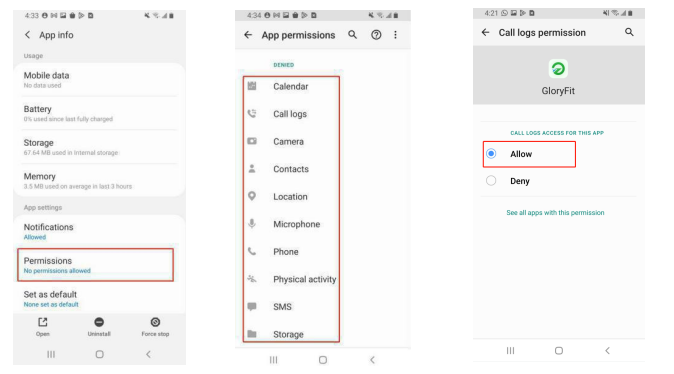
For android
- Enter 【Settings】
- Scroll down to find 【GloryFit 】 APP and click to enter the relevant permission setting page
- Enter 【Mobile data】, turn on 【Allow background data usage & Allow app while data saver on】
- Enter 【Battery】, turn on 【Allow background activity】
- Enter 【Notifications】, turn on 【Show notifications & App icon badges】
- Enter 【Permissions】, turn on 【Calender, Call logs, Camera, ect】, choose【Allow】
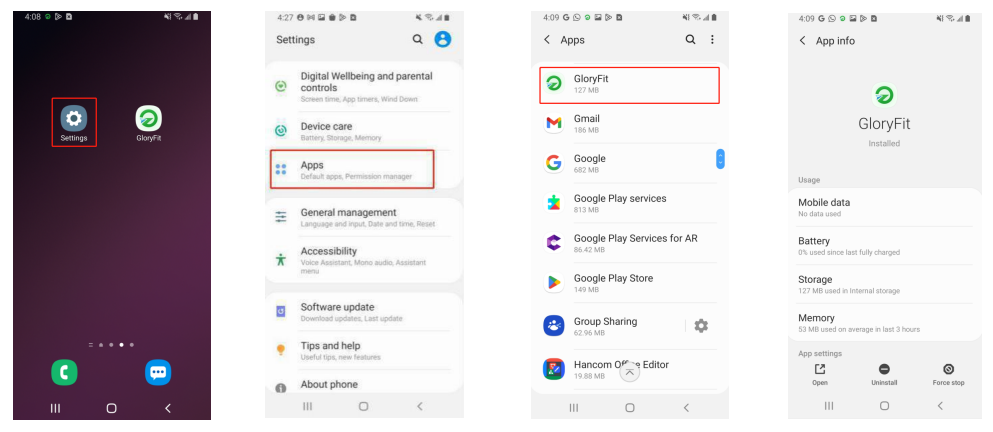
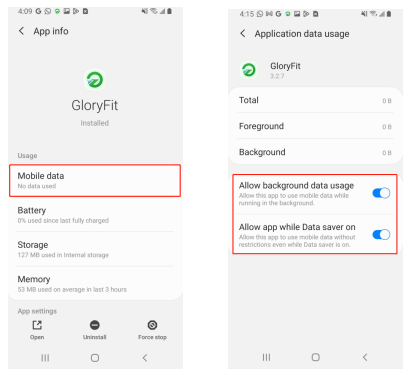
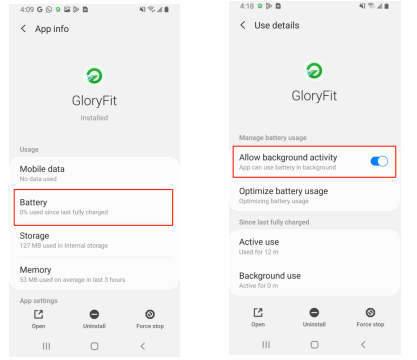
Q: Why are Android phones easily disconnected?
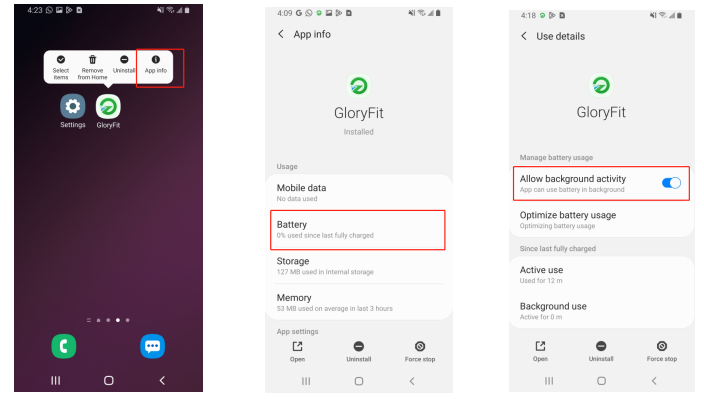
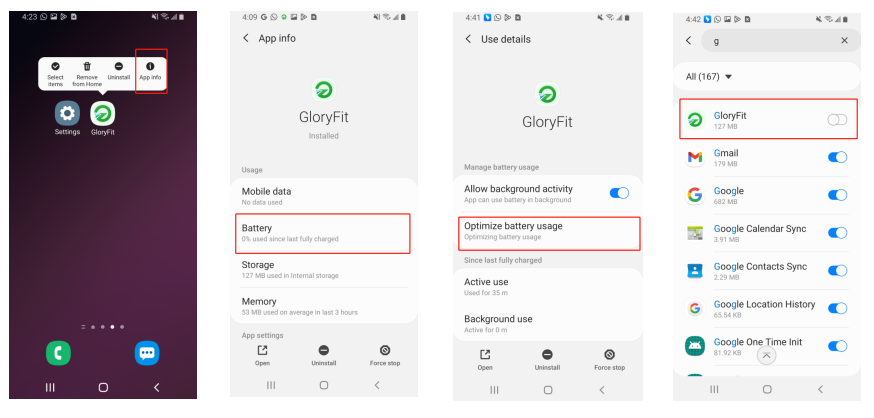
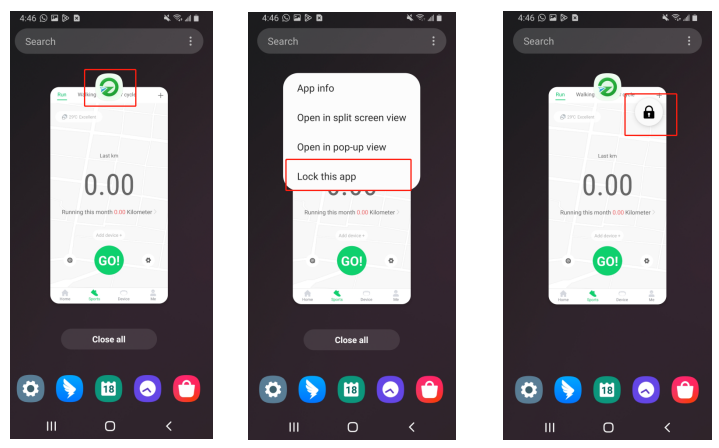
A: "GloryFit " APP must be running on the phone so that the Bluetooth will not be disconnected automatically. But the storage management of the Android system will forcibly turn off the app,.To prevent the GloryFit APP from being killed by the system, please make the following 3 settings:
- Background running permission setting
[long press] GloryFit → click [App information] → [Battery] → turn on [Allow background activity] to enable background protection settings. - Battery optimization permission settings
[long press] GloryFit → click [App information] → [Battery] → [Optimize battery usage] → [All] → [Close] FitCloudPro App optimization button. - Clean up protection permission settings
To prevent the App process from being closed, click the [Multitasking] button in the navigation bar (or slide and stay from the bottom of the screen) → [GloryFit ] → [Lock this application].
Technical Specifications and Key Features of the egqinr P88 Smart Watch
- Display: 1.78-inch AMOLED screen with 368×448 pixel resolution for crisp, vibrant visuals
- Health Monitoring: 24/7 heart rate, blood pressure, and SpO2 sensors for continuous wellness tracking
- Sports Modes: Supports 114+ exercise types, including running, cycling, swimming, and more
- Battery: 300mAh rechargeable battery offering up to 7 days of typical usage on a single charge
- Connectivity: Bluetooth 5.0 for stable pairing with iOS and Android smartphones
- Water Resistance: IP68 rating, suitable for swimming and exposure to rain
- Smart Features: Call answering, message notifications, sedentary alerts, alarm clock, weather updates, music control
- Additional Functions: Breath rate monitoring, voice assistant, stopwatch, find my phone, remote camera control
Compared to similar smartwatches like the Fitbit Versa and Amazfit Bip series, the egqinr P88 offers a higher number of sports modes and a larger AMOLED display at a more competitive price point, making it especially attractive for users seeking variety and visibility in fitness tracking.
Precautions
- No charging with water stains.
- This product is an electronic monitoring product, not for medical use, and the measurement data is for reference only.
- It is not recommended to wear in hot water bathord for long-term swimming.
- Please charge with the matching charging cable.
- Please keep the charging interface on the back of the watch clean to avoid poor charging contact.
Troubleshooting Common Issues with the egqinr P88 Smart Watch
- Problem: The Watch is not charging
Solution: Ensure e the magnetic charger aligns properly with the device's charging port; use only a 5V/1A power adapter to prevent damage. - Problem: Bluetooth connection drops or fails
Solution: Restart both watch and smartphone; update the companion app; ensure the watch firmware is current. - Problem: Health data is not syncing or is inaccurate
Solution: Verify sensor contact with skin; recalibrate by restarting the watch; update app permissions on phone settings. - Error Codes: Displayed errors often indicate sensor malfunctions or Bluetooth issues—refer to the user manual for specific codes.
- Preventive Measures: Keep firmware and app updated; avoid exposure to extreme temperatures; charge with original accessories only.
The egqinr P88 comes with a standard warranty covering manufacturing defects. For support, customers can contact the manufacturer’s service center or authorized retailers. User manuals and FAQ resources are also available online.
Pros & Cons of the egqinr P88 Smart Watch
- Pros:
- Large, high-definition AMOLED display ensures clear readability in all lighting conditions.
- Comprehensive health tracking, including heart rate, SpO2, blood pressure, and sleep data.
- Extensive sports mode selection (114+), catering to a wide range of fitness activities.
- Affordable price compared to premium smartwatches with similar features.
- Waterproof design supports versatile use cases,, including swimming.
- Cons:
- Occasional Bluetooth connectivity issues reported, requiring app and firmware updates.
- Limited standalone app ecosystem; some advanced features require smartphone connectivity.
- No built-in camera for direct photography despite the remote control feature.
- Battery life, while decent, may require more frequent charging under heavy use.
- The egqinr P88 offers excellent value for money, especially for users prioritizing fitness tracking and smart notifications over premium brand names.
Customer Reviews and Feedback on the egqinr P88 Smart Watch
Users consistently praise the EQINRP88 Smart Watch for its bright AMOLED display and extensive health tracking capabilities, often highlighting the accuracy of the heart rate and SpO2 sensors. Many appreciate the affordability combined with features like call answering and music control, which enhance everyday convenience.
Common complaints include occasional Bluetooth disconnections and the learning curve needed to fully utilize the companion app’s settings. Some users note the absence of a built-in camera and wish for longer battery endurance under intensive use.
Overall, the product holds around a 4 out of 5-star rating on popular retail platforms, with strong recommendations for fitness enthusiasts and casual users alike who seek a budget-friendly yet feature-rich smartwatch.
Faqs
How do I set up the egqinr P88 Smart Watch for first-time use?
What should I do if my egqinr P88 Smart Watch is not connecting to Bluetooth?
Can the egqinr P88 Smart Watch make and receive calls directly from the watch?
What health monitoring features does the egqinr P88 Smart Watch offer and how can I view the data?
Is the egqinr P88 Smart Watch compatible with both Android and iOS devices?
How can I optimize the battery life on my egqinr P88 Smart Watch?
What maintenance steps should I follow to keep my egqinr P88 Smart Watch in good condition?
How do I enable and use the NFC door card feature on the egqinr P88 Smart Watch?
More egqinr manuals
Leave a Comment