
Setup: Egqinr Smart Watch User Manual
Content
Egqinr Smart Watch
Introduction
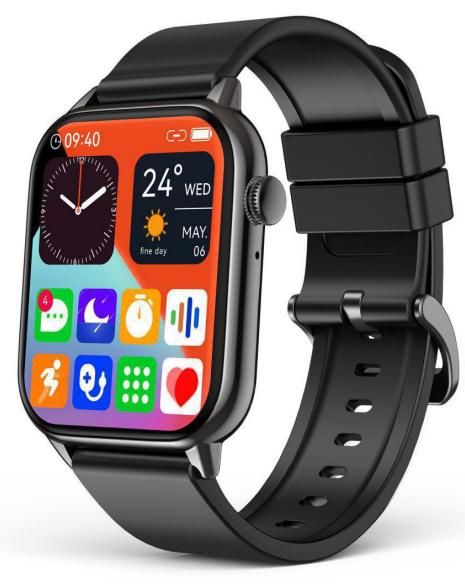
Equinox Smart Watch is a cutting-edge wearable device designed to blend advanced health monitoring with seamless connectivity. Featuring a vibrant 1.78-inch AMOLED HD display with a resolution of 368 x 448 pixels, it offers sharp visuals and intuitive navigation for all users. This smartwatch is tailored for fitness enthusiasts, tech-savvy professionals, and everyday users seeking a comprehensive health and lifestyle companion.
Key benefits include real-time heart rate monitoring, blood pressure tracking, sleep analysis, and over 69 sports modes to cover a wide range of activities. Its Bluetooth calling and text notification capabilities make it a practical extension of your smartphone, allowing calls and messages to be managed directly from the wrist. The watch also supports NFC door card simulation, enabling convenient access control for compatible smart locks.
Ideal for those who want to stay connected while maintaining an active lifestyle, the egqinr Smart Watch is competitively priced in the mid-range segment, generally available between $60 and $90 depending on the retailer. It is widely accessible through online marketplaces and select electronics stores, making it an attractive option for both men and women seeking a versatile smartwatch with comprehensive features.
Charge and Activate
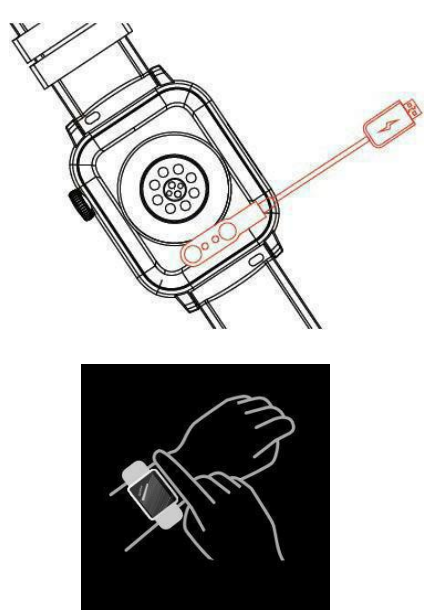
Align the magnetic charger with the magnetic hole on the back of the watch until the charging reminder appears on the watch screen. Please charge the watch for 2 hours before using it for the first time.
Wear Correctly
Please ensure that your watch is at least one finger above your wrist bone and that the sensor on the back touches your skin.
Button and Touchscreen
Bluetooth Connection
APP Using Tips:
- Please use official applications to download the FitCloudPro APP and avoid using third-party applications to download. If you download the app from a third-party application or browser, spam ads may pop up and require you to provide credit card information. Please do not click and do not provide credit card information.
- When connecting, the Bluetooth pairing request and notifications request appear on your phone. Please click 【Pair】and【Allow】
- Log in to the APP and fill in the correct information of gender, birthday, height, weight, etc. (*Incorrect information will affect the accuracy of health and activity Data.)
Connection steps:
Step A.
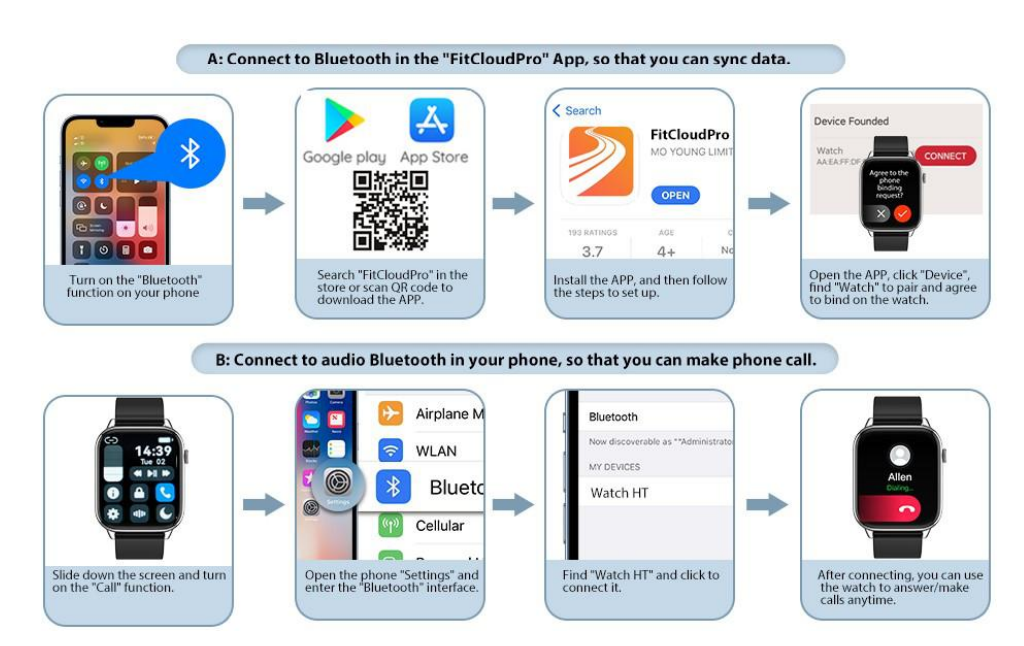
Connect to Bluetooth in the FitCloudPro App(for data transfer)
- Turn on the【Bluetooth】function of your phone.
- Search【FitCloudPro】in the store or scan the QR code on the manual to download the APP.
- Open the APP, click【Device】, find【Watch】to pair and agree to bind on the watch.
Step B.
Connect to the audio Bluetooth in your phone (for answering/ dialing/ listening to music)
- Slide down the screen and turn on the【Call】function.
- Open the phone【Settings】and enter the【Bluetooth】interface.
- Find【Watch HT】and click to connect it.
Technical Specifications and Features of the EQINR Smart Watch
- Display: 1.78-inch AMOLED HD screen, 368 x 448 pixels resolution
- Health Monitoring: Heart rate, blood pressure, blood oxygen (SpO2), sleep quality tracking
- Sports Modes: 69+ modes including running, cycling, swimming, yoga, and more
- Connectivity: Bluetooth 5.0 for calls, notifications, music control, and phone finder
- Battery: 300mAh battery providing up to 5-7 days of typical use
- Additional Features: NFC door card emulation (13.56MHz), calculator, do not disturb mode, customizable watch faces
- Water Resistance: IP67 rating for protection against dust and water splashes
- Compatibility: Android and iOS devices
Compared to similar smartwatches in its price range, e Qinrr offers a larger AMOLED display and NFC smart door access, features often absent in competitors at this price point. Its extensive health metrics and 69+ sports modes provide a comprehensive fitness tracking experience, rivalling more expensive brands.
Troubleshooting Common Issues with the egqinr Smart Watch
- Watch not turning on: Ensure the device is charged using the original charger. If still unresponsive, perform a hard reset by holding the power button for 10 seconds.
- Bluetooth connection issues: Both the otherwatch and the phone. Clear Bluetooth cache on your phone and re-pair through the official app.
- Heart rate or sensor inaccuracies: Wear the watch snugly and clean the sensors regularly. Update firmware through the app for improved accuracy.
- Error code or app sync failure: Reinstall the companion app and ensure your phone’s OS is updated. Check permissions for notifications and Bluetooth access.
- Preventive tips: Avoid exposure to extreme temperatures, keep the watch dry, and update software regularly to enhance stability.
The Equinor Smart Watch comes with a standard 12-month warranty covering manufacturing defects. Customer support is accessible via the official website and authorized retailers, with live chat and email support available for troubleshooting assistance.
Pros and Cons of the EQR Smart Watch
- Pros:
- Vivid 1.78-inch AMOLED display ensures excellent readability.
- Comprehensive health monitor, ring including heart rate, blood pressure, and SpO2.
- Bluetooth call and text notification functionality for convenience.
- Unique NFC door card simulation feature for smart home access.
- Affordable price offering strong value for money compared to competitors.
- Cons:
- Battery life, while decent, is shorter than some rivals offering 10+ days.
- NNF functions are are limited to unencrypted 13.56MHz door cards only.
- No built-in camera or GPS, which some users may expect at this price.
- Some users report occasional Bluetooth connectivity hiccups.
Customer Reviews and Ratings for egqinr Smart Watch
Users consistently praise EQINRinr Smart Watch for its crisp AMOLED screen and reliable health tracking capabilities. Many highlight the convenience of managing calls and messages directly from the wrist, especially during workouts. The wide variety of sports modes and fitness tracking accuracy receive positive mentions in reviews.
Common complaints include occasional Bluetooth disconnections and limited NFC compatibility. Some users desire longer battery life, but most agree the watch offers excellent value given its features and price.
Overall, Equinorrqinr Smart Watch maintains a solid average rating of 4.2 out of 5 stars on major retail platforms, with numerous recommendations for anyone seeking a versatile, budget-friendly smartwatch with advanced health and connectivity features.
Faqs
How do I set up my egqinr Smart Watch for the first time?
What should I do if my egqinr Smart Watch is not receiving notifications?
Can I make and receive phone calls directly from the egqinr Smart Watch?
Is the egqinr Smart Watch compatible with both Android and iOS devices?
How can I optimize battery life on my egqinr Smart Watch?
What are the key health monitoring features on the egqinr Smart Watch?
How do I use the NFC door card feature on the egqinr Smart Watch?
What maintenance tips should I follow to keep my egqinr Smart Watch in good condition?
More egqinr manuals
Leave a Comment