
Setup: Eurans A5 Pro Smart Watch User Manual
Content
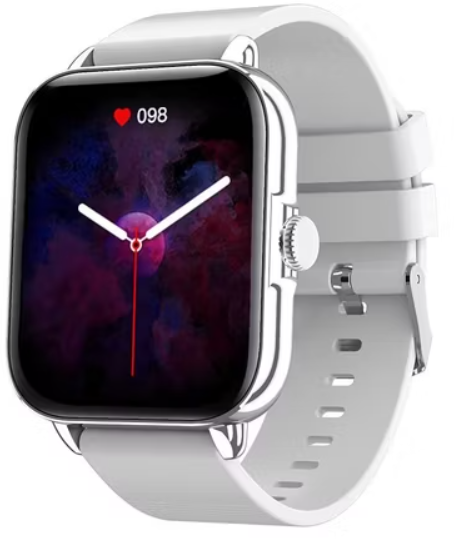
Eurans A5 Pro Smart Watch
Introduction
The Eurans A5 Pro Smart Watch is a cutting-edge wearable designed to provide users with a seamless integration of style and functionality. This advanced smartwatch is perfect for fitness enthusiasts, busy professionals, and anyone looking to stay connected without compromising on style. Key benefits include heart rate monitoring, sleep tracking, music control, and seamless integration with smartphones to receive notifications. The Eurans A5 Pro is ideal for those seeking a versatile device that supports active lifestyles while keeping them connected on the go. Priced competitively, this smartwatch is available in the estimated price range of $50 to $100, making it an accessible choice for a wide range of consumers.
The Eurans A5 Pro Smart Watch is designed to cater to diverse use cases, from tracking daily activities to setting reminders and alarms. Its user-friendly interface ensures that both beginners and experienced users can navigate its features with ease. Whether you're looking to enhance your fitness journey or simply want a stylish accessory that complements your daily routine, the Eurans A5 Pro Smart Watch is an excellent choice.
Getting Started
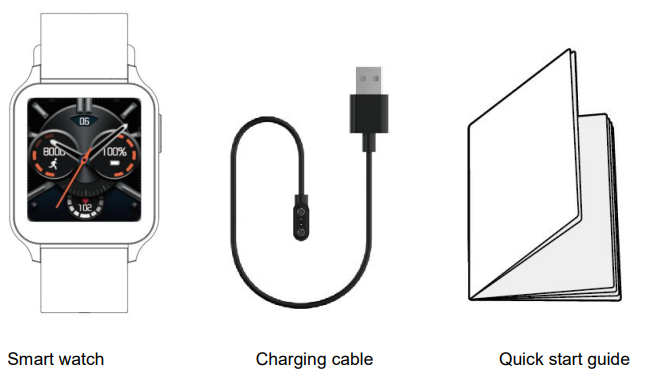
What’s in the Box
What’s in This Document
This manual gets you started quickly with setting up your watch. Setup ensures that your watch can synchronize its data with the Fit app, where you can get detailed information on your stats, view historical trends, log sleep, and more. As soon as setup is complete, you’re ready to start moving. The remainder of the manual walks you through every function on your watch.
Setting up Your Watch
Charging Your Watch
Please fully charge your watch before initial use.
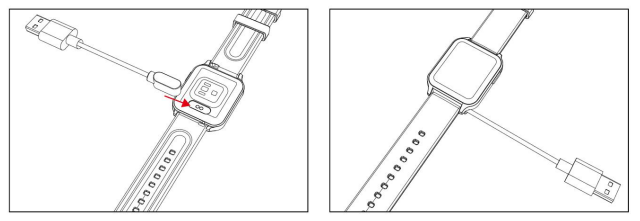
- Insert the USB plug of the charging cable into the USB port on your computer or a UL-certified USB wall charger.
- Hold the other end of the charging cable near the port on the back of the watch until it attaches magnetically.
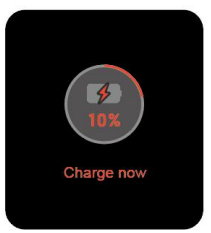
- Make sure the pins on the charging cable lock securely with the port. The connection is secure when the watch vibrates and the battery icon with percent charged appears on the screen.
When the watch shows that the battery is low, connect the watch to a USB port with 5V-500mA.
While the watch charges, there is a battery progress bar on the screen and you can check the battery level at any time. - Remove the watch from the power supply once fully charged.
- USB charger requirement: DC USB port (5V-500mA)
- Charging time: Approximately 2 hours
Disassembling / Assembling Your Watch
Disassembly
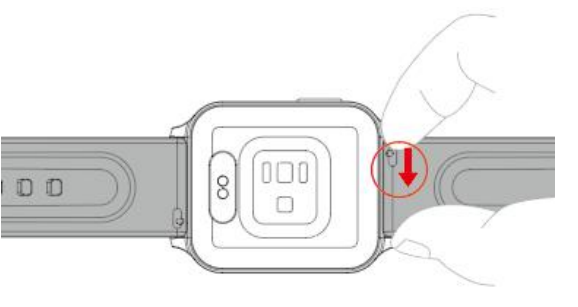
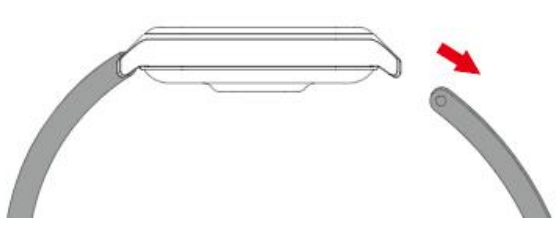
- To remove the wristbands, turn over the watch and find the quick-release lever.
- While pressing the quick-release lever inward, gently pull the wristband away from the watch to release it.
- Repeat on the other side.
Assembly
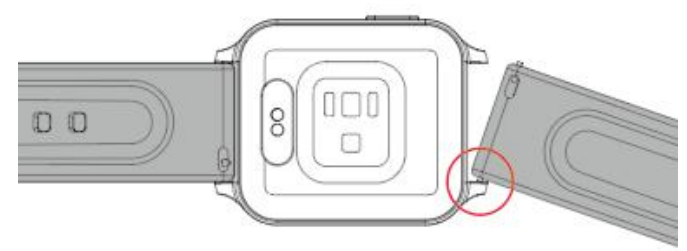
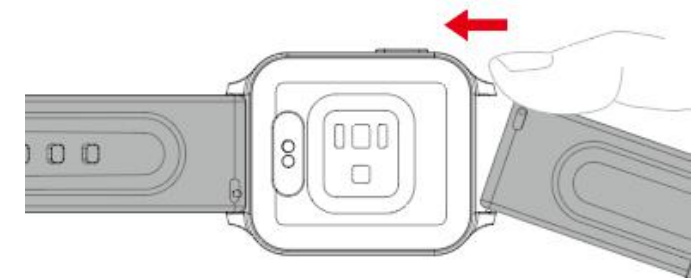
- To reattach the wristbands, slide the pin (the side opposite the quick-release lever) into the notch on the watch. Attach the wristband with the clasp to the top of the watch.
- While pressing the quick-release lever inward, slide the other end of the wristband into place.
- When both ends of the pin are inserted, release the quick-release lever.
Wearing Your Watch
All-day wear and exercise
For all-day wear when you’re not exercising, wear the device on your wrist horizontally, a finger’s width below your wrist bone and lying flat, the same way you would put on a watch.
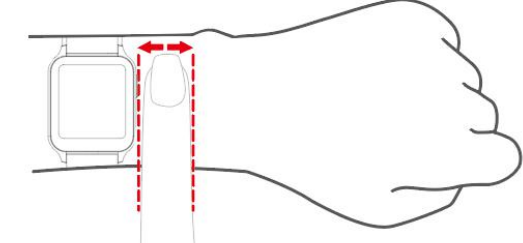
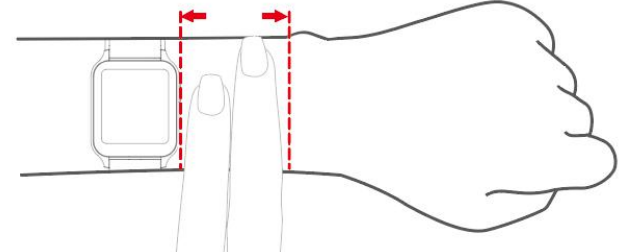
- Experiment with wearing the watch higher on your wrist during exercise. Because the blood flow in your arm increases the farther up you go, moving the watch up a couple of inches can improve the heart rate signal. Also, many exercises such as bike riding or weight lifting require you to bend your wrist frequently, which is more likely to interfere with the heart rate signal if the watch is lower on your wrist.
- Do not wear your watch too tight. A tight band restricts blood flow, potentially affecting the heart rate signal. This being said, the watch should also be slightly tighter (snug but not constricting) during exercise than during all-day wear.
Basic Specifications
- Model No.: IW1 Lite
- Sync: Bluetooth 5.0
- Screen: 1.52" color TFT
- Battery Capacity: 180mAh
- Working Voltage: 5V-500mA
- Working Temperature: -10℃ to 40℃Weight: 1.14oz (32.4g)
- Waterproof Rating: IP68
- Working Time: about 10 days
Warranty
We strive to build our products with the highest attention to detail and craftsmanship. However, sometimes there are occurrences of a defect, so we are happy to offer a ONE-year hassle-free warranty on all our devices as we continue to make amazing products. Please contact us if you have any questions about our devices.
Customer Reviews
Users of the Eurans A5 Pro Smart Watch have praised its battery life, ease of use, and stylish design. Common praises include its ability to track fitness metrics accurately and its compatibility with both Android and iOS devices. However, some users have noted occasional connectivity issues with Bluetooth. Overall, the Eurans A5 Pro Smart Watch has received a star rating of 4.2 out of 5, with many users recommending it for its value for money.
Testimonials highlight that it is a "great budget smartwatch" with "excellent functionality." Despite some minor complaints, the Eurans A5 Pro Smart Watch remains a top choice for those seeking a reliable and feature-rich smartwatch. For those experiencing connectivity issues, restarting the device or updating the firmware can often resolve the problem.
Technical Features
Key Features of the Eurans A5 Pro Smart Watch
- Heart Rate Monitoring: Continuous heart rate tracking to monitor your health and fitness levels.
- Sleep Tracking: Detailed sleep analysis to help you understand your rest patterns and improve sleep quality.
- Music Control: Seamlessly control your music playlists right from your wrist.
- Notification Alerts: Receive call, text, and app notifications directly on your watch.
- Long Battery Life: Enjoy extended use without needing to recharge frequently.
Getting Started with Your Eurans A5 Pro Smart Watch
- Charging: Charge your watch using the provided USB cable.
- Pairing: Connect your watch to your smartphone via Bluetooth.
- App Installation: Download and install the companion app to access full features.
Optimizing Your Experience
Customizing Your Eurans A5 Pro Smart Watch
To fully personalize your Eurans A5 Pro Smart Watch, explore different watch faces and adjust settings to suit your preferences. Use the companion app to customize alerts, monitor health metrics, and control music playback.
Troubleshooting Common Issues
- Bluetooth Connectivity Issues: Restart your watch and ensure Bluetooth is enabled on both devices.
- Notification Issues: Check app settings and ensure notifications are enabled.
With its comprehensive set of features and user-friendly design, the Eurans A5 Pro Smart Watch is an excellent choice for anyone looking for a reliable and stylish smartwatch. Whether you're a fitness enthusiast or just starting your smartwatch journey, this device offers a perfect blend of functionality and style.
Faqs
How do I set up the eurans A5 Pro Smart Watch for the first time?
What should I do if the eurans A5 Pro Smart Watch screen is unresponsive or frozen?
Can the eurans A5 Pro Smart Watch track blood oxygen and heart rate continuously?
Is the eurans A5 Pro Smart Watch compatible with all smartphones?
How can I extend the battery life of my eurans A5 Pro Smart Watch during daily use?
What are the best practices for maintaining and caring for the eurans A5 Pro Smart Watch?
How do I troubleshoot connectivity issues between the eurans A5 Pro Smart Watch and my phone?
What unique features does the eurans A5 Pro Smart Watch offer compared to other smartwatches?
Tags
More eurans manuals
Leave a Comment