
How to Use: Eurans HW22 Sports Smart Watch User Manual
Content
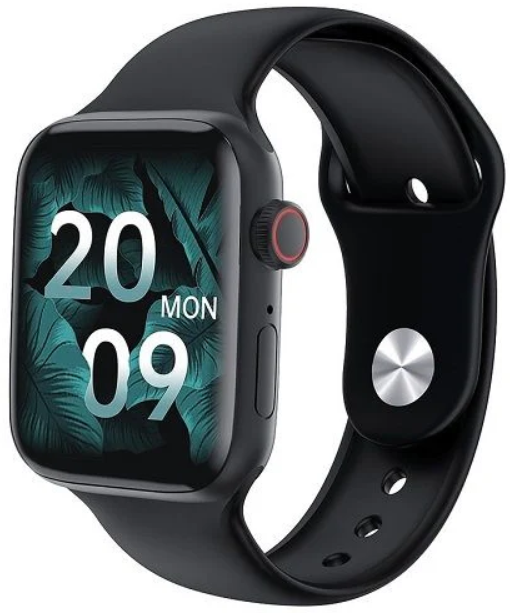
Eurans HW22 Sports Smart Watch
Introduction
Step into the world of advanced fitness and connectivity with the Eurans HW22 Sports Smart Watch, a feature-rich wearable designed for active lifestyles and tech-savvy users. This sleek smartwatch combines robust health tracking, seamless communication, and a vibrant full-screen display, making it a standout choice for fitness enthusiasts and everyday users alike.
The Eurans HW22 Sports Smart Watch is engineered to keep you connected and informed. With built-in Bluetooth calling, HD voice quality, and smart notifications, you can take calls, receive messages, and stay updated without reaching for your phone. Its comprehensive health suite tracks heart rate, blood pressure, sleep, and more, empowering you to monitor your wellness around the clock. The device also boasts a generous 1.75-inch full-color touchscreen, customizable watch faces, and a comfortable silicone strap for all-day wear.
Designed for both men and women, the Eurans HW22 is ideal for athletes, professionals, and anyone seeking a reliable companion for daily activity tracking and communication. Use it to monitor workouts, receive important alerts, or simply stay stylish with interchangeable dials. Estimated to be priced in the affordable mid-range segment, this smartwatch is widely available through online retailers, offering excellent value for its feature set.
Whether you're hitting the gym, running errands, or managing a busy schedule, the Eurans HW22 Sports Smart Watch delivers performance, convenience, and style in a single package.
The package box contains:
- a packing box,
- a manual,
- a host, and two data cables.
APP download
Scan the QR code to download the APP
For Android end user:
Search for “WearPro” in the Google Play App Store or any customized Android Store to download. Remember to check the phone pop-up box to agree to the permissions when installing.
For IOS end user:
Search for “WearPro” in the APP Store to download. Remember to check the mobile phone pop-up box to agree to the permissions when installing.
After WearPro is installed, the application icon is shown as:

Connect the APP through the mobile phone Bluetooth
Search for the Bluetooth name to connect/pair
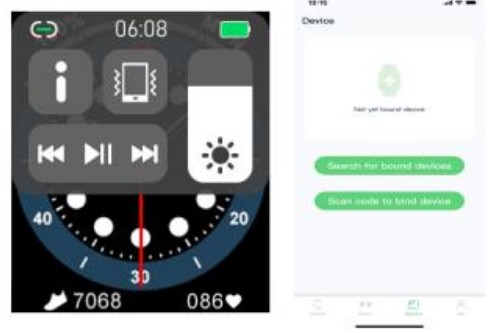
Scroll down on the watch main interface, find the first icon "About (i)" and click it, and remember the Bluetooth name of the watch; then, open the WearPro APP on the mobile phone, click on the "Device" column, and click on "Search to bind device" to start searching , In theBluetooth list, find the Bluetooth name of the your watch and pair it. If the connection is successful, the Bluetooth icon of the watch will light up green (in the middle of the i.on).
Scan the QR code to connect/pair.
After pulling down on the watch main interface, click on the first icon displayed "About (i)" , you can see a QR code for connection, then take out the phone to open WearPro, and in the "Device" column, select "Scan to bind device", the pairing box will pop up after scanning the QR code. Click "Pair" to connect the App to the watch. Remember to check to agree to the notification permissions of various apps.
Unbind the Bluetooth connection from the APP side. The
Android system unbinds Bluetooth from the app. APP In the "Device" column of WearPro, pull down to the "Unbind" and click to unbind the. App;
IOS system unbthe inds APP Bluetooth
- In the "Device" column of WearPro, scroll down to "Unbind" and click to unbind the App; then go to the Bluetooth settings of the phone, select the Bluetooth name of the smart watch, and click “Ignore this device”
- After canceling the Bluetooth connection on the APP, the green connection in the middle of the Bluetooth icon of the watch is released, and the blue outside the circle is still lit.
Unbind the audio Bluetooth connection.
TO disable the audio Bluetooth connection, find the name of the audio Bluetooth in the Bluetooth settings of the mobile phone, and click "Ignore this device" to unbind all Bluetooth connections with the watch. After all operations are completed, the watch’s Bluetooth icon will return to gray, which means no connection .
Find the device
The watch is successfully bound to the app. Click to find the watch on the mobile app, and the watch will vibrate once when the screen is on.
Camera
Tap the camera to wake up the watch device's camera mode, tap the camera button to take a photo, and the picture will be automatically saved to the phone system album..
Data synchronization
The watch is successfully bound to the app, and the data from the watch can be synchronized to the app.
Raise your hand to brighten the screen.
Wear the watch correctly on your wrist (left/right hand). When you turn on the hand-up button, when you lift your wrist to look at the watch, the watch will automatically brighten the screen.
Do not disturb mode
In the APP Device>More, set the start to end time, such as: 12:00 to 14:00 noon for the do not disturb . During this , time, there will be no phone calls and message sound reminders on the watch.
Daily alarm clock
In the APP in the APP Device>More, set the start to end . The the alarm can be set only once or repeatedly select the date (week) setting, and the alarm can be turned on./off
Sedentary reminder
Set the start to end time period and the sedentary time interval (minutes) in the APP, click to enter the repeat setting only, once, or select the sedentary reminder.r date
(week). When the sedentary time is reached, the watch will vi, vibrate and there will be a sedentary icon.
Drink water reminder
Set the start to end time period and frequency (minutes) in the APP, click to enter the repeat setting, select the drinking reminder date (week), check the drinking reminder,nder and save it. When the reminder time for drinking water arrives, the watch will vibrate, and there will be a drinking water icon.
Firmware version
The version of the watch is displayed, and the user can choose to upgrade the firmware version.
QR code of Alipay payment
The watch features the payment function, which requires the phone to scan the code to verify binding. Follow the steps below:
Click the Alipay icon on the main dropdown screen. Off the watch, and complete the binding and use of a personal Alipay account and smart watch payment function according to the instructions in the pop-up box. If you do not use the watch to pay, you can also u itnbind.
Eurans HW22 Sports Smart Watch – Detailed Specifications
- Display: 1.75-inch full-color square TFT touchscreen, 320 x 320 resolution
- Size & Weight: 44mm case, 43.4 x 38 x 11 mm dimensions, 50g weight
- Battery: 200mAh lithium-ion, up to 10 days of normal use, magnetic charging
- Connectivity: Bluetooth 5.2, compatible with Android 5.0+ and iOS 10.0+
- Sensors: Heart rate, blood pressure, accelerometer, barometer, sleep monitor, sedentary reminder
- Call & Notifications: Built-in speaker and microphone for HD calls, smart notifications for calls, SMS, and social apps
- Sports Modes: Multi-sport tracking (exact number of modes not specified, but typical for this class)
- Water Resistance: Not explicitly rated, but splash-resistant design suitable for daily use
- Storage: 64MB internal memory
- Band: Skin-friendly silicone, interchangeable
- Additional Features: Customizable watch faces, brightness adjustment, alarm, music control, app support (WearFit Pro)
Compared to similar smartwatches, the Eurans HW22 Sports Smart Watch offers a larger, sharper display and more advanced health sensors, while maintaining a competitive price point. Its battery life outperforms many rivals, and the inclusion of Bluetooth calling sets it apart from basic fitness trackers.
Warranty
- When this product is in normal use, if there are product quality problems caused by manufacturing, materials, design, etc.,
From the date of purchase, the motherboard is guaranteed for free within one year, and the battery and charger are guaranteed for half a year. - No free warranty is provided for failures caused by the user's personal reasons, as follows:
- Failure caused by unauthorized disassembly or modification of the watch.
- Failure caused by an accidental fall during use.
- All man-made or due to the third party's fault, misuse (such as: water in the main engine, external force cracking, scratches on peripheral components, ents Damage, etc.) are not covered by the warranty.
Customer Reviews and Real-World Feedback
Users of the Eurans HW22 Sports Smart Watch generally praise its large, bright display, comfortable fit, and robust battery life. Many highlight the convenience of taking calls directly from the wrist and the accuracy of basic health metrics like heart rate and step counting. The customizable watch faces and easy-to-use app further enhance the user experience.
Common compliments include the device’s value for money, stylish design, and reliable performance for daily activities. However, some users mention that the user interface can be slow at times, and the availability of watch faces is limited compared to more expensive models—changes must be made via the smartphone app, not directly on the watch . A few note that heart rate readings, while useful, may not match medical-grade devices for precision.
Overall, the Eurans HW22 Sports Smart Watch earns strong recommendations for budget-conscious buyers seeking a feature-packed smartwatch. It’s especially suitable for those who prioritize health tracking, Bluetooth calling, and a large display. If you need top-tier performance or extensive third-party app support, consider higher-end alternatives. For most users, the HW22 delivers excellent functionality and style at an attractive price.
Faqs
How do I set up the eurans HW22 Sports Smart Watch for the first time?
What should I do if the eurans HW22 Sports Smart Watch is not receiving notifications?
Can the eurans HW22 Sports Smart Watch make and receive Bluetooth calls?
Is the eurans HW22 Sports Smart Watch compatible with all smartphones?
How can I optimize battery life on the eurans HW22 Sports Smart Watch?
What are the main health monitoring features of the eurans HW22 Sports Smart Watch?
How do I clean and maintain my eurans HW22 Sports Smart Watch?
What should I do if the eurans HW22 Sports Smart Watch touchscreen is unresponsive?
More eurans manuals
Leave a Comment