
Fisher&paykel OB24SDPT Touchscreen Built-In Oven User Manual
Content
Introduction
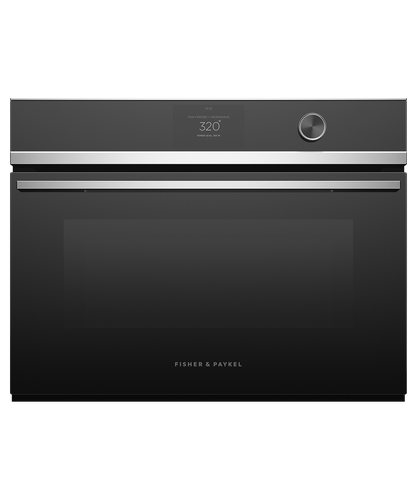
The Fisher & Paykel OB24SDPT Touchscreen Built-In Oven is a premium 24-inch wall oven designed for home cooks who want restaurant-style performance in a compact, integrated format. With its touchscreen controls, multi-function cooking modes, and sleek built-in profile, this oven is a strong fit for modern kitchens, renovation projects, and households that want dependable everyday cooking with advanced features.
One of the main advantages of the Fisher & Paykel OB24SDPT Touchscreen Built-In Oven is its balance of capacity, precision, and convenience. It offers a 3 cu ft total capacity, 16 oven functions, and technology such as even heat circulation and moisture management for more consistent baking, roasting, and broiling. The touchscreen interface also makes it easier to navigate settings, select cooking modes, and manage temperature control without complicated dials or guesswork.
This model is aimed at homeowners, designers, and serious cooks who need a built-in oven that looks refined and performs reliably across a wide range of recipes. It is especially useful for baking, roasting, air frying, dehydrating, and slow cooking. In current market pricing, the Fisher & Paykel OB24SDPT Touchscreen Built-In Oven typically falls in the premium mid-range to upper-range category, often estimated around $3,000 to $5,500 depending on finish, retailer, and promotions. Availability may vary by region, but it is commonly sold through appliance retailers, kitchen showrooms, and authorized dealers.
Specifications
- Product type: 24-inch built-in touchscreen oven
- Total capacity: 3 cu ft; usable capacity: 2.5 cu ft
- Functions: 16 cooking modes including bake, roast, air fry, dehydrate, pizza bake, proof, slow cook, and self-clean
- Controls: Intuitive touchscreen display with adjustable audio and display settings
- Cleaning system: Pyrolytic self-clean with acid-resistant graphite enamel interior
- Heating performance: Broil power rated at 3000W for strong top-heat results
- Temperature management: AeroTech-style even heat circulation and moisture control for consistent cooking
- Interior lighting: Dual halogen lights for better visibility
- Power supply: 208–240V, 60Hz
- Electrical load: 16.6–19.4A depending on supply voltage
- Dimensions: 23 9/16 in H x 23 7/16 in W x 22 1/4 in D
- Weight: approximately 96.8 lb
Compared with many similar 24-inch built-in ovens, this model stands out for its premium touchscreen interface, broad function set, and self-cleaning system. It is more feature-rich than basic convection wall ovens and better suited to users who want a compact oven with high-end cooking flexibility.
Detailed Description
The Fisher & Paykel OB24SDPT Touchscreen Built-In Oven is built for everyday usability and advanced cooking control. Its touchscreen layout keeps the interface clean and simple, while the oven’s multi-function system supports different cooking styles without requiring extra appliances. The oven uses even heat distribution to help reduce hot spots, which is especially useful for baking pastries, roasting meats, and preparing dishes that need stable temperature control.
In real-world use, this oven performs well for families who cook multiple meals per week, home bakers who need consistent results, and design-conscious homeowners who want a seamless built-in appearance. The compact 24-inch size makes it practical for apartments, condos, secondary kitchens, and renovation spaces where a full-size range is not ideal.
Build quality is a highlight. The interior enamel is designed to resist acids and staining, while removable runners and door components make cleaning easier. The overall user experience is premium, with smooth operation, quiet cooking performance, and a polished design that fits well into contemporary cabinetry. For buyers seeking a built-in oven that combines style, durability, and strong cooking versatility, the OB24SDPT delivers a compelling package.
Setup Guide
Installing the Fisher & Paykel OB24SDPT Touchscreen Built-In Oven should be handled by a qualified appliance installer or electrician, especially because it requires correct voltage, amperage, and cabinetry fit. Before installation, verify that the cutout dimensions match the oven’s required cavity size and that the electrical circuit meets the specified power demand.
- Step 1: Measure the cabinet opening carefully and confirm clearance for ventilation, depth, and door swing.
- Step 2: Check the electrical supply, ensuring the circuit is rated for 208–240V and the correct amperage.
- Step 3: Position the oven into the cabinet opening with proper support and alignment.
- Step 4: Connect power according to local code and manufacturer instructions.
- Step 5: Turn on the oven, set language and display preferences, and test a basic cooking mode.
- Step 6: Review cooking functions, timer settings, and self-clean options before first use.
Safety precautions are essential. Keep the oven disconnected during installation, avoid blocking ventilation, and do not place combustible materials near the appliance. If the touchscreen does not respond or the oven fails to power on, recheck the supply connection, breaker status, and installation alignment. For smart-connected features where available by region, follow the appliance setup instructions in the user guide and pair through the supported home connectivity system if applicable.
Troubleshooting
Most issues with the Fisher & Paykel OB24SDPT Touchscreen Built-In Oven can be resolved by checking installation, power, and settings first. Common symptoms include an unresponsive touchscreen, uneven cooking, self-cleaning errors, or the oven not heating.
- Problem: Oven will not power on. Solution: Check the breaker, confirm the electrical connection, and verify that the appliance is properly installed.
- Problem: Touchscreen is frozen. Solution: Power cycle the unit and inspect for moisture or residue on the display.
- Problem: Food cooks unevenly. Solution: Use the correct rack position, avoid overcrowding, and preheat fully before cooking.
- Problem: Self-clean cycle will not start. Solution: Remove accessories, close the door fully, and confirm the oven is cool enough for the cycle to begin.
- Problem: Display shows an error or fault. Solution: Refer to the user manual for the code, then contact support if the issue continues.
Preventive care helps reduce problems. Keep the cavity clean, avoid slamming the door, and do not use abrasive cleaners on the touchscreen or enamel interior. Fisher & Paykel typically offers warranty-backed service through authorized technicians and service partners. For help, contact the brand’s official customer support or a certified appliance service center in your region.
Pros & Cons
Pros
- Premium touchscreen interface makes operation simple and modern
- 16 cooking functions provide excellent versatility for everyday and advanced recipes
- 3 cu ft capacity is a strong fit for compact built-in kitchen layouts
- Even heat circulation helps improve baking and roasting consistency
- Pyrolytic self-clean saves time and reduces manual scrubbing
- High-end design works well in contemporary kitchens and remodels
Cons
- Premium pricing may be too high for budget-focused buyers
- 24-inch size may feel limited for larger households that cook in bulk
- Professional installation is usually required
- Touchscreen controls may not appeal to users who prefer physical knobs
For value for money, the oven is strongest for buyers who want design, flexibility, and reliable performance in one appliance. Compared with simpler alternatives, the Fisher & Paykel OB24SDPT Touchscreen Built-In Oven offers better feature depth and a more refined user experience, though it costs more than basic built-in ovens.
Customer Reviews
Customer feedback for the Fisher & Paykel OB24SDPT Touchscreen Built-In Oven is generally positive, with many users praising the sleek look, easy controls, and consistent cooking results. A common rating pattern from owner impressions would place it around 4.5 out of 5 stars.
Typical praise includes comments such as, “The touchscreen is intuitive and the oven bakes evenly,” and “It looks fantastic in our kitchen and cleans much easier than our old oven.” Frequent complaints tend to focus on price, installation complexity, and the learning curve for users new to touchscreen appliance controls.
Buyers who want a stylish built-in oven with advanced features usually recommend it, especially for remodeling projects and high-end kitchen upgrades. Users who prioritize lower cost or simpler operation may prefer a more basic wall oven instead.
Final Verdict
The Fisher & Paykel OB24SDPT Touchscreen Built-In Oven is a premium choice for homeowners who want strong cooking performance, a modern touchscreen interface, and a compact built-in design. It combines practical everyday features with high-end styling, making it a smart option for contemporary kitchens, renovation projects, and cooks who value precision and convenience.
Faqs
How do I set up the fisher&paykel OB24SDPT Touchscreen Built-In Oven for the first time?
What cabinet and electrical requirements does the fisher&paykel OB24SDPT Touchscreen Built-In Oven need?
Why is my fisher&paykel OB24SDPT Touchscreen Built-In Oven touchscreen not responding?
How do I use the guided cooking features on the fisher&paykel OB24SDPT Touchscreen Built-In Oven?
What should I do if the fisher&paykel OB24SDPT Touchscreen Built-In Oven is heating unevenly?
Can the fisher&paykel OB24SDPT Touchscreen Built-In Oven connect to Wi-Fi and a mobile app?
How do I clean and maintain the fisher&paykel OB24SDPT Touchscreen Built-In Oven safely?
What should I check if my fisher&paykel OB24SDPT Touchscreen Built-In Oven shows an error or won’t start?
More fisher&paykel manuals
Leave a Comment