
Installation: Foscam FI9818W Indoor HD IP-Camera User Manual
Content
Foscam FI9818W Indoor HD IP-Camera Manual
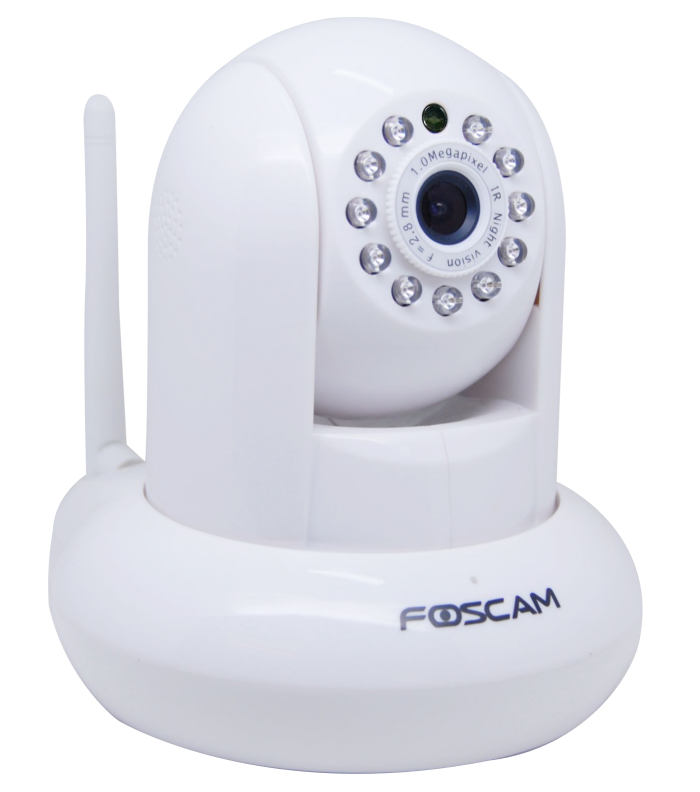
Introduction: Foscam FI9818W Indoor HD IP-Camera Overview
The Foscam FI9818W Indoor HD IP-Camera is a compact Wi‑Fi security camera designed for reliable indoor monitoring, live remote viewing, and easy home or office surveillance. It delivers 720p HD video at 1280 x 720 resolution, making it a practical choice for users who want clearer detail than basic VGA cameras without moving into premium smart-home pricing. Built for everyday security use, it supports indoor placement for watching over children, pets, entryways, small business counters, and home offices.
One of the main benefits of the Foscam FI9818W Indoor HD IP-Camera is its balance of simplicity and useful features. It supports Wi‑Fi connectivity, remote access through compatible Foscam apps and software, and SD card recording on supported configurations up to 32GB. It is also known for broad compatibility with older Foscam HD camera ecosystems, which makes it attractive for users already invested in the brand. The camera is typically positioned as an affordable indoor IP camera, with estimated pricing often found in the budget-to-midrange segment depending on seller, condition, and stock availability.
This model is a strong fit for homeowners, apartment residents, small office managers, and anyone looking for basic indoor security camera monitoring with HD video quality. It is commonly available through third-party marketplaces, resellers, and remaining stock listings, though availability may vary because it is an older model. For buyers who want a dependable indoor Wi‑Fi camera with a familiar Foscam setup, the FI9818W remains a practical and cost-conscious option.
Troubleshooting: Common Foscam FI9818W Issues and Fixes
If your Foscam FI9818W Indoor HD IP-Camera is offline, first confirm that the power adapter is connected securely, the Wi‑Fi network is active, and the camera is within range of the router. If the video feed is delayed or unstable, reboot the camera and router, then reduce interference from nearby wireless devices. If the SD card is not recognized, reformat it in a compatible format and confirm that the card size is supported, since this model supports micro SD cards up to 32GB in compatible firmware versions.
Common setup problems often involve incorrect Wi‑Fi credentials, outdated firmware, or browser compatibility issues. If the camera cannot be accessed from a modern browser, try the vendor’s recommended app or desktop client, since older IP cameras may not work properly with newer browser security standards. If you see a generic connection failure or blank video, reset the camera to factory settings and re-add it to the network. Preventive maintenance includes keeping firmware current, using a stable 2.4GHz Wi‑Fi network, and placing the camera away from thick walls and microwave interference.
Warranty coverage and support depend on the seller and region, since older inventory may be sold through distributors rather than direct retail channels. For help, check the official Foscam support site, product manual, and download center, or contact the retailer where you purchased the device. If the camera is still under warranty, prepare the serial number, purchase receipt, and a clear description of the issue before requesting service.
Pros and Cons of the Foscam FI9818W Indoor HD IP-Camera
Pros
- 720p HD video provides a clearer image than many basic indoor security cameras.
- Compact indoor design works well for shelves, desks, and wall-mounted monitoring.
- Wi‑Fi connectivity makes it easy to install without running Ethernet cables.
- Supports SD card recording for local storage in compatible setups.
- Good value for users seeking an affordable Foscam IP camera for home monitoring.
- Works well for common use cases such as pet watching, baby monitoring, and office surveillance.
Cons
- It is an older model, so availability can be limited and pricing varies widely.
- Feature set is more basic than newer smart cameras with advanced AI detection.
- Browser and app compatibility may require extra setup on modern devices.
- Storage support is limited compared with newer models offering larger cards or cloud features.
- For buyers wanting modern motion analytics, newer alternatives may offer better long-term value.
Overall, the foscam FI9818W Indoor HD IP-Camera offers solid value for users who prioritize affordable HD monitoring over premium features. Compared with newer indoor cameras from brands like TP-Link Tapo, Eufy, or Wyze, it may feel less advanced, but it still serves as a dependable entry-level surveillance solution for straightforward indoor security needs.
Customer Reviews: What Users Say About the Foscam FI9818W Indoor HD IP-Camera
Customer feedback for the Foscam FI9818W Indoor HD IP-Camera is generally positive among users who want a budget-friendly indoor HD camera. Many buyers praise the easy setup, reliable live video, and compact design, often rating it around 4 out of 5 stars for basic home monitoring. A typical testimonial would be: “Good picture quality for the price, and it works well for checking on pets while I’m away.”
Common complaints focus on older software support, limited app flexibility, and occasional Wi‑Fi reconnection issues after router changes. Another frequent comment is that the camera performs best when used with compatible Foscam tools rather than newer browser-based access methods. Users who understand they are buying an older but functional IP camera usually report better satisfaction, especially when the price is low. For buyers who need a simple indoor security camera with HD video and local recording, the FI9818W is often recommended; for advanced smart-home users, newer alternatives may be the better purchase.
Faqs
How do I set up the foscam FI9818W Indoor HD IP-Camera for the first time?
Why is my foscam FI9818W Indoor HD IP-Camera not connecting to Wi-Fi?
What video quality and viewing features does the foscam FI9818W Indoor HD IP-Camera offer?
How can I reduce motion alert false alarms on the foscam FI9818W Indoor HD IP-Camera?
Is the foscam FI9818W Indoor HD IP-Camera compatible with phones, PCs, and home networks?
What should I do if the foscam FI9818W Indoor HD IP-Camera image is blurry or lagging?
How do I keep the foscam FI9818W Indoor HD IP-Camera secure from unauthorized access?
How often should I clean and maintain the foscam FI9818W Indoor HD IP-Camera?
More foscam manuals
Leave a Comment