
Setup Guide: Ge Appliances Air Conditioner AQP05 User Manual
Content
GE Appliances Air Conditioner AQP05: Complete Product Manual and Buying Guide
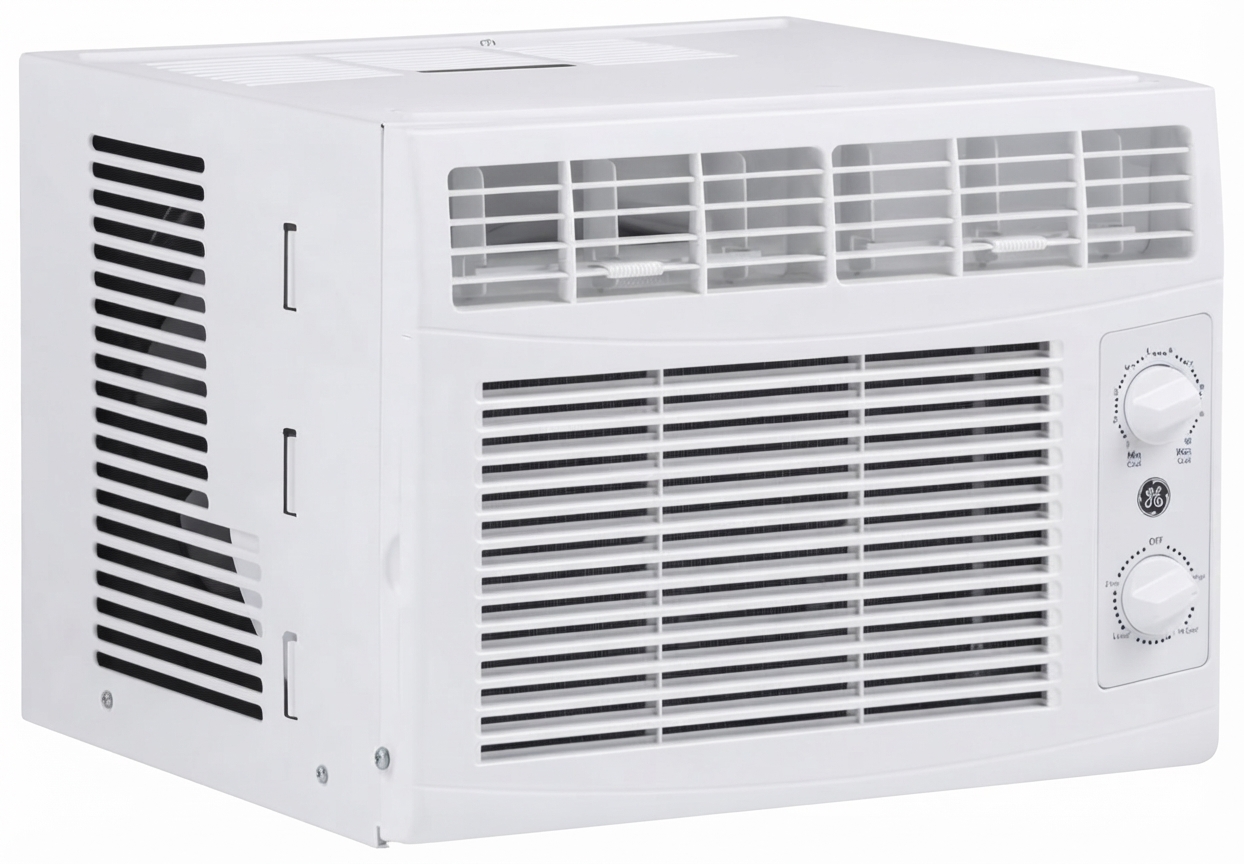
The GE Appliances Air Conditioner AQP05 is a compact window air conditioner designed for small rooms, apartments, dorm rooms, and home offices. It is built for users who need dependable cooling in a space-saving format, with straightforward installation and easy-to-use controls. The unit is best suited for bedrooms, studio spaces, and other areas where a full-size cooling system is unnecessary but consistent comfort still matters.
One of the key strengths of the GE Appliances Air Conditioner AQP05 is its practical design. The unit is intended for 115/120-volt operation with grounded electrical support, making it suitable for standard residential use. Its installation kit includes window filler panels and sealing materials to help improve fit and reduce air leakage. For buyers looking for a no-frills cooling solution, this model offers a balance of simplicity, reliability, and value.
In terms of price, the GE Appliances Air Conditioner AQP05 typically falls in the budget-friendly category for small-room window AC units. Depending on condition, seller, and regional availability, a reasonable estimated price range is about $150 to $250. Availability may vary because this model is an older GE unit and is more commonly found through secondary marketplaces, refurbished listings, or legacy inventory rather than mainstream retail shelves.
Specifications for GE Appliances Air Conditioner AQP05
- Product type: Window air conditioner for small rooms
- Model: GE Appliances AQP05
- Power requirement: 115/120V AC, 60 Hz
- Electrical protection: 15-amp time-delay fuse or circuit breaker
- Grounding: Requires a properly grounded 3-wire receptacle
- Installation style: Window-mounted with filler panels
- Cooling use case: Best for compact spaces and small bedrooms
- Air sealing: Includes gasket and sealing components to reduce outside air infiltration
- Leveling guidance: Unit should be level or slightly tilted outward for drainage
The GE Appliances Air Conditioner AQP05 is built for practical cooling rather than advanced smart features. Compared with newer room air conditioners, it focuses on basic mechanical reliability, standard electrical compatibility, and easy installation. Similar small-room units from modern GE lines may include digital controls, higher efficiency ratings, or app connectivity, while the AQP05 emphasizes simplicity and ease of maintenance.
Troubleshooting GE Appliances Air Conditioner AQP05 Common Problems
If the GE Appliances Air Conditioner AQP05 does not start, first check the power outlet, circuit breaker, and fuse. Make sure the unit is firmly plugged into a grounded receptacle and that the 15-amp circuit is not overloaded. If cooling seems weak, inspect the window seal, filler panels, and gasket for gaps that may let warm air enter the room.
Common issues and fixes include:
- Unit will not power on: Check outlet power, reset breaker, and verify the plug is secure.
- Poor cooling: Clean the filter, close windows and doors, and confirm correct room size for the unit.
- Water leakage: Recheck leveling; the unit should tilt slightly outward so moisture drains properly.
- Excess vibration or noise: Tighten mounting hardware and confirm the unit is stable in the window frame.
- Air drafts around the unit: Reinstall sealing foam and filler panels to improve insulation.
No modern digital error code system is documented for this model, so troubleshooting is usually mechanical and electrical rather than code-based. Preventive care includes cleaning the filter regularly, inspecting the installation seal each season, and ensuring proper airflow around the front grille. For support, GE historically provided customer assistance through the GE Answer Center at 800-626-2000 and GE CARES at 800-432-2737, though warranty status and service availability for older units may depend on seller coverage or third-party repair options.
Pros and Cons of the GE Appliances Air Conditioner AQP05
Pros
- Simple, easy-to-understand operation for first-time users.
- Compact window design works well in small rooms and tight spaces.
- Standard 115/120V compatibility fits most household outlets.
- Installation accessories help improve sealing and reduce air leaks.
- Good value for buyers who only need basic cooling without premium features.
Cons
- Older design with fewer convenience features than newer smart air conditioners.
- Likely limited availability because it is not a current mass-market model.
- May be less efficient than modern ENERGY STAR room AC alternatives.
- No advanced controls, remote app support, or modern automation features.
- Best performance depends heavily on correct window installation and sealing.
For value for money, the GE Appliances Air Conditioner AQP05 can be a solid choice if found at a fair price and in good working condition. Compared with newer alternatives, it is less feature-rich but easier to maintain and simpler to use. Buyers who prioritize low-cost, dependable cooling over smart functions may find it worthwhile.
Customer Reviews of GE Appliances Air Conditioner AQP05
Customer feedback for the GE Appliances Air Conditioner AQP05 typically centers on basic comfort, installation ease, and dependable cooling for small spaces. Overall ratings from users of similar legacy GE window units often land around 4 out of 5 stars when the unit is properly sized for the room.
- Praise: “Works well in my small bedroom and cools the room quickly.”
- Praise: “Easy to install and fits the window securely.”
- Complaint: “It is noisier than newer air conditioners.”
- Complaint: “I wish it had a remote or digital thermostat.”
Most users recommend the GE Appliances Air Conditioner AQP05 for small rooms, guest spaces, and seasonal cooling needs. Buyers commonly mention that performance depends on proper sealing and correct room sizing. For anyone seeking a straightforward window AC without extra features, this model remains a practical purchase.
Faqs
How do I set up ge appliances Air Conditioner AQP05 for the first time?
Why is my ge appliances Air Conditioner AQP05 not cooling the room effectively?
What features of ge appliances Air Conditioner AQP05 should I use for better comfort?
What room size and power requirements are best for ge appliances Air Conditioner AQP05?
Why does ge appliances Air Conditioner AQP05 keep shutting off or cycling too often?
How do I clean and maintain ge appliances Air Conditioner AQP05 properly?
Can ge appliances Air Conditioner AQP05 be used in a bedroom overnight safely?
How can I reduce noise and improve energy efficiency with ge appliances Air Conditioner AQP05?
More ge appliances manuals
- Setup Guide: Ge Appliances Self-Cleaning Electric Ranges JBP24 User Manual
- Setup Guide: Ge Appliances Dishwasher Built-in Model GSD820P User Manual
- Setup Guide: Ge Appliances Triton Profile Dishwasher GSD5 & GSDL Series User Manual
- Setup Guide: Ge Appliances Dishwasher Convertible Model GSC410 User Manual
- Setup: Ge Appliances Microwave Oven JE2160 User Manual
- Setup : Ge Appliances Reverse Osmosis Filteration System GXRM10RBL User Manual
Leave a Comment