
How to Use: Ge Appliances Hand/Stand Mixer User Manual
Content
GE Appliances Hand/Stand Mixer: Complete Product Manual and Buying Guide
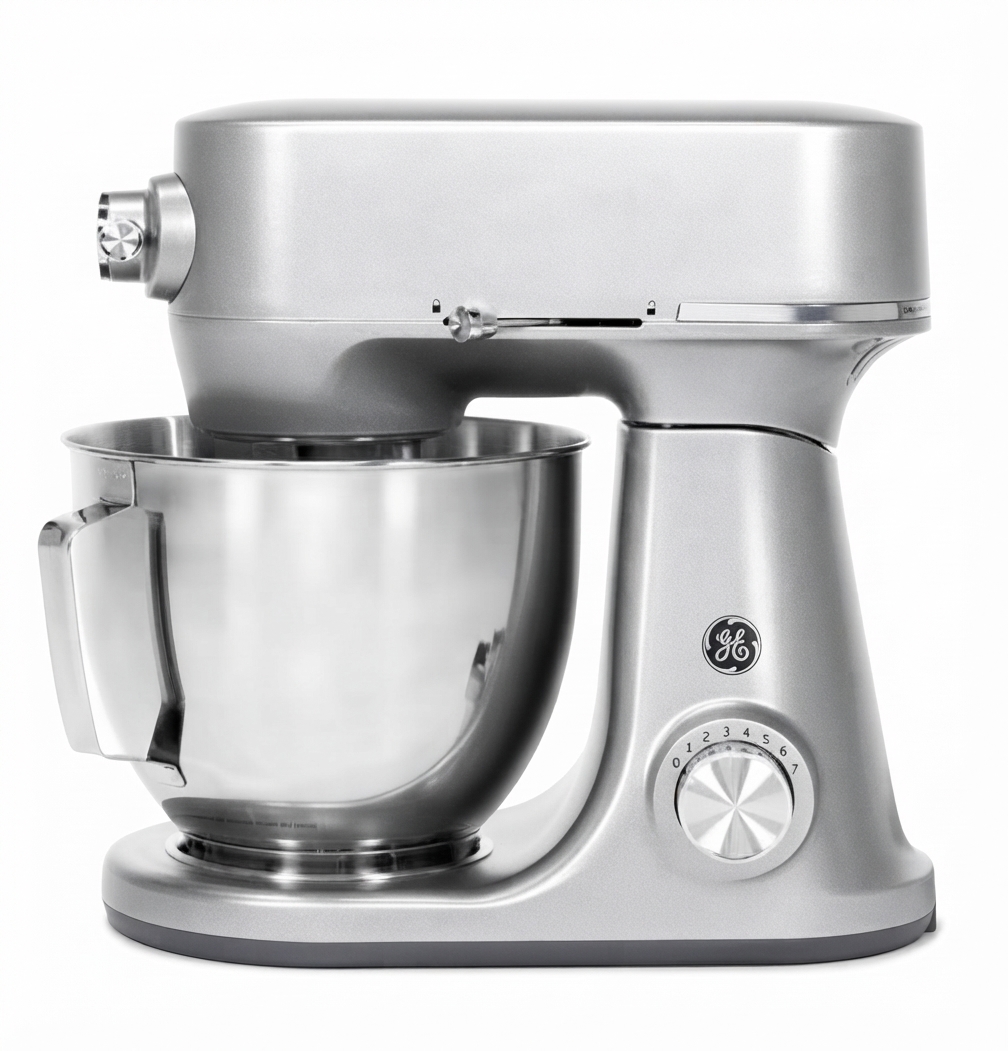
The GE Appliances Hand/Stand Mixer category offers versatile kitchen performance for home bakers who want one appliance that can handle everyday mixing and heavier batters with ease. In GE’s stand mixer lineup, models typically feature a 5.3-quart stainless steel bowl, a 350-watt motor, and 7 optimized speed settings for everything from whipping cream to kneading dough. Higher-end GE Profile smart models expand that experience with larger 7-quart capacity, a low-temperature high-power brushless motor, and auto-sense features designed to reduce guesswork while maintaining consistent results. The primary appeal of a GE Appliances Hand/Stand Mixer is its balance of power, capacity, and ease of use, making it suitable for beginner bakers, frequent meal preppers, and experienced home cooks alike.
This product line is especially useful for mixing cookie dough, cake batter, bread dough, meringues, and frosting. The stand mixer versions are a strong fit for users who bake in batches or want a countertop appliance that can also support third-party attachments through an accessory port. Depending on configuration and retailer, pricing generally falls around the mid-range to premium segment: standard stand mixers are often positioned near the $150 to $250 range, while smart 7-quart GE Profile models can be much higher, with some premium versions listed near $799. Availability is broad through GE Appliances, major home improvement retailers, appliance stores, and online marketplaces, though specific colors and bundles may vary by seller.
Specifications for GE Appliances Hand/Stand Mixer Models
- Bowl capacity: 5.3-quart stainless steel bowl on standard models; 7-quart bowl on GE Profile smart models.
- Motor power: 350 watts on standard stand mixers; 540-watt brushless motor on premium smart versions.
- Speed settings: 7 optimized speeds for general mixing, whipping, and kneading.
- Control type: Electronic speed control with barrel-style speed selector on many models.
- Included attachments: Coated flat beater, coated dough hook, wire whisk, and pouring shield.
- Accessory support: Accessory port compatible with third-party attachment ecosystems on select models.
- Dimensions: Approximately 13.57 inches high, 8.93 inches wide, and 15.56 inches deep for one standard model.
- Construction: Stainless steel mixing bowl, durable housing, dishwasher-safe attachments on many models.
- Performance notes: Built for cookie dough, cake batter, whipped creams, and denser doughs without frequent stalling.
Compared with compact hand mixers, the GE stand mixer line delivers higher torque, larger batch capacity, and better stability on the counter. Compared with premium competitors such as KitchenAid, GE models often provide strong value for buyers who want smart features or a large bowl without moving into the highest price tier.
How to Set Up a GE Appliances Hand/Stand Mixer
To set up your GE Appliances Hand/Stand Mixer, place the mixer on a flat, dry, stable surface before plugging it into a grounded 120V outlet. Attach the bowl securely to the base, then lock in the flat beater, dough hook, or whisk depending on your recipe. If your model includes a tilt-head design, raise the head, insert the attachment, and lower the head until it locks into place. For smart models, connect the mixer to Wi-Fi through the companion app or onboard setup flow if app-based pairing is supported by your specific model.
Select the speed carefully: start low to prevent splashing, then increase gradually for heavier mixing tasks. For best results, add ingredients slowly and avoid overfilling the bowl. If the mixer does not start, confirm that the head or bowl is fully locked and that the power cord is firmly seated. If you notice vibration or uneven mixing, stop the appliance, redistribute the ingredients, and check that the attachment is fully engaged. Always keep hands, utensils, and loose clothing away from moving parts, and never insert objects into the bowl while the mixer is running.
Troubleshooting Common GE Appliances Mixer Problems
If the mixer will not power on, test the outlet, inspect the cord, and verify that the bowl and head are properly locked. If the motor sounds strained, reduce the load and lower the speed setting. Overly thick dough can cause temporary slowdown, so divide large batches and follow the recommended capacity. If attachments are not mixing evenly, pause the machine and scrape the bowl with a silicone spatula before continuing.
Some smart models may display connectivity or pairing issues if the Wi-Fi signal is weak or the setup process is interrupted. Reboot the mixer, restart the app, and repeat the pairing sequence in a location with stronger signal strength. While specific error codes vary by model, most operational warnings are resolved by power cycling, checking lock positions, or updating the app and firmware. To reduce future issues, clean attachments after each use, avoid prolonged operation at maximum load, and keep vents clear. GE Appliances typically backs stand mixers with a 1-year parts warranty on many models, and support is available through GE Appliances customer care, retailer service teams, and appliance parts pages for model-specific guidance.
Pros and Cons of the GE Appliances Hand/Stand Mixer
Pros
- Strong mixing power for doughs, batters, and whipping tasks.
- Large 5.3-quart or 7-quart bowl options for family-sized recipes.
- Useful accessory port on select models for expanding functionality.
- 7-speed control makes everyday use simple and predictable.
- Good value for buyers who want premium features without a luxury price.
Cons
- Standard models may be louder at higher speeds.
- Bowl handles and controls may feel less refined than top-tier alternatives.
- Some versions are sold in limited color options depending on retailer.
- Smart features may be unnecessary for users who only want basic mixing.
Overall, the GE Appliances Hand/Stand Mixer line delivers a strong blend of performance and practicality. It compares favorably with other mid-range stand mixers for everyday baking, while GE Profile models appeal to users who want smart capabilities and larger capacity in a single appliance.
Customer Reviews: What Buyers Say About GE Appliances Mixers
Customer feedback for the GE Appliances Hand/Stand Mixer and stand mixer models is generally positive, with many buyers giving ratings around 4.6 to 4.7 out of 5 stars. Users commonly praise the generous bowl size, reliable mixing power, and ease of use. One frequent comment is that the mixer handles cookie dough and bread dough better than expected for its price class. Buyers also appreciate dishwasher-safe attachments and the included pouring shield on many models.
Common complaints include noticeable noise at higher speeds and a bowl handle that some users find less comfortable during heavy mixing. Even so, many reviewers recommend the product for home bakers who want a dependable, feature-rich machine. If value, capacity, and straightforward operation matter most, the GE Appliances Hand/Stand Mixer is a strong choice for everyday kitchen use.
Faqs
How do I set up a ge appliances Hand/Stand Mixer for the first time?
Why is my ge appliances Hand/Stand Mixer wobbling or moving during mixing?
What should I do if my ge appliances Hand/Stand Mixer stops working mid-recipe?
Which attachments work best with a ge appliances Hand/Stand Mixer for bread, cake, and whipping tasks?
How do I know if my ge appliances Hand/Stand Mixer is compatible with my bowl size and attachments?
How can I improve mixing performance on thick doughs with a ge appliances Hand/Stand Mixer?
What is the best way to clean and maintain a ge appliances Hand/Stand Mixer?
Why does my ge appliances Hand/Stand Mixer make a loud noise or smell hot during use?
More ge appliances manuals
- Setup Guide: Ge Appliances Top-Mount No-Frost Refrigerators 14 User Manual
- How to Use: Ge Appliances Water Filtration System 215C1001P019 User Manual
- Setup Guide: Ge Appliances Top-Mount No-Frost Refrigerators Model 18 User Manual
- How to Use: Ge Appliances Dryer 333, 453, 463, 483, 485, 2000, 3300, and 4500 User Manual
- Setup Guide: Ge Appliances Dishwasher Series GSD6000 User Manual
- How to Use: Ge Appliances Connect Series Split Heat Pumps User Manual
Leave a Comment