
Genesis GLCD2038A 20V Lithium-ion Drill User Manual
Content
Genesis GLCD2038A 20V Lithium-ion Drill Manual and Product Overview
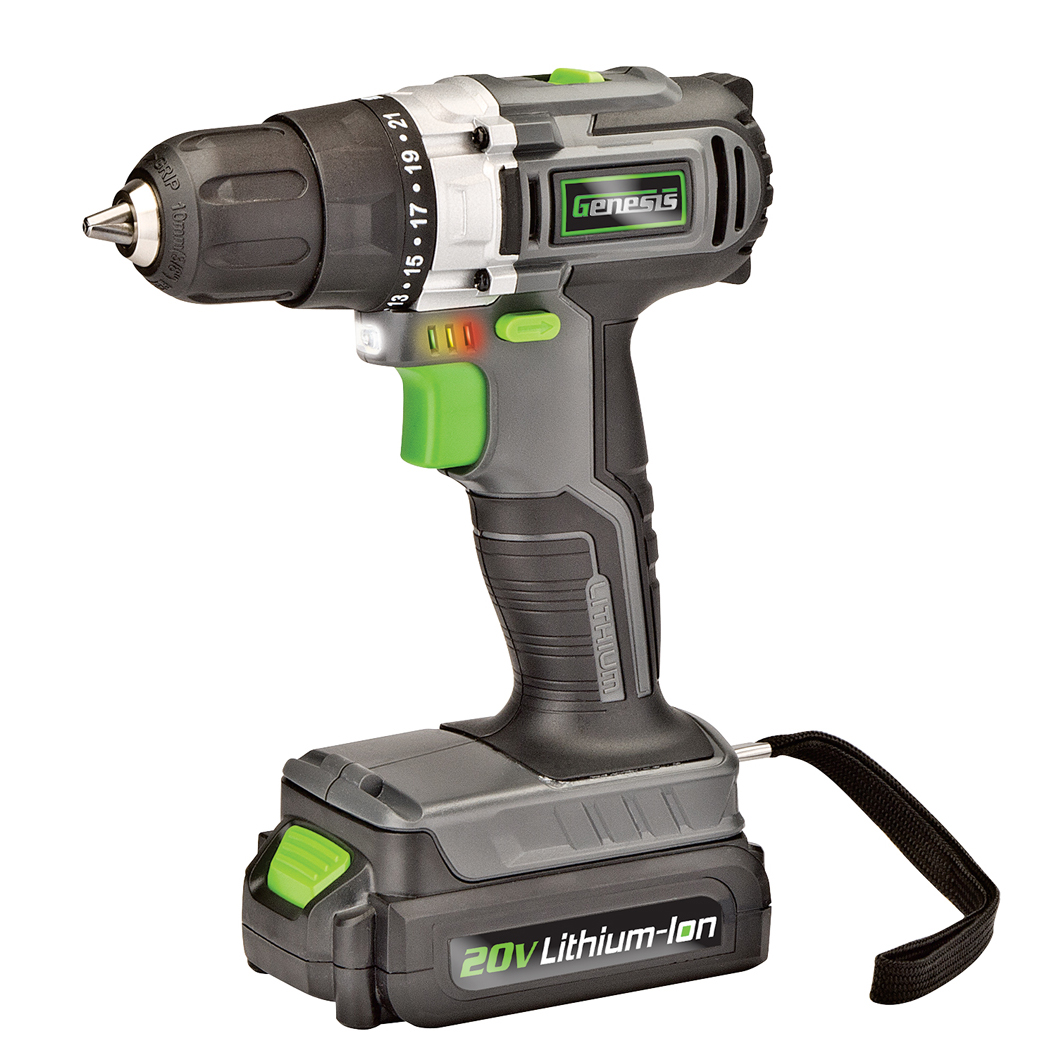
The Genesis GLCD2038A 20V Lithium-ion Drill is a compact cordless drill/driver designed for everyday home repairs, light woodworking, furniture assembly, and general DIY tasks. It combines a 20V lithium-ion battery system with a 3/8-inch keyless chuck, variable two-speed control, and multiple clutch settings to help users drill clean pilot holes and drive screws with better control. With a lightweight build and a portable cordless design, it is a practical choice for homeowners, hobbyists, and entry-level users who want a simple, dependable power tool without paying premium-brand prices.
One of the biggest strengths of the Genesis GLCD2038A 20V Lithium-ion Drill is its balance of power and usability. The tool is rated at 350 in.-lbs of torque, includes a 20V 1.5Ah lithium-ion battery, and features speed ranges of 0-350 RPM and 0-1300 RPM for both precision work and faster fastening. The included charger and double-ended screwdriver bit make it ready to use out of the box. Estimated pricing typically falls in the budget-to-midrange category, with used and resale listings often appearing around $15 to $25, while new or kit-based listings can be significantly higher depending on availability and seller. Availability may vary by retailer, marketplace, and seasonal stock, so shoppers should compare current offers before buying.
This drill is best suited for furniture assembly, shelf installation, drywall anchors, small repairs, and general household drilling in wood, plastic, and light metal. For users searching for an affordable cordless drill with solid everyday performance, the Genesis GLCD2038A 20V Lithium-ion Drill remains a practical value option.
Troubleshooting the Genesis GLCD2038A 20V Lithium-ion Drill
If the drill will not start, first confirm that the battery is fully charged and properly seated. A loose battery connection, depleted pack, or dirty terminals can prevent power delivery. If speed feels weak or inconsistent, check whether the drill is in the correct speed range and whether the clutch is set too low for the task. For slipping bits, tighten the keyless chuck firmly and make sure the bit shank is centered.
Common issues may include no charging, reduced runtime, or overheating during heavy use. This is often caused by an aging battery, blocked ventilation, or forcing the drill beyond its light-duty design. There are no widely documented digital error codes for this model, so most fixes are based on battery, charger, and mechanical checks rather than screen alerts. Preventive care includes storing the battery in a cool dry place, avoiding deep discharge, cleaning the chuck regularly, and allowing the motor to rest during extended jobs.
For warranty or support help, Genesis customer service can be reached toll-free at 888-552-8665. Keep the proof of purchase and model number GLCD2038A available when requesting service or replacement guidance.
Pros and Cons of the Genesis GLCD2038A 20V Lithium-ion Drill
Pros
- Affordable entry-level cordless drill for home use and light DIY projects.
- 20V lithium-ion battery platform offers cordless convenience and decent portability.
- 3/8-inch keyless chuck works well for common drill bits and screwdriver bits.
- Two-speed operation improves control for both drilling and fastening tasks.
- 350 in.-lbs of torque is enough for routine household assembly and repair work.
- Good value for money compared with premium drills from larger brands.
Cons
- Not intended for demanding construction, heavy masonry, or continuous professional use.
- The included 1.5Ah battery may feel limited for long sessions.
- 3/8-inch chuck is less versatile than 1/2-inch chucks on larger drills.
- Performance is more basic than higher-end alternatives with brushless motors.
- May not match the durability or battery ecosystem of more expensive brands.
Overall, the Genesis GLCD2038A 20V Lithium-ion Drill offers strong value for casual users who want a simple cordless drill without a high upfront cost. Compared with premium alternatives, it gives up some runtime, torque refinement, and ruggedness, but it remains a sensible budget choice for everyday household tasks.
Customer Reviews for the Genesis GLCD2038A 20V Lithium-ion Drill
User feedback for the Genesis GLCD2038A 20V Lithium-ion Drill is generally positive among DIY shoppers who want a low-cost cordless drill for home projects. Many users praise the lightweight feel, easy handling, and straightforward operation. Typical ratings cluster around 4 out of 5 stars for value-focused buyers who use it for furniture assembly, hanging shelves, and light repairs.
Common compliments include the convenient cordless design, decent power for small jobs, and the fact that it comes with a battery, charger, and bit. Common complaints usually focus on battery capacity, slower charging compared with newer systems, and limited suitability for tough materials or all-day use. A frequent recommendation is to buy a spare battery if the drill will be used regularly.
Customer testimonial style feedback often sounds like: “Great little drill for around the house” and “Perfect for quick repairs and assembly, but not a heavy-duty tool.” For buyers who need an affordable starter drill, this model is a practical purchase. For contractors or frequent users, a higher-capacity or brushless alternative may be a better fit.
Frequently Asked Questions About the Genesis GLCD2038A 20V Lithium-ion Drill
What can this drill be used for? It is ideal for drilling pilot holes, driving screws, assembling furniture, and completing light home repairs.
Does it come with a battery and charger? Yes, the standard kit includes a 20V lithium-ion battery, charger, and a double-ended screwdriver bit.
Is it good for professional use? It is better suited to DIY and light-duty tasks than to demanding professional jobsite work.
What is the key selling point? The main advantage is affordable cordless performance with simple controls and a practical tool layout.
Faqs
How do I set up the genesis GLCD2038A 20V Lithium-ion Drill for the first time?
Why does my genesis GLCD2038A 20V Lithium-ion Drill keep losing power during use?
What drill bits are compatible with the genesis GLCD2038A 20V Lithium-ion Drill?
How do I change drill bits safely on the genesis GLCD2038A 20V Lithium-ion Drill?
What should I do if the genesis GLCD2038A 20V Lithium-ion Drill chuck keeps slipping?
How can I get better drilling performance from the genesis GLCD2038A 20V Lithium-ion Drill?
How long does the battery last on the genesis GLCD2038A 20V Lithium-ion Drill, and how can I extend runtime?
How should I maintain and store the genesis GLCD2038A 20V Lithium-ion Drill for long-term use?
More genesis manuals
- Genesis 6.0 Amp Angle Grinder GAG645 User Manual
- Setup: Genesis GLGG04V2 4V Lithium-ion Cordless Glue Gun User Manual
- Setup: Genesis GLWL08B Pocket Work Light or Spotlight User Manual
- Setup: Genesis GMSS400W Miter Saw Stand User Manual
- Genesis GLMT20BH Oscillating Multi-Tool User Manual
- Genesis GBS900 Benchtop Band Saw User Manual
Leave a Comment