
How to Setup: Gotrax Pulse Max Smart Hoverboard User Manual
Content
Gotrax Pulse Max Smart Hoverboard
Introduction
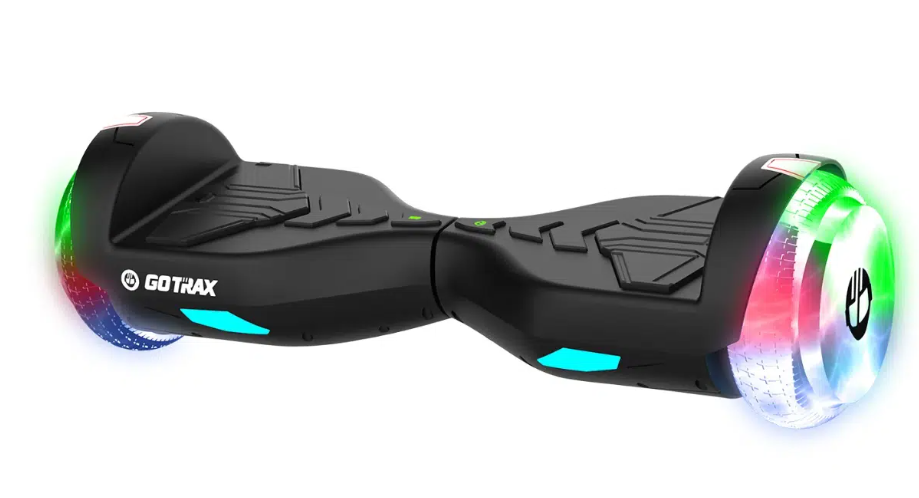
The Gotrax Pulse Max Smart Hoverboard is a cutting-edge personal transportation device designed to provide a fun, efficient, and safe way to move around. Launched in 2023, this hoverboard is equipped with advanced features that make it stand out in the market. With an estimated price range of $400-$500, it is an affordable option for those looking to invest in a high-quality hoverboard.
The Pulse Max is intended for various uses, including commuting short distances, recreational riding, and even learning new tricks. It is suitable for users of all ages, though it is recommended for riders aged 13 and above due to its speed and weight capacity.
This smart hoverboard boasts a sleek design, robust construction, and innovative technology that enhances the riding experience. Whether you are navigating through urban streets or enjoying a leisurely ride in the park, the Gotrax Pulse Max Smart Hoverboard is an excellent choice.
Detailed Specifications (Key Features)
The Gotrax Pulse Max Smart Hoverboard comes with several key features that make it a top-tier product:
- Top Speed: 6.2 mph
- Distance per Charge: 7 miles
- Weight Range Up To: 176 los
- Battery Type: 36V 2.6Ah
- Battery Charger: 42V 0.85A
- Charge Time: 4 hours
- Power Requirements: AC 100-24OV ~ 50/60Hz 1.5A
- FCC ID: 2AWFV-TRINITYMAX
Product Details
Setup Guide
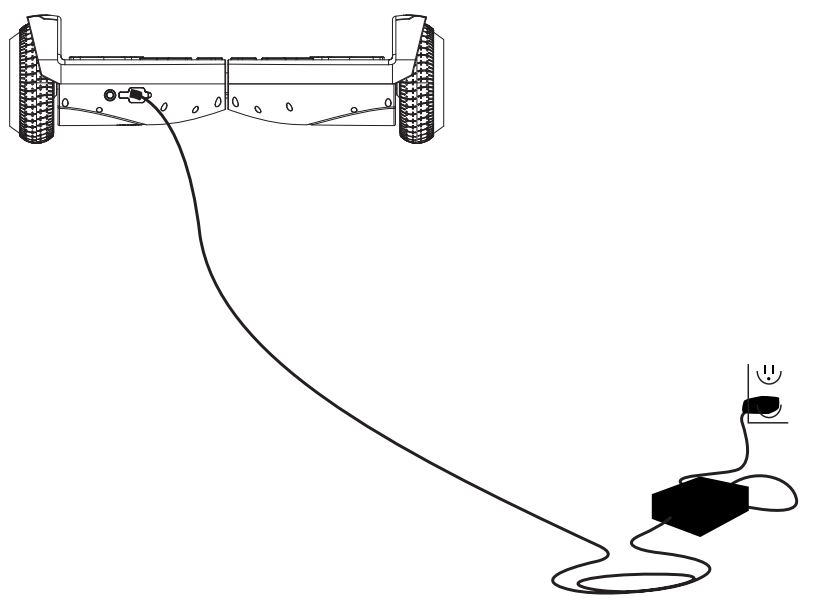
Charge your hoverboard
To operate the Gotrax Pulse Max Smart Hoverboard, follow these steps:
- Charge the hoverboard by inserting the plug into port for at least 2 hours before first use.
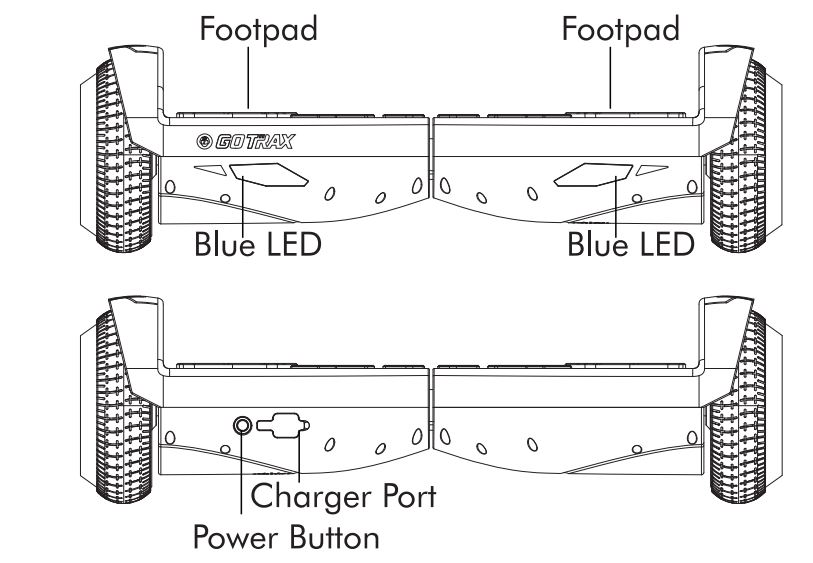
- Turn on the hoverboard by pressing the power button located on the side.
- Stand on the hoverboard with your feet shoulder-width apart, one foot on each pad.
- Lean forward slightly to start moving and adjust your balance as needed.
Use the Gotrax app to pair your hoverboard via Bluetooth and access additional features like speed mode adjustment and battery level monitoring.
Hoverboard Functions
- To power the hoverboard on, press and hold the Power Button on the back of your hoverboard for 2 seconds.
- To power the hoverboard off, press and hold the Power Button on the back of your hoverboard for 2 seconds.
- To switch the light mode, in the power-on state, short press the Power button to switch the hoverboard's magic light mode, there are 6 modes that can be changed.
- Forward Acceleration: Gently push down with your toes. Be prepared to lean forward slightly as the board accelerates.
- Forward Acceleration: Gently lift your toes. Be prepared to lean backward as the board accelerates.
- To Turn Right: Push gently down with your left toes. Be prepared to shift your weight to the right.
- To Turn Left: Push gently down with your left toes. Be prepared to shift your weight to the left.
- Slow to Stop: Return to an upright position with your weight evenly balanced.
- Low Battery: When the hoverboard is low on battery and ablout to die,the hoverboard will beep and flash red on the LED lights. Once it starts beeping and you see the red LED light, get off of the hoverboard and charge.
- Overheat Alarm: The motor will overheat after a long time of high speed running. When the motor temperature is high, it will keep beeping, and the hoverboard will move very slowly. Meanwhile, the red light will be flashing all the time. If it continues to run, the control system will cut off the power to protect the motor from damage.
Warning: To prevent wrestling, when the motor temperature is too high and the alarm is beeping, please stop riding the hoverboard, and wait for the motor cool down before riding.
Riding Tips
- You will want to start riding your hiverdoard by mounting the board from the rear. The rear of the board can be identified by the power button and the charging port.
- Place your hoverboard on the ground directly in front of your feet. Step with one foot onto the platform, and then quickly step up onto the hoverboard with your second foot.
- Always dismount from the back of the hoverboard.
- The hoverboard performs best when on a smooth surface e.g. carparks, smooth roads, footpaths.
- Always clean your hoverboard (wheel, platform, etc.), it's a, machine and it needs to be maintained.
- Be aware of the terrain you are riding on, watch out for curds and obstacles!
Bluetooth Setup
The hoverboard features a Bluetooth speaker that can be paired with any mobile device to play audio. The Bluetooth speaker is automatically enabled when the hoverboard is turned on and will remain enabled and discoverable as long as the hoverboard is power on. Read the instructions below to learn how to operate the hoverboard Bluetooth speaker.
- To turn on the Bluetooth speaker, power on the hoverboard as normal.
- Turn on the Bluetooth on the mobile device you wish to pair with your hoverboard Search Name "PULSE MAX".
- On your mobile device, click on "PULSE MAX" to connet. The Bluetooth speaker on the hoverboard will voice that a connection has been made and the devices are successfully paired.
- Make sure your mobile device and the hoverboard remain within a reasonable distance in order to maintain a connection. The Bluetooth speaker will not far apart.
- Play the music or audio you wish to hear on your mobile device, and it will broadcast through the hoverboard Bluetooth speaker.
Maintenance & Repair
- If you regularly clean and maintain your electric hoverboard, it will extend its life.
- If the scooter is dirty, wipe it clean with a soft damp cloth.
- DO NOT use alcohol, gasoline, kerosene, or other corrosive chemical solvents to clean the hoverboard. It can severely damage the appearance and structure of the hoverboard. Please do not use a pressure washer as it may also cause damage to the electronics.
- When you're not using your hoverboard store in a dry and cool location. Aviod storing your scooter outdoors because sun exposure can damage it's appearance and may cause wear on the life of the battery and tires.
- One of the most common solutions for hoverboard issues is calibrating your board. Here are the steps invoiced in hoverboard calibration:
- Start with the hoverboard powered off.
- Adjust the foot pedals until they are level with each other and the ground.
- Press and hold the power button for 10 seconds. The LED lights will flash.
- Press the power button to turn off.
- Press the power button to turn on. The hoverboard will be calibrated and ready for galactic adventures.
NOTE: You may have to repeat the above process multiple time in order to fully reset and calibrate your hoverboard. For example, you may have to go through the process 3 times in a row before the calibration fully takes effect.
Battery Information
- Only use the approved GOTRAX power adapter to charge your hoverboard, others may cause risk of fire & equipment may be damaged.
- Improper disposal of used batteries may seriously pollute the environment. Please comply with local disposal regulations.
- Make sure to store your hoverboard and power adapter in conditions that do not exceed 104 degrees Fahrenheit or below 32 degrees Fahrenheit.
- Warning: Risk of Fire. No User Serviceable Parts, The prolonged exposure to UV Rays, Rain and the Elements may damage the enclosed materials, store indoors when not in use.
NOTE:- Only use the battery(ies) specified by the manufaturer.
- Only use the charger(s) specified by the manufaturer.
Troubleshooting
If you encounter any issues with your Gotrax Pulse Max Smart Hoverboard, here are some common problems and their solutions:
- Hoverboard Not Turning On: Check that the battery is fully charged and ensure the power button is functioning correctly.
- Loss of Balance: Make sure you are standing correctly on the footpads and adjust your stance if necessary.
- Restart both the hoverboard and your device, then try pairing again through the app.
Always follow safety instructions and wear protective gear such as a helmet and knee pads when riding.
Pros & Cons
Pros:
- High Performance: Powerful motors provide a smooth ride.
- Up to 12 miles on a single charge.
- Robust frame and high-quality components.
- Easy to learn and use.
- Compliant with UL2272 safety standards.
Cons:
- Maximum weight capacity of 220 pounds.
- Takes about 2 hours to fully charge.
- Some users may find limited customization options in the app.
Customer Reviews
Customers have generally praised the Gotrax Pulse Max Smart Hoverboard for its performance, durability, and ease of use. Many appreciate its long battery life and stable ride. However, some users have noted that it can be a bit heavy to carry around when not in use.
Common complaints include occasional connectivity issues with the app and the need for a longer charging cable. Despite these minor drawbacks, the overall consensus is positive, with many recommending it as a reliable and fun transportation option.
Faqs
What is the maximum weight capacity of the Gotrax Pulse Max Smart Hoverboard?
How long does it take to fully charge the Gotrax Pulse Max Smart Hoverboard?
Is the Gotrax Pulse Max Smart Hoverboard safe for children under 13?
Can I customize settings on my Gotrax Pulse Max Smart Hoverboard?
What safety certifications does the Gotrax Pulse Max Smart Hoverboard have?
How do I pair my Gotrax Pulse Max Smart Hoverboard with my smartphone?
What if my Gotrax Pulse Max Smart Hoverboard does not turn on?
Can I use my Gotrax Pulse Max Smart Hoverboard in wet conditions?
How fast can the Gotrax Pulse Max Smart Hoverboard go?
What kind of tires does the Gotrax Pulse Max Smart Hoverboard have?
Tags
More gotrax manuals
Leave a Comment