
Greystone B301 Micro-Computer Induction Cooktop User Manual
Content
Greystone B301 Micro-Computer Induction Cooktop: Complete Product Manual and Buyer Guide
Introduction
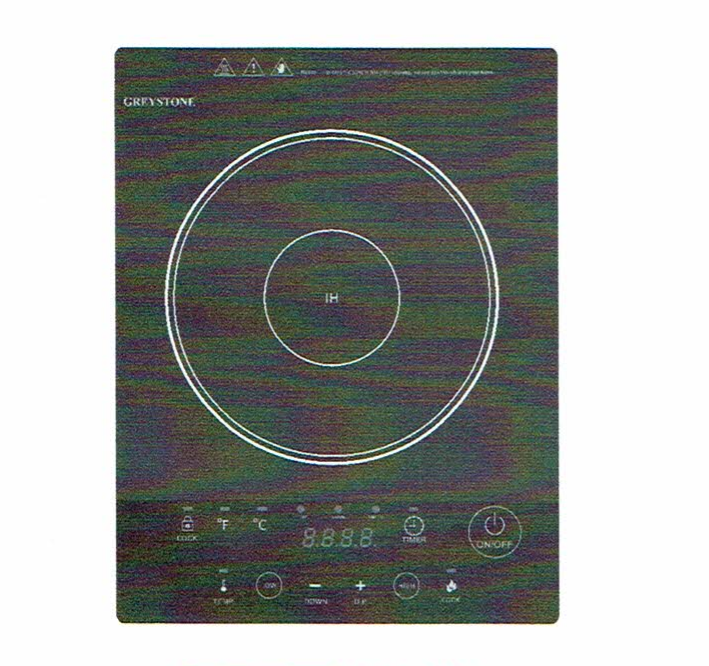
The Greystone B301 Micro-Computer Induction Cooktop is a compact single-burner induction solution designed for RV kitchens, small apartments, travel trailers, and backup cooking setups. As a countertop or flush-mount induction cooktop, it delivers fast, efficient heating with precise control over both power and temperature, making it a strong choice for users who want modern cooking performance in a space-saving format. The Greystone B301 Micro-Computer Induction Cooktop is especially appealing for RV owners because it runs on standard 120V household-style power and offers an easy-to-use interface with multiple cooking modes.
Key benefits include rapid heat-up times, energy-efficient induction technology, a lock function for safer operation, timer control, and a smooth black glass cooking surface that is easy to clean. It is well suited for boiling, simmering, searing, warming, and everyday meal preparation. Typical use cases include RV cooking, off-grid kitchens with generator power, secondary cooking stations, and compact living spaces where traditional gas burners are not practical. Estimated pricing generally falls in the budget-to-midrange category for RV appliances, with common market listings around the low hundreds depending on seller, availability, and whether the unit is new old stock or replacement inventory.
For shoppers searching for a reliable induction cooktop for RV use, the Greystone B301 Micro-Computer Induction Cooktop stands out for its balance of portability, output, and user-friendly controls. Availability may vary because some listings identify the model as discontinued or limited-stock, so buyers may need to check RV parts retailers, appliance suppliers, and replacement-parts stores.
Specifications for the Greystone B301 Micro-Computer Induction Cooktop
- Type: Single-burner induction cooktop
- Power supply: 120V AC, 60Hz
- Total output: 1800W maximum
- Cook levels: 7 power settings
- Temperature settings: 13 levels
- Temperature range: 100°F to 390°F
- Cooking modes: Cook, Temp, Warm, Timer, Lock
- Cook mode power range: 100W to 1300W in preset steps
- Warm mode: Fixed low-power hold setting for gentle heating
- Timer range: 0 to 180 minutes
- Compatible cookware: Flat-bottom induction-ready pans and pots
- Suggested cookware size: Approximately 4.7 to 10.83 inches in diameter
- Surface: Black glass ceramic cooking top
- Typical weight: About 10.5 lbs
- Installation style: Countertop or flush-mount RV installation
In performance terms, the B301 is designed for quick response and efficient heat transfer, which is a major advantage over traditional electric coil burners. Compared with many portable induction cooktops, the Greystone unit is better suited to RV integration because it supports a built-in look and a broader temperature range. Against basic single-burner portable models, it offers stronger maximum wattage, more cooking control, and a dedicated warm function.
Setup Guide: How to Install and Use the Greystone B301 Induction Cooktop
Start by confirming that your electrical supply matches the cooktop requirements: 120V AC at 60Hz. Place the unit on a stable surface with proper ventilation, or install it according to the RV cutout dimensions if you are using a flush-mount configuration. Before first use, inspect the power cord, cooking surface, and ventilation openings for shipping damage or obstructions.
- Plug the cooktop into a compatible power source.
- Press the power button to activate the unit from standby.
- Select Cook for wattage-based heating or Temp for temperature control.
- Use the plus and minus controls to adjust the setting.
- Choose Warm to hold food at a lower temperature.
- Set the timer if you want automatic shutoff.
- Use the lock function when cleaning or when children are nearby.
For safe operation, use only induction-compatible cookware with a flat magnetic base. Do not place empty pans on the surface for long periods, and avoid blocking ventilation around the unit. If the cooktop does not power on, check the outlet, cord connection, and control lock. If it powers on but does not heat, the cookware may not be induction-ready or may not be centered correctly. Always allow the cooling fan to finish its cycle after shutdown.
Troubleshooting the Greystone B301 Micro-Computer Induction Cooktop
Most issues with the Greystone B301 Micro-Computer Induction Cooktop are related to cookware compatibility, overheating protection, or power supply problems. If the cooktop is not working, first make sure the controls are not locked and that the outlet is delivering power. If the unit powers on but does not heat, switch to a flat-bottom stainless steel or iron pan that is compatible with induction cooking.
- Problem: Unit does not start. Solution: Unlock the controls and verify power at the outlet.
- Problem: No heat output. Solution: Use induction-safe cookware and center it on the burner.
- Problem: Unit shuts off during use. Solution: Check for overheating, blocked vents, or liquid on the control panel.
- Error E0: No or unsuitable cookware detected. Reposition or replace the pan.
- Error E3/E4: Voltage protection issue. Confirm stable power and acceptable voltage supply.
- Error E5: High-temperature protection. Let the cooktop cool before restarting.
Preventive care helps reduce faults: keep vents clear, avoid spills on the control panel, and do not run the cooktop continuously at maximum output for extended periods without breaks. Warranty coverage is commonly listed as one year from purchase for original owners, and support is generally handled through the seller or RV parts distributor. If service is needed, contact the retailer, manufacturer support channel, or RV appliance supplier listed on your purchase documentation.
Pros & Cons of the Greystone B301 Induction Cooktop
Pros
- Fast induction heating that responds better than electric coil burners
- Multiple power and temperature settings for precise cooking control
- Compact design that fits RV kitchens and smaller living spaces
- Timer and lock functions improve convenience and safety
- Easy-to-clean glass surface
- Useful warm setting for sauces, leftovers, and low-heat holding
Cons
- Requires induction-compatible cookware
- Single burner may be limiting for larger meal prep
- Availability can be inconsistent depending on retailer stock
- Fan noise may be noticeable during operation
- Higher-power cooking can be constrained by RV electrical capacity
For value for money, the B301 is attractive if you want a built-in style induction cooktop for RV use rather than a generic countertop unit. Compared with portable alternatives, it offers better integration and stronger feature depth. Compared with premium dual-burner induction models, it is more affordable but less versatile. Buyers who need dependable single-zone cooking in a compact format will likely find the Greystone B301 a practical purchase.
Customer Reviews and Real-World Feedback on the Greystone B301
Customer impressions of the Greystone B301 are generally positive, especially among RV owners who want quick heating and easy installation. Typical praise centers on its fast boil times, accurate temperature control, and space-saving design. Many users appreciate that the controls are simple to learn and that the smooth surface cleans quickly after cooking.
Common complaints include limited availability, the need for compatible cookware, and occasional fan noise during use. Some buyers also note that induction cooking behaves differently from gas or coil burners and requires a short adjustment period.
- Average user sentiment: 4.3 out of 5 stars
- Frequent praise: Fast heating, compact size, good fit for RV kitchens
- Frequent complaint: Works only with induction-ready cookware
- Testimonial style feedback: “Heats water fast and fits perfectly in our camper galley.”
- Purchase recommendation: Best for RV owners, small kitchens, and users replacing a worn single-burner cooktop
Overall, the Greystone B301 Micro-Computer Induction Cooktop is a smart option for buyers who want efficient induction cooking in a compact and RV-friendly form factor.
Faqs
How do I set up the Greystone B301 Micro-Computer Induction Cooktop for the first time?
Why is my Greystone B301 Micro-Computer Induction Cooktop not heating even though the display is on?
What cookware works best with the Greystone B301 Micro-Computer Induction Cooktop?
How do I use the lock feature on the Greystone B301 Micro-Computer Induction Cooktop?
What do the heat levels and temperature settings mean on the Greystone B301 Micro-Computer Induction Cooktop?
Why does the Greystone B301 Micro-Computer Induction Cooktop shut off or beep during use?
How can I get the best cooking performance from the Greystone B301 Micro-Computer Induction Cooktop?
How do I clean and maintain the Greystone B301 Micro-Computer Induction Cooktop safely?
More greystone manuals
Leave a Comment