
Use & Care: Guardian Technologies 4-in-1 Air Purifier User Manual
Content
Guardian Technologies 4-in-1 Air Purifier
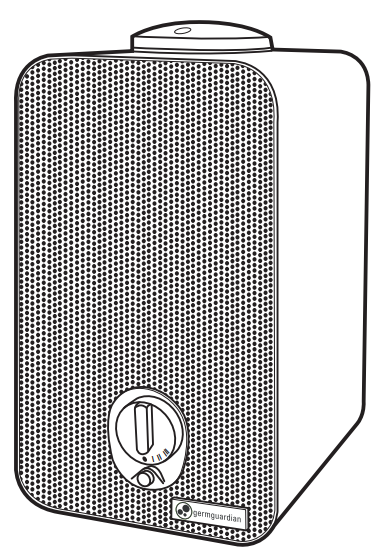
Introduction
The Guardian Technologies 4-in-1 Air Purifier is designed to significantly improve indoor air quality by combining advanced filtration technologies in one sleek tower unit. This air purifier features a True HEPA filter that captures up to 99.97% of allergens, dust, pollen, pet dander, and mold spores as small as 0.1 microns, ensuring cleaner and healthier air for your home or office. Additionally, the built-in UV-C light sanitizer works to reduce airborne bacteria, viruses, and mold spores, while the activated carbon layer effectively neutralizes common odors caused by pets, cooking, and smoke.
Ideal for allergy sufferers, pet owners, and anyone seeking fresher indoor air, this purifier is perfect for bedrooms, living rooms, dorm rooms, and other small to medium-sized spaces—typically covering areas up to 100–150 square feet depending on the model variant. Its compact and modern tower design blends aesthetically with various home decor whiledecor while providing 360-degree air intake and circulation.
With multiple speed settings i,, including an ultra-quiet sleep mode and a convenient timer feature, the Guardian Technologies 4-in-1 Air Purifier offers flexible operation tailored to your comfort and lifestyle. The electronic controls also include a filter change indicator, making maintenance hassle-free. Prices generally range from approximately $80 to $130, making it an accessible option for those seeking effective air purification with UV sanitization and odor control. It is widely available through major retailers and online marketplaces.
PRODUCT SPECIFICATIONS AND PARTS
SPECIFICATIONS
- MODEL NUMBER: AC4150 DIMENSIONS: 7.48 L x 6.41 W x 11.5 H WEIGHT: 5.38 pounds
- INPUT VOLTAGE: 120V 60Hz 0.56 Amps
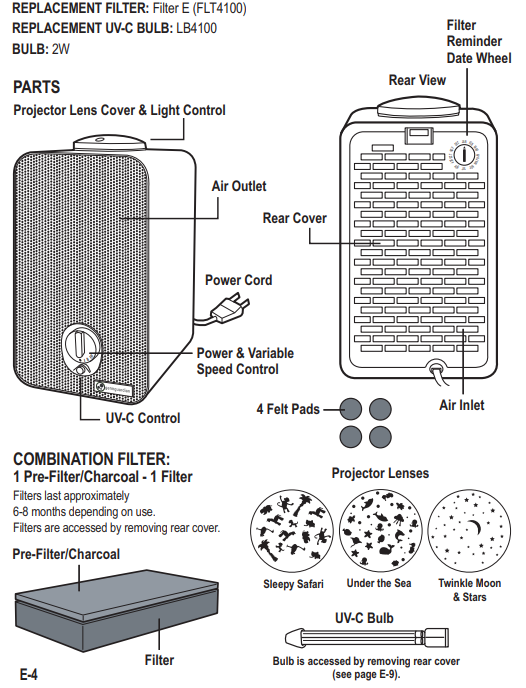
DIGITAL AIR CLEANING SYSTEM
Improve the indoor air quality in your child's bedroom with the Night, Night 4-in-1 Air Purifier. Multiple levels of cleaning work together to capture allergens, kill germs,, and remove odors. The night light projector gently transforms their bedroom ceiling to your choice of ocean, night sky,,y or animal safari images.
COMBINATION FILTER
PRE-FILTER/CHARCOAL
This layer serves as a pre-filter for capturing large dust particles, lint,, and pet hair,, which helps extend the life of your filter. The activated carbon absorbs household and pet odors.
FILTER
Reduces allergens.
UV-C LIGHT
The power of UV-C light kills bacteria and viruses, including: rhinovirus, E. coli,, and streptococcus.
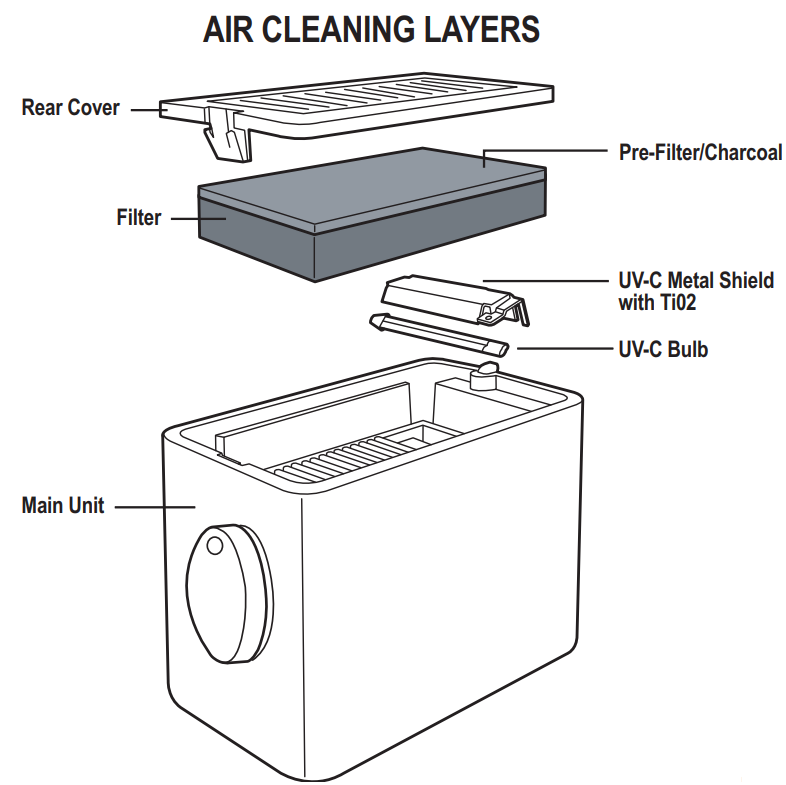
DIRECTIONS FOR USE
SET UP
- Select a firm, lev, el, and flat location for the air purifier. For proper air flow, locate the unit at least 1 foot from any wall or furniture. Make sure none of the grills are blocked.
- Carefully remove your air purifier from the box and bag.
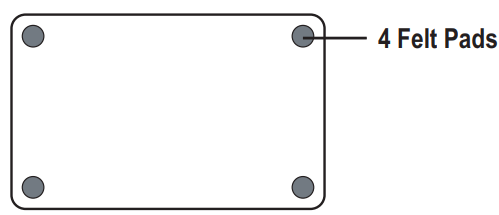
- Adhere 4 felt pads to the unit base to protect the table top surface. Remove adhesive backing and apply one pad to each corner of the unit base.
OPERATING THE AIR PURIFIER
- Plug the power cord into a 120V AC outlet.
- Select 1 of the 3 project lenses. Rotate the lens cap counterclockwise to unlock the position and lift off. Replace with the new lens cap and rotate clockwise to lock the position.
- Turn unit power ON.
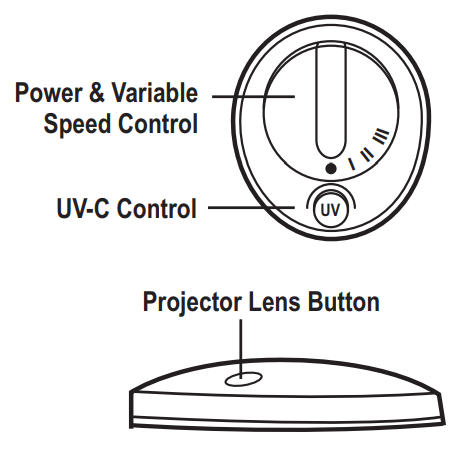
- Select fan speed MODE 1-3
- lowest speed setting
- highest speed setting
- Select UV-C ON or OFF using the UV-C button.
- Push the button on the projector lens to control the lights. One push - 3 colors auto-rotate.. Continue to push for a specific color.
CLEANING & MAINTENANCE
GENERAL CLEANING
Always unplug the unit before cleaning or servicing in any way.
Caution: Do NOT use gasoline, benzene, thinner, harsh cleaners, etc. on and/or in the unit while cleaning,, as they will damage the product. NEVER use alcohol or other solvents. Note: Do NOT stick any foreign objects or your fingers inside the unit.
- Wipe the surface of the unit with a clean, dry soft cloth as needed.
- Clean the Filter monthly with the brush of your vacuum cleaner.
- Remove and Clean (or Replace) Filter.
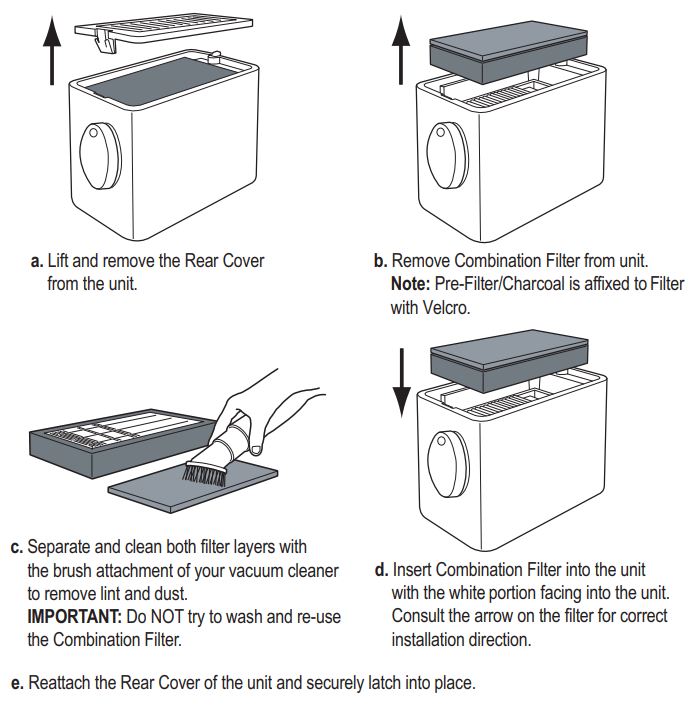
IMPORTANT: Do NOT try to wash and re-use the Combination Filter. Please contact Customer Service at 1.866.603.5900 or visit us at www.guardiantechnologies.com to purchase a replacement filter. Replacement Combination Filter: E (FLT4100)
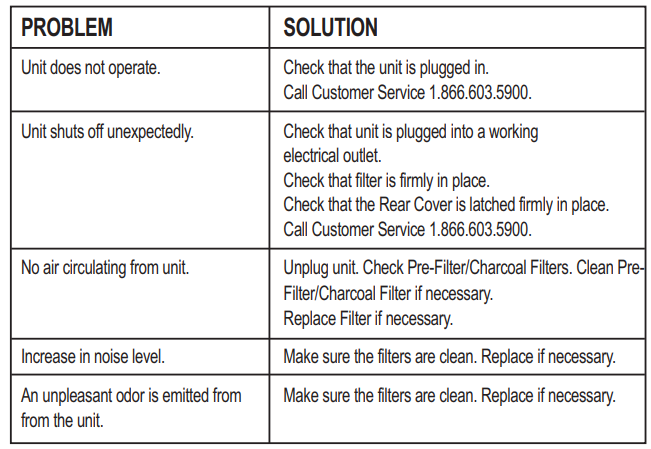
TROUBLESHOOTING GUIDE
LIMITED WARRANTY
To the consumer, Guardian Technologies LLC warrants this product to be free of defects in materials or workmanship commencing upon the date of the original purchase. Save your original sales receipt to validate e the start of the warranty period. Warranty is not valid without a receipt.
If this product should become defective within the warranty period, we will repair or replace any defective parts free of charge. All warranty repairs must be completed by Guardian Technologies LLC. This warranty does not cover unauthorized repairs. The warranty does not include unusual wear, damage resulting from an accident, or unreasonable use of the product. This warranty only covers the product when used with genuine Guardian Technologies accessories. This warranty covers products that were purchased from authorized distributors. This warranty gives you specific legal rights, and you may also have other rights (other rights may vary from state to state.
the U.S.A.)
The product warranty registration can be completed online at www.guardiantechnologies.com. We consider the registration process important to ensuring superior service to our customers; however, submitting the warranty registration is optional and does not affect your rights to utilize this warranty according to the conditions stated above. To submit a product under warranty, the complete machine must be delivered prepaid to Guardian Technologies LLC. Please include complete information,, including: the problem, the model number of the product, the day of purchase, and a copy of the original sales receipt,t along with your name, address, and telephone (email optional). Address returns to the attention of: Customer Service,
at the address below. Additional questions or comments can be mailed to the number listed below.
Pros & Cons of the Guardian Technologies 4-in-1 Air Purifier
Pros
- Effective Filtration: The True HEPA filter captures 99.97% of microscopic particles, including allergens and mold spores, providing significant relief for allergy sufferers.
- UV-C Sanitization: The integrated UV-C light reduces airborne germs, bacteria, and viruses, enhancing overall air hygiene.
- Odor Reduction: Activated carbon filter layer effectively eliminates common household odors from pets, cooking, and smoke.
- Quiet Operation: Multiple speed settings include an ultra-quiet sleep mode, allowing uninterrupted use in bedrooms or office spaces.
- Compact and Stylish: The space-saving tower design fits well in various room sizes without compromising aesthetics.
- Easy Maintenance: Filter change indicators and accessible controls simplify upkeep.
Cons
- Coverage Area Limitations: Best suited for small to medium rooms (around 100–150 sq. ft.), which might be insufficient for larger open-plan spaces compared to some higher-end models offering up to 700+ sq. ft. coverage.
- Replacement Filter Costs: Genuine HEPA and UV-C replacement parts can be relatively costly, impacting long-term value.
- Limited Speed Options: Some models offer fewer fan speed settings (usually 3 or 4), which may limit customization for some users.
- No Smart Features: Lacks Wi-Fi connectivity or app control found in some competing purifiers.
Overall, the Guardian Technologies 4-in-1 Air Purifier offers strong value for money for users targeting effective allergen removal and germ reduction in smaller spaces, though larger rooms may require more powerful alternatives.
Customer Reviews and Feedback on the Guardian Technologies 4-in-1 Air Purifier
Users generally praise the Guardian Technologies 4-in-1 Air Purifier for its effective allergy relief and noticeably fresher air quality, often rating it between 4 and 4.5 stars out of 5. Many customers highlight the quiet operation during sleep mode as a key positive, appreciating its unobtrusive performance overnight. The UV-C light feature receives particular mention for providing an added sense of germ protection.
Common compliments include easy setup, compact design, and the visible reduction of pet and cooking odors. However, some users report that the unit’s coverage feels limited for larger rooms and that the replacement filters can be somewhat pricey. A few reviews mention the fan speed controls as slightly basic compared to smart air purifiers. Despite these minor concerns, the majority recommend the product for bedrooms, small offices, and dormitories due to its balance of filtration, sanitization, and price point.
For best results, customers emphasize the importance of timely filter replacements and genuine Guardian Technologies parts to maintain peak purifier performance.
Faqs
How do I set up the guardian technologies 4-in-1 Air Purifier for the first time?
What should I do if the guardian technologies 4-in-1 Air Purifier is not turning on or responding?
Can I use the guardian technologies 4-in-1 Air Purifier in rooms larger than its recommended coverage?
How do the 4-in-1 features of the guardian technologies air purifier work together to improve air quality?
What maintenance is required to keep the guardian technologies 4-in-1 Air Purifier functioning optimally?
Why is my guardian technologies 4-in-1 Air Purifier making unusual noises and how can I fix it?
How can I optimize the performance of my guardian technologies 4-in-1 Air Purifier for allergy relief?
Is it safe to leave the UV-C light on continuously in the guardian technologies 4-in-1 Air Purifier?
More guardian technologies manuals
Leave a Comment