
Setup & Features: Hik Vision 21xx Network Camera User Manual
Content
Hikvision 21xx Network Camera Product Manual
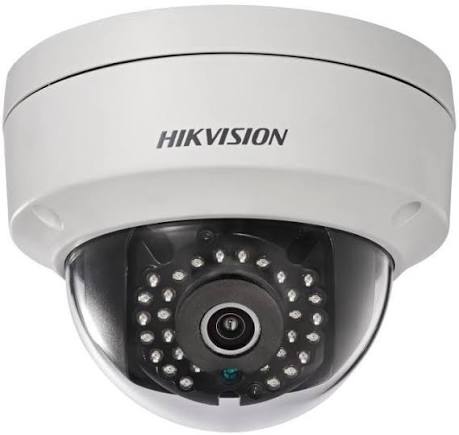
Introduction: Hikvision 21xx Box Camera/Bullet Camera Overview
The Hikvision 21xx Network Camera is a practical surveillance solution designed for dependable day-to-day security in homes, offices, retail stores, warehouses, and outdoor perimeters. Built for users who need clear video capture, flexible installation, and reliable monitoring, this camera family is widely used in entry-level to mid-range security systems. The 21xx series is especially valued for its balance of image quality, low-light performance, and compatibility with standard NVR-based video security setups.
One of the main strengths of the Hikvision 21xx Network Camera is its versatility. Box cameras are commonly chosen for custom lens setups and indoor professional installations, while bullet cameras are preferred for visible deterrence and weather-exposed mounting locations. Depending on the exact model, users can expect features such as HD resolution, infrared night vision, motion detection support, H.265 compression, and digital wide dynamic range. These capabilities make the camera suitable for entrances, loading bays, parking areas, corridors, and cash-handling zones.
For buyers comparing security camera options, the hik vision 21xx Network Camera typically sits in an affordable category, with estimated pricing often ranging from about $40 to $150 for standard models and higher for specialized variants. Availability is generally broad through security distributors, online retailers, and system integrators. For anyone seeking a dependable CCTV camera with flexible deployment, this line remains a strong value-focused choice.
Specifications: Hikvision 21xx Network Camera Technical Details
- Camera type: Box camera or bullet camera, depending on model and installation needs.
- Image sensor: Commonly 1/2.7-inch progressive scan CMOS in many 21xx-class models.
- Resolution: Typically 2MP Full HD 1920 × 1080, with some variants offering higher or lower resolutions.
- Lens options: Fixed lens or interchangeable lens support on box camera versions; bullet versions often use fixed focal lenses.
- Night vision: Infrared support for low-light and zero-light monitoring, often with ranges suitable for small to medium spaces.
- Video compression: H.265, H.265+, H.264, and H.264+ support on many network models for efficient storage use.
- Frame rate: Commonly up to 25/30 fps at Full HD, depending on region and model.
- Image enhancement: Features may include WDR, BLC, HLC, 3D noise reduction, and privacy masking.
- Power: Many models support 12V DC, PoE, or both, depending on the camera format.
- Protection rating: Bullet cameras often include outdoor weather resistance, making them suitable for exterior use.
Compared with higher-end security cameras, the hik vision 21xx Box Camera/Bullet Camera focuses on essential surveillance performance rather than advanced analytics. It is ideal for users who want stable recording, easy integration, and predictable operation without paying for premium AI functions.
Troubleshooting: Common Problems and Solutions for Hikvision 21xx Cameras
If the camera is not showing video, first check the power supply, PoE switch, and Ethernet cable. A damaged cable or weak power source is one of the most common causes of failure. If the camera is powered but not appearing on the recorder, confirm that the device is activated, added correctly, and using the correct IP address or channel assignment.
- No image: Verify power, cable continuity, and NVR compatibility.
- Dark or blurry video: Clean the lens, adjust focus, and check IR reflection near walls or glass.
- Night vision not working: Make sure infrared is enabled and the camera is not exposed to strong nearby light.
- Network loss: Replace the cable, test the PoE port, and check the IP address conflict.
- Activation error: Use the device management software to create a secure password and complete setup.
Common setup issues may appear as device offline, password error, or video loss. Preventive maintenance includes using quality cables, avoiding moisture intrusion, tightening connectors, and keeping firmware updated. For support, Hikvision provides regional technical assistance and warranty services through authorized channels. In the United States, users can contact technical support at 1-866-200-6690 or email techsupport.usa@hikvision.com for help with installation, troubleshooting, and product registration.
Pros and Cons: Is the Hikvision 21xx Network Camera Worth It?
Pros
- Good value for money for small business and home security installations.
- Clear Full HD monitoring on many models with dependable day and night performance.
- Box camera options allow lens flexibility for specialized viewing angles.
- Bullet camera designs provide strong visual deterrence and easier outdoor placement.
- Efficient video compression helps reduce storage usage on NVR systems.
Cons
- Feature set is more basic than premium smart cameras with advanced AI analytics.
- Some models require careful activation and network setup before use.
- Box cameras may need separate housing or accessories for outdoor deployment.
- Image quality depends heavily on lens selection, mounting position, and lighting.
Compared with entry-level alternatives, the hik vision 21xx Box Camera/Bullet Camera offers a stronger balance of reliability, installation flexibility, and ecosystem support. It is a smart choice when the goal is dependable surveillance rather than complex automation.
Customer Reviews: User Feedback on Hikvision 21xx Cameras
Overall user feedback for the hik vision 21xx Box Camera/Bullet Camera is generally positive, with many buyers rating it around 4 out of 5 stars for image clarity, easy integration, and reliable recording. Customers often praise the camera’s solid build quality and strong night monitoring, especially in retail and perimeter security setups.
Common complaints usually involve setup complexity, especially for first-time users who are unfamiliar with IP camera activation or recorder pairing. Some users also mention that the camera performs best when installed with proper lighting and a correctly matched lens.
- Average rating: 4.0/5 stars
- Praise: “Great value for a dependable security system and very clear footage during the day.”
- Complaint: “Setup took longer than expected, but the camera has been stable ever since.”
- Recommendation: Best for users who want a reliable CCTV camera with professional-style performance and manageable cost.
Quick Buying Guide: Who Should Choose This Camera?
The hik vision 21xx Box Camera/Bullet Camera is a strong fit for buyers who want practical security coverage, straightforward recording, and flexible installation options. It is especially useful for shops, office entrances, storage areas, and outdoor zones where dependable surveillance matters more than advanced smart features. For users comparing box camera versus bullet camera designs, the box version is better for customized optics and the bullet version is better for visible deterrence and quick outdoor mounting.
Faqs
How do I set up hik vision 21xx Box Camera/Bullet Camera for the first time?
Why is my hik vision 21xx Box Camera/Bullet Camera not showing video on the NVR or app?
What video settings should I change on hik vision 21xx Box Camera/Bullet Camera for clearer night footage?
Can hik vision 21xx Box Camera/Bullet Camera work with third-party NVRs and video software?
How do I fix blurry or out-of-focus video on hik vision 21xx Box Camera/Bullet Camera?
What power and network requirements does hik vision 21xx Box Camera/Bullet Camera need?
How often should I clean and maintain hik vision 21xx Box Camera/Bullet Camera?
How can I improve motion detection accuracy on hik vision 21xx Box Camera/Bullet Camera?
Tags
More hik vision manuals
Leave a Comment