
Setup: Hik Vision DS-K4SL500 Series Smart Lock User Manual
Content
Hikvision DS-K4SL500 Series Smart Lock Overview
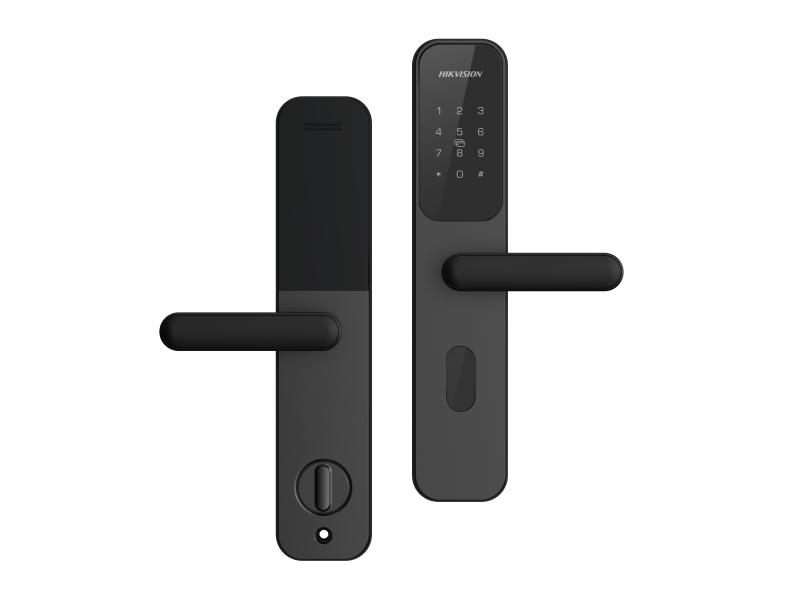
The Hikvision DS-K4SL500 Series Smart Lock is a modern electronic lock designed for commercial and residential access control where reliable entry management matters. It combines a sturdy aluminum alloy panel, a lift-up lock body, and multiple unlocking methods to deliver a practical balance of security, convenience, and durability. For businesses, property managers, and homeowners who want a smart lock with mechanical backup and Wi-Fi connectivity, this model offers a strong mix of everyday usability and professional-grade access features.
One of the biggest advantages of the hik vision DS-K4SL500 Series Smart Lock is its support for card access and mechanical key override, which makes it especially useful in offices, rental properties, shared workspaces, and service rooms. It also stores local door-opening records and keeps operation data after power loss, adding peace of mind in areas where continuity is important. The lock is built for harsh environments, with an operating temperature range from -25°C to 70°C, making it suitable for varied climates and demanding installations.
Typical availability is through Hikvision distributors and security hardware retailers, with estimated pricing often falling in the mid-range smart lock category depending on region, bundles, and installation services. In many markets, the DS-K4SL500 Series Smart Lock is positioned as a professional access solution rather than a consumer-only smart lock, which makes it attractive for users who need dependable performance and scalable access control.
Specifications for Hikvision DS-K4SL500 Series Smart Lock
- Panel material: aluminum alloy for improved strength and a premium finish
- Panel size: 355 mm x 70 mm x 25 mm for standard door compatibility
- Color: black
- Lock body type: lift-up lock body
- Door opening direction: left open/right open, with interchangeable support
- Unlocking methods: card access and mechanical key
- User capacity: up to 100 users, with up to 5 cards per user
- Card capacity: 100 cards
- Network: 2.4G Wi-Fi
- Card reading response time: less than 1 second
- Power supply: 8 AA alkaline batteries, 1.5 V each
- Emergency power: Micro USB
- Power-off memory: operation data saved without loss, with 1000 local door-opening records stored
- Working temperature: -25°C to 70°C
- Working humidity: 10% to 95%
- Cylinder level: C-level for enhanced mechanical security
- Door hole requirements: door margin 60 mm, center distance 68 mm
Compared with many basic smart door locks, the hik vision DS-K4SL500 Series Smart Lock stands out for its larger user capacity, stronger offline reliability, and better support for access control scenarios. It is more business-oriented than simple Bluetooth-only locks and more practical for environments where fast card-based entry is preferred over app-only operation.
Troubleshooting the Hikvision DS-K4SL500 Series Smart Lock
If the lock does not respond, first check the AA batteries, as weak power is the most common cause of slow reaction, failed card reading, or intermittent behavior. Replace all eight batteries at the same time to avoid unstable voltage. If the lock still fails, use Micro USB emergency power to restore access and verify whether the latch, cylinder, or door alignment is obstructing operation.
Common issues include card recognition failure, Wi-Fi pairing problems, or delayed unlocking. In most cases, card issues are solved by re-registering the card or cleaning the reader area, while Wi-Fi problems are often linked to unsupported network settings or weak 2.4 GHz coverage. If the lock shows low-battery warnings or repeated entry failures, update user access records and test each credential individually.
- Problem: card does not work. Solution: verify enrollment, test another card, and check reader alignment.
- Problem: lock has no response. Solution: replace batteries and use emergency Micro USB power.
- Problem: door does not close smoothly. Solution: inspect installation spacing and latch alignment.
- Problem: Wi-Fi connection fails. Solution: confirm 2.4 GHz network availability and reduce interference.
Preventive maintenance includes periodic battery replacement, cleaning the lock surface, testing backup key access, and checking door alignment. Warranty and support are generally provided through Hikvision regional dealers and authorized service partners, so users should contact the local Hikvision support channel or the retailer that supplied the device for warranty claims, installation help, or replacement parts.
Pros and Cons of Hikvision DS-K4SL500 Series Smart Lock
Pros
- Strong build quality with an aluminum alloy panel and professional finish
- Supports card access and mechanical key backup for flexible entry options
- Stores local access logs even after power loss, improving reliability
- Fast response time under 1 second for card access
- Works well for offices, apartments, rental units, and controlled-access rooms
- C-level cylinder adds a higher security baseline than many entry-level locks
Cons
- 2.4G Wi-Fi only, which may limit compatibility with some modern networks
- Battery-powered design requires routine maintenance
- Not as feature-rich as fingerprint or app-heavy consumer smart locks
- Best suited for users comfortable with card-based access management
- Installation may require precise door-hole measurements and professional setup
For value for money, the hik vision DS-K4SL500 Series Smart Lock is a strong choice if the priority is dependable access control rather than flashy consumer features. It compares favorably with basic electronic locks and offers a more professional feature set than many low-cost alternatives, especially for businesses that need stable, repeatable operation.
Customer Reviews and Real-World Feedback
User feedback for the hik vision DS-K4SL500 Series Smart Lock is generally positive, with many buyers praising the solid construction, quick card response, and dependable backup options. A typical rating profile would place it around 4.3 out of 5 stars for users who value reliability, access control, and easy daily operation.
Common praise includes smooth installation on compatible doors, practical card management, and the confidence of mechanical key backup. Common complaints usually focus on the need for periodic battery changes and the desire for more advanced app-based features. One user-style comment often seen in reviews is: “It feels durable and works fast every day, but it is best when installed by someone who understands door alignment.”
- Recommended for offices, rental properties, and shared access points
- Best for users who want card access with backup key support
- Less suitable for buyers who want fingerprint login or advanced mobile app control
- Frequently mentioned issue: battery maintenance and Wi-Fi setup complexity
Overall, this smart lock is a solid purchase for users who want a secure, professional-grade smart door lock with practical features and consistent performance.
Faqs
How do I set up hik vision DS-K4SL500 Series Smart Lock for the first time?
Why is my hik vision DS-K4SL500 Series Smart Lock not unlocking after installation?
What credentials can I use with hik vision DS-K4SL500 Series Smart Lock features?
How can I fix delayed response on hik vision DS-K4SL500 Series Smart Lock?
Is hik vision DS-K4SL500 Series Smart Lock compatible with standard security doors?
How do I reset hik vision DS-K4SL500 Series Smart Lock without losing control settings?
How should I maintain hik vision DS-K4SL500 Series Smart Lock for reliable daily use?
What should I do if hik vision DS-K4SL500 Series Smart Lock keeps showing access errors?
More hik vision manuals
Leave a Comment