
Setup: Hisense HDR Smart TV 55U7G User Manual
Content
Hisense HDR Smart TV 55U7G Product Manual and Review Guide
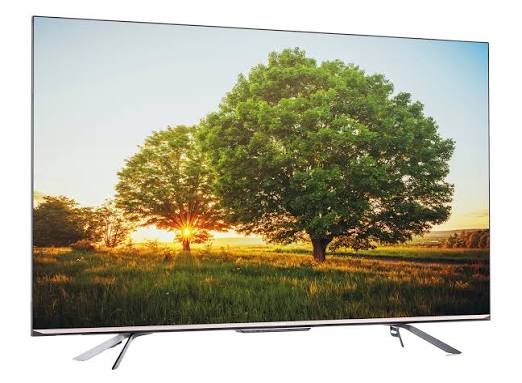
The Hisense HDR Smart TV 55U7G is a 55-inch 4K ULED television designed to deliver bright HDR performance, smooth motion, and strong gaming features in a mid-range package. Built around a 3840 x 2160 resolution panel with quantum-dot color and local dimming, it aims to provide vivid picture quality for movies, sports, and streaming. The TV also includes a native 120Hz refresh rate, Dolby Vision, HDR10, HDR10+, and HLG support, making it a capable choice for users who want a more cinematic viewing experience without moving into premium flagship pricing.
This model is especially appealing to gamers and home entertainment users who want HDMI 2.1 support, low input lag, VRR, and FreeSync for smoother console play. With four HDMI ports, built-in Wi-Fi, Bluetooth, and a smart TV platform with popular streaming apps, the Hisense HDR Smart TV 55U7G works well in living rooms, bedrooms, and media setups where versatility matters. The 55-inch size is a practical sweet spot for most spaces, offering immersive viewing without demanding a very large room.
As of 2026, the estimated price range for the Hisense HDR Smart TV 55U7G typically falls around $500 to $850 depending on condition, retailer, and remaining stock, since this is no longer a current flagship model and availability may vary by region. It remains a strong value-oriented option for buyers looking for a 4K HDR smart TV with premium-style features at a lower cost than many OLED and high-end mini-LED alternatives.
Hisense HDR Smart TV 55U7G Pros and Cons
Pros
- Excellent value for money: the Hisense HDR Smart TV 55U7G offers many features usually found on more expensive TVs, including 4K resolution, native 120Hz, and advanced HDR support.
- Strong gaming features: HDMI 2.1 connectivity, VRR, FreeSync, and low input lag make it a practical choice for PlayStation 5 and Xbox Series X users.
- Bright, colorful picture: quantum-dot color and local dimming help deliver punchy contrast and vivid highlights for HDR content.
- Good all-around smart TV use: built-in streaming apps, Wi-Fi, and Bluetooth make everyday entertainment simple and convenient.
- Balanced screen size: the 55-inch format suits apartments, bedrooms, and medium-sized living rooms.
Cons
- Not as refined as premium OLED TVs: black levels and viewing angles are strong for the price, but not class-leading.
- Smart platform performance can feel less polished than top-tier competitors like Samsung, LG, or Sony.
- Audio is serviceable but not exceptional, so many buyers will want a soundbar for better dialogue and bass.
- Availability may be limited in some markets because this is an older model.
- Compared with newer mini-LED TVs, peak brightness and overall dimming control may be less advanced.
Overall, the Hisense HDR Smart TV 55U7G is a compelling mid-range television for buyers who want premium features without premium pricing. Compared with alternatives in its class, it stands out for gaming support and HDR versatility, while trade-offs include a less polished interface and less sophisticated shadow detail than higher-end models.
Customer Reviews for Hisense HDR Smart TV 55U7G
Customer feedback for the Hisense HDR Smart TV 55U7G is generally positive, with many users praising the picture quality, gaming performance, and overall value. Average sentiment often lands around 4.3 out of 5 stars, especially from buyers who use the TV for streaming and next-gen consoles.
- “Amazing picture for the price.” Many owners highlight the bright HDR performance and rich color reproduction for movies and sports.
- “Great for PS5 and Xbox.” Gamers frequently mention smooth motion, responsive gameplay, and the benefit of HDMI 2.1 features.
- “The sound is okay, but a soundbar helps.” A common complaint is that the built-in speakers are acceptable, not impressive.
- “Smart TV apps work well enough.” Some users like the convenience, while others note occasional menu sluggishness compared with premium brands.
Frequent recommendations suggest buying this TV if picture quality, gaming features, and value matter most. Users who want the cleanest black levels, the most refined processing, or top-tier audio often consider higher-end OLED or newer mini-LED alternatives instead.
Hisense HDR Smart TV 55U7G Key Specifications and Features
- Display size: 55 inches
- Resolution: 4K UHD 3840 x 2160
- Panel technology: ULED with quantum-dot color and local dimming
- Refresh rate: Native 120Hz
- HDR formats: Dolby Vision, HDR10, HDR10+, and HLG
- HDMI ports: 4 total, including HDMI 2.1 support
- Gaming features: VRR, FreeSync, and low input lag
- Smart connectivity: Wi-Fi, Bluetooth, Ethernet, USB ports
- Mounting: 300 x 200 mm VESA compatible
- Best use cases: streaming, sports, movies, and console gaming
Who Should Buy the Hisense HDR Smart TV 55U7G?
This model is a smart pick for shoppers who want a feature-rich 55-inch 4K HDR smart TV at a competitive price. It is especially well suited for gamers, families, and streaming users who want strong performance without paying flagship prices. If you are looking for a balanced TV for everyday entertainment, the Hisense HDR Smart TV 55U7G remains a highly practical choice.
Faqs
How do I set up hisense HDR Smart TV 55U7G for the first time?
Why is my hisense HDR Smart TV 55U7G not connecting to Wi-Fi, and how can I fix it?
How do I enable the best HDR picture settings on hisense HDR Smart TV 55U7G?
What should I do if hisense HDR Smart TV 55U7G has no sound but the picture works?
Is hisense HDR Smart TV 55U7G compatible with gaming consoles and what settings should I use?
How do I update the software on hisense HDR Smart TV 55U7G safely?
What are the most useful hisense HDR Smart TV 55U7G features for streaming and everyday viewing?
How should I clean and maintain hisense HDR Smart TV 55U7G to avoid damage?
More hisense manuals
- Hisense 5000-BTU Air Conditioner AHW0521K1W User Manual
- Hisense HWS54029SS Wine Cooler User Manual
- Hisense HRF254N6T-E Refrigerator User Manual
- Setup: Hisense HBE3501CPS Electric Range User Manual
- Usage: Hisense J1-91 Air Conditioner Remote Controller User Manual
- Installation: Hisense AP0722CW1W Portable Air Conditioner User Manual
Leave a Comment