
Usage: Hisense J1-91 Air Conditioner Remote Controller User Manual
Content
Overview
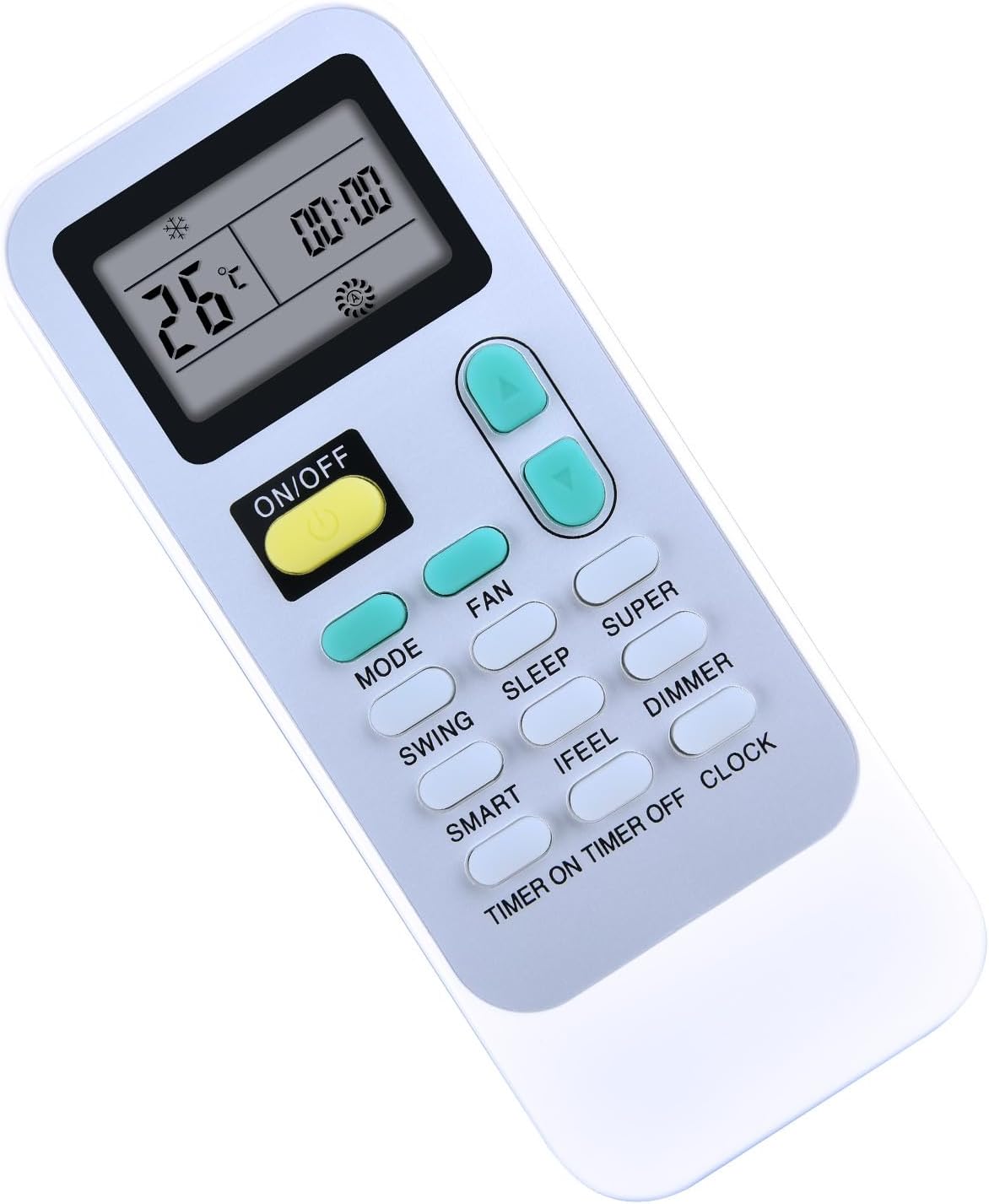
The Air Conditioner Remote Controller is designed to send operating signals to the indoor unit and give you convenient control over common comfort settings. It supports core functions such as power, mode selection, fan speed, temperature adjustment, airflow direction, timer scheduling, sleep operation, smart control, IFEEL, dimmer, and turbo-style fast cooling or heating.
This guide is useful for homeowners, renters, and anyone who needs a practical reference for everyday use of an Air Conditioner Remote Controller with multiple modes and display indicators.
Detailed Description
The remote control communicates with the air conditioner’s signal receiver from up to 7 meters away when aimed correctly. Its button layout includes dedicated controls for ON/OFF, MODE, FAN, SWING, SLEEP, SUPER, SMART, IFEEL, DIMMER, TIMER ON, TIMER OFF, CLOCK, and room temperature adjustment.
The LCD screen shows operating status and symbols such as cooling, heating, dry, fan-only, fan speed, set temperature, current time, timer status, sleep, smart, IFEEL, and super mode indicators. This makes the Air Conditioner Remote Controller a central tool for both routine operation and advanced comfort settings.
Specifications
- Remote type: infrared room air conditioner remote controller
- Battery type: 2 x LR03 AAA 1.5V batteries
- Recommended control distance: up to 7 m when pointed at the indoor unit receiver
- Temperature adjustment range: 16 °C to 30 °C in normal operation
- Special adjustment range in smart operation: on/off models use -2 to 2; inverter models use -7 to 7
- Supported operating modes: Cooling, Heating, Dry, Fan Only, Smart, Sleep, Super
- Optional accessory: wall holder for storage
Safety
- Keep the indoor unit receiver away from direct sunlight, strong light, and heat sources that can interfere with signal transmission.
- Do not place the unit near devices that may react to remote signals, such as flat-panel televisions or other electrical appliances.
- Make sure curtains, doors, and similar barriers do not block the signal path between the remote and the indoor unit.
- Do not use rechargeable batteries in the remote controller.
- Do not press the manual ON/OFF button too long when operating without the remote control, because abnormal operation may occur.
- Do not move the vertical louver by hand, or the unit may malfunction.
Setup and Operation
Battery installation
Open the battery cover in the direction indicated by the case, insert two AAA batteries with the correct polarity, and slide the cover back into place. Replace both batteries at the same time when the display becomes dim.
Basic controls
- ON/OFF starts or stops the air conditioner.
- MODE cycles through operating modes in sequence.
- FAN changes fan speed among auto, high, medium, and low.
- Temperature buttons raise or lower the set temperature by 1 °C.
- CLOCK sets the current time.
- DIMMER turns off the indoor unit display; press any button to restore it.
Operating modes
Cooling, heating, dry, fan only, and smart operation are selected with the MODE or SMART buttons depending on how you want the system to behave. Heating is not available on cooling-only models. In dry mode, the fan speed is fixed to auto and the fan button does not change it.
When changing modes, the unit may pause briefly before responding. After turning on or restarting, wait about 3 minutes if needed. In heating mode, airflow may not begin immediately because the indoor heat exchanger needs time to warm up.
Airflow direction
Vertical airflow can be adjusted with the SWING button. One press starts automatic louver movement, and a second press stops it at the preferred angle. Horizontal airflow is adjusted manually with the horizontal louver control rods.
For cooling and dry operation, the airflow is typically set horizontally, while heating and fan-only operation use a downward direction. Avoid keeping the vertical louver pointed downward for long periods in cooling or dry mode to reduce the chance of condensation dripping.
Smart mode
SMART mode activates fuzzy logic operation regardless of whether the unit is on or off. In this mode, the remote controller and air conditioner automatically balance temperature and fan speed based on the room condition. Temperature, airflow volume, and direction are managed automatically, and the SMART button does not work while SUPER mode is active.
Timer mode
TIMER ON lets you schedule when the air conditioner will start. After pressing TIMER ON, use the temperature/time buttons to choose the desired start time, then press TIMER ON again to confirm. If no setting is made within 10 seconds, the remote exits timer setup automatically.
TIMER OFF works in the same way for automatic shutoff. The timer is useful for pre-cooling a room before you return home or turning the unit off at night for more comfortable sleep.
Sleep mode
SLEEP mode is available in cooling, heating, and dry operation. It lowers noise and improves overnight comfort by setting fan speed to low and gradually adjusting temperature. In cooling, the set temperature can rise by up to 2 °C after two hours; in heating, it can drop by up to 2 °C after two hours. The unit stops automatically after 8 hours.
Super mode
SUPER mode is intended for fast cooling or fast heating. In cooling, the system switches to high fan speed and automatically sets 16 °C. In heating, it uses auto fan speed and automatically sets 30 °C. You can still adjust airflow direction or use the timer while in this mode.
IFEEL and dimmer functions
IFEEL turns the remote into a temperature reference point for more precise comfort control. Press it once to enable the function and again to turn it off. If it will not switch off normally, holding the button for about 5 seconds can help. For best results, keep the remote where the indoor unit can easily receive the signal. DIMMER is useful at night or in dark rooms because it disables the indoor display lighting until any button is pressed again.
Operation without the remote control
If the remote is lost or not working, the indoor unit can still be operated with the manual ON/OFF button behind the front panel. Press once to start the unit and again to stop it. The air conditioner will choose an operating mode automatically based on the room temperature.
Cleaning and Maintenance
The remote controller itself mainly needs battery care and proper storage. Mounting it in the optional wall holder helps keep it accessible and protected. Replace batteries with new ones of the same type when the display begins to fade.
Troubleshooting
- If the air conditioner does not respond, check that the remote is pointed at the indoor receiver within range.
- If signals seem weak, remove obstacles such as curtains or move the remote to avoid interference from sunlight or other electronics.
- If the unit does not react after a mode change, wait a few minutes before trying again.
- If the display is dim, install fresh AAA batteries.
- If the vertical louvers behave incorrectly after being moved by hand, switch the unit off, disconnect power, then restore power.
Pros & Cons
- Pros: Supports a wide set of comfort features, including smart control, sleep mode, timer scheduling, dimmer, and fast operation.
- Pros: Easy-to-read LCD indicators make the status of the Air Conditioner Remote Controller straightforward to follow.
- Pros: Simple battery setup and optional wall storage make daily use convenient.
- Cons: Signal performance depends on clear line of sight and proper receiver placement.
- Cons: Some modes respond with a short delay, and heating airflow may take time to begin.
- Cons: Manual handling of the louvers can cause malfunction if not done carefully.
Faqs
How do I insert the batteries in the air conditioner remote controller correctly?
Why is my air conditioner remote controller not working from a distance?
What do I do if the air conditioner does not respond right after I change settings?
How do I use the MODE button on the air conditioner remote controller?
How do I set the airflow direction with the SWING button?
How do I set the timer on the air conditioner remote controller?
What does SMART mode do on the air conditioner remote controller?
How do SLEEP mode and SUPER mode work on the air conditioner remote controller?
More hisense manuals
Leave a Comment