
Hisense A6 Series UHD TV 70A6H User Manual
Content
Hisense A6 Series UHD TV 70A6H Review and Product Manual
Introduction: Hisense A6 Series UHD TV 70A6H Overview
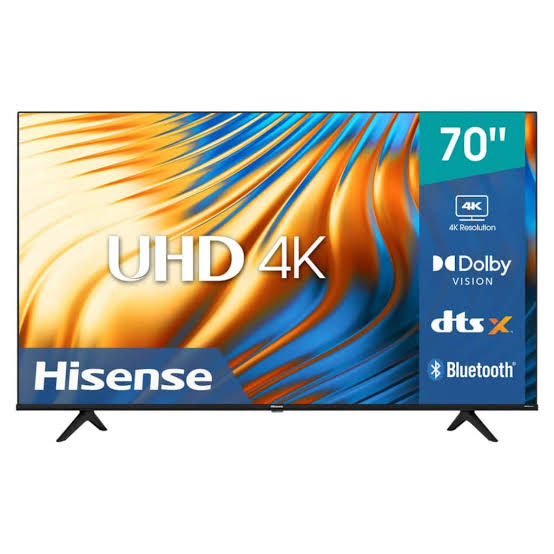
The Hisense A6 Series UHD TV 70A6H is a 70-inch 4K smart television designed for buyers who want a large-screen experience without moving into premium pricing territory. With Ultra HD resolution, HDR support, a 60Hz refresh rate, and smart TV functionality, it delivers a practical balance of size, picture quality, and everyday convenience. This model is especially appealing for living rooms, family entertainment spaces, sports viewing, and streaming setups where screen size matters as much as affordability.
The hisense A6 Series UHD TV 70A6H is built around a direct-lit LED panel with 3840 x 2160 resolution, 178-degree viewing angles, and support for HDR formats such as Dolby Vision and HDR10. It also includes built-in Wi-Fi, Ethernet, Bluetooth, multiple HDMI inputs, and USB ports for connecting consoles, soundbars, streaming devices, and external storage. For users seeking a simple large-screen 4K TV for movies, gaming, and streaming, it offers strong value for money.
In 2026, the estimated price range for the hisense A6 Series UHD TV 70A6H typically falls between budget and mid-range 70-inch TV pricing, often around $450 to $600 in the United States, with regional pricing varying by market, retailer, and stock availability. This model is commonly available through major electronics stores, online marketplaces, and regional appliance retailers. It is a solid choice for shoppers who want a spacious 4K smart TV at a competitive price.
Pros and Cons of the Hisense A6 Series UHD TV 70A6H
Pros
- Large 70-inch 4K display provides an immersive viewing experience for movies, sports, and streaming.
- HDR support, including Dolby Vision and HDR10, improves contrast and helps compatible content look more detailed.
- Smart TV features make it easy to access popular streaming apps and online content without extra devices.
- Multiple HDMI and USB ports support game consoles, soundbars, Blu-ray players, and media drives.
- Good value for money compared with premium large-screen alternatives from Samsung, LG, and Sony.
Cons
- 60Hz refresh rate is fine for everyday viewing but less ideal for fast-paced competitive gaming than higher-refresh alternatives.
- Built-in speakers are serviceable, but many users will still prefer a soundbar for fuller audio.
- Picture performance is strong for the price, but it does not match the brightness, contrast control, or processing quality of premium models.
- Some competing TVs in the same price range may offer more advanced gaming features or better smart-platform polish.
For shoppers comparing options, the hisense A6 Series UHD TV 70A6H stands out as a practical large-screen purchase. If the priority is the biggest screen for the lowest cost, it is more compelling than many brand-name alternatives. If advanced gaming features, superior HDR performance, or top-tier panel uniformity matter most, a higher-end TV may be worth the extra spend.
Customer Reviews: What Buyers Say About the Hisense A6 Series UHD TV 70A6H
Customer feedback for the hisense A6 Series UHD TV 70A6H is generally positive, with many buyers rating it around 4.4 out of 5 stars in retail review summaries. Praise commonly centers on the huge screen size, easy setup, sharp 4K image, and overall affordability. One typical sentiment is, “Great value for a 70-inch TV, especially for streaming and watching sports.”
Common complaints include average built-in speakers, modest brightness in very bright rooms, and the limitations of a 60Hz panel for gaming enthusiasts. Another frequent comment is, “The picture is good, but a soundbar makes a big difference.” Buyers usually recommend it for families, casual gamers, and anyone who wants a large smart TV without spending premium-brand money.
Overall, the hisense A6 Series UHD TV 70A6H is a smart buy for users focused on size, 4K clarity, and affordability rather than flagship-level performance.
Key Features of the Hisense A6 Series UHD TV 70A6H
- 70-inch 4K UHD LED display
- 3840 x 2160 native resolution
- 60Hz refresh rate
- HDR support with Dolby Vision and HDR10
- Smart TV platform with streaming access
- Wi-Fi, Ethernet, and Bluetooth connectivity
- Multiple HDMI and USB ports
- Wall-mount compatible design
Who Should Buy the Hisense A6 Series UHD TV 70A6H?
This TV is best for users who want a large 4K screen for movie nights, everyday TV watching, sports, and family entertainment. It is also a strong option for buyers upgrading from a smaller 1080p set and looking for a straightforward smart TV experience. The hisense A6 Series UHD TV 70A6H is less suited for users who need premium gaming performance, very high brightness, or advanced home-theater calibration tools.
Setup and Installation Tips
- Use a sturdy TV stand or wall mount rated for the size and weight of a 70-inch display.
- Connect a soundbar through HDMI ARC or optical audio for better sound quality.
- Place the TV at a comfortable viewing distance to fully enjoy the 4K resolution.
- Update the TV software after installation to improve stability and app performance.
- Use high-speed HDMI cables for consoles, streaming devices, and 4K sources.
Final Verdict
The hisense A6 Series UHD TV 70A6H offers a compelling mix of screen size, 4K resolution, HDR support, and smart features at a price that remains accessible for many households. It is not a premium flagship television, but it delivers exactly what most buyers want in a large-screen budget 4K TV: a big picture, simple operation, and solid everyday performance.
If the goal is to get the most screen for the money, the hisense A6 Series UHD TV 70A6H is a strong value-focused choice. For shoppers comparing it with alternatives, it is one of the more appealing options in the large-screen smart TV category.
Faqs
How do I set up the hisense A6 Series UHD TV 70A6H for the first time without missing any important configuration steps?
Why is my hisense A6 Series UHD TV 70A6H not connecting to Wi-Fi, and how can I fix the problem quickly?
What picture settings should I adjust on the hisense A6 Series UHD TV 70A6H for better 4K streaming quality?
How do I troubleshoot sound delay or no audio on the hisense A6 Series UHD TV 70A6H?
Can the hisense A6 Series UHD TV 70A6H work with gaming consoles, and what settings improve gaming performance?
What should I do if the hisense A6 Series UHD TV 70A6H remote control stops responding?
How can I connect external devices to the hisense A6 Series UHD TV 70A6H without causing input or resolution issues?
How do I maintain and clean the hisense A6 Series UHD TV 70A6H safely to protect the screen and ports?
More hisense manuals
- Hisense AP1022HW1GD Portable Air Conditioner User Manual
- Hisense H3 Series TV 32H3D1 User Manual
- Hisense U8H Series Mini-LED TV ES-A22081W-1 User Manual
- Hisense H65 Series HD Smart TV 75H6570G User Manual
- Hisense 65R7F Roku TV User Manual
- Usage: Hisense J1-91 Air Conditioner Remote Controller User Manual
Leave a Comment