
Hisense 65R7F Roku TV User Manual
Content
Hisense 65R7F Roku TV Manual: Setup, Features, and Everyday Use
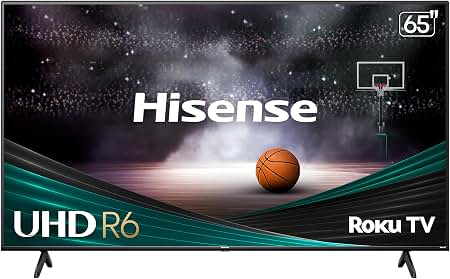
The Hisense 65R7F Roku TV is a 65-inch 4K UHD smart television designed for viewers who want a large screen, simple streaming access, and dependable everyday performance. With a 64.5-inch diagonal display, 3840 × 2160 resolution, Roku TV software, and built-in wireless connectivity, it is well suited for living rooms, family entertainment spaces, and casual home theater setups. The combination of Hisense hardware and Roku’s straightforward interface makes this model especially appealing to users who want quick access to streaming apps without complicated menus or extra devices.
Key benefits include sharp 4K picture quality, HDR-capable playback support, HDMI connectivity for game consoles and soundbars, and easy parental controls for family use. The TV also supports common broadcast and digital cable formats, making it flexible for both streaming and antenna-based viewing. Audio output is rated at 10W + 10W, which is adequate for small to medium rooms, though many owners pair it with an external sound system for fuller sound. The Hisense 65R7F Roku TV is a practical choice for budget-conscious buyers who want a big-screen smart TV with a familiar interface and broad app support.
Typical pricing for the Hisense 65R7F Roku TV has historically fallen in the mid-range budget category for a 65-inch 4K Roku TV, often depending on retailer promotions, stock availability, and seasonal sales. Availability may vary because this model is not always stocked year-round, so shoppers may find it through clearance listings, third-party sellers, or refurbished channels. For users comparing alternatives, it offers strong value against similarly priced 65-inch 4K TVs from other entry-level smart TV brands.
Troubleshooting Common Hisense 65R7F Roku TV Problems
If the TV will not turn on, confirm the power cable is firmly connected, test a different wall outlet, and check whether the standby light is active. If the Roku interface freezes or apps crash, restart the TV from the settings menu or perform a full power cycle by unplugging it for 60 seconds. For no-signal messages, verify the correct HDMI input is selected and inspect the cable connection from your device.
Common Roku error codes such as network connection issues, activation problems, or channel loading errors are usually fixed by restarting the router, reconnecting to Wi-Fi, or updating the Roku software. If the picture looks dim or distorted, reset picture mode to the default setting and confirm the content source is actually sending 4K signal. To prevent recurring problems, keep firmware updated, avoid overloading the TV with unstable power, and use high-quality HDMI cables for gaming consoles and streaming devices.
If support is needed, Hisense customer service in the U.S. has historically provided phone and email assistance through its official support channels, and Roku also offers manufacturer-specific help for Roku TV models. Warranty coverage depends on the retailer and region, so users should keep proof of purchase and product registration details ready before contacting support.
Pros and Cons of the Hisense 65R7F Roku TV
Pros
- Large 65-inch 4K UHD display delivers an immersive viewing experience for movies, sports, and streaming.
- Roku TV platform is simple to use, with fast access to popular apps, live TV options, and voice-friendly navigation.
- Good value for money compared with many other 65-inch smart TVs in the same class.
- Multiple HDMI inputs make it easy to connect gaming consoles, Blu-ray players, and soundbars.
- Parental controls and broad broadcast support make it suitable for family households.
Cons
- Built-in speakers are functional but may sound limited in larger rooms.
- Picture performance is solid for the price, but it does not match premium OLED or high-end QLED alternatives.
- Availability can be inconsistent because the model is older and often sold through remaining stock.
- Some buyers may prefer more advanced gaming features or brighter HDR performance found in newer competing models.
Overall, the Hisense 65R7F Roku TV offers strong everyday performance for the price, especially if you want a simple smart TV experience instead of a complex premium feature set. Compared with more advanced alternatives, it prioritizes ease of use and affordability over cutting-edge picture technology.
Customer Reviews: What Buyers Say About the Hisense 65R7F Roku TV
Customer feedback for the Hisense 65R7F Roku TV is generally positive, with many owners praising the large screen size, intuitive Roku interface, and easy setup process. A typical rating pattern would be around 4 out of 5 stars, especially among users who want a dependable second-TV or main living room display without spending premium-brand prices.
Common praise includes smooth streaming, simple remote controls, and strong value for money. Frequent complaints usually mention average built-in audio, occasional software hiccups, and picture quality that is good rather than exceptional. One recurring testimonial style is: “Great for streaming and everyday TV, but I added a soundbar for better audio.” Another common sentiment is: “Easy to use and perfect for the price.” For shoppers who want a straightforward 65-inch 4K Roku TV, this model is often recommended as a practical budget-friendly choice.
Faqs
How do I set up the hisense 65R7F Roku TV for the first time?
Why is my hisense 65R7F Roku TV not connecting to Wi-Fi, and how can I fix it?
How do I improve picture quality on the hisense 65R7F Roku TV?
What should I do if the hisense 65R7F Roku TV has no sound but the picture works?
Which devices and apps are compatible with the hisense 65R7F Roku TV?
How can I reduce lag and make the hisense 65R7F Roku TV respond faster?
How do I connect a soundbar or home theater system to the hisense 65R7F Roku TV?
What maintenance steps help keep the hisense 65R7F Roku TV working well long term?
More hisense manuals
Leave a Comment