
Setup: Homelabs Compact Air Purifier HME020020N User Manual
Content
Homelabs Compact Air Purifier HME020020N
Introduction
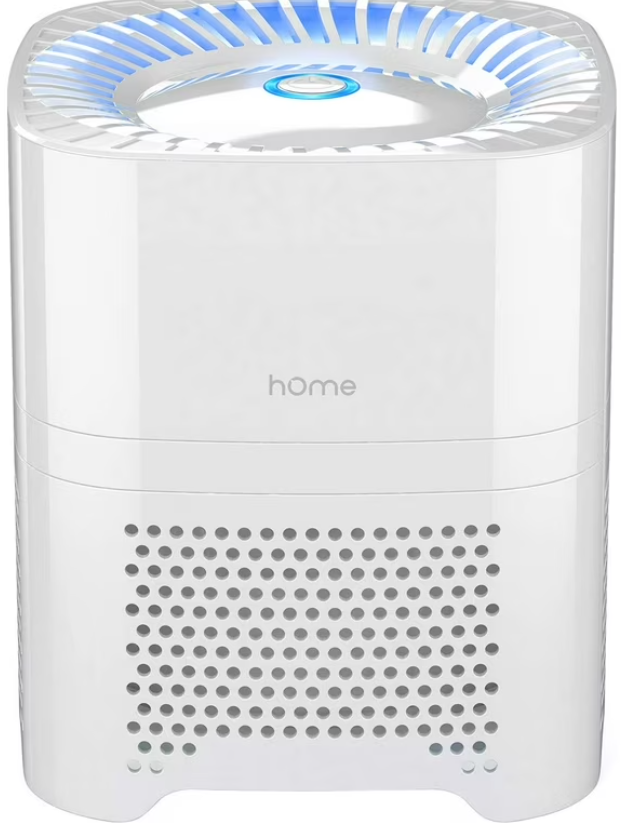
The homelabs Compact Air Purifier HME020020N is designed for those seeking cleaner, fresher air in small living spaces, bedrooms, offices, or dorm rooms. This compact, user-friendly device delivers powerful air purification with a four-stage filtration system: a pre-filter, true HEPA filter, activated carbon filter, and ion booster, working together to remove dust, pollen, allergens, odors, and even smoke particles from your environment.
What sets the Homelabs Compact Air Purifier apart is its quiet operation, portability, and energy efficiency. It features two fan speeds, allowing users to tailor purification intensity to their needs, and a smart filter change indicator to remind you when maintenance is due. The ion booster generates over 3 million ions per cubic centimeter, further enhancing air purity and freshness. With a coverage area of up to 40–50 sq. ft., this purifier is ideal for personal spaces, desktops, or bedside use.
The Homelabs Compact Air Purifier HME020020N is perfect for allergy sufferers, pet owners, and anyone concerned about indoor air quality. Its sleek, minimalist design fits seamlessly into any decor, and its easy filter replacement process—no tools required—makes upkeep simple. The device is available both online and in major retailers, with an estimated price range of $40–$60, offering excellent value for those seeking affordable, effective air purification.
Whether you’re looking to reduce allergens, eliminate cooking odors, or simply enjoy fresher air, the homelabs Compact Air Purifier HME020020N is a smart, accessible choice for healthier living in compact spaces.
Specifications
- Input Voltage: AC 100–240V, 50–60Hz
- Output Voltage: DC 12V
- Rated Power: 4W
- Coverage Area: 40–50 sq. ft.
- Dimensions: 6.7 x 6.7 x 8 inches (170 x 170 x 205 mm)
- Weight: 2.4 lbs (1.1 kg)
- Filtration: Pre-filter, HEPA, activated carbon, ion booster
- Fan Speeds: 2 (low and high)
- Filter Life: Up to 700 hours (about 6 months with typical use)
- Filter Change Indicator: Yes
- Noise Level: Quiet operation, suitable for bedrooms and offices
Get to Know Your Appliance
How to Use Your Appliance
- Connect the power supply
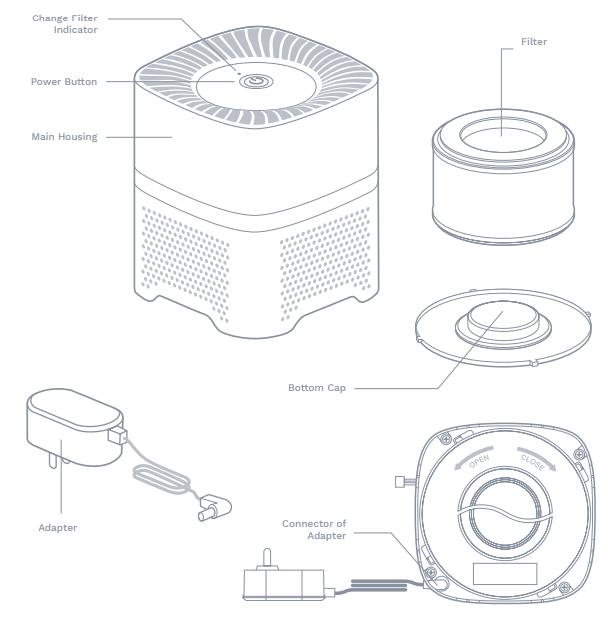
Insert the output end of the supplied adapter into the connector on the bottom of the appliance (see Figure 1). Make sure the filter and the bottom cap are fully assembled, then put the appliance on a flat surface. After that, plug the adapter into a power outlet.
WARNING
To ensure safe operation of the appliance, always use the supplied adapter to avoid any accident or injury. If the supplied adapter is damaged or lost, please contact - Turn on/off and settings.
- Once the appliance is plugged in, the LED indicator light around the power button will turn red,d indicating you are in “standby” mode.
- Press the “power button” to turn the appliance to low speed (the indicator LED surrounding the power button will turn light blue in color).
- Press the “power button” again to turn the appliance to high speed (the indicator LED surrounding the power button will turn dark blue in color).
- Press the power button again to turn the appliance off.
WARNING
If the appliance is not being used, please turn it off the appliance and unplug it from the power outlet to avoid damage.
- Ion function
The ion generator inside the appliance provides millions of ions and turns on automatically when the appliance is on. The ion generator turns off when the appliance is in “standby” mode or turned off. - Change Filter Indicator
The “change filter” indicator light will flash each time the filter needs to be replaced.
Cleaning and Maintenance
WARNING
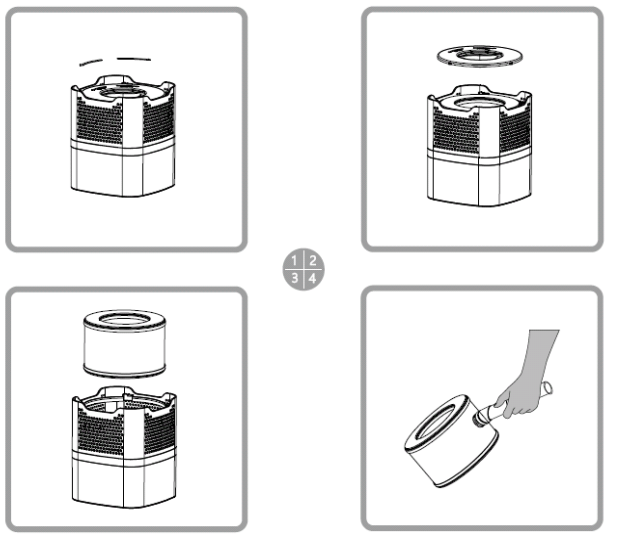
Always make sure the appliance is turned off and unplugged before cleaning. Follow the steps below to change the filter in your appliance:
You can use a vacuum cleaner to clean the surface of the filter every 4 weeks use to extend the lifetime of the filter. More frequent cleaning will be necessary if the unit is located in an area with a high level of airborne contaminants (excessive amounts of smoke, pet dander, etc.).
We suggest replacing the filter at least every 6 months of use, or replace it once the reminder indicator on the top panel flashes to keep the efficient working of the air purifier.
Exposing the air purifier to candle/oil/fireplace soot and smoke is not recommended and will require more frequent cleaning.
ATTENTION: Do not use water or any household cleaners or detergents to clean the Filter.
Clean the filter
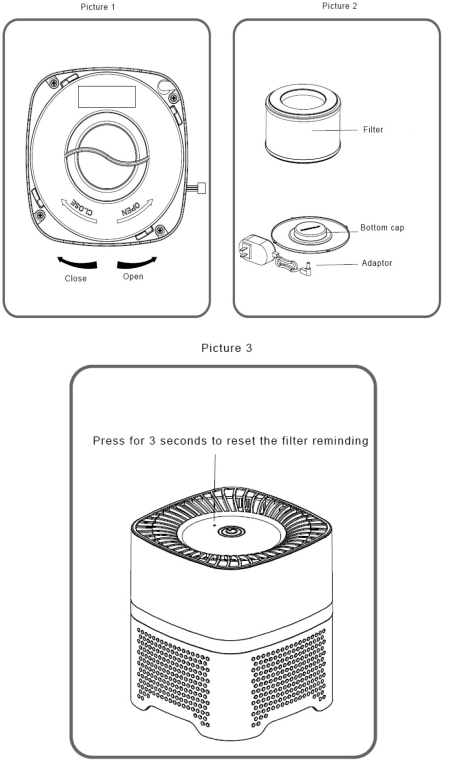
- Rotate the bottom cap anticlockwise to the opening and take detach the bottom cap (see picture 1).
- Take out the Filter according to the direction as pictures 2 and picture 3.
- To clean the Filter, use the brush or crevice attachment with a vacuum cleaner. Run the attachment along the inlet and outlet sides of the filter, cleaning between the crevices as much as possible. Do not use water or any household cleaners or detergents to clean the Filter.
- Once the Filter has been cleaned and checked for any possible damage, replace the filter back in the reverse direction described here. And rotate it clockwise till you can hear a click; the cap is closed.
Change the Filter
- Rotate the bottom cap anticlockwise to the opening and detach the bottom cap (see picture 1).
- Take out the used Filter. Change to the new filter and insert it into the air purifier according to the direction in picture 2.
- Cover the cap and rotate it clockwise till you can hear a click, and the cap is closed. Use a toothpick or something similar to press the “filter changing indicator” for 3 seconds. The indicator will flash 3 times, and the buzzer will sound 3 times, which means the filter reset successfully.
- The air purifier can be operated normally after plugging in.
Clean the surface of housing
- Turn off the air purifier and unplug the adaptor.
- Use a soft cloth with a little soap and water to clean the surface of the housing.
- Please make sure the water does not flow into the air purifier,; otherwise, it may damage your air purifier and lead to electric shock and injury.
- Place the air purifier somewhere well-ventilated. Never expose yourself to the sun directly. Only turn on the air purifier when it is thoroughly dry.
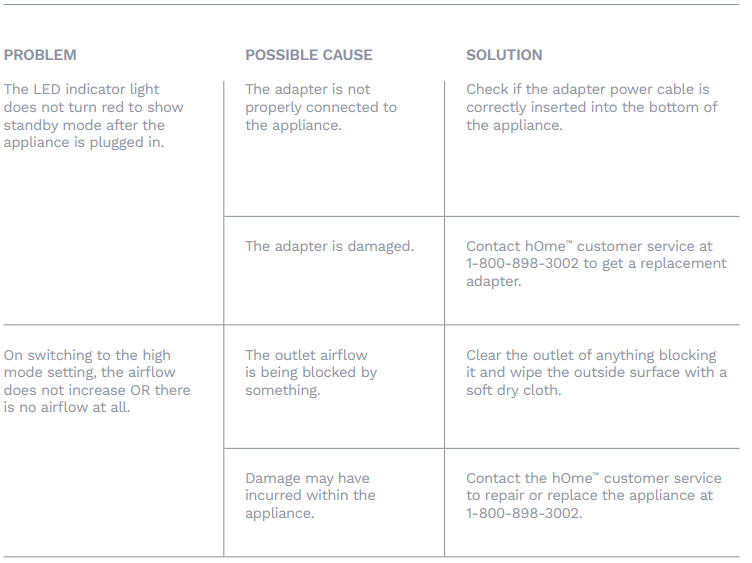
Troubleshooting
Warranty
- hOme™ offers a limited two-year warranty (“warranty period”) on all of our products purchased new and unused from hOme Technologies, LLC or an authorized reseller, with an original
proof of purchase,e and where a defect has arisen, wholly or substantially, as a result of faulty manufacture, parts, or workmanship during the warranty period. The warranty does not apply where damage is caused by other factors, including without limitation: (a) normal wear and tear; (b) abuse, mishandling, accident, or failure to follow operating instructions; (c) exposure to liquid or infiltration of foreign particles; (d) servicing or modifications of the product other than by hOme™; (e) commercial or non-household use. - The hOme™ warranty covers all costs related to restoring the proven defective product through repair or replacement of any defective part and necessary labor so that it conforms to its original specifications. A replacement product may be provided instead of repairing a defective product. hOme™’s exclusive obligation under this warranty is limited to such repair or replacement.
- A receipt indicating the purchase date is required for any claim, so please keep all receipts in a safe place. We recommend that you register your product on our website, homelabs.com/reg. Although greatly appreciated, the product registration is not required to activate any warranty, and product registration does not eliminate the need for the original proof of purchase.
- The warranty becomes void if attempts at repair are made by non-authorized third parties and/or if spare parts, other than those provided by hOme™, are used.
- You may also arrange for service after the warranty expires at an additional cost.
- These are our general terms for warranty service, but we always urge our customers to reach out to us with any issue, regardless of warranty terms. If you have an issue with a hOme™ product, please contact us at 1-800-898-3002, and we will do our best to resolve it for you.
- This warranty gives you specific legal rights, and you may have other legal rights which vary from state to state, country to country,y or province to province. The customer may assert any such rights at their sole discretion.
Pros & Cons
Advantages
- Effective Multi-Stage Filtration: The combination of pre-filter, HEPA, activated carbon, and ion booster removes a wide range of particles, allergens, and odors for noticeably cleaner air.
- Compact and Portable: At just 6.7 x 6.7 x 8 inches and 2.4 lbs, it’s easy to move and fits on desks, nightstands, or countertops.
- Quiet Operation: Two-speed settings ensure the unit runs quietly, making it ideal for bedrooms and workspaces.
- Smart Filter Reminder: The change filter indicator alerts you when it’s time for maintenance, helping maintain optimal performance.
- Energy Efficient: With a rated power of 4W, it’s cost-effective to run continuously.
- Easy Maintenance: Replacement filters are widely available and simple to install without tools.
Limitations
- Limited Coverage: Best suited for small rooms up to 40–50 sq. ft. Larger spaces require multiple units
- Filter Replacement Costs: While filters are affordable, regular replacement (every 6 months or 700 hours) adds to long-term costs.
- Ionizer Concerns: Some users may be sensitive to ionized air, though the effect is generally mild for most people.
- Manual Speed Control: Lacks automatic sensors or smart connectivity found in premium models.
- Plastic Construction: Build quality is functional but not premium, which is reflected in the price.
Value for Money: The Homelabs Compact Air Purifier HME020020N offers strong performance for its price, especially compared to bulkier, more expensive alternatives. While it lacks some advanced features, it delivers reliable air purification for small spaces at a budget-friendly price point.
Customer Reviews
Users consistently praise the Homelabs Compact Air Purifier HME020020N for its quiet operation, compact size, and noticeable improvement in air quality—especially in bedrooms and home offices. Many highlight the ease of filter replacement and the helpful filter change indicator as standout features.
Common compliments include reduced allergy symptoms, elimination of pet and cooking odors, and the unit’s unobtrusive design. However, a few users note that the coverage area is limited for larger rooms and that the ionizer function may not be suitable for everyone. Some have mentioned the need for more frequent filter changes in environments with higher pollution or pet dander.
Star ratings typically average between 4 and 4.5 out of 5, reflecting high satisfaction among buyers seeking an affordable, effective air purifier for small spaces. Testimonials often recommend the device for dorm rooms, workspaces, and bedside use. For those with larger rooms or advanced needs, considering a higher-capacity model may be worthwhile.
Most complaints are minor, focusing on the unit’s plastic construction and the absence of smart features. Overall, the Homelabs Compact Air Purifier HME020020N is a well-reviewed, budget-friendly choice for cleaner air in compact environments.
Faqs
How do I set up the homelabs Compact Air Purifier HME020020N for the first time?
What should I do if the homelabs Compact Air Purifier HME020020N is not turning on?
How does the ion booster feature work in the homelabs Compact Air Purifier HME020020N?
Is the homelabs Compact Air Purifier HME020020N compatible with third-party replacement filters?
How often should I replace the HEPA filter in the homelabs Compact Air Purifier HME020020N?
Can the homelabs Compact Air Purifier HME020020N effectively clean air in rooms larger than 50 sq. ft.?
How do I clean and maintain the homelabs Compact Air Purifier HME020020N?
What does the change filter indicator mean on the homelabs Compact Air Purifier HME020020N?
More homelabs manuals
Leave a Comment