
Pairing: Hp Poly Voyager Free 60 Series Earbuds User Manual
Content
HP Poly Voyager Free 60 Series Earbuds
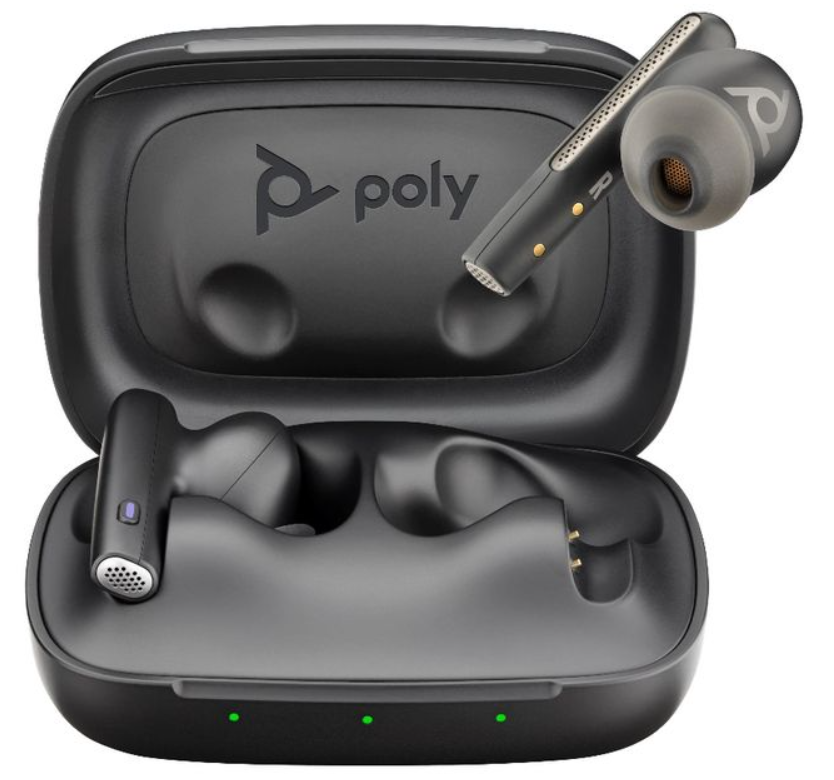
Discover everything you need to know about the HP Poly Voyager Free 60 Series Earbuds, a premium wireless audio solution designed for professionals and busy individuals who demand clarity, comfort, and reliability in every call and listening session.
Introduction: Premium Audio for Work and Play
The HP Poly Voyager Free 60 Series Earbuds deliver a premium audio experience tailored for modern professionals, remote workers, and anyone who values crystal-clear communication and immersive sound. Featuring advanced noise-canceling technology, these earbuds are engineered to block out distractions and deliver studio-quality audio whether you're in a busy office, on a commute, or working from home. With AI-powered noise recognition, adaptive ANC, and a comfortable, discreet design, the Poly Voyager Free 60 Series stands out as a top choice for those who need distraction-free calls and seamless connectivity.
Key benefits include Microsoft Teams, Zoom, and Google Meet certification, making these earbuds ideal for hybrid work environments. The smart charge case offers up to 16.5 hours of extra talk time, and the included USB-C to 3.5mm cable ensures compatibility with a wide range of devices. Available in Carbon Black and White Sand, the HP Poly Voyager Free 60 Series Earbuds are priced competitively in the $150–$200 range and are widely available through major electronics retailers and the HP official store.
Specifications: Technical Details and Performance
- Voyager Free 60+: PC via included BT700 Bluetooth* adapter; smartphone via Bluetooth*, external audio source via a. 3.5 mm (listening only, cable included)
- Voyager Free 60: PC via included BT700 Bluetooth* adapter; smartphone via Bluetooth®
RECOMMENDED FOR
- Professionals who prefer discreet in-ear hands-free calls at home, in the office,, or on the go
COMPATIBLE WITH
- Windows (supports Microsoft Swift pair
- Mac OS, IOS (made for iPhone)
- Android
WEARING STYLE
- In-ear true wireless earbuds with a pressure relief design
WIRELESS
- Bluetooth*
- v5.3
- Class
- 1
- Multipoint connectivity
- The headset connects to two devices at the same time, remembers up to 8 devices.
- Easily switch between the two active devices via smart charge case (Voyager Free 60+ only)
- Supported Bluetooth profiles
- A2DP, AVRCP. HSP, HFP, SPP
- Supported Codecs
- AAC. AptX, SBC, and mSBC
- LC3 with BT 700 only, in both mono and stereo telephony mode,s for improved density
- Range
- Up to 30m / 98 ft with included
BT 700 Bluetooth® adapter
- Up to m/ 9.8 ft streaming via smart charge case (Voyager Free 60+ only)
BATTERY
- Battery Capacity
- EacEarbudud 70mAh,|
- Charge Case 580mAh
- Battery Type
- Lithium ion
- Talk time (using both earbuds)
- Up to 16.5 hours (5.5 hours plus an extra 11 hours with the charge case)
- Listening Time (ANC On)
- Up to 24 hours (8 hours plus an extra 16 hours with the charge case)
- Charge time (Earbuds)
- Full charge 2 hours
- Charge case
- Full charge 3 hours
- Fast Charge
- Up to 1 hour 12 minutes of talk time after 15 minutes of charge
- Standby time
- Up to 30 days, including the charging case
- Qi-certified wireless charging
RECEIVE FREQUENCY RESPONSE
- Dynamic EQ optimized for PC wideband voice telephony up to 7 kHz or for multimedia 20 Hz to 20 kHz
HEARING PROTECTION
- SoundGuard DIGITAL: G616 support limits the level to 102 dBSPL: Time-weighted average prevents average daily noise exposure from exceeding 85dBA'
ANC / TRANSPARENCY MODE
- Adaptive ANC automatically compensates for variations in user fit
- Transparency mode
SMART SENSORS
- Answer calls by inserting earbuds, mute off , and pause/resume music by removing earbuds
MICROPHONE AND TECHNOLOGY
- Three microphones per earbud
- WindSmart technology for protection against wind noise
- Adjustable Sidetone
- Low, Medium, or High
- Use only one earbud for calls, if necessary
HEADSET CONTROLS AND LIGHTS
- Earbuds
- Button for Bluetooth* pairing. Call Answer/End (for mobile calls), Play/ Pause (for media), Voice Assistant, etc.c
- Gesture control for volume up/down, mute/unmute, call hold/resume, ANC/transparency, track forward/ backward"
- Charge Case
- Pairing Button (Voyager Free 60)
- Three charging status LEDs (Voyager Free 60)
- Touch display for full configuration and control (Voyager Free 60+)
HEADSET WEIGHT
- Earbuds (Left/Right)
- 5.8 g/ .01 lbs
- Smart charge case (Voyager Free 60+)
- 80 g/.18 lbs
- Charge case (Voyager Free 60)
- 52.6 g/ 12 lbs
CHARGE CASE DIMENSIONS
- Smart charge case (Voyager Free 60+)|
- 54.5 × 72 × 33.1 mm / 2.15 × 2.83 x 1.30 in
- Charge case (Voyager Free 60)
- 53.5 × 72 x 28 mm / 2.11 × 2.83 x 1.10 in
COLOR OPTIONS
- Carbon Black
- White Sand
Compared to similar models, the HP Poly Voyager Free 60 Series Earbuds offer superior noise cancellation, longer battery life, and more advanced communication features, making them a standout in the professional earbud market.
ACCESSORIES (INCLUDED)
- Voyager Free 60+
- Smart charging case powered by Poly LaunchPad technology, LCD touch display,, and Qi wireless charging
- Small, medium , um, and large silicon ear tips
- USB charging cable (300 mm / 11.8 in)
- BT700 USB Bluetooth* adapter
- USB to 3.5mm audio cable (770:20mm)
- Voyager Free 60
- Charging case with Qi wireless charging
- Small, medium smallm, and large silicon ear tips
- USB charging cable (300 mm / 11.8 in)
- BT700 USB Bluetooth* adapter
- Travel case (charging case and BT700 adapter)
MANAGEABILITY
- Cloud
- Poly Lens service
- Local (Windows/Mac)
- Poly Lens Desktop App
- Poly Lens Mobile App
IP RATING
- IP54 splash and dust resistant
CERTIFICATION
- Microsoft Teams Certified (Microsoft Teams version only)
- Certified for Zoom'
- Certified for Google Meet'
- Certified for Google Voice'
- Made for iPhone
- Qi Certified (Charge case)
WARRANTY
2-year limited warranty included
'Requires Poly Lens Desktop App to enable SoundGuard DIGITAL features *Configurable via Poly Lens app 'Certification pending
Troubleshooting: Common Issues and Solutions
- Earbuds not connecting: Ensure Bluetooth is enabled and the earbuds are charged. Reset by holding the case button for 10 seconds.
- Noise cancellation not working: Check ANC settings in the Poly Lens app and ensure firmware is up to date.
- Microphone issues: Clean the mic ports and check for obstructions. Update firmware via Poly Lens.
- Fast charging not working: Use the included USB-C cable and ensure the charger supports fast charging.
- Error codes: Refer to the user manual for specific error codes. Common codes indicate low battery, pairing issues, or firmware updates.
- Preventive measures: Regularly clean earbuds and case, update firmware, and store in a dry place.
- Warranty and support: Poly offers a two-year limited warranty. Contact HP support or visit the official website for assistance.
For further help, visit the HP support page or call customer service at 1-800-HP-INVENT.
Pros & Cons: Balanced Assessment
Pros
- Exceptional noise cancellation with Poly NoiseBlockAI and Acoustic Fence
- Long battery life and fast charging
- Comfortable, lightweight design for all-day wear
- Advanced sidetone and microphone technology for clear calls
- Smart charge case with touch controls and display (Voyager Free 60+)
- Wide compatibility with major communication platforms
The premium price point may be high for casual users
- Some users report a learning curve with advanced features
- Case design may be bulkier than competitors 'rs
The HP Poly Voyager Free 60 Series Earbuds offer excellent value for professionals seeking top-tier audio and communication features, outperforming many alternatives in noise cancellation and battery life.
Customer Reviews: User Feedback and Ratings
Customers consistently praise the HP Poly Voyager Free 60 Series Earbuds for their clear audio, effective noise cancellation, and comfortable fit. The average rating is 4.7 out of 5 stars, with users highlighting the seamless integration with Microsoft Teams and Zoom, as well as the long battery life. Common complaints include the higher price and occasional connectivity issues with older devices. Many reviewers recommend these earbuds for professionals and frequent travelers who need reliable, high-quality audio for work and leisure.
“These earbuds are a game-changer for my remote work setup. The noise cancellation is incredible, and the battery lasts all day.” – Sarah L., 5 stars
“Great for calls, but the case is a bit bulky. Still, the sound quality makes up for it.” – Mark T., 4 stars
Faqs
How do I set up hp Poly Voyager Free 60 Series Earbuds for the first time?
What should I do if my hp Poly Voyager Free 60 Series Earbuds are not pairing with my device?
Can I use hp Poly Voyager Free 60 Series Earbuds with a Windows 11 PC?
How do the active noise cancellation (ANC) features work on hp Poly Voyager Free 60 Series Earbuds?
What is the best way to maintain and clean my hp Poly Voyager Free 60 Series Earbuds?
How can I optimize battery life on hp Poly Voyager Free 60 Series Earbuds?
What should I do if one earbud of the hp Poly Voyager Free 60 Series stops working?
How do I customize settings and update firmware on hp Poly Voyager Free 60 Series Earbuds?
More hp manuals
- Setuo & Features: Hp Desktops User Manual
- Hp Office Jet Pro 8030 All-in-One Printer User Manual
- Setup & Features: Hp LaserJet 5 Printer User Manual
- Hp Sprocket 200 Printer User Manual | Specifications & Features
- Setup & Features: Hp Monitors User Manual
- Hp Chromebook 14a-na0024nr User Manual | Specifications
Leave a Comment