
Hunter Hydrawise Irrigation Controller User Manual
Content
Hunter Hydrawise Irrigation Controller: Smart Watering for Modern Landscapes
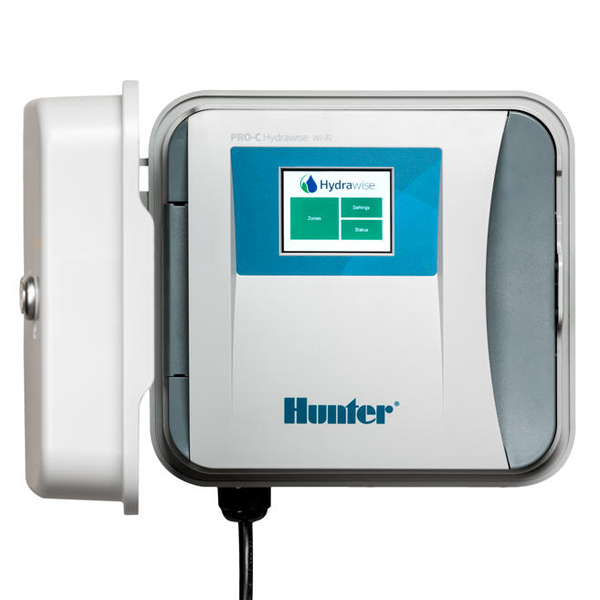
The Hunter Hydrawise Irrigation Controller is a Wi-Fi-enabled smart irrigation solution designed to simplify landscape watering while improving efficiency, control, and water savings. Built for both homeowners and professional irrigation installers, it connects to the Hydrawise platform so users can manage schedules, adjust watering remotely, and automate irrigation based on weather conditions. This makes it especially valuable for residential yards, commercial properties, HOA landscapes, and small-to-large turf systems that need reliable, app-based watering control.
One of the biggest advantages of the Hunter Hydrawise Irrigation Controller is its blend of professional-grade hardware and intelligent cloud software. Depending on the model, it supports multiple zones, indoor or outdoor installation, color touchscreen interfaces, and advanced features such as flow monitoring and sensor integration. The platform is known for smart scheduling that can reduce overwatering and improve plant health by reacting to weather data and site conditions. For users who want a controller that is easier to manage than traditional timers, this system stands out for convenience and scalability.
Estimated pricing typically starts around the mid-range smart controller category and increases with zone count, enclosure type, and accessory options. In general, hardware costs can range from roughly $180 to $800 depending on the model and configuration, while installation and sensors add to the total project cost. The Hunter Hydrawise Irrigation Controller is widely available through irrigation supply retailers, professional distributors, and online marketplaces, making it accessible for both DIY buyers and contractors looking for a dependable smart watering platform.
Technical Specifications and Key Features of the Hunter Hydrawise Irrigation Controller
- Wi-Fi compatibility: 2.4 GHz only, supporting 802.11 b/g/n networks with 20 MHz bandwidth.
- Security support: WPA/WPA2 Personal on some models, with higher-end units also supporting Enterprise authentication and TLS.
- Power input: Available in 120 VAC or 230 VAC configurations depending on model and region.
- Transformer output: Commonly rated at 24 VAC with outputs ranging from 1.0 A to 1.4 A depending on the controller.
- Station output: Typically 0.56 A at 24 VAC for zone operation.
- P/MV output: Usually 0.28 A to 0.56 A at 24 VAC for pump or master valve support.
- Zone capacity: Model-dependent, with options ranging from 4 zones on compact units to 54 zones on commercial-grade systems.
- Display and interface: Available with touchscreen color displays on higher models and simpler interfaces on entry-level units.
- Enclosure options: Indoor/outdoor-rated versions are available, including plastic and metal cabinet designs.
- Environmental tolerance: Designed for outdoor irrigation environments with broad operating temperature and humidity ranges.
- Warranty: Standard 2-year warranty on major Hydrawise controllers.
- Expansion and accessories: Compatible with flow meters and sensor inputs for advanced water management.
Compared with similar smart irrigation controllers, the Hunter Hydrawise Irrigation Controller offers stronger scalability than many consumer-focused timers and better professional features than basic app-based systems. It competes closely with premium smart controllers that emphasize weather intelligence, remote access, and contractor-friendly management tools.
Pros and Cons of the Hunter Hydrawise Irrigation Controller
Pros
- Smart scheduling helps reduce water waste by adjusting irrigation based on weather and site conditions.
- Multiple model choices make it suitable for both small residential landscapes and large commercial properties.
- Professional-grade features such as flow meter support and sensor integration improve system oversight.
- Remote management through the Hydrawise platform is convenient for homeowners and irrigation contractors.
- Strong value for users who need a scalable controller rather than a basic timer.
- Well suited for users comparing it with other premium Wi-Fi irrigation controllers that lack the same zone flexibility.
Cons
- Requires a stable 2.4 GHz Wi-Fi network, which can be limiting in some homes or commercial buildings.
- Advanced models and accessories can push the total cost higher than entry-level irrigation timers.
- Installation may be more complex for users unfamiliar with irrigation wiring or valve setups.
- Some buyers may find the subscription-style app plans and contractor features less straightforward than simpler competitors.
- Best value usually appears in multi-zone systems, so very small yards may not need this level of controller.
Overall, the Hunter Hydrawise Irrigation Controller delivers excellent value for users who want smart irrigation control, reliable zone management, and room to expand. For larger landscapes, it is often a better long-term investment than lower-cost alternatives.
What Customers Say About the Hunter Hydrawise Irrigation Controller
Customer feedback is generally positive, with many users giving the system around 4 out of 5 stars for its ease of use, remote access, and water-saving automation. Homeowners often praise the app-based scheduling and the ability to make changes from anywhere, while contractors like the flexibility of the larger models and system monitoring tools.
Common complaints usually focus on setup complexity, Wi-Fi dependence, and the learning curve for first-time users. Some reviews also mention that the interface feels more advanced than basic controllers, which is a benefit for power users but can be overwhelming for beginners. A typical testimonial might say, “Once installed, it made watering much easier to manage and cut down on wasted water.” Another frequent comment is, “The controller works well, but the initial setup took longer than expected.”
For buyers who want a smart irrigation controller with strong long-term capabilities, the Hunter Hydrawise Irrigation Controller is often recommended over basic timers and many entry-level competitors. It is best suited for users who value automation, app control, and professional-grade irrigation management.
Faqs
How do I set up a hunter Hydrawise Irrigation Controller for the first time?
What should I do if my hunter Hydrawise Irrigation Controller will not connect to Wi-Fi?
Why are some zones not watering on my hunter Hydrawise Irrigation Controller?
How do I troubleshoot a hunter Hydrawise Irrigation Controller that has no power?
What features make the hunter Hydrawise Irrigation Controller different from a standard sprinkler timer?
Is the hunter Hydrawise Irrigation Controller compatible with rain sensors, flow meters, and smart home systems?
How can I optimize watering schedules on a hunter Hydrawise Irrigation Controller for better performance?
What maintenance does a hunter Hydrawise Irrigation Controller need to stay reliable?
More hunter manuals
- Hunter IP68 Battery-Operated Controller User Manual
- Hunter Ceiling Fan 51219 User Manual
- Installation: Hunter Aker 59301 Fan Instruction Manual
- Setup & Features: Hunter Icc Commercial Irrigation Controllers User Manual
- Installation: Hunter 50460 Ceiling Fan User Manual
- How to Use: Hunter Radeon 6-blade Wi-In Ceiling Fan 50952 User Manual
Leave a Comment