
Setup & Features: Hunter Icc Commercial Irrigation Controllers User Manual
Content
Hunter ICC Commercial Irrigation Controllers: Complete Product Manual
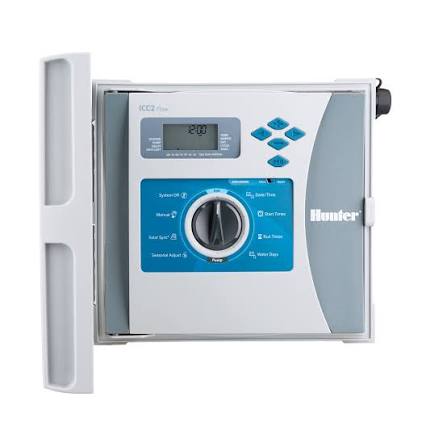
Introduction
Hunter ICC commercial irrigation controllers are professional-grade irrigation management systems designed for demanding landscape, turf, and site-maintenance applications. Built for commercial properties, campuses, parks, sports fields, and large residential estates, the Hunter ICC platform is known for modular expansion, flexible programming, and dependable day-to-day operation. It is especially well suited for users who need precise zone control, multiple watering schedules, and compatibility with sensors and pump/master valve circuits.
One of the biggest advantages of Hunter ICC commercial irrigation controllers is their versatility. They support multiple independent programs, seasonal adjustment, odd/even or interval watering, and long run times for drip irrigation zones. Many installations use them because they scale easily from smaller systems to larger multi-zone properties without requiring a full controller replacement. The controller line is also valued for straightforward programming, durable enclosures, and strong integration with commercial irrigation accessories.
Target users include irrigation contractors, facilities managers, landscape professionals, and property owners who want a reliable controller for routine watering automation. Typical use cases include managing turf zones, shrub beds, drip irrigation, and pump-start applications. Depending on configuration and enclosure type, estimated pricing generally ranges from mid-level commercial controller pricing to higher-end modular systems, with availability through irrigation distributors, online retailers, and Hunter-authorized sellers.
Specifications for Hunter ICC Commercial Irrigation Controllers
- Controller type: Modular commercial irrigation controller
- Programs: 4 independent programs with up to 2 programs running simultaneously
- Start times: Up to 8 per program
- Station run time: 1 minute to 2 hours on standard programs; up to 12 hours on drip-focused program settings
- Watering schedules: 7-day calendar, interval watering up to 31 days, odd/even-day programming
- Station capacity: Expandable depending on enclosure and module configuration
- Power input: 120 VAC or 230 VAC models depending on region
- Transformer output: 24 VAC, 1.5 amp
- Station output: 24 VAC, 0.56 amp per station
- Maximum total output: 24 VAC, 1.4 amp including master valve circuit
- Backup power: 9-volt alkaline battery for timekeeping during outages
- Sensor compatibility: Rain and weather sensor support, including common Hunter sensor integrations
- Comparison note: Compared with basic residential controllers, the Hunter ICC offers stronger expansion capacity, more programming flexibility, and better commercial durability
In practical terms, the Hunter ICC commercial irrigation controllers sit above entry-level irrigation timers and below modern cloud-connected smart controllers in connectivity, but they remain highly respected for dependable standalone operation.
Detailed Description
The Hunter ICC is a commercial irrigation control platform designed to automate water delivery across multiple irrigation zones with consistent timing and repeatable performance. It works by sending low-voltage signals to solenoids on irrigation valves, opening each zone according to the programmed schedule. The modular design allows contractors to expand station count as the site grows, making it a practical choice for large properties that may need future upgrades.
Real-world applications include golf course support areas, corporate landscapes, schools, municipal grounds, and multi-zone drip systems. The controller is also useful for sites that require pump start relay control or master valve operation, improving overall system safety and water management. Build quality is a strong point, with rugged enclosure options designed for indoor or outdoor environments. Depending on the model, enclosures may be plastic, metal, or pedestal styles for different installation needs.
User experience is generally straightforward for professional installers. The interface is designed for fast scheduling, seasonal adjustments, and zone-by-zone management. For many commercial users, the main appeal is reliability: once configured, the controller performs consistently with minimal maintenance.
Setup Guide for Hunter ICC Commercial Irrigation Controllers
Follow these steps to install and configure the controller safely:
- Mount the controller in a dry, accessible location that matches the enclosure rating and site conditions.
- Connect the controller to the correct power supply and verify voltage compatibility before energizing the unit.
- Wire each station valve to the appropriate terminal, then connect the common wire and master valve or pump relay if used.
- Install optional sensors such as rain sensors or weather devices if your configuration supports them.
- Set the current date, time, and watering schedule before assigning run times to each station.
- Choose the correct program structure for turf, shrub, or drip zones, and separate zones by water needs.
- Test each zone manually to confirm wiring, valve operation, and proper water delivery.
For configuration, use seasonal adjustment to reduce or increase watering frequency as weather changes. If the controller supports multiple start times, stagger them to avoid hydraulic overload. When pairing with accessories, confirm compatibility with the installed sensor type or pump start relay. If a zone fails to run, check wire continuity, valve condition, and station output load. Always disconnect power before wiring, and keep the controller protected from moisture, electrical surges, and accidental tampering.
Troubleshooting Hunter ICC Commercial Irrigation Controllers
Most issues on Hunter ICC commercial irrigation controllers are related to wiring, valve faults, sensor interruptions, or programming errors. Start by reviewing the schedule, then inspect the field wiring and station terminals. If a zone does not activate, test the solenoid and verify that the common wire is intact. If multiple zones fail, check the transformer, fuse, and incoming power.
- Problem: No display or no response. Solution: Check the power source, transformer, and backup battery.
- Problem: One zone not watering. Solution: Inspect station wiring, solenoid resistance, and valve diaphragm condition.
- Problem: Controller skips watering. Solution: Review active sensor status, program days, and seasonal adjust settings.
- Problem: Pump or master valve not activating. Solution: Confirm relay wiring and output load limits.
- Problem: Erratic run times. Solution: Reset programming values and verify schedule overlap.
Preventive maintenance includes tightening terminal connections, checking valves seasonally, and replacing the backup battery as needed. Warranty coverage typically depends on the seller and model configuration, while support is usually available through Hunter customer service, authorized distributors, and irrigation professionals. For help, contact the retailer where the unit was purchased or the official Hunter support channel listed in product documentation.
Pros & Cons of Hunter ICC Commercial Irrigation Controllers
Pros
- Strong commercial-grade reliability for large irrigation systems
- Flexible modular expansion for growing properties
- Multiple programs and start times for precise scheduling
- Supports long drip irrigation run times
- Compatible with sensors, master valves, and pump-start setups
- Good value for contractors who need a proven standalone controller
Cons
- Less advanced connectivity than newer Wi-Fi-based smart controllers
- Programming can feel dated compared with app-driven alternatives
- Installation may require professional wiring knowledge
- Higher upfront cost than basic residential timers
For value for money, the Hunter ICC remains attractive if dependable hardwired control matters more than cloud features. Compared with newer alternatives, it is less focused on remote access and more focused on proven irrigation control performance.
Customer Reviews
Typical user feedback for Hunter ICC commercial irrigation controllers is positive, with many reviewers praising the dependable operation and flexible zone management. Common ratings often fall around 4 to 4.5 stars from commercial users who value reliability and easy serviceability.
“Excellent controller for large landscapes. Once installed, it runs consistently and handles our multiple zones without problems.”
“A little old-school in design, but very dependable. Great for contractors who want a solid commercial irrigation controller.”
Common complaints include the learning curve for first-time users and the lack of modern remote-management features found in newer smart controllers. Most buyers recommend it for professional installations, especially where long-term durability matters more than app control.
Buying Guide: Is Hunter ICC Right for Your Project?
If you need a rugged, expandable, and proven irrigation controller for commercial landscapes, the Hunter ICC is a strong option. It works best for properties that require dependable zone scheduling, sensor support, and manual control without relying on internet connectivity. For facilities managers and contractors, the combination of commercial durability and programming flexibility makes it a practical long-term investment.
Faqs
How do I set up Hunter ICC Commercial Irrigation Controllers for the first time?
Why is my Hunter ICC Commercial Irrigation Controller not turning on or showing a blank display?
How do I program multiple irrigation zones on Hunter ICC Commercial Irrigation Controllers?
What should I check if a zone on Hunter ICC Commercial Irrigation Controllers is not watering?
Are Hunter ICC Commercial Irrigation Controllers compatible with rain sensors and flow sensors?
How can I optimize watering schedules on Hunter ICC Commercial Irrigation Controllers for better efficiency?
What maintenance does Hunter ICC Commercial Irrigation Controllers need to stay reliable?
How do I troubleshoot communication or programming issues on Hunter ICC Commercial Irrigation Controllers?
More hunter manuals
- Hunter Ceiling Fan 51219 User Manual
- How to Use: Hunter Radeon 6-blade Wi-In Ceiling Fan 50952 User Manual
- Hunter Hydrawise Irrigation Controller User Manual
- Hunter IP68 Battery-Operated Controller User Manual
- Installation: Hunter Aker 59301 Fan Instruction Manual
- Installation: Hunter 50460 Ceiling Fan User Manual
Leave a Comment