
Setup: Iclever IC-HS22 Wired Headphones User Manual
Content
Introduction to iclever IC-HS22 Wired Headphones
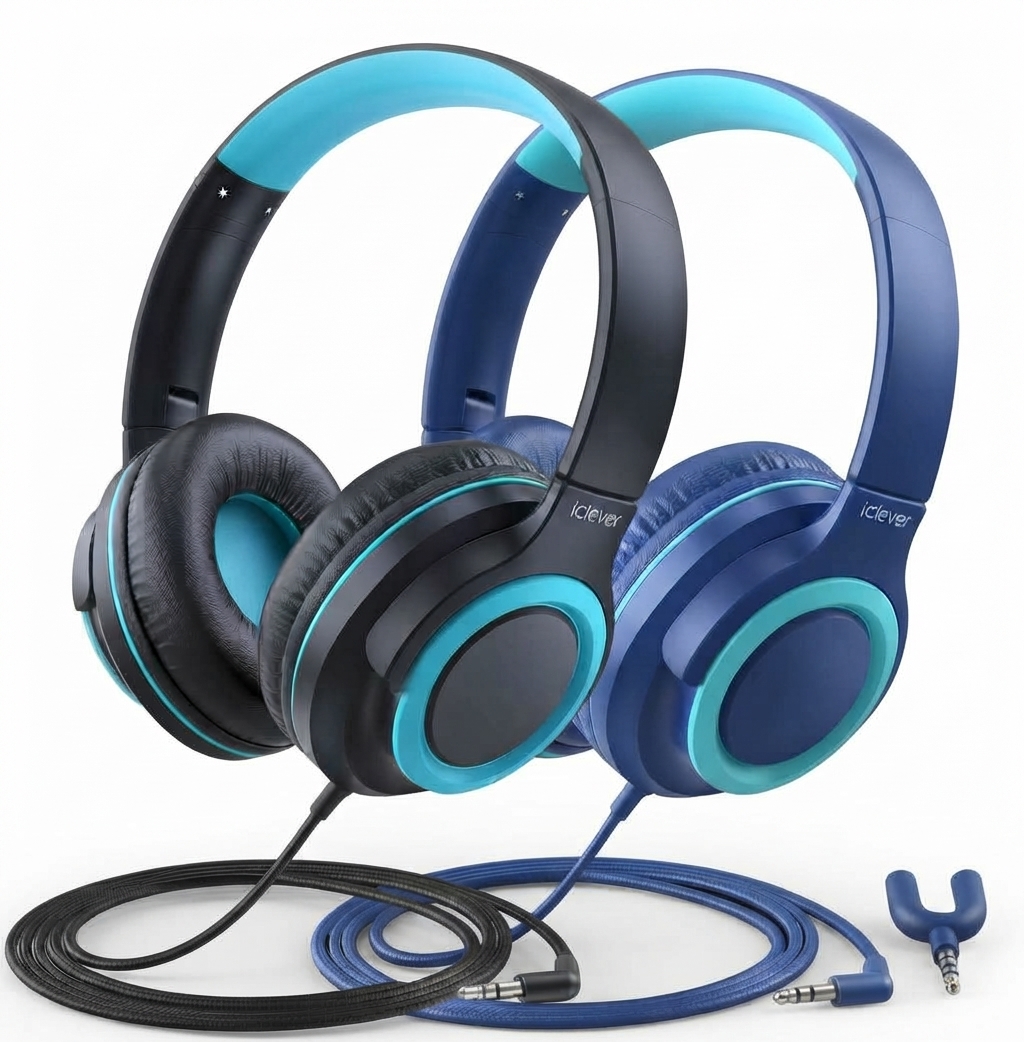
The iclever IC-HS22 Wired Headphones are specially designed to deliver a safe, comfortable, and high-quality audio experience for kids and teens. Engineered with volume-limiting technology set at a safe 94dB, these headphones protect young ears while providing clear, immersive sound for school, entertainment, and casual listening. Their durable yet lightweight build makes them ideal for everyday use, whether in classrooms, at home, or on the go.
Key benefits include tangle-free cables for hassle-free use, an adjustable headband to fit growing children, and over-ear cushioned ear cups for comfort during extended wear. The headphones feature a built-in microphone and multifunction button to easily manage calls and media playback, enhancing usability for online learning and communication.
Targeted primarily at children and teenagers, the IC-HS22 is perfect for parents seeking a safe headphone option that balances audio performance with hearing protection. These headphones also suit educational environments and family use, thanks to their durable design and volume controls.
Priced affordably within the $20-$30 range, the iclever IC-HS22 Wired Headphones are widely available through major online retailers and the official iclever website, often with promotions or bundle deals. Their combination of safety, comfort, and sound quality makes them a compelling choice in the kids’ wired headphone market.
Specifications of iclever IC-HS22 Wired Headphones
- Driver Size: 40mm large speaker drivers for clear, balanced audio
- Frequency Response: 20Hz to 20kHz, covering full audible spectrum
- Volume Limiting: Built-in limiter at 94dB to protect young ears from loud sounds
- Connectivity: Wired with a 3.5mm audio jack compatible with most devices
- Cable: Tangle-free 1.2m cable with inline microphone and multifunction button
- Comfort: Adjustable headband and pillow-soft over-ear cushions for extended use
- Durability: Constructed with 1.5x stronger ABS materials and reinforced joints
- Compatibility: Suitable for tablets, smartphones, laptops, and educational devices
- Additional Features: Multi-function button controls for playback and calls
Compared to similar children’s headphones like the iclever HS26 or HS25 models, the HS22 stands out with its optimized volume limit and robust build, offering slightly improved audio clarity and better user controls[2][4][6].
Setup Guide for iClever IC-HS22 Wired Headphones
- Unbox and Inspect: Remove the headphones and check for any visible damage or defects.
- Connection: Plug the 3.5mm jack firmly into the headphone port of your device (tablet, phone, or computer).
- Adjust Fit: Extend or retract the adjustable headband to ensure a comfortable, secure fit over the ears.
- Using Controls: Use the inline multifunction button to play/pause music, answer/end calls, and control volume where supported.
- Microphone Usage: For calls, position the microphone on the cable near your mouth for optimal voice pickup.
- Troubleshooting: If no sound is heard, verify the headphone is properly plugged in and the device volume is up. Untangle the cord if needed.
Safety Precautions: Avoid listening at high volumes for prolonged periods despite volume limiting. Do not expose the headphones to water or extreme temperatures. Disconnect after use to preserve cable integrity.
OPERATION
- Gently press: Answer/ Play/ Pause
- Double press: Next Track
- Press for 3 times: Previous Track
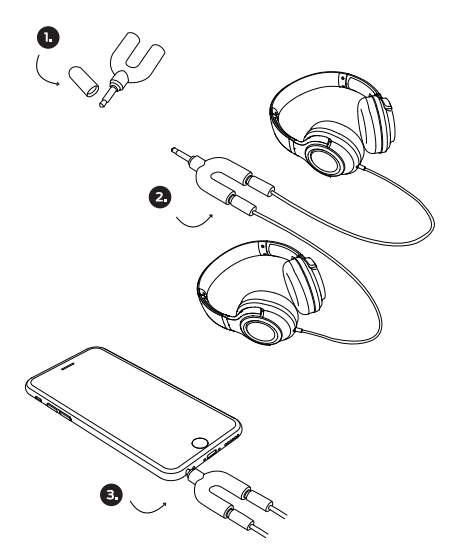
Note: If you need to share music, insert a headphone audio cable into the jack.

FCC Statement
This device complies with Part 15 of the FCC Rules. Operation is subject to the following two conditions:
- This device may not cause harmful interference.
- This device must accept any interference received, including interference that may cause undesired operation
Troubleshooting for iClever IC-HS22 Wired Headphones
- No Sound Output: Ensure the 3.5mm jack is fully inserted. Try a different device to isolate the issue.
- Distorted Audio: Check the cable for damage or twists. Restart the connected device or test volume settings.
- Microphone Not Working: Confirm the microphone is positioned correctly and the device’s input settings allow microphone access.
- Multifunction Button Issues: Reset device audio app or try using the button on another compatible device.
- Preventive Tips: Store headphones properly, avoid pulling cables, and keep away from moisture.
- Warranty & Support: iClever offers a 12-month warranty on the IC-HS22 model. For assistance, contact iClever customer support via their official website or the retailer from which the headphones were purchased.
Pros & Cons of iclever IC-HS22 Wired Headphones
- Pros:
- Effective volume limiting protects children’s hearing
- Comfortable adjustable headband and soft ear cushions
- Clear audio quality with 40mm drivers for enhanced listening
- Durable build withstands daily use and handling by kids
- Inline microphone and multifunction button add convenience
- Affordable price point suitable for families and schools
- Cons:
- Wired design may limit mobility compared to wireless models
- No active noise cancellation feature
- Compatibility limited to devices with 3.5mm headphone jacks (adapter may be needed for some newer devices)
- Volume limiter set at 94dB may be too high for some parents preferring lower caps (e.g., 85dB models)
Customer Reviews of iclever IC-HS22 Wired Headphones
Users frequently praise the iclever IC-HS22 Wired Headphones for their comfortable fit and sound clarity suitable for children’s learning and entertainment. Many appreciate the volume-limiting feature as a vital safety aspect, allowing peace of mind during extended headphone use. Parents often highlight the durable build and tangle-free cable as practical advantages in daily use.
Common complaints include the wired format, which some find restrictive compared to Bluetooth options, and occasional issues with the inline microphone sensitivity. Most reviewers rate the headphones between 4 and 4.5 stars, recommending them especially for school-age kids needing durable, safe, and easy-to-use headphones.
Overall, the product is viewed as a strong value-for-money choice with positive purchase recommendations for families seeking reliable wired headphones designed specifically for kids and teens.
Faqs
How do I set up the iclever IC-HS22 Wired Headphones for the first time?
What should I do if my iclever IC-HS22 Wired Headphones are not producing sound?
Can I use the iclever IC-HS22 Wired Headphones with all 3.5mm audio devices?
What features of the iclever IC-HS22 Wired Headphones help protect children's hearing?
How do I use the Multi-function Button (MFB) on the iclever IC-HS22 Wired Headphones?
What maintenance tips help prolong the life of my iclever IC-HS22 Wired Headphones?
Why does the microphone on my iclever IC-HS22 Wired Headphones not work during calls?
How can I share music using the audio share jack on the iclever IC-HS22 Wired Headphones?
More iclever manuals
- Setup & Usage: Iclever Wireless Headphones BTH16 User Manual
- Iclever Tri-Folding Keyboard IC-BK03 User Manual
- Usage & Setup: Iclever IC-HS23 Wired Headphones User Manual
- Setup: Iclever BTH03 Wireless Headphones User Manual
- Setup: Iclever EM02 Wireless Headphones User Manual
- Setup: Iclever BTH21 Wireless Headphones User Manual
Leave a Comment