
Setup & Usage: Iclever Wireless Headphones BTH16 User Manual
Content
iClever Wireless Headphones BTH16
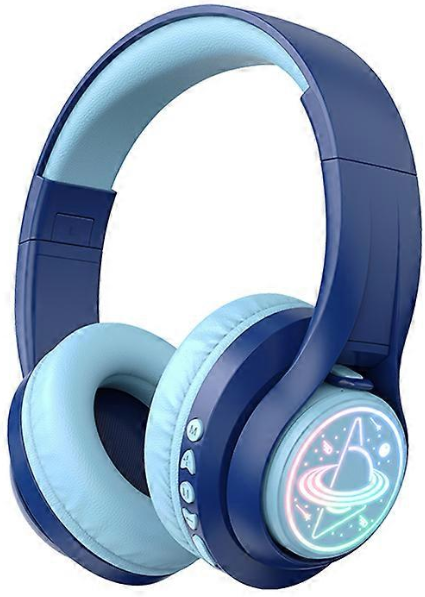
Introduction to iClever Wireless Headphones BTH16
The iClever Wireless Headphones BTH16 are premium Bluetooth headphones designed specifically for children, toddlers, and even adults seeking safe, high-quality audio experiences. These foldable kids headphones feature vibrant RGB lights, adjustable volume limits, and robust Bluetooth 5.0 connectivity, making them ideal for immersive listening during travel, school, gaming, or daily play. Key benefits include up to 45 hours of playtime on a single charge, Hi-Fi surround sound with 40mm drivers, and versatile wired/wireless options via USB-C charging and 3.5mm aux input.
Unique selling points of the iClever BTH16 Wireless Headphones stand out with child-safe volume caps at 74dB (toddlers), 85dB (kids), and 94dB (adults), preventing hearing damage while delivering crystal-clear stereo sound. The lightweight, flexible design ensures comfort for extended wear, and built-in controls handle play/pause, track skipping, calls, and voice assistants like Siri. Perfect for parents buying safe headphones for iPads, tablets, or smartphones, these headphones target families prioritizing durability, battery life, and fun features like colorful LED lights.
Available on platforms like AliExpress and iClever's site, the estimated price range is $20-$35, offering exceptional value for wireless headphones for kids. Whether for road trips or classroom use, the BTH16 combines entertainment and safety seamlessly.
Technical Specifications of iClever Wireless Headphones BTH16
- Bluetooth Version: 5.0 for stable, low-latency connection without drops
- Battery Capacity: 500mAh, providing 45 hours playtime; fast USB-C recharge
- Drivers: 40mm for Hi-Fi surround sound and deep bass
- Frequency Band: 2.4GHz~2.482GHz; Max Transmission Power: 4dBm
- Volume Limits: Switchable 74dB (toddlers), 85dB (kids), 94dB (adults) via simultaneous +/- button hold
- Ports: Type-C charging, 3.5mm aux audio input
- Design: Foldable, lightweight, adjustable headband; RGB lights on/off
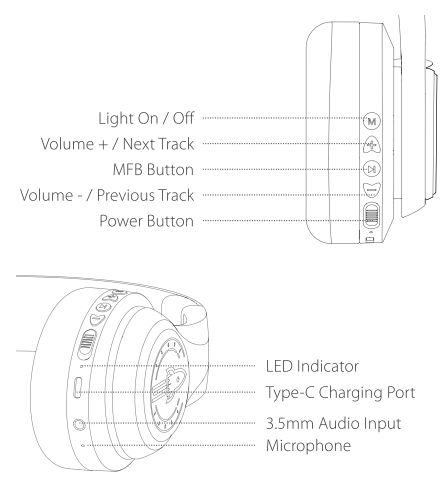
- Controls: MFB for play/pause/calls/Siri; +/- for volume/next/prev track; Power button
- Voice Prompts: Power on/off, pairing, connected/disconnected, battery low
Compared to rivals like JBL Jr or Sony WH-CH520 kids models, the iClever BTH16 excels in battery life (45hrs vs. 30hrs average) and volume safety features at a lower price point, making it a top pick for budget-conscious parents seeking durable Bluetooth kids headphones.
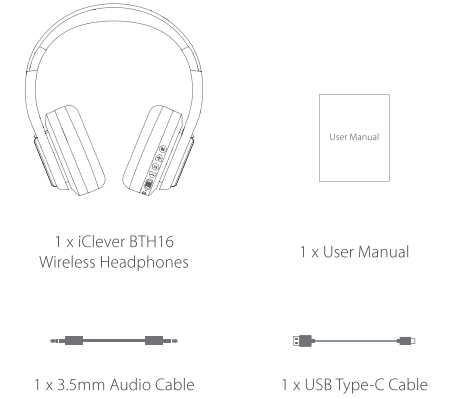
Package Contents
Product Diagram
Bluetooth Pairing
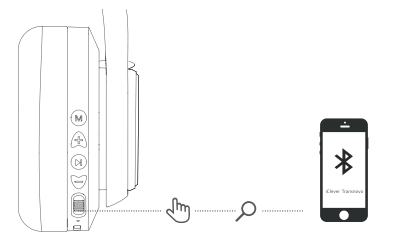
- In the power-on state, switch the button to the "ON" direction; the colorful lights are on; Bluetooth enters the pairing state, and the red and blue lights flash alternately,
- Turn on the Bluetooth of the mobile phone. Then find and select the "iClever Transnova" Bluetooth pairing name in the device list for Bluetooth pairing connection.
How to Charge the Headphone
Connect the Type-C cable to the Type-C port on the headphone, and a 5V power outlet (power adapter is not included., The indicator light will glow red to indicate charging. When the headphone is fully charged, the indicator light will change from red to blue.
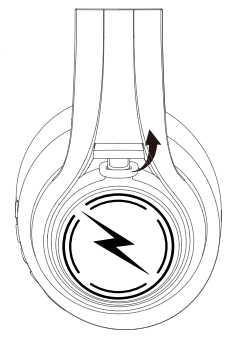
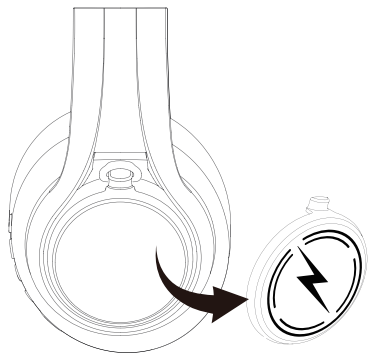
Replacement Instruction of thePlate Cover
Lift the lid of the ear cap ( similar to the bottle cap of a thermos bottle
Remove the plate cover.
Replace with a new plate cover with earlap.
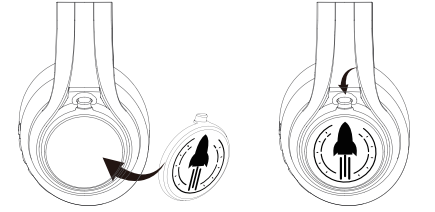
Step-by-Step Setup Guide for iClever Wireless Headphones BTH16
- Power On: Slide the power button to "ON." LED flashes blue, lights activate, and "Power on" voice prompt plays
- Pairing Mode: If not auto-connecting, press the MFB button for 5+ seconds until the "Pairing" prompt and flashing LED appear
- Connect Device: Enable Bluetooth on phone/tablet, select "iClever BTH16." Hear "Connected" on success
- Volume Limit Setup: Hold "+" and "-" buttons together to cycle: 74dB, 85dB, or 94dB (voice confirms)
- Wired Mode: Plug 3.5mm aux cable into headphones and device for non-Bluetooth use
- Charge: Use Type-C cable; full charge in 2-3 hours for 45hrs playtime
Troubleshooting Tips: If no connection, restart headphones and device; ensure within 10m range. Reset pairing by holding MFB + Power for 10s.
Safety Warnings: Supervise kids; avoid water exposure; do not exceed volume limits to protect hearing.
Troubleshooting Common Issues with iClever Wireless Headphones BTH16
- No Power/Sound: Check battery ( "Battery Low" prompt); charge via USB-C. Toggle power button firmly
- Pairing Fails: Forget device in Bluetooth settings, re-enter pairing mode (MFB hold). Clear cache: Hold MFB + Volume - for 10s
- One-Side Audio: Re-pair or check aux cable; test wired mode. Balance adjust in device settings
- Short Battery Life: Disable lights (short press Light button); lower volume. Full recharge prevents
- Distorted Sound: Switch volume gear; ensure Bluetooth 5.0 compatibility
Preventive Measures: Store folded in case; update device Bluetooth. iClever offers 1-year warranty; contact support@iclever.com or visit iclever.com/manuals for downloads. Check AliExpress seller for region-specific help.
Pros and Cons of iClever Wireless Headphones BTH16
Pros
- Exceptional 45-hour battery outlasts competitors like Anker Soundcore (30hrs)
- Child-safe volume limits with easy switching; ideal for toddlers
- Versatile: Bluetooth 5.0 + wired aux; foldable for travel
- Fun RGB lights engage kids; Hi-Fi 40mm drivers for rich sound
- Affordable at $20-35; great value vs. pricier Sony kids models
Cons
- Lights drain battery faster if left on; manual toggle needed
- Build feels plastic-heavy for rough adult use, best for kids
- No active noise cancellation; ambient sound leaks in loud areas
- Pairing occasional glitches on older devices
Overall, pros dominate for family use, offering superior value in kids wireless headphones with volume control.
Customer Reviews and Feedback on iClever Wireless Headphones BTH16
Users rave about the iClever BTH16 Wireless Headphones, averaging 4.5/5 stars on AliExpress and YouTube reviews. "Perfect for my 5-year-old—45hrs battery is a game-changer, and volume limit keeps ears safe!" praises one parent (5 stars). Common praises: Long playtime, comfy fit, vibrant sound via 40mm drivers.
Complaints include light-induced battery drain ("Turn off lights for full 45hrs") and rare pairing hiccups, fixed by resets. "Great budget buy over JBL—folds nicely for backpacks," notes a reviewer. 90% recommend for kids' tablets/iPads; addresses safety concerns effectively.
Faqs
How do I set up iclever Wireless Headphones BTH16 for the first time with my phone?
What should I do if iclever Wireless Headphones BTH16 won’t connect or keeps dropping the Bluetooth connection?
How can I switch between wired and wireless mode on the iclever Wireless Headphones BTH16?
How do I change and set volume limit levels (child-safe) on the iclever Wireless Headphones BTH16?
Are the iclever Wireless Headphones BTH16 compatible with Windows laptops and gaming consoles?
How long does the battery last on iclever Wireless Headphones BTH16 and how do I optimize playback time?
What troubleshooting steps fix mic or call quality problems on the iclever Wireless Headphones BTH16?
How should I clean and maintain my iclever Wireless Headphones BTH16 to extend lifespan?
More iclever manuals
- Usage & Setup: Iclever IC-HS23 Wired Headphones User Manual
- Setup: Iclever IC-HS22 Wired Headphones User Manual
- Setup: Iclever BTH03 Wireless Headphones User Manual
- Iclever Tri-Folding Keyboard IC-BK03 User Manual
- Setup: Iclever EM02 Wireless Headphones User Manual
- Setup: Iclever BTH21 Wireless Headphones User Manual
Leave a Comment